
Dil Seçin

DS-115 Request for NYS Driving Privileges (Fillable PDF)

  1. Dil İngilizce
  2. Ülke Amerika Birleşik Devletleri
  3. Aktivite Ehliyet
  4. Belirtmek, bildirmek New York
DS-115 Request for NYS Driving Privileges (Fillable PDF)

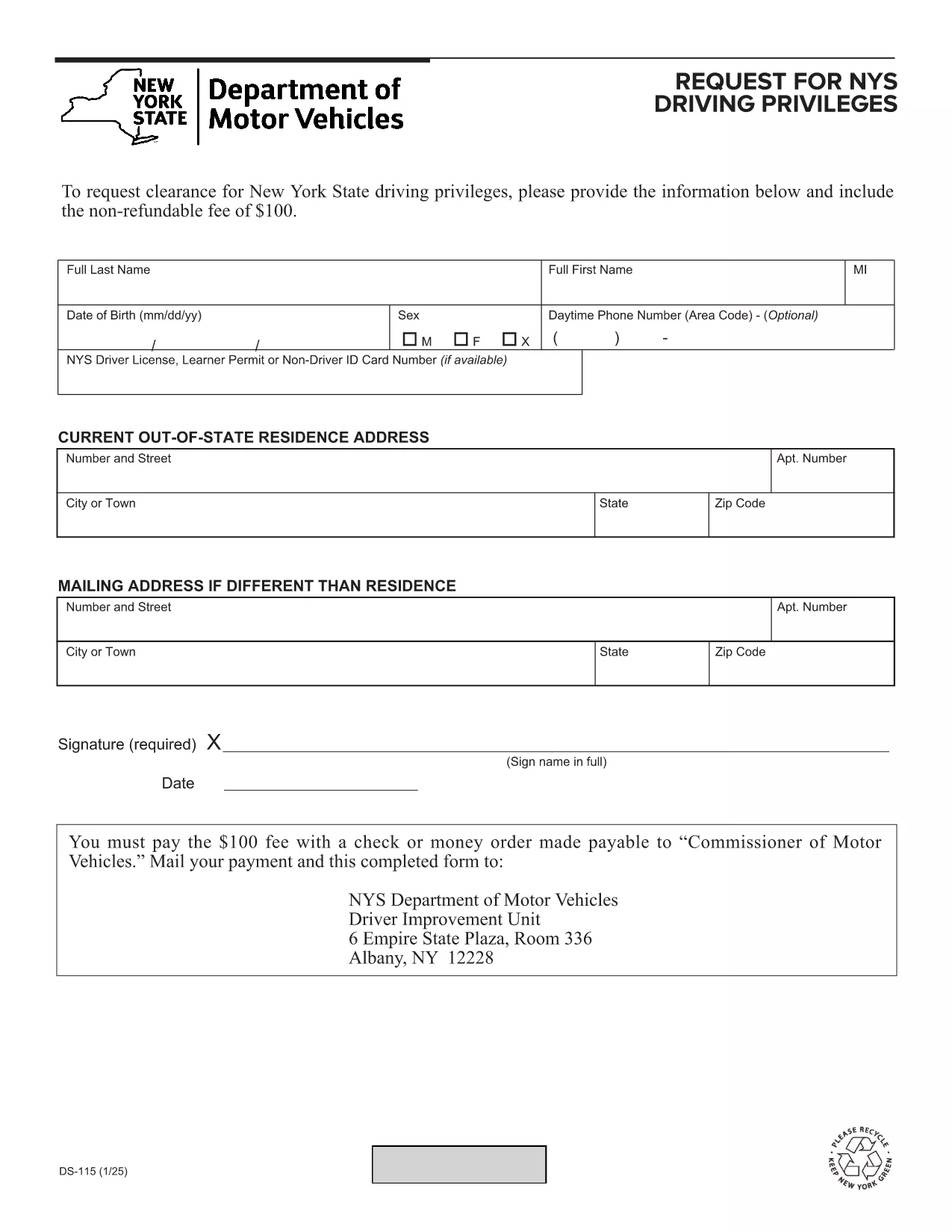
The DS-115 is the New York State Department of Motor Vehicles (NY DMV) request used to restore or obtain driving privileges after a suspension, revocation, or other restriction. This official form must be completed, signed, and mailed with the required fee before the DMV can process your request.

With Formize’s fillable PDF technology, you can complete the DS-115 directly in your browser—no Adobe Acrobat or other editor required. Simply click the button below, fill the fields, and download a ready‑to‑print version.

What Is the DS-115 Form?

The DS-115, titled “Request for NYS Driving Privileges,” collects personal information, details about the suspension, and the payment amount. It is required for:

  • Reinstating a driver’s license after a suspension.
  • Requesting a special driving privilege (e.g., for work or medical reasons).
  • Updating the DMV on compliance with court or administrative orders.

How to Complete the DS-115 Online with Formize

Follow these simple steps to fill out the form without downloading any software:

  1. Click the Fill out this form button on this page.
  2. The Formize PDF Filler app loads in a secure overlay.
  3. Enter your information into each fillable field. The form automatically saves your progress.
  4. Review the completed form, then click Download PDF to save a printable copy.
  5. Print, sign, attach the non‑refundable fee, and mail to the address shown on the form.

Common Mistakes to Avoid

  • Missing signatures: The DMV will reject the form if any required signature is blank.
  • Incorrect fee amount: Check the current fee on the DMV website; an incorrect amount delays processing.
  • Illegible handwriting: Using the fillable PDF eliminates this issue.
  • Wrong mailing address: Send to the Driver Improvement Unit, 6 Empire State Plaza, Room 336, Albany, NY 12228.

Where to Submit Your DS-115

After completing and printing the form, mail it with your payment to:

Driver Improvement Unit
6 Empire State Plaza, Room 336
Albany, NY 12228

Use a traceable mailing method (e.g., USPS Certified Mail) to ensure delivery.

FAQs About the DS-115 Form

Find quick answers to the most common questions below (full FAQ list appears further down the page).

SSS
  • What is the purpose of the DS-115 form?

    The DS-115 is used to request the restoration or granting of New York State driving privileges after a suspension, revocation, or other restriction.

  • Can I fill out DS-115 on a mobile device?

    Yes. The Formize fillable PDF works on smartphones and tablets as long as the browser supports JavaScript.

  • Is there a filing fee for DS-115?

    A non‑refundable fee is required. Check the NY DMV website for the current amount before mailing your form.

  • Do I need to attach supporting documents?

    Depending on the reason for your request, you may need to include proof of insurance, court documents, or a medical certificate. The form’s instructions list required attachments.

  • How long does the DMV take to process the DS-115?

    Processing typically takes 10‑14 business days after the DMV receives a complete, correctly signed form with the proper fee.

  • Can I submit the DS-115 online instead of mailing it?

    No. The NY DMV requires a physical, signed copy mailed to the address on the form.

  • What should I do if I make a mistake on the form?

    Correct the error by crossing it out neatly, initial the change, and re‑enter the correct information. If many errors exist, it’s best to start a new fillable PDF.

  • Is the Formize filler secure?

    Yes. All data is processed locally in your browser; nothing is stored on our servers.

NASıL

DS-115 formunu ücretsiz, çevrimiçi olarak 5 kolay adımda nasıl doldurabilirsiniz:

  1. 1
    Open the Fillable Form
    Click the “Fill out this form” button on the page. The Formize PDF Filler loads instantly in your browser.
  2. 2
    Enter Your Information
    Complete each field—personal details, suspension info, and payment amount. The form saves as you type.
  3. 3
    Review and Sign
    Double‑check all entries, then add your electronic signature if available, or print to sign manually after download.
  4. 4
    Download and Print
    Click “Download PDF” to save a printable version. Print on standard 8.5" × 11" paper.
  5. 5
    Mail to the DMV
    Attach the required fee, place the signed form in an envelope, and mail to the Driver Improvement Unit in Albany, NY.
PDF Filler uygulamasını biçimlendirin
HAKKıNDA

Ehliyet Başvuru Formları

DS-115, bireylerin kamuya açık yollarda motorlu araç kullanmalarına izin veren, devlet tarafından verilen resmi bir belge olan sürücü belgesi alma veya yenileme sürecinde kullanılan belgeler olan Sürücü belgesi formlarından biridir. Bu formlar yargı yetkisine bağlı olarak değişiklik gösterebilir ancak genel olarak aşağıdakileri içerir:

Başvuru Formu: Bu form, ehliyet başvurusunda bulunmak için kullanılır ve genellikle ad, adres, doğum tarihi ve Sosyal Güvenlik numarası gibi kişisel bilgileri ister.

Kimlik Belgeleri: Başvuru formuyla birlikte bireylerden genellikle kimliklerini, ikametlerini ve ülkedeki yasal varlıklarını kanıtlayacak belirli kimlik belgeleri sağlamaları istenir. Bunlar geçerli bir pasaport, doğum belgesi, Sosyal Güvenlik kartı veya devlet tarafından verilmiş başka bir kimlik belgesini içerebilir.

İkamet Kanıtı: Birçok yargı bölgesi, başvuru sahiplerinin adreslerini doğrulamak için elektrik faturası, kira sözleşmesi veya banka ekstresi gibi ikamet kanıtlarını sağlamalarını şart koşar.

Tıbbi Muayene Formu: Bazı yargı bölgelerinde, başvuru sahibinin güvenli sürüş için gerekli fiziksel ve zihinsel gereksinimleri karşıladığından emin olmak amacıyla tıbbi muayene yapılması gerekebilir. Bu formu genellikle bir tıp uzmanı doldurur.

Sürücü Eğitimi Tamamlama Formu: İlk kez sürücü olacaklar için bir sürücü eğitim programının tamamlanması gerekli olabilir. Sürücü ehliyetine başvurmak için genellikle başarıyla tamamlandığını gösteren bir form veya sertifika gereklidir.

Görme Testi Formu: Ehliyet başvuru sürecinde yaygın olarak bir görme testi yapılır. Bir göz uzmanı veya yetkili personel, başvuru sahibinin görme keskinliğini değerlendirecek ve gerekli formu dolduracaktır.

Bu formlar genellikle yerel Motorlu Araçlar Departmanında (DMV) veya sürücü ehliyetinden sorumlu eşdeğer devlet kurumunda mevcuttur. Farklılık gösterebileceğinden, yargı alanınız için geçerli olan özel gereklilikleri ve formları kontrol etmeniz önemlidir.

ÖZELLIKLERI

PDF Doldurucu

PDF formlarını çevrimiçi doldurmanın en kolay yolu

  • DS-115'ü hızlıca doldurun
    DS-115 çevrimiçi olarak hızlı bir şekilde doldurmanın bir yolunu mu arıyorsunuz? Çevrimiçi ücretsiz PDF form doldurucumuzla, bu pdf belgesini nasıl düzenleyeceğinizi ve dolduracağınızı bir dakikadan kısa sürede öğreneceksiniz.
  • Kullanımı kolay çevrimiçi PDF düzenleyici
    PDF dosyalarını yeniden tarayıp geri göndermeden önce düzenleyebilmek için yazdırmaktan bıktınız mı? PDF belgelerini çevrimiçi olarak ücretsiz düzenleyin. Zamandan ve kağıttan tasarruf etmek için çevrimiçi pdf editörümüzü kullanın.
  • Harika araçlar, tüm platformlar
    Bir Mac'te DS-115'ü nasıl dolduracağınızı veya PDF doldurucuyu ücretsiz olarak nasıl kullanacağınızı mı merak ediyorsunuz? Çevrimiçi PDF araçlarımız tüm platformlarda çalışır.
  • Güvenli dosya depolama
    Tamamlanan "DS-115" dosyaları, Amazon Cloud barındırma tarafından yönetilen güvenli bir veritabanında depolanır. Dosyalarınızı istediğiniz zaman sistemimizden silebilirsiniz. Her durumda, bu dosyalar 24 saat sonra otomatik olarak silinir.
  • DS-115 ile sohbet et
    Ücretsiz bir PDF okuyucu asistanı olan Chatize'da "DS-115" ile sohbet edin. "DS-115" adlı kişiden sorular sorun ve yanıtlar alın. Yukarıdaki Belgeyle Sohbet Et düğmesini tıklamanız yeterlidir.

Doldurma oturumunu sil

Seçilen doldurma oturumunu silin mi? Bu durumda, formu doldurmadaki ilerlemeniz kaybolacaktır.

Düzenleme oturumunu sil

Seçilen düzenleme oturumu silinsin mi? Bu durumda formu oluşturma ve düzenleme konusundaki ilerlemeniz kaybolacaktır.