
Dil Seçin

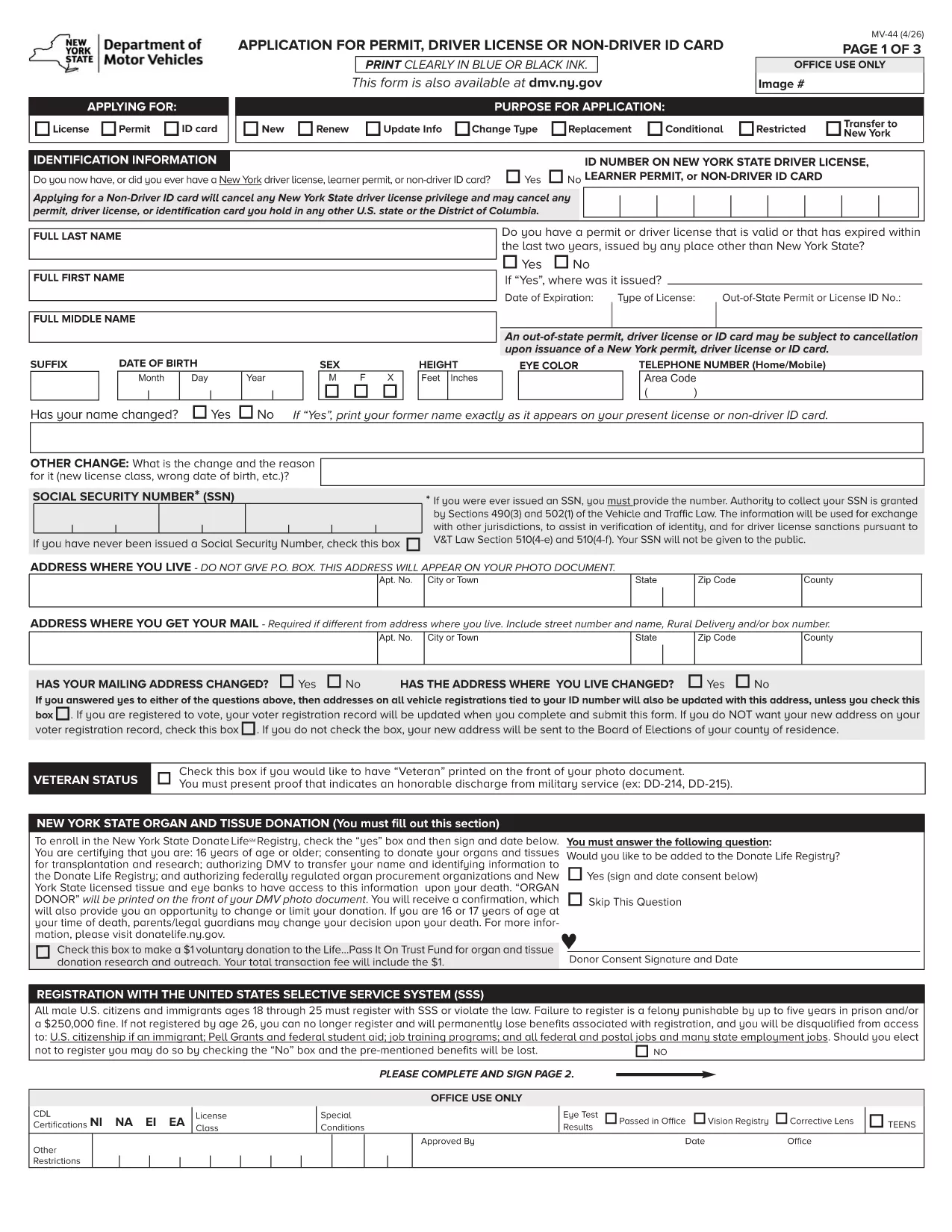
MV-44 Application Form – Permit, Driver License & Non‑Driver ID

  1. Dil İngilizce
  2. Ülke Amerika Birleşik Devletleri
  3. Aktivite Ehliyet
  4. Belirtmek, bildirmek New York
MV-44 Application Form – Permit, Driver License & Non‑Driver ID

The MV-44 is the official New York State application used to request a learner’s permit, a driver’s license, or a non‑driver identification card. This form is required for first‑time applicants, renewals, and certain name‑change situations.

Formize.com offers a fully fillable PDF version of the MV‑44, so you can complete the entire application directly in your web browser—no Adobe Acrobat needed.

Below you’ll find everything you need to know about the MV‑44, step‑by‑step instructions for filling it out online, and tips to avoid common errors that can delay processing.

Key benefits of using the Formize fillable PDF:

  • Instant loading in the Formize PDF Filler app
  • Auto‑save as you type, preventing data loss
  • Built‑in validation to catch missing or incorrect information
  • Easy electronic signature and direct download of the completed form

Ready to start? Simply click the "Fill out this form" button and let the Formize PDF Filler do the rest.

SSS
  • Can I save my progress and finish the MV‑44 later?

    Yes. The Formize PDF Filler auto‑saves your entries locally. Simply close the tab and reopen the form to continue where you left off.

  • Do I need a PDF reader to use this form?

    No. The fillable version runs entirely in your browser via the Formize PDF Filler, eliminating the need for Adobe Acrobat or other PDF software.

  • What identification documents do I need to attach?

    You’ll need a valid photo ID (passport, existing NY driver’s license, or non‑driver ID) and proof of residency such as a utility bill or lease agreement. Upload scans after completing the form.

  • How long does the DMV take to process the MV‑44?

    Processing times vary, but most applications are reviewed within 7‑10 business days after the completed form and required documents are submitted.

  • Is the MV‑44 form free to download?

    Yes. The MV‑44 is a free, government‑provided form. Formize only hosts the fillable version at no cost.

  • Can I submit the completed MV‑44 electronically?

    The NY DMV currently requires a printed and signed copy. After downloading, print the form, sign it, and mail or deliver it to your local DMV office.

  • What should I do if I make a mistake on the form?

    If you notice an error before printing, simply go back in the Formize filler, correct the field, and re‑download the PDF. Once printed and signed, you’ll need to start a new form.

  • Do I need a separate form for a duplicate license?

    For a duplicate or replacement, you must complete Form MV‑44 and check the “Duplicate” box. Additional documentation may be required.

NASıL

MV-44 formunu ücretsiz, çevrimiçi olarak 4 kolay adımda nasıl doldurabilirsiniz:

  1. 1
    Click the Fill‑out Button
    On this page, locate the bright "Fill out this form" button and click it. The Formize PDF Filler will open in a new tab.
  2. 2
    Wait for the PDF Filler to Load
    The fillable MV‑44 PDF loads automatically. A loading spinner indicates the app is preparing the document.
  3. 3
    Enter Your Information
    Complete each field using the on‑screen prompts. Required fields are marked with an asterisk. The filler validates dates, numbers, and signatures in real time.
  4. 4
    Review, Sign & Download
    After filling all sections, review the data, add your electronic signature, and click "Download Completed Form". You can then print or submit the PDF as instructed by the DMV.
PDF Filler uygulamasını biçimlendirin
HAKKıNDA

Ehliyet Başvuru Formları

Çoğu ülkede, yola çıkmadan önce ehliyet almak zorunludur. Ehliyet almak, araba kullanmak isteyen herkes için önemli bir kilometre taşıdır.

MV-44, ​​ehliyet başvurusu yapmak isteyen kişilerden bilgi toplamak için kullanılan belgeler olan Ehliyet Başvuru formlarından biridir. Genellikle başvuranın adı, doğum tarihi, kimlik numarası, iletişim bilgileri ile sürücü belgesi geçmişi ve deneyimi için alanlar içerir.

ÖZELLIKLERI

PDF Doldurucu

PDF formlarını çevrimiçi doldurmanın en kolay yolu

  • MV-44'ü hızlıca doldurun
    MV-44 çevrimiçi olarak hızlı bir şekilde doldurmanın bir yolunu mu arıyorsunuz? Çevrimiçi ücretsiz PDF form doldurucumuzla, bu pdf belgesini nasıl düzenleyeceğinizi ve dolduracağınızı bir dakikadan kısa sürede öğreneceksiniz.
  • Kullanımı kolay çevrimiçi PDF düzenleyici
    PDF dosyalarını yeniden tarayıp geri göndermeden önce düzenleyebilmek için yazdırmaktan bıktınız mı? PDF belgelerini çevrimiçi olarak ücretsiz düzenleyin. Zamandan ve kağıttan tasarruf etmek için çevrimiçi pdf editörümüzü kullanın.
  • Harika araçlar, tüm platformlar
    Bir Mac'te MV-44'ü nasıl dolduracağınızı veya PDF doldurucuyu ücretsiz olarak nasıl kullanacağınızı mı merak ediyorsunuz? Çevrimiçi PDF araçlarımız tüm platformlarda çalışır.
  • Güvenli dosya depolama
    Tamamlanan "MV-44" dosyaları, Amazon Cloud barındırma tarafından yönetilen güvenli bir veritabanında depolanır. Dosyalarınızı istediğiniz zaman sistemimizden silebilirsiniz. Her durumda, bu dosyalar 24 saat sonra otomatik olarak silinir.
  • MV-44 ile sohbet et
    Ücretsiz bir PDF okuyucu asistanı olan Chatize'da "MV-44" ile sohbet edin. "MV-44" adlı kişiden sorular sorun ve yanıtlar alın. Yukarıdaki Belgeyle Sohbet Et düğmesini tıklamanız yeterlidir.

Doldurma oturumunu sil

Seçilen doldurma oturumunu silin mi? Bu durumda, formu doldurmadaki ilerlemeniz kaybolacaktır.

Düzenleme oturumunu sil

Seçilen düzenleme oturumu silinsin mi? Bu durumda formu oluşturma ve düzenleme konusundaki ilerlemeniz kaybolacaktır.