
Dil Seçin

SFN 61560 – North Dakota CDL Third‑Party Tester Form (Fillable PDF)

  1. Dil İngilizce
  2. Ülke Amerika Birleşik Devletleri
  3. Aktivite Ehliyet
  4. Belirtmek, bildirmek Kuzey Dakota
SFN 61560 – North Dakota CDL Third‑Party Tester Form (Fillable PDF)

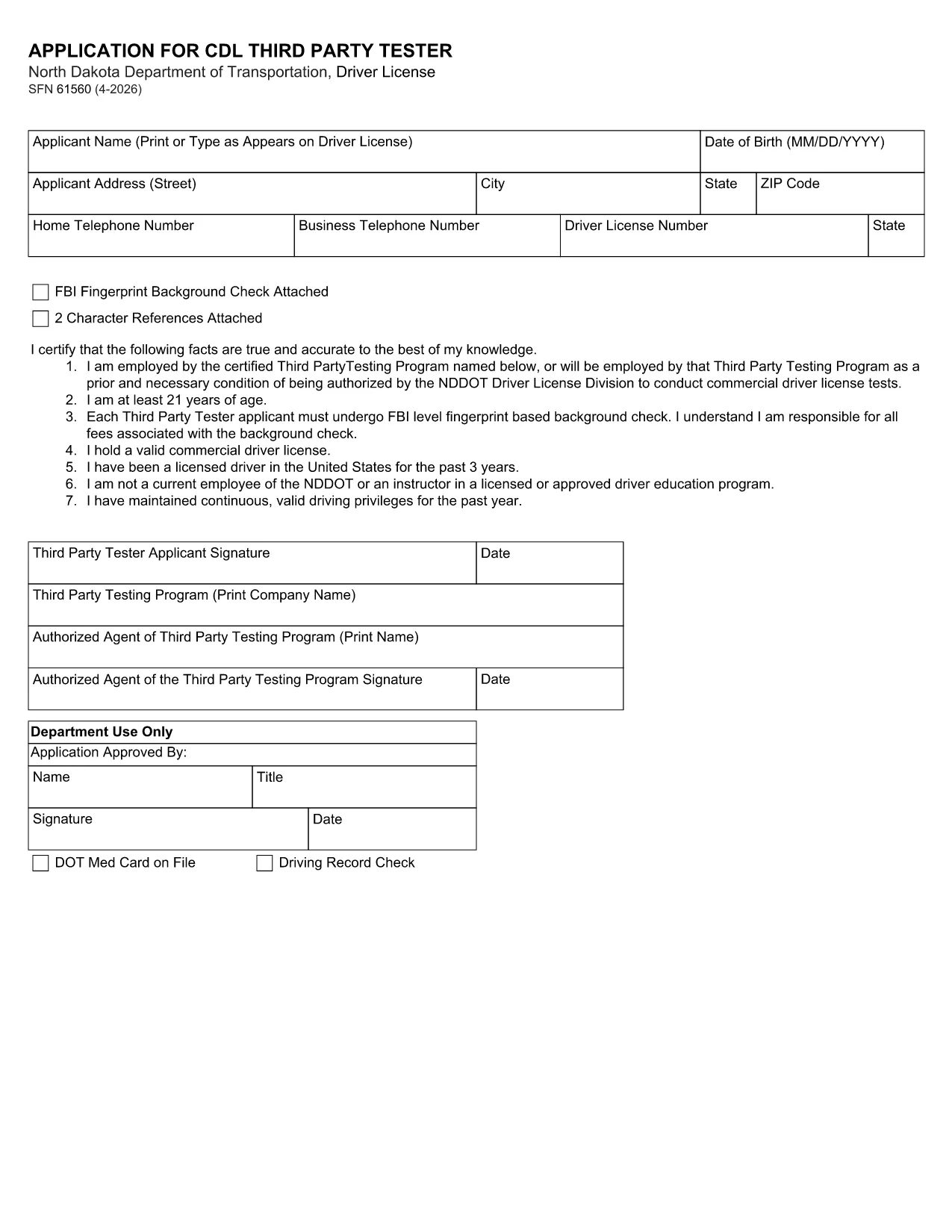
The SFN 61560 is the North Dakota Department of Transportation (ND DOT) application used by third‑party testers to request a Commercial Driver’s License (CDL) testing authorization. This form is now available as a fully fillable PDF, so you can complete it from any device without printing.

What Is the SFN 61560 Form?

SFN 61560 is the official ND DOT application for CDL third‑party testers. It collects personal information, licensing history, and the required FBI fingerprint background check. The completed form is submitted to the ND DOT to verify eligibility before you can administer CDL skills tests.

Who Needs to Complete SFN 61560?

  • Independent CDL testing companies
  • Driving schools that provide third‑party testing services
  • Any individual or organization seeking ND approval to conduct CDL skills examinations

How to Fill Out the Form Online

Instead of downloading, printing, and scanning, simply click the "Fill out this form" button on this page. The Formize PDF Filler will load in seconds, letting you type directly into each field.

Common Mistakes to Avoid

  • Leaving the FBI fingerprint section blank – a background check is mandatory.
  • Using an expired driver’s license number.
  • Forgetting to attach the two required character references.
  • Submitting the form without a notarized signature where required.

Download & Fill the Form Instantly

When you’re ready, click the button below to open the fillable PDF in Formize. After completing all fields, review the data, then either print for mail‑in submission or save a PDF copy for electronic upload if your local ND DOT office accepts it.

SSS
  • What is the purpose of the SFN 61560 form?

    It authorizes a third‑party tester to administer CDL skills tests in North Dakota after a background check and verification of qualifications.

  • Is the PDF fillable online?

    Yes. Using Formize’s PDF Filler you can type directly into the PDF fields without printing.

  • Do I need to submit a hard copy?

    Most ND DOT offices require a printed, signed form. Save the completed PDF and print it for mailing unless you receive electronic submission instructions.

  • What supporting documents are required?

    A recent FBI fingerprint background check, two character references, and a notarized signature (if required).

  • How long does the approval process take?

    After the ND DOT receives a complete form, processing typically takes 10‑14 business days.

  • Can I edit the form after I’ve saved it?

    Yes. Open the saved PDF again in Formize or any PDF editor to make changes before final submission.

  • Is there a filing fee?

    There is no fee for the SFN 61560 application itself, but any required background‑check fees are paid to the FBI.

  • Where do I send the completed form?

    Mail it to the North Dakota Department of Transportation, Driver Licensing Division, 600 East Boulevard Ave, Bismarck, ND 58501.

  • What if I make a mistake on the form?

    Correct the error in the PDF, re‑save, and submit a clean copy. If you’ve already mailed it, contact the ND DOT licensing office for guidance.

  • Can I get help filling out SFN 61560?

    Contact the ND DOT Driver Licensing Division at (701) 328‑2725 for questions about required information.

NASıL

SFN 61560 formunu ücretsiz, çevrimiçi olarak 5 kolay adımda nasıl doldurabilirsiniz:

  1. 1
    Step 1 – Click “Fill out this form”
    Press the button on this page to launch the Formize PDF Filler. No software download is required.
  2. 2
    Step 2 – Wait for the filler to load
    The fillable PDF loads in your browser within a few seconds. All fields become editable.
  3. 3
    Step 3 – Complete each field
    Enter your personal data, licensing details, and attach the required fingerprint and character reference documents.
  4. 4
    Step 4 – Review and save
    Double‑check every entry, then click “Save” to download a completed PDF or “Print” to send a hard copy to ND DOT.
  5. 5
    Step 5 – Submit
    Mail the printed form to the address on the ND DOT website, or upload the saved PDF if electronic submission is accepted.
PDF Filler uygulamasını biçimlendirin
HAKKıNDA

Ehliyet Başvuru Formları

SFN 61560, ehliyet başvurusunda bulunmak veya ehliyetle ilgili çeşitli hizmetleri talep etmek için kullanılan belgeler olan sürücü belgesi formlarından biridir. Bu formlar genellikle Amerika Birleşik Devletleri'ndeki Motorlu Araçlar Departmanı (DMV) gibi belirli bir yargı bölgesinde sürücü ehliyeti vermekten sorumlu departman veya kurum tarafından sağlanır.

Yaygın sürücü belgesi formları şunları içerir:

Ehliyet Başvurusu: Bu form, yeni bir ehliyet başvurusunda bulunmak veya mevcut bir ehliyeti yenilemek için kullanılır. Genellikle ad, adres, doğum tarihi ve Sosyal Güvenlik numarası gibi kişisel bilgileri gerektirir.

Kimlik Belgeleri: Bazı yargı bölgelerinde, başvuru sahibinin kimliğini ve ikametgahını doğrulamak için özel kimlik belgeleri istenir. Bunlar doğum belgesi, pasaport veya sosyal güvenlik kartı gibi formları içerebilir.

Görme Muayenesi: Çoğu sürücü ehliyeti başvurusu, yetkili bir tıp uzmanının veya göz bakımı uzmanının, başvuru sahibinin araç kullanmak için minimum görme gereksinimlerini karşıladığını onayladığı bir görme muayenesi formu gerektirir.

Sürücü Eğitim Formları: Bazı durumlarda kişilerin, sürücü eğitimi tamamlama sertifikası veya eğitmen tarafından imzalanmış bir form gibi bir sürücü eğitimi kursunu tamamladıklarına dair kanıt sunmaları gerekebilir.

Tıbbi Değerlendirme: Bazı tıbbi durumlar, bir sağlık uzmanı tarafından ek formların doldurulmasını gerektirebilir. Bu formlar, başvuru sahibinin fiziksel ve zihinsel olarak araç kullanmaya uygunluğunu doğrular.

Adres Değişikliği Formu: Ehliyet sahibinin yeni bir adrese taşınması durumunda, ehliyet bilgilerini güncellemek için adres değişikliği formu doldurması gerekebilir.

Sürücü belgesi formları yerel DMV ofisinden alınabilir veya web sitesinden indirilebilir. Sorunsuz bir başvuru veya hizmet süreci sağlamak için gerekli formları destekleyici belgelerle birlikte dikkatlice doldurup göndermeniz önemlidir.

ÖZELLIKLERI

PDF Doldurucu

PDF formlarını çevrimiçi doldurmanın en kolay yolu

  • SFN 61560'ü hızlıca doldurun
    SFN 61560 çevrimiçi olarak hızlı bir şekilde doldurmanın bir yolunu mu arıyorsunuz? Çevrimiçi ücretsiz PDF form doldurucumuzla, bu pdf belgesini nasıl düzenleyeceğinizi ve dolduracağınızı bir dakikadan kısa sürede öğreneceksiniz.
  • Kullanımı kolay çevrimiçi PDF düzenleyici
    PDF dosyalarını yeniden tarayıp geri göndermeden önce düzenleyebilmek için yazdırmaktan bıktınız mı? PDF belgelerini çevrimiçi olarak ücretsiz düzenleyin. Zamandan ve kağıttan tasarruf etmek için çevrimiçi pdf editörümüzü kullanın.
  • Harika araçlar, tüm platformlar
    Bir Mac'te SFN 61560'ü nasıl dolduracağınızı veya PDF doldurucuyu ücretsiz olarak nasıl kullanacağınızı mı merak ediyorsunuz? Çevrimiçi PDF araçlarımız tüm platformlarda çalışır.
  • Güvenli dosya depolama
    Tamamlanan "SFN 61560" dosyaları, Amazon Cloud barındırma tarafından yönetilen güvenli bir veritabanında depolanır. Dosyalarınızı istediğiniz zaman sistemimizden silebilirsiniz. Her durumda, bu dosyalar 24 saat sonra otomatik olarak silinir.
  • SFN 61560 ile sohbet et
    Ücretsiz bir PDF okuyucu asistanı olan Chatize'da "SFN 61560" ile sohbet edin. "SFN 61560" adlı kişiden sorular sorun ve yanıtlar alın. Yukarıdaki Belgeyle Sohbet Et düğmesini tıklamanız yeterlidir.

Doldurma oturumunu sil

Seçilen doldurma oturumunu silin mi? Bu durumda, formu doldurmadaki ilerlemeniz kaybolacaktır.

Düzenleme oturumunu sil

Seçilen düzenleme oturumu silinsin mi? Bu durumda formu oluşturma ve düzenleme konusundaki ilerlemeniz kaybolacaktır.