
Dil Seçin

Virginia DL 569 Emergency Contact Application (Fillable PDF)

  1. Ülke Amerika Birleşik Devletleri
  2. Dil İngilizce
  3. Aktivite Ehliyet
  4. Belirtmek, bildirmek Virjinya
Virginia DL 569 Emergency Contact Application (Fillable PDF)

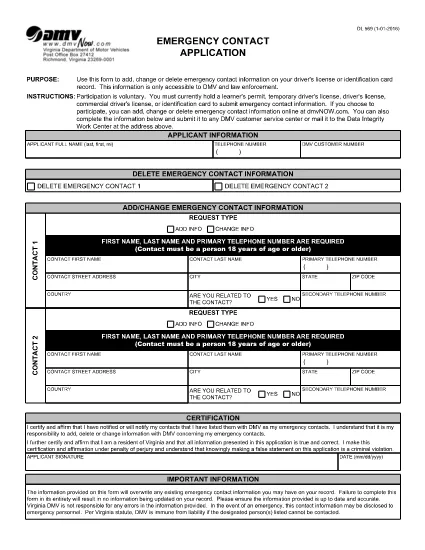
The DL 569 is the Virginia Department of Motor Vehicles (DMV) Emergency Contact Application. It lets you add, change, or delete emergency contact information linked to your driver’s license or state ID. Keeping this information up‑to‑date can help law enforcement and DMV staff reach your designated contacts quickly in an emergency.

What Is the DL 569 Form?

This form is a short, printable PDF that captures:

  • Primary and secondary emergency contacts
  • Relationship to you
  • Phone numbers and mailing address
  • Signature and date

Because it’s a fillable PDF, you can complete it directly in your browser without needing special software.

How to Fill Out the DL 569 Online

Instead of downloading the PDF and opening a separate editor, simply click the “Fill out this form” button on this page. The Formize PDF Filler will load instantly, allowing you to type, select, and sign the form online.

  1. Click Fill out this form below.
  2. The Formize PDF Filler app opens in a new tab.
  3. Enter each field carefully – the form will highlight required sections.
  4. Save your progress at any time with the Save button.
  5. When finished, click Submit to download the completed PDF.

Common Mistakes to Avoid

  • Leaving a required field blank – the filler will block submission.
  • Entering an incorrect phone format (use 10‑digit numbers without dashes).
  • Forgetting to sign and date the form.
  • Using a non‑Virginia address for a Virginia driver’s license.

Where to Submit Your Completed Form

After you download the completed PDF, you can:

  • Mail it to your local Virginia DMV office.
  • Drop it off in person at any DMV service center.
  • Upload it via the Virginia DMV online portal if you have an account.

Make sure to keep a copy for your records.

SSS
  • Do I need Adobe Acrobat to fill out DL 569?

    No. The Formize PDF Filler works in any modern browser, so you can complete the form without installing additional software.

  • Can I edit the form after I download it?

    Yes, but you’ll need a PDF editor. To avoid extra steps, finish all edits in the online filler before downloading.

  • Is there a fee to submit the DL 569?

    No. The Emergency Contact Application is free to complete and submit.

  • How long does the DMV keep my emergency contact information?

    The DMV retains the information as long as your driver’s license or ID is active. Update the form whenever contacts change.

  • What if I make a mistake on the form?

    Simply reopen the fillable PDF, correct the error, and download a new version before submitting.

  • Can I submit the form electronically?

    Yes, if you have a Virginia DMV online account you can upload the completed PDF directly through the portal.

  • Do I need to provide both a primary and secondary contact?

    Providing a secondary contact is optional but recommended for added safety.

  • Is the DL 569 accepted for non‑Virginia licenses?

    The form is specific to Virginia driver’s licenses and state IDs only.

NASıL

DL 569 formunu ücretsiz, çevrimiçi olarak 5 kolay adımda nasıl doldurabilirsiniz:

  1. 1
    Open the Fillable Form
    Click the "Fill out this form" button below. The Formize PDF Filler loads instantly in a new browser tab.
  2. 2
    Enter Your Information
    Type your emergency contacts, relationship, phone numbers, and address directly into the highlighted fields.
  3. 3
    Save and Review
    Use the Save button to keep a draft. Review each entry for accuracy before finalizing.
  4. 4
    Submit and Download
    When all fields are completed, click Submit to generate a finished PDF. Download and keep a copy for your records.
  5. 5
    Send to the DMV
    Mail, drop off, or upload the completed PDF to your nearest Virginia DMV office.
PDF Filler uygulamasını biçimlendirin
HAKKıNDA

Ehliyet Başvuru Formları

DL 569, ehliyet başvurusunda bulunmak veya ehliyetle ilgili çeşitli hizmetleri talep etmek için kullanılan belgeler olan sürücü belgesi formlarından biridir. Bu formlar genellikle Amerika Birleşik Devletleri'ndeki Motorlu Araçlar Departmanı (DMV) gibi belirli bir yargı bölgesinde sürücü ehliyeti vermekten sorumlu departman veya kurum tarafından sağlanır.

Yaygın sürücü belgesi formları şunları içerir:

Ehliyet Başvurusu: Bu form, yeni bir ehliyet başvurusunda bulunmak veya mevcut bir ehliyeti yenilemek için kullanılır. Genellikle ad, adres, doğum tarihi ve Sosyal Güvenlik numarası gibi kişisel bilgileri gerektirir.

Kimlik Belgeleri: Bazı yargı bölgelerinde, başvuru sahibinin kimliğini ve ikametgahını doğrulamak için özel kimlik belgeleri istenir. Bunlar doğum belgesi, pasaport veya sosyal güvenlik kartı gibi formları içerebilir.

Görme Muayenesi: Çoğu sürücü ehliyeti başvurusu, yetkili bir tıp uzmanının veya göz bakımı uzmanının, başvuru sahibinin araç kullanmak için minimum görme gereksinimlerini karşıladığını onayladığı bir görme muayenesi formu gerektirir.

Sürücü Eğitim Formları: Bazı durumlarda kişilerin, sürücü eğitimi tamamlama sertifikası veya eğitmen tarafından imzalanmış bir form gibi bir sürücü eğitimi kursunu tamamladıklarına dair kanıt sunmaları gerekebilir.

Tıbbi Değerlendirme: Bazı tıbbi durumlar, bir sağlık uzmanı tarafından ek formların doldurulmasını gerektirebilir. Bu formlar, başvuru sahibinin fiziksel ve zihinsel olarak araç kullanmaya uygunluğunu doğrular.

Adres Değişikliği Formu: Ehliyet sahibinin yeni bir adrese taşınması durumunda, ehliyet bilgilerini güncellemek için adres değişikliği formu doldurması gerekebilir.

Sürücü belgesi formları yerel DMV ofisinden alınabilir veya web sitesinden indirilebilir. Sorunsuz bir başvuru veya hizmet süreci sağlamak için gerekli formları destekleyici belgelerle birlikte dikkatlice doldurup göndermeniz önemlidir.

ÖZELLIKLERI

PDF Doldurucu

PDF formlarını çevrimiçi doldurmanın en kolay yolu

  • DL 569'ü hızlıca doldurun
    DL 569 çevrimiçi olarak hızlı bir şekilde doldurmanın bir yolunu mu arıyorsunuz? Çevrimiçi ücretsiz PDF form doldurucumuzla, bu pdf belgesini nasıl düzenleyeceğinizi ve dolduracağınızı bir dakikadan kısa sürede öğreneceksiniz.
  • Kullanımı kolay çevrimiçi PDF düzenleyici
    PDF dosyalarını yeniden tarayıp geri göndermeden önce düzenleyebilmek için yazdırmaktan bıktınız mı? PDF belgelerini çevrimiçi olarak ücretsiz düzenleyin. Zamandan ve kağıttan tasarruf etmek için çevrimiçi pdf editörümüzü kullanın.
  • Harika araçlar, tüm platformlar
    Bir Mac'te DL 569'ü nasıl dolduracağınızı veya PDF doldurucuyu ücretsiz olarak nasıl kullanacağınızı mı merak ediyorsunuz? Çevrimiçi PDF araçlarımız tüm platformlarda çalışır.
  • Güvenli dosya depolama
    Tamamlanan "DL 569" dosyaları, Amazon Cloud barındırma tarafından yönetilen güvenli bir veritabanında depolanır. Dosyalarınızı istediğiniz zaman sistemimizden silebilirsiniz. Her durumda, bu dosyalar 24 saat sonra otomatik olarak silinir.
  • DL 569 ile sohbet et
    Ücretsiz bir PDF okuyucu asistanı olan Chatize'da "DL 569" ile sohbet edin. "DL 569" adlı kişiden sorular sorun ve yanıtlar alın. Yukarıdaki Belgeyle Sohbet Et düğmesini tıklamanız yeterlidir.

Doldurma oturumunu sil

Seçilen doldurma oturumunu silin mi? Bu durumda, formu doldurmadaki ilerlemeniz kaybolacaktır.

Düzenleme oturumunu sil

Seçilen düzenleme oturumu silinsin mi? Bu durumda formu oluşturma ve düzenleme konusundaki ilerlemeniz kaybolacaktır.