
Dil Seçin

Virginia DMV DMS-004 Fillable PDF – Payment Authorization Form

  1. Ülke Amerika Birleşik Devletleri
  2. Dil İngilizce
  3. Aktivite Ehliyet
  4. Belirtmek, bildirmek Virjinya
Virginia DMV DMS-004 Fillable PDF – Payment Authorization Form

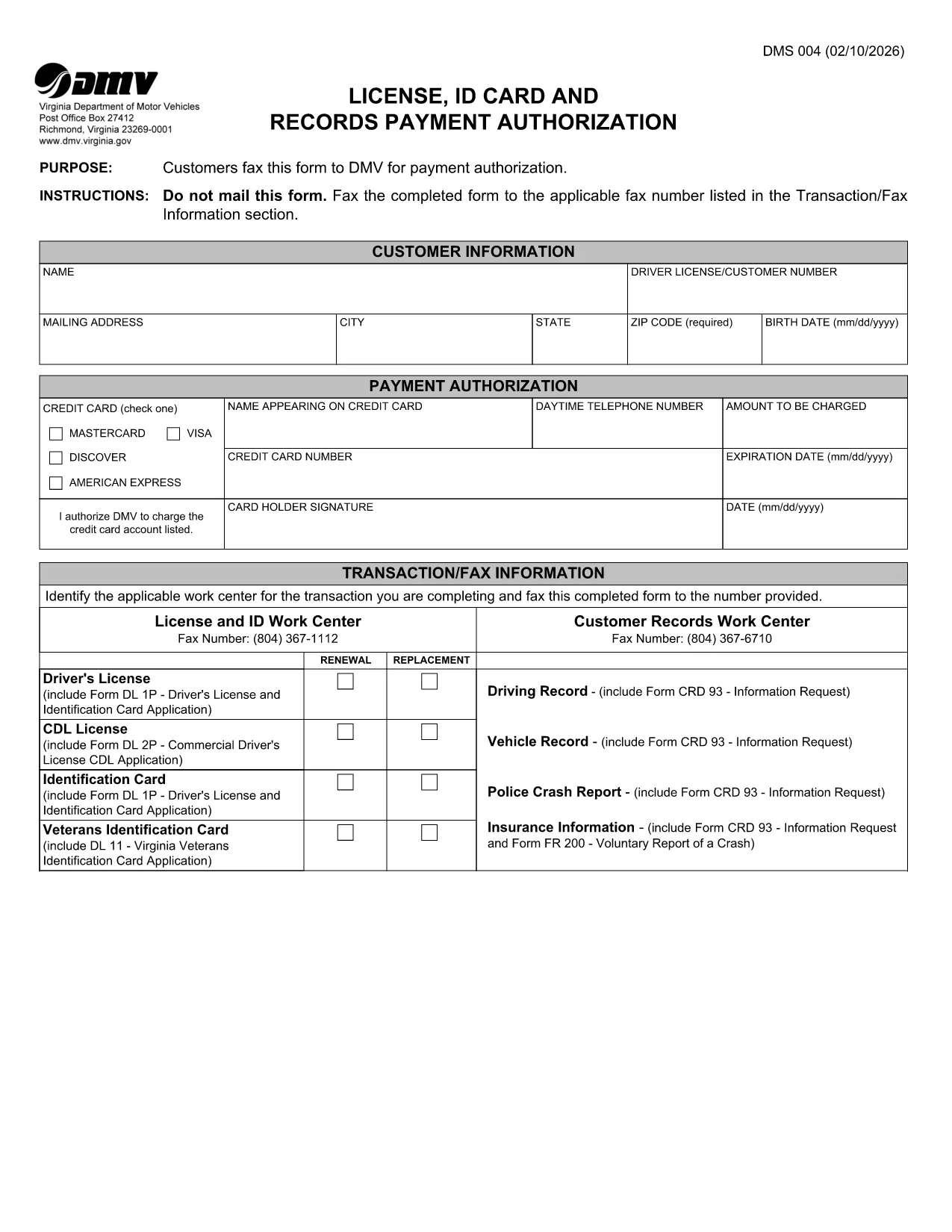
The DMS-004 is the official Virginia Department of Motor Vehicles (DMV) form used to authorize payment for a driver's license, ID card, or records request. This fillable PDF lets you complete the payment authorization quickly, without printing or faxing.

Our online Formize PDF Filler loads the DMS-004 directly in your browser, so you can type, sign, and submit the form in minutes. No additional software is required.

What Is the DMS-004 Form?

The DMS-004, titled "License, ID Card and Records Payment Authorization," captures:

  • Applicant’s personal information (name, address, driver’s license number)
  • Details of the requested service (license renewal, new ID, record copy)
  • Payment method and authorization signature

It is required whenever you need to pay the DMV for a license, ID card, or official record request.

How to Fill Out DMS-004 Online with Formize

Follow the simple steps below to complete the form without ever leaving the page.

Common Mistakes to Avoid

Even a tiny error can delay processing. Keep these tips in mind:

  • Double‑check the driver’s license number – a single digit off will cause a rejection.
  • Use a valid credit or debit card number; the form does not accept expired cards.
  • Sign exactly where the signature box appears; digital signatures are accepted.
  • Do not leave any mandatory fields blank; the Formize validator will highlight them.

Where to Submit the Completed Form

After you finish, you have two options:

  • Fax – The form automatically generates a fax‑ready PDF you can send to the number listed in the “Transaction/Fax Information” section.
  • Upload – Use the Virginia DMV online portal to upload the completed PDF directly.

Both methods are accepted, but the online upload is faster and provides an instant confirmation.

SSS
  • What is the purpose of the DMS-004 form?

    The DMS-004 authorizes the Virginia DMV to process payment for a driver's license, state ID card, or official records request.

  • Can I fill out DMS-004 on a mobile device?

    Yes. The Formize PDF Filler is fully responsive, allowing you to complete the form on smartphones or tablets.

  • Is a digital signature accepted?

    A digital signature created within the Formize app meets the DMV’s requirements and is treated the same as a handwritten signature.

  • Do I need to print the form after filling it out?

    No. You can fax the completed PDF directly from the app or upload the file to the DMV’s online portal.

  • What payment methods are accepted on DMS-004?

    The form accepts credit or debit card numbers. Ensure the card is current and has sufficient funds.

  • How long does it take for the DMV to process the form?

    Processing is typically 2–3 business days after the DMV receives the completed and authorized form.

  • Can I save a draft and finish later?

    Yes. The Formize app allows you to save a draft locally in your browser and return to it anytime before submission.

  • What should I do if I make a mistake?

    Edit the field directly in the Formize app before final submission. If you have already submitted, contact the Virginia DMV to request a correction.

NASıL

DMS-004 formunu ücretsiz, çevrimiçi olarak 4 kolay adımda nasıl doldurabilirsiniz:

  1. 1
    Open the Fillable Form
    Click the "Fill out this form" button on the page. The Formize PDF Filler app loads the DMS-004 directly in your browser.
  2. 2
    Enter Your Information
    Type in all required fields: personal details, service requested, and payment information. The form validates entries in real time.
  3. 3
    Add Your Digital Signature
    Use your mouse, trackpad, or touchscreen to sign in the signature box. Formize captures a secure digital signature.
  4. 4
    Review and Submit
    Click the "Review" button to ensure no fields are missing. Then choose to either fax the PDF automatically or download it for online upload to the Virginia DMV portal.
PDF Filler uygulamasını biçimlendirin
HAKKıNDA

Ehliyet Başvuru Formları

Çoğu ülkede, yola çıkmadan önce ehliyet almak zorunludur. Ehliyet almak, araba kullanmak isteyen herkes için önemli bir kilometre taşıdır.

DMS-004, ​​ehliyet başvurusu yapmak isteyen kişilerden bilgi toplamak için kullanılan belgeler olan Ehliyet Başvuru formlarından biridir. Genellikle başvuranın adı, doğum tarihi, kimlik numarası, iletişim bilgileri ile sürücü belgesi geçmişi ve deneyimi için alanlar içerir.

ÖZELLIKLERI

PDF Doldurucu

PDF formlarını çevrimiçi doldurmanın en kolay yolu

  • DMS-004'ü hızlıca doldurun
    DMS-004 çevrimiçi olarak hızlı bir şekilde doldurmanın bir yolunu mu arıyorsunuz? Çevrimiçi ücretsiz PDF form doldurucumuzla, bu pdf belgesini nasıl düzenleyeceğinizi ve dolduracağınızı bir dakikadan kısa sürede öğreneceksiniz.
  • Kullanımı kolay çevrimiçi PDF düzenleyici
    PDF dosyalarını yeniden tarayıp geri göndermeden önce düzenleyebilmek için yazdırmaktan bıktınız mı? PDF belgelerini çevrimiçi olarak ücretsiz düzenleyin. Zamandan ve kağıttan tasarruf etmek için çevrimiçi pdf editörümüzü kullanın.
  • Harika araçlar, tüm platformlar
    Bir Mac'te DMS-004'ü nasıl dolduracağınızı veya PDF doldurucuyu ücretsiz olarak nasıl kullanacağınızı mı merak ediyorsunuz? Çevrimiçi PDF araçlarımız tüm platformlarda çalışır.
  • Güvenli dosya depolama
    Tamamlanan "DMS-004" dosyaları, Amazon Cloud barındırma tarafından yönetilen güvenli bir veritabanında depolanır. Dosyalarınızı istediğiniz zaman sistemimizden silebilirsiniz. Her durumda, bu dosyalar 24 saat sonra otomatik olarak silinir.
  • DMS-004 ile sohbet et
    Ücretsiz bir PDF okuyucu asistanı olan Chatize'da "DMS-004" ile sohbet edin. "DMS-004" adlı kişiden sorular sorun ve yanıtlar alın. Yukarıdaki Belgeyle Sohbet Et düğmesini tıklamanız yeterlidir.

Doldurma oturumunu sil

Seçilen doldurma oturumunu silin mi? Bu durumda, formu doldurmadaki ilerlemeniz kaybolacaktır.

Düzenleme oturumunu sil

Seçilen düzenleme oturumu silinsin mi? Bu durumda formu oluşturma ve düzenleme konusundaki ilerlemeniz kaybolacaktır.