
Dil Seçin

IRS Form 637 – Excise Tax Registration (Fillable PDF)

  1. Ülke Amerika Birleşik Devletleri
  2. Dil İngilizce
  3. Aktivite vergiler
  4. Departman IRS
IRS Form 637 – Excise Tax Registration (Fillable PDF)

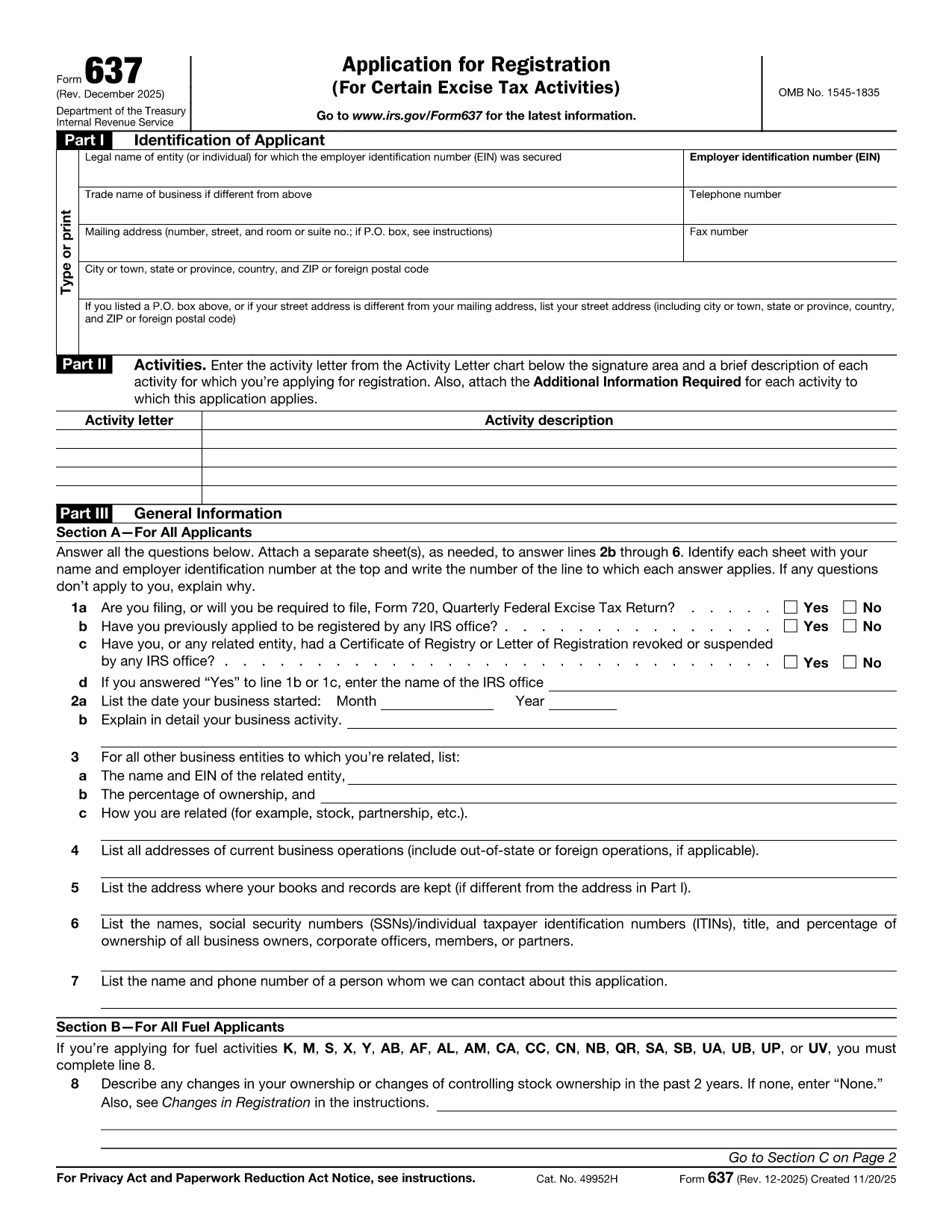
Looking for a fast, secure way to complete Form DSMV 637 (also known as IRS Form 637)? You’ve come to the right place. This page offers a fully fillable PDF that loads directly in the Formize PDF Filler—no extra software required.

What Is IRS Form 637?

Form 637 is the Internal Revenue Service’s excise tax registration form. It is used by businesses and individuals who need to register for excise taxes under sections 4101, 4222, 4662, and 4682 of the Internal Revenue Code. The form collects essential information such as the taxpayer’s name, address, type of activity, and the specific excise tax category.

How to Complete the Fillable PDF Form

Follow these simple steps to fill out the form online:

  1. Click the "Fill out this form" button below.
  2. Wait a few seconds while the Formize PDF Filler loads the document.
  3. Enter your information directly into the highlighted fields. The filler validates dates, numbers, and required fields for you.
  4. Review the completed form for accuracy.
  5. Save a copy to your device or email it directly to the IRS using the built‑in “Send” button.

Common Mistakes to Avoid

  • Leaving required fields blank: The filler will highlight missing information, but double‑check before submission.
  • Incorrect tax activity code: Use the Activity Letter chart on the form to match your business activity.
  • Mismatched EIN or SSN: Verify that the identification number matches your IRS records.
  • Illegible signatures: Use the digital signature tool in Formize for a clear, legally acceptable signature.

Where to Submit the Completed Form

After you finish, you can either:

  • Mail the printed form to the address listed in the instructions, or
  • Submit electronically through the IRS e‑services portal if you have an authorized e‑file account.

Download the Official PDF

If you prefer the static version, you can download the official IRS PDF below. The fillable version on this page is based on the same document and is kept up‑to‑date with the latest IRS revisions.

Download IRS Form 637 (PDF)

SSS
  • Who needs to file IRS Form 637?

    Any individual or business that must register for excise taxes under sections 4101, 4222, 4662, or 4682 of the Internal Revenue Code must complete Form 637.

  • Is there a filing deadline for Form 637?

    Form 637 must be filed before you begin the taxable activity or within 30 days of starting the activity, whichever is later.

  • Can I submit Form 637 electronically?

    Yes. After completing the fillable PDF, you can upload it through the IRS e‑services portal if you have an authorized account.

  • Do I need a paid PDF editor to fill out Form 637?

    No. The Formize PDF Filler is free and works directly in your web browser—no download or installation required.

  • What should I do if I make a mistake on the form?

    Correct the error in the fillable PDF before saving or printing. If you have already submitted a paper copy, contact the IRS to request a corrected form.

  • Is Form 637 the same as DSMV 637?

    Some states refer to the excise tax registration form as DSMV 637, but the official IRS designation is Form 637. The content and requirements are identical.

NASıL

Form 637 formunu ücretsiz, çevrimiçi olarak 4 kolay adımda nasıl doldurabilirsiniz:

  1. 1
    Open the Fillable Form
    Click the "Fill out this form" button on the page. The Formize PDF Filler will open the document in a new window.
  2. 2
    Enter Your Information
    Type directly into each highlighted field. The filler automatically validates dates, numbers, and required entries.
  3. 3
    Review and Sign
    Use the built‑in signature tool to add a digital signature. Double‑check all entries for accuracy.
  4. 4
    Save or Submit
    Save a copy to your computer or click the "Send" button to email the completed form to the IRS or your tax professional.
PDF Filler uygulamasını biçimlendirin
HAKKıNDA

Federal vergi formları

Form 637, Amerika Birleşik Devletleri'nde federal gelir vergilerini Ulusal Gelir İdaresi'ne (IRS) bildirmek ve dosyalamak için kullanılan belgeler olan Federal vergi formlarından biridir. Bu formlar bireyler, işletmeler ve kuruluşlar tarafından gelirlerini, kesintilerini ve federal vergi yükümlülüklerini hesaplamak için gerekli diğer bilgileri bildirmek için kullanılır.

En yaygın kullanılan federal vergi formu, bireysel vergi mükellefleri tarafından kişisel gelir vergilerini bildirmek için kullanılan Form 1040'dır. Yaygın olarak kullanılan diğer formlar arasında ortaklıklar için Form 1065, Form 1120 ve vergiden muaf kuruluşlar için Form 990.

Federal vergi formları genellikle vergi mükelleflerinin ücretler, maaşlar ve bahşişler gibi çeşitli gelir kaynaklarının yanı sıra yatırımlardan, kiralık mülklerden ve diğer kaynaklardan elde edilen gelirleri bildirmelerini gerektirir. Formlar aynı zamanda vergi mükelleflerinin hayır amaçlı katkılar, ipotek faizi ve sağlık harcamaları gibi çeşitli harcamalar için kesinti ve kredi talep etmelerine de olanak tanıyor.

Federal vergi formlarının doğru ve zamanında doldurulması önemlidir; aksi takdirde IRS'den cezalar ve faiz kesintileri gelebilir.

ÖZELLIKLERI

PDF Doldurucu

PDF formlarını çevrimiçi doldurmanın en kolay yolu

  • Form 637'ü hızlıca doldurun
    Form 637 çevrimiçi olarak hızlı bir şekilde doldurmanın bir yolunu mu arıyorsunuz? Çevrimiçi ücretsiz PDF form doldurucumuzla, bu pdf belgesini nasıl düzenleyeceğinizi ve dolduracağınızı bir dakikadan kısa sürede öğreneceksiniz.
  • Kullanımı kolay çevrimiçi PDF düzenleyici
    PDF dosyalarını yeniden tarayıp geri göndermeden önce düzenleyebilmek için yazdırmaktan bıktınız mı? PDF belgelerini çevrimiçi olarak ücretsiz düzenleyin. Zamandan ve kağıttan tasarruf etmek için çevrimiçi pdf editörümüzü kullanın.
  • Harika araçlar, tüm platformlar
    Bir Mac'te Form 637'ü nasıl dolduracağınızı veya PDF doldurucuyu ücretsiz olarak nasıl kullanacağınızı mı merak ediyorsunuz? Çevrimiçi PDF araçlarımız tüm platformlarda çalışır.
  • Güvenli dosya depolama
    Tamamlanan "Form 637" dosyaları, Amazon Cloud barındırma tarafından yönetilen güvenli bir veritabanında depolanır. Dosyalarınızı istediğiniz zaman sistemimizden silebilirsiniz. Her durumda, bu dosyalar 24 saat sonra otomatik olarak silinir.
  • Form 637 ile sohbet et
    Ücretsiz bir PDF okuyucu asistanı olan Chatize'da "Form 637" ile sohbet edin. "Form 637" adlı kişiden sorular sorun ve yanıtlar alın. Yukarıdaki Belgeyle Sohbet Et düğmesini tıklamanız yeterlidir.

Doldurma oturumunu sil

Seçilen doldurma oturumunu silin mi? Bu durumda, formu doldurmadaki ilerlemeniz kaybolacaktır.

Düzenleme oturumunu sil

Seçilen düzenleme oturumu silinsin mi? Bu durumda formu oluşturma ve düzenleme konusundaki ilerlemeniz kaybolacaktır.