
Dil Seçin

OPM Form 1514 – Fillable Military Deposit Worksheet

  1. Dil İngilizce
  2. Ülke Amerika Birleşik Devletleri
  3. Departman Personel Yönetimi Ofisi
  4. sektör OPM Formları
OPM Form 1514 – Fillable Military Deposit Worksheet

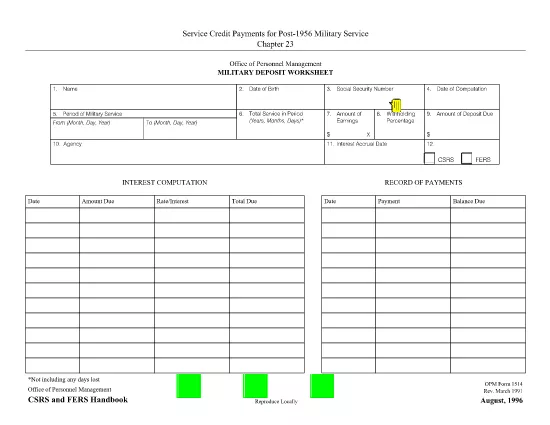
OPM Form 1514, also known as the Military Deposit Worksheet, is required for federal employees who served in the military after 1956 and need to calculate the deposit due to the Civil Service Retirement System (CSRS) or the Federal Employees Retirement System (FERS). This page lets you download the official fillable PDF, complete it directly in your browser, and submit it to your agency.

What Is OPM Form 1514?

The worksheet captures:

  • Period of military service
  • Earnings during that period
  • Withholding percentage
  • Interest rate applied to the deposit
  • Year‑by‑year payment balance

It is used to compute the amount of deposit required for post‑1956 military service under CSRS or FERS.

How to Fill Out the Form Online

Instead of downloading the PDF to a desktop editor, simply click the "Fill out this form" button below. The Formize PDF Filler app will load, letting you complete the worksheet instantly.

Common Errors to Avoid

  • Incorrect service dates: Double‑check the start and end dates of your military service.
  • Wrong earnings amount: Use official pay records; rounding errors can affect the deposit calculation.
  • Missing signatures: The form requires both the employee’s and the agency’s signatures.
  • Forgetting to select the correct retirement system: Choose CSRS or FERS based on your current retirement status.

Download the Fillable PDF

Click the button to open the fillable version. No extra software is needed.

Fill out this form

FAQs About OPM Form 1514

Below are the most frequently asked questions. Click each question to reveal the answer.

SSS
  • Who needs to file OPM Form 1514?

    Any federal employee who performed post‑1956 military service and is required to make a deposit to CSRS or FERS must complete this worksheet.

  • Can I submit a paper copy instead of the fillable PDF?

    Yes, you may print the completed form and submit a hard copy, but the fillable PDF ensures calculations are accurate and speeds up processing.

  • What is the deadline for submitting the deposit?

    Deposits are generally due within 30 days of the employee’s return to federal service. Check your agency’s specific deadline.

  • Do I need a digital signature?

    A digital signature is acceptable for most agencies when using the fillable PDF. Verify with your HR office if a wet signature is required.

  • How is the interest rate determined?

    OPM applies the current Treasury rate to the deposit amount. The worksheet updates the rate automatically when you use the online filler.

  • What if I make a mistake after submitting?

    Contact your agency’s retirement office immediately. They can provide a corrected form or allow you to amend the submitted worksheet.

  • Is there a cost to use the fillable PDF?

    No. The PDF is provided free of charge by the Office of Personnel Management.

NASıL

OPM Form 1514 formunu ücretsiz, çevrimiçi olarak 5 kolay adımda nasıl doldurabilirsiniz:

  1. 1
    Open the Fillable Form
    Click the "Fill out this form" button above. The Formize PDF Filler will launch in a new tab.
  2. 2
    Enter Your Service Details
    Input the dates of military service, earnings, and any applicable withholding percentages exactly as shown on your service record.
  3. 3
    Review Calculations
    The worksheet automatically calculates the deposit amount, interest, and yearly balance. Verify the numbers for accuracy.
  4. 4
    Add Required Signatures
    Use the signature fields to sign electronically. If your agency requires a wet signature, print the completed form after saving.
  5. 5
    Save and Submit
    Save the completed PDF to your computer and upload it to your agency’s HR portal or email it to the designated retirement office.
PDF Filler uygulamasını biçimlendirin
HAKKıNDA

Personel Yönetimi Ofisi (OPM) Formları

OPM Form 1514, ​​federal hükümetin kamu hizmeti işgücünü ve federal çalışanlara sağlanan sosyal hakları yönetmekten sorumlu bağımsız bir kurumu olan Amerika Birleşik Devletleri Personel Yönetimi Ofisi tarafından kullanılan resmi formlardan biridir. OPM, federal istihdamla ilgili politika ve düzenlemeleri belirler, çeşitli personel programlarını yönetir ve federal çalışanlara, emeklilere ve iş başvurusunda bulunanlara hizmet sağlar.

Personel Yönetimi Ofisi formlarından bazı örnekler:

Standart Form 86 (SF-86) : Bu form, güvenlik izni başvurusunda bulunan kişilerin geçmiş araştırma süreci için kullanılır. Kapsamlı kişisel bilgiler, istihdam, eğitim ve mali bilgilerin yanı sıra yabancı kişiler ve faaliyetlerle ilgili ayrıntıları da toplar.

Standart Form 2809 (SF-2809) : Bu form, federal çalışanlara, emeklilere ve onların uygun aile üyelerine sağlık sigortası teminatı sağlayan Federal Çalışanların Sağlık Yardımları (FEHB) Programına kaydolmak için kullanılır.

Standart Form 2817 (SF-2817): Bu form, emeklilik veya federal hizmetten ayrılma sonrasında Federal Çalışanlar Diş ve Görme Sigortası Programı (FEDVIP) kapsamının devamı için başvuruda bulunmak için kullanılır.

Standart Form 3107 (SF-3107) : Bu form, Kamu Hizmeti Emeklilik Sistemi (CSRS) kapsamında emeklilik yardımlarına başvurmak için kullanılır.

Standart Form 2801 (SF-2801) : Bu form, Federal Çalışan Emeklilik Sistemi (FERS) kapsamında emeklilik yardımlarına başvurmak için kullanılır.

Standart Form 15 (SF-15) : Bu form, gazilerin federal istihdamdaki tercihine başvurmak için kullanılır. Federal hükümette iş fırsatı arayan gaziler veya onların uygun aile üyeleri tarafından sunulur.

Bu örnekler, federal istihdam ve çalışanlara sağlanan faydalar bağlamında kullanılan bazı yaygın OPM formlarını temsil etmektedir. Ancak OPM'nin çeşitli personel programları, emeklilik, sigorta ve federal istihdamın diğer yönleriyle ilgili bir dizi başka formu da vardır. Gereken spesifik formlar, aranan işlemin, programın veya avantajın niteliğine bağlı olarak değişiklik gösterebilir. Doğru ve güncel bilgilere ulaşmak için ABD Personel Yönetimi Ofisi'nin resmi web sitesine (www.opm.gov) başvurmanız veya OPM'den veya ilgili insan kaynakları personelinden rehberlik almanız önerilir. Federal istihdamınız veya yardımlarla ilgili ihtiyaçlarınızla ilgili belirli OPM formlarına ilişkin güncel bilgiler.

ÖZELLIKLERI

PDF Doldurucu

PDF formlarını çevrimiçi doldurmanın en kolay yolu

  • OPM Form 1514'ü hızlıca doldurun
    OPM Form 1514 çevrimiçi olarak hızlı bir şekilde doldurmanın bir yolunu mu arıyorsunuz? Çevrimiçi ücretsiz PDF form doldurucumuzla, bu pdf belgesini nasıl düzenleyeceğinizi ve dolduracağınızı bir dakikadan kısa sürede öğreneceksiniz.
  • Kullanımı kolay çevrimiçi PDF düzenleyici
    PDF dosyalarını yeniden tarayıp geri göndermeden önce düzenleyebilmek için yazdırmaktan bıktınız mı? PDF belgelerini çevrimiçi olarak ücretsiz düzenleyin. Zamandan ve kağıttan tasarruf etmek için çevrimiçi pdf editörümüzü kullanın.
  • Harika araçlar, tüm platformlar
    Bir Mac'te OPM Form 1514'ü nasıl dolduracağınızı veya PDF doldurucuyu ücretsiz olarak nasıl kullanacağınızı mı merak ediyorsunuz? Çevrimiçi PDF araçlarımız tüm platformlarda çalışır.
  • Güvenli dosya depolama
    Tamamlanan "OPM Form 1514" dosyaları, Amazon Cloud barındırma tarafından yönetilen güvenli bir veritabanında depolanır. Dosyalarınızı istediğiniz zaman sistemimizden silebilirsiniz. Her durumda, bu dosyalar 24 saat sonra otomatik olarak silinir.
  • OPM Form 1514 ile sohbet et
    Ücretsiz bir PDF okuyucu asistanı olan Chatize'da "OPM Form 1514" ile sohbet edin. "OPM Form 1514" adlı kişiden sorular sorun ve yanıtlar alın. Yukarıdaki Belgeyle Sohbet Et düğmesini tıklamanız yeterlidir.

Doldurma oturumunu sil

Seçilen doldurma oturumunu silin mi? Bu durumda, formu doldurmadaki ilerlemeniz kaybolacaktır.

Düzenleme oturumunu sil

Seçilen düzenleme oturumu silinsin mi? Bu durumda formu oluşturma ve düzenleme konusundaki ilerlemeniz kaybolacaktır.