
Dil Seçin

OPM Form 913B – Recognitions and Agreements Change (Fillable PDF)

  1. Dil İngilizce
  2. Ülke Amerika Birleşik Devletleri
  3. Departman Personel Yönetimi Ofisi
  4. sektör OPM Formları
OPM Form 913B – Recognitions and Agreements Change (Fillable PDF)

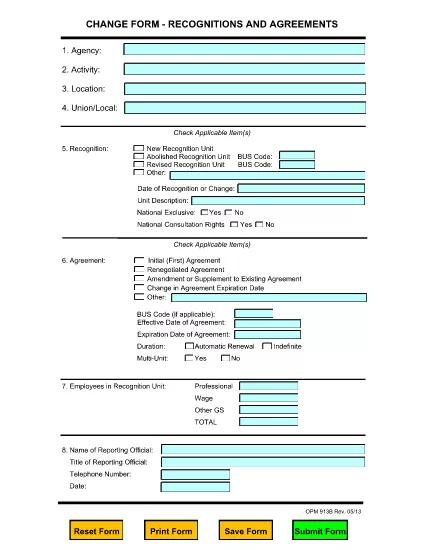
The OPM Form 913B is the official Recognitions and Agreements Change Form used by federal agencies to record new recognitions, modify existing ones, or discontinue agreements. This fillable PDF version is hosted on Formize.com, allowing you to complete the form directly in your browser without installing any software.

What Is OPM Form 913B?

Form 913B is issued by the U.S. Office of Personnel Management (OPM). It captures essential details such as:

  • Agency name and location
  • Recognition type (new, revised, abolished)
  • Agreement numbers and effective dates
  • Signature of the authorized official

The form ensures consistent documentation of collective bargaining recognitions across the federal workforce.

How to Fill Out OPM Form 913B Online

Follow these simple steps to complete the form with Formize’s PDF Filler:

  1. Click the "Fill out this form" button below.
  2. Wait a few seconds while the Formize PDF Filler app loads.
  3. Enter the required information in each field. All fields are interactive and save automatically.
  4. When you’re finished, click "Save & Download" to get a completed PDF copy.
  5. Print or email the saved PDF to the appropriate OPM office.

Common Mistakes & Tips for a Successful Submission

  • Missing Agency Code: Double‑check the OPM agency identifier; an incorrect code will delay processing.
  • Incorrect Dates: Use the MM/DD/YYYY format and verify that the effective date is not earlier than the submission date.
  • Signature Field: Use the built‑in signature tool or attach a scanned signature; handwritten signatures on a printed copy are also acceptable.
  • Incomplete Sections: Even optional sections must be marked “N/A” if not applicable; blank fields are flagged by OPM.

Where to Submit the Completed Form

After saving your completed PDF, send it to the OPM Office of Labor Relations at the address listed on the form’s last page, or upload it through the agency’s internal HR portal if your organization has a designated submission process.

Need a quick download? Use the button below to open the fillable PDF directly in Formize.

SSS
  • Is the OPM Form 913B available for free?

    Yes. The fillable PDF is free to download and complete using the Formize PDF Filler on our site.

  • Can I edit the form after I download it?

    You can edit the saved PDF with any standard PDF editor, but it’s easier to make all changes before downloading using the online filler.

  • What browsers are supported?

    Formize works with modern browsers such as Chrome, Edge, Firefox, and Safari. No plugins are required.

  • Do I need an OPM account to fill out Form 913B?

    No. The form can be completed anonymously; only the required agency information is needed.

  • How long does the form stay valid?

    Form 913B remains the current version until OPM issues a revision. Check the OPM website for updates.

  • What should I do if I make a mistake?

    Simply correct the field in the online filler before saving. If you have already downloaded, you can re‑open the PDF in Formize and edit again.

  • Is there a hard‑copy version available?

    Yes. After downloading, you can print the completed PDF and submit a physical copy if your agency requires it.

  • Where can I find help with specific form fields?

    Each field includes a tooltip with brief guidance. For detailed instructions, refer to the OPM Form 913B user guide linked on the OPM website.

NASıL

OPM Form 913B formunu ücretsiz, çevrimiçi olarak 4 kolay adımda nasıl doldurabilirsiniz:

  1. 1
    Open the Fillable Form
    Click the "Fill out this form" button on the page. The Formize PDF Filler app will load in your browser.
  2. 2
    Enter Your Information
    Complete each interactive field—agency details, recognition type, dates, and signatures—directly on the page.
  3. 3
    Save and Download
    When all required fields are filled, click "Save & Download" to get a copy of the completed PDF.
  4. 4
    Submit to OPM
    Print or email the saved PDF to the OPM Office of Labor Relations as instructed on the form.
PDF Filler uygulamasını biçimlendirin
HAKKıNDA

Personel Yönetimi Ofisi (OPM) Formları

OPM Form 913B, ​​federal hükümetin kamu hizmeti işgücünü ve federal çalışanlara sağlanan sosyal hakları yönetmekten sorumlu bağımsız bir kurumu olan Amerika Birleşik Devletleri Personel Yönetimi Ofisi tarafından kullanılan resmi formlardan biridir. OPM, federal istihdamla ilgili politika ve düzenlemeleri belirler, çeşitli personel programlarını yönetir ve federal çalışanlara, emeklilere ve iş başvurusunda bulunanlara hizmet sağlar.

Personel Yönetimi Ofisi formlarından bazı örnekler:

Standart Form 86 (SF-86) : Bu form, güvenlik izni başvurusunda bulunan kişilerin geçmiş araştırma süreci için kullanılır. Kapsamlı kişisel bilgiler, istihdam, eğitim ve mali bilgilerin yanı sıra yabancı kişiler ve faaliyetlerle ilgili ayrıntıları da toplar.

Standart Form 2809 (SF-2809) : Bu form, federal çalışanlara, emeklilere ve onların uygun aile üyelerine sağlık sigortası teminatı sağlayan Federal Çalışanların Sağlık Yardımları (FEHB) Programına kaydolmak için kullanılır.

Standart Form 2817 (SF-2817): Bu form, emeklilik veya federal hizmetten ayrılma sonrasında Federal Çalışanlar Diş ve Görme Sigortası Programı (FEDVIP) kapsamının devamı için başvuruda bulunmak için kullanılır.

Standart Form 3107 (SF-3107) : Bu form, Kamu Hizmeti Emeklilik Sistemi (CSRS) kapsamında emeklilik yardımlarına başvurmak için kullanılır.

Standart Form 2801 (SF-2801) : Bu form, Federal Çalışan Emeklilik Sistemi (FERS) kapsamında emeklilik yardımlarına başvurmak için kullanılır.

Standart Form 15 (SF-15) : Bu form, gazilerin federal istihdamdaki tercihine başvurmak için kullanılır. Federal hükümette iş fırsatı arayan gaziler veya onların uygun aile üyeleri tarafından sunulur.

Bu örnekler, federal istihdam ve çalışanlara sağlanan faydalar bağlamında kullanılan bazı yaygın OPM formlarını temsil etmektedir. Ancak OPM'nin çeşitli personel programları, emeklilik, sigorta ve federal istihdamın diğer yönleriyle ilgili bir dizi başka formu da vardır. Gereken spesifik formlar, aranan işlemin, programın veya avantajın niteliğine bağlı olarak değişiklik gösterebilir. Doğru ve güncel bilgilere ulaşmak için ABD Personel Yönetimi Ofisi'nin resmi web sitesine (www.opm.gov) başvurmanız veya OPM'den veya ilgili insan kaynakları personelinden rehberlik almanız önerilir. Federal istihdamınız veya yardımlarla ilgili ihtiyaçlarınızla ilgili belirli OPM formlarına ilişkin güncel bilgiler.

ÖZELLIKLERI

PDF Doldurucu

PDF formlarını çevrimiçi doldurmanın en kolay yolu

  • OPM Form 913B'ü hızlıca doldurun
    OPM Form 913B çevrimiçi olarak hızlı bir şekilde doldurmanın bir yolunu mu arıyorsunuz? Çevrimiçi ücretsiz PDF form doldurucumuzla, bu pdf belgesini nasıl düzenleyeceğinizi ve dolduracağınızı bir dakikadan kısa sürede öğreneceksiniz.
  • Kullanımı kolay çevrimiçi PDF düzenleyici
    PDF dosyalarını yeniden tarayıp geri göndermeden önce düzenleyebilmek için yazdırmaktan bıktınız mı? PDF belgelerini çevrimiçi olarak ücretsiz düzenleyin. Zamandan ve kağıttan tasarruf etmek için çevrimiçi pdf editörümüzü kullanın.
  • Harika araçlar, tüm platformlar
    Bir Mac'te OPM Form 913B'ü nasıl dolduracağınızı veya PDF doldurucuyu ücretsiz olarak nasıl kullanacağınızı mı merak ediyorsunuz? Çevrimiçi PDF araçlarımız tüm platformlarda çalışır.
  • Güvenli dosya depolama
    Tamamlanan "OPM Form 913B" dosyaları, Amazon Cloud barındırma tarafından yönetilen güvenli bir veritabanında depolanır. Dosyalarınızı istediğiniz zaman sistemimizden silebilirsiniz. Her durumda, bu dosyalar 24 saat sonra otomatik olarak silinir.
  • OPM Form 913B ile sohbet et
    Ücretsiz bir PDF okuyucu asistanı olan Chatize'da "OPM Form 913B" ile sohbet edin. "OPM Form 913B" adlı kişiden sorular sorun ve yanıtlar alın. Yukarıdaki Belgeyle Sohbet Et düğmesini tıklamanız yeterlidir.

Doldurma oturumunu sil

Seçilen doldurma oturumunu silin mi? Bu durumda, formu doldurmadaki ilerlemeniz kaybolacaktır.

Düzenleme oturumunu sil

Seçilen düzenleme oturumu silinsin mi? Bu durumda formu oluşturma ve düzenleme konusundaki ilerlemeniz kaybolacaktır.