
Dil Seçin

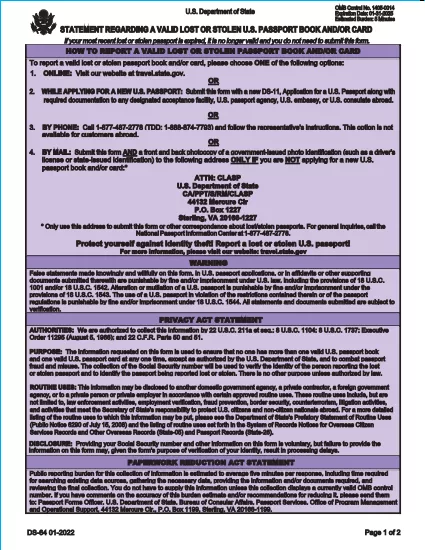
DS-64 Statement Regarding a Lost or Stolen U.S. Passport (Fillable PDF)

  1. Dil İngilizce
  2. Ülke Amerika Birleşik Devletleri
  3. Aktivite Pasaport
DS-64 Statement Regarding a Lost or Stolen U.S. Passport (Fillable PDF)

The DS-64 is the official U.S. Department of State form used to report a lost or stolen passport. Once submitted, the passport is immediately invalidated, preventing fraud and protecting your identity.

What Is the DS-64 Form?

DS-64, titled Statement Regarding a Lost or Stolen Passport, collects personal details, passport information, and a description of how the passport was lost or stolen. It is required whether you plan to request a replacement (DS‑11) or simply need the record of loss.

Why Use Formize’s Fillable PDF Filler?

  • Instant online filling: No need to download, print, and hand‑write.
  • Auto‑save: Your progress is saved in the browser, so you never lose data.
  • Error‑checking: Real‑time validation reduces mistakes.
  • Secure: All data stays on your device; Formize never stores personal information.

Step‑by‑Step Guide to Complete DS-64

Follow the simple steps below to fill, sign, and download the form.

Common Mistakes to Avoid

  • Leaving the passport number blank when you know it – the number is essential for cancellation.
  • Using colored ink or handwritten corrections – Formize requires black‑ink digital entry.
  • Forgetting to indicate whether you are submitting a replacement application (DS‑11).

Where to Submit Your Completed Form

After you download the completed DS‑64 PDF, you can:

  • Mail it to the address printed on the form if you are not applying for a new passport.
  • Include it with your DS‑11 application when requesting a replacement.
  • Submit it in person at a regional passport agency.

There is no fee to submit DS‑64 alone; fees apply only when you request a replacement passport.

SSS
  • Can I submit DS‑64 online?

    No. The DS‑64 must be printed, signed, and submitted by mail or in person. Formize only provides a fillable PDF to simplify completion.

  • Is there a fee to file DS‑64?

    There is no fee to report a lost or stolen passport with DS‑64. Fees apply only when you request a replacement passport.

  • What if I don’t know my passport number?

    Enter ‘Unknown’ in the passport number field and provide as much other identifying information as possible.

  • Do I need a notary for DS‑64?

    No. The form only requires your signature; notarization is not required.

  • How long does it take for the passport to be invalidated?

    Once the State Department receives the DS‑64, the passport is typically canceled within a few business days.

  • Can a parent fill out DS‑64 for a minor?

    Yes. A parent or legal guardian may complete the form on behalf of a minor, signing in the appropriate section.

  • What should I do if my passport was expired when it was lost?

    You do not need to submit DS‑64 for an expired passport, but you may still do so to have a record of the loss.

  • Will I receive confirmation that my passport is canceled?

    The State Department does not send a formal confirmation, but the passport will be marked as invalid in their system.

NASıL

DS-64 formunu ücretsiz, çevrimiçi olarak 5 kolay adımda nasıl doldurabilirsiniz:

  1. 1
    Open the Fillable Form
    Click the **Fill out this form** button on the page. The Formize PDF Filler app will load instantly in your browser.
  2. 2
    Enter Your Information
    Type your personal details, passport number, and loss description directly into the fields. All required fields are highlighted.
  3. 3
    Review & Sign
    Use the built‑in signature tool to sign the form digitally, then review each section for accuracy.
  4. 4
    Download or Print
    When you’re satisfied, click **Download PDF** to save a copy or **Print** to produce a hard copy for mailing.
  5. 5
    Submit the Form
    Mail or bring the completed DS‑64 to the address shown on the form, or attach it to your DS‑11 replacement application.
PDF Filler uygulamasını biçimlendirin
HAKKıNDA

Pasaport Formları

DS-64, ​​sahibinin kimliğini ve uyruğunu onaylayan ve uluslararası seyahat etmelerine olanak tanıyan bir seyahat belgesi olan pasaport başvurusunda kullanılan belgeler olan Pasaport formlarından biridir. Pasaport formları, pasaportu veren ülkeye göre değişebilir, ancak genellikle başvuranın adı, doğum tarihi ve doğum yeri gibi kişisel bilgilerini ve ayrıca başvuranın ebeveynleri ve önceki pasaportları veya seyahat belgeleri hakkında bilgiler içerir. .

Amerika Birleşik Devletleri'nde en yaygın iki pasaport formu DS-11 ve DS-82'dir. DS-11 formu, ilk kez başvuranlar, reşit olmayanlar veya DS-82 formunu kullanmaya uygun olmayan kişiler için kullanılır. DS-82 formu, şartları taşıyan başvuru sahiplerinin posta yoluyla pasaport yenilemelerinde kullanılmaktadır. Her iki form da başvuru sahibinin kişisel bilgilerini ve pasaport fotoğrafı ve vatandaşlık belgesi gibi destekleyici belgeleri sağlamasını gerektirir.

Diğer ülkelerin farklı pasaport formları ve gereklilikleri olabilir, ancak temel süreç genellikle bir pasaport başvurusunun tamamlanmasını, destekleyici belgelerin sağlanmasını ve bir devlet tesisinde veya büyükelçiliğinde bir pasaport görevlisi ile görüşmeye katılmayı içerir. Pasaport başvuru sürecinin birkaç hafta hatta aylar sürebileceğini unutmamak önemlidir, bu nedenle planlanan herhangi bir seyahatten çok önce başvurmanız önerilir.

ÖZELLIKLERI

PDF Doldurucu

PDF formlarını çevrimiçi doldurmanın en kolay yolu

  • DS-64'ü hızlıca doldurun
    DS-64 çevrimiçi olarak hızlı bir şekilde doldurmanın bir yolunu mu arıyorsunuz? Çevrimiçi ücretsiz PDF form doldurucumuzla, bu pdf belgesini nasıl düzenleyeceğinizi ve dolduracağınızı bir dakikadan kısa sürede öğreneceksiniz.
  • Kullanımı kolay çevrimiçi PDF düzenleyici
    PDF dosyalarını yeniden tarayıp geri göndermeden önce düzenleyebilmek için yazdırmaktan bıktınız mı? PDF belgelerini çevrimiçi olarak ücretsiz düzenleyin. Zamandan ve kağıttan tasarruf etmek için çevrimiçi pdf editörümüzü kullanın.
  • Harika araçlar, tüm platformlar
    Bir Mac'te DS-64'ü nasıl dolduracağınızı veya PDF doldurucuyu ücretsiz olarak nasıl kullanacağınızı mı merak ediyorsunuz? Çevrimiçi PDF araçlarımız tüm platformlarda çalışır.
  • Güvenli dosya depolama
    Tamamlanan "DS-64" dosyaları, Amazon Cloud barındırma tarafından yönetilen güvenli bir veritabanında depolanır. Dosyalarınızı istediğiniz zaman sistemimizden silebilirsiniz. Her durumda, bu dosyalar 24 saat sonra otomatik olarak silinir.
  • DS-64 ile sohbet et
    Ücretsiz bir PDF okuyucu asistanı olan Chatize'da "DS-64" ile sohbet edin. "DS-64" adlı kişiden sorular sorun ve yanıtlar alın. Yukarıdaki Belgeyle Sohbet Et düğmesini tıklamanız yeterlidir.

Doldurma oturumunu sil

Seçilen doldurma oturumunu silin mi? Bu durumda, formu doldurmadaki ilerlemeniz kaybolacaktır.

Düzenleme oturumunu sil

Seçilen düzenleme oturumu silinsin mi? Bu durumda formu oluşturma ve düzenleme konusundaki ilerlemeniz kaybolacaktır.