
Dil Seçin

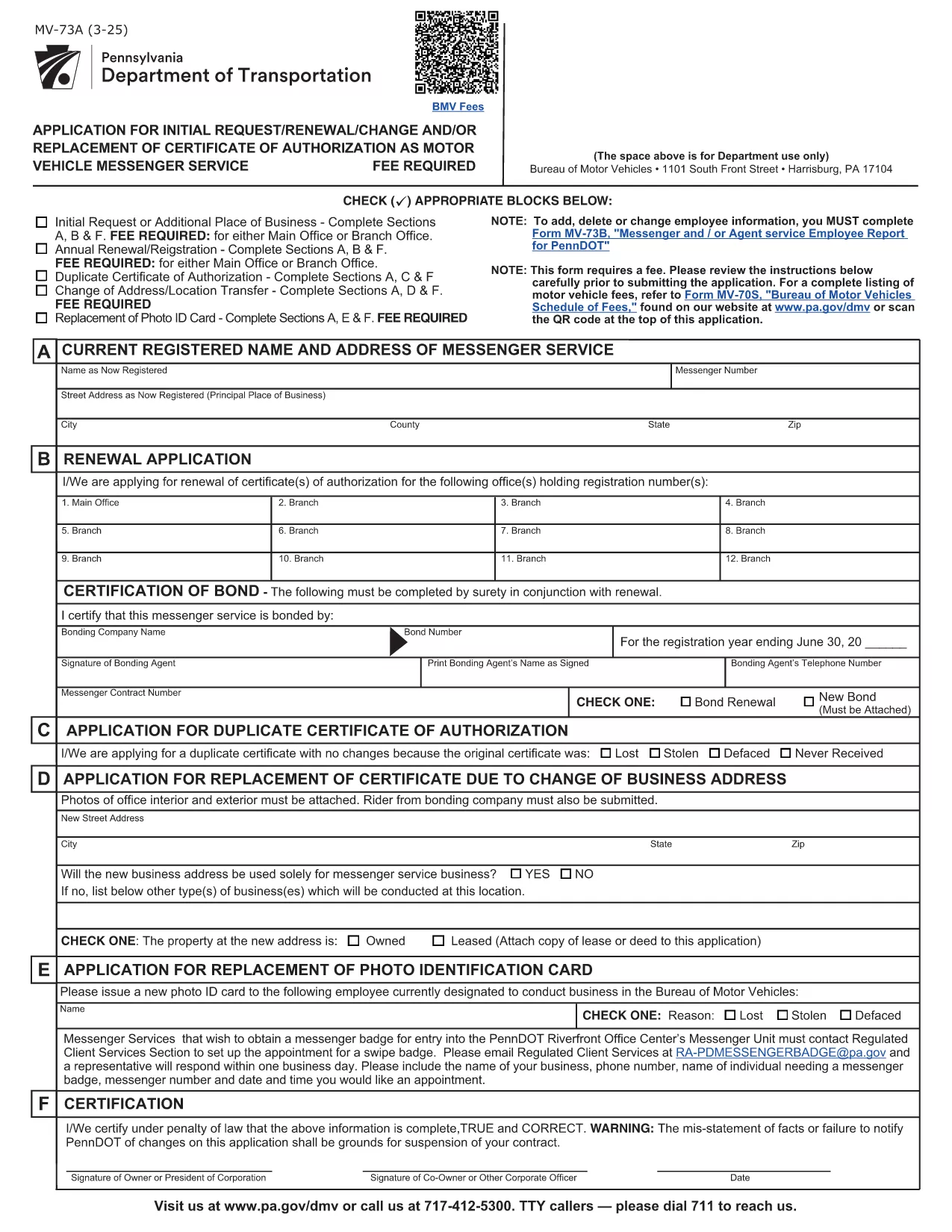
PennDOT Form MV‑73A – Fillable Employee Service Report

  1. Dil İngilizce
  2. Ülke Amerika Birleşik Devletleri
  3. Departman PennDOT
  4. Aktivite Araç Kaydı
PennDOT Form MV‑73A – Fillable Employee Service Report

What Is Form MV‑73A?

Form MV‑73A is the Pennsylvania Department of Transportation (PennDOT) “Messenger and/or Agent Service Employee Report.” It is required when a messenger, agent, or employee provides services on behalf of a motor vehicle dealer or a registered motor vehicle service provider. The form captures employee details, service type, and any fees associated with the service.

How to Complete the Fillable PDF

Instead of downloading the PDF and editing it manually, simply click the “Fill out this form” button on this page. The Formize PDF Filler app will load the official MV‑73A document, allowing you to type directly into each field, add dates, and select check‑boxes.

Once all required fields are completed, you can review, save, or print the form for submission.

Common Mistakes to Avoid

  • Leaving the “Signature” or “Date” fields blank – both are mandatory.
  • Entering an incorrect employee ID number; double‑check the ID on the employee badge.
  • Using a non‑fillable version of the PDF – the Formize version ensures every field is editable.
  • Forgetting to attach supporting documents (e.g., proof of agency registration).

Where to Submit the Form

After completing the form, submit it to the PennDOT office that issued the original request. Most dealers fax or mail the completed MV‑73A to their local PennDOT Motor Vehicle Services office. Check the instructions on the form for the correct address or fax number.

Download the Official PDF

If you prefer to keep a copy of the original, you can download the official, government‑issued PDF directly from the link below. This file is the source used by the Formize filler.

Download MV‑73A PDF

SSS
  • Do I need Adobe Acrobat to fill out MV‑73A?

    No. The Formize PDF Filler works in any modern browser, so you don’t need Adobe Acrobat or any extra software.

  • Is there a fee to submit Form MV‑73A?

    The form itself is free, but PennDOT may charge a processing fee depending on the service reported. Check the form’s instructions for details.

  • Can I save my progress and finish later?

    Yes. Use the “Save” button in the Formize filler to download a partially‑filled PDF, then reopen it later to continue.

  • What should I do if I make a mistake after submitting?

    Contact the PennDOT office where you submitted the form. They will advise whether you need to submit a corrected MV‑73A or an amendment.

  • Is the fillable PDF compatible with mobile devices?

    The Formize filler is responsive and works on smartphones and tablets, allowing you to complete the form on the go.

  • How long does it take PennDOT to process the form?

    Processing times vary, but most offices complete the review within 7‑10 business days after receipt.

  • Do I need a notary for the signature on MV‑73A?

    A notary is not required for MV‑73A unless specifically stated in the accompanying instructions.

NASıL

MV-73A formunu ücretsiz, çevrimiçi olarak 4 kolay adımda nasıl doldurabilirsiniz:

  1. 1
    Click the Fill‑out Button
    Press the “Fill out this form” button on the page to launch the Formize PDF Filler.
  2. 2
    Wait for the Filler to Load
    The fillable version of MV‑73A will appear in your browser. All fields become editable automatically.
  3. 3
    Enter Your Information
    Type directly into each field, select dates from the calendar widget, and check the appropriate boxes.
  4. 4
    Review, Save, and Submit
    After completing the form, review it for errors, then download or print the completed PDF to submit to PennDOT.
PDF Filler uygulamasını biçimlendirin
HAKKıNDA

Araç Tescil Formları

MV-73A, bir motorlu taşıtın ilgili devlet kurumuna, genellikle Motorlu Taşıtlar Dairesi'ne (DMV) veya eşdeğer bir kuruma tescil ettirilmesi için kullanılan belgeler olan Araç kayıt formlarından biridir. Bu formlar, bir kişi yeni veya kullanılmış bir araç satın aldığında, aracın mülkiyetini devrettiğinde veya bir araçla yeni bir yargı bölgesine taşındığında gereklidir.

Belirli araç kayıt formları yargı yetkisine göre değişiklik gösterebilir ancak genellikle aşağıdaki bilgileri gerektirir:

Araç Bilgileri: Bu, marka, model, yıl, araç şasi numarası (VIN) ve kilometre sayacı okuması gibi araçla ilgili ayrıntıları içerir.

Sahip Bilgileri: Form, aracın sahibi hakkında, adı, adresi, iletişim bilgileri ve ehliyet numarası dahil olmak üzere bilgiler gerektirecektir.

Mülkiyet Kanıtı: Koşullara bağlı olarak tapu belgesi, satış faturası veya üreticinin menşe belgesi (yeni araçlar için) gibi mülkiyet kanıtı gerekli olabilir.

Sigorta Bilgileri: Genellikle geçerli araç sigortası teminatının kanıtı gereklidir. Bu, sigorta poliçe numarasının, teminat tarihlerinin ve sigorta şirketi ayrıntılarının sağlanmasını içerebilir.

Ücretlerin Ödenmesi: Araç tescili, tescil ücretleri, vergiler ve muhtemelen yargı bölgesine özgü diğer masraflar gibi çeşitli ücretlerin ödenmesini içerir.

Bu temel gerekliliklere ek olarak, bazı yargı bölgelerinde ek formlar veya belge gereklilikleri olabilir. Örneğin, belirli bölgelerde emisyon testi sonuçları, güvenlik denetimleri veya ikamet belgesi gerekli olabilir.

Araç tescil formları tamamlanıp gönderildikten sonra, resmi makam bir tescil belgesi, araç plakaları ve tescil çıkartmaları düzenleyecektir. Bu belgeler, aracın yasal olarak kayıtlı olduğunu ve kamuya açık yollarda çalıştırılmaya yetkili olduğunu gösterir.

Araç tescil gerekliliklerinin yargı yetkisine göre önemli ölçüde değişebileceğini unutmamak önemlidir. Bu nedenle, bulunduğunuz yere uygun özel formlar ve prosedürler için yerel DMV'ye veya eşdeğer kuruma danışmanız önerilir.

ÖZELLIKLERI

PDF Doldurucu

PDF formlarını çevrimiçi doldurmanın en kolay yolu

  • MV-73A'ü hızlıca doldurun
    MV-73A çevrimiçi olarak hızlı bir şekilde doldurmanın bir yolunu mu arıyorsunuz? Çevrimiçi ücretsiz PDF form doldurucumuzla, bu pdf belgesini nasıl düzenleyeceğinizi ve dolduracağınızı bir dakikadan kısa sürede öğreneceksiniz.
  • Kullanımı kolay çevrimiçi PDF düzenleyici
    PDF dosyalarını yeniden tarayıp geri göndermeden önce düzenleyebilmek için yazdırmaktan bıktınız mı? PDF belgelerini çevrimiçi olarak ücretsiz düzenleyin. Zamandan ve kağıttan tasarruf etmek için çevrimiçi pdf editörümüzü kullanın.
  • Harika araçlar, tüm platformlar
    Bir Mac'te MV-73A'ü nasıl dolduracağınızı veya PDF doldurucuyu ücretsiz olarak nasıl kullanacağınızı mı merak ediyorsunuz? Çevrimiçi PDF araçlarımız tüm platformlarda çalışır.
  • Güvenli dosya depolama
    Tamamlanan "MV-73A" dosyaları, Amazon Cloud barındırma tarafından yönetilen güvenli bir veritabanında depolanır. Dosyalarınızı istediğiniz zaman sistemimizden silebilirsiniz. Her durumda, bu dosyalar 24 saat sonra otomatik olarak silinir.
  • MV-73A ile sohbet et
    Ücretsiz bir PDF okuyucu asistanı olan Chatize'da "MV-73A" ile sohbet edin. "MV-73A" adlı kişiden sorular sorun ve yanıtlar alın. Yukarıdaki Belgeyle Sohbet Et düğmesini tıklamanız yeterlidir.

Doldurma oturumunu sil

Seçilen doldurma oturumunu silin mi? Bu durumda, formu doldurmadaki ilerlemeniz kaybolacaktır.

Düzenleme oturumunu sil

Seçilen düzenleme oturumu silinsin mi? Bu durumda formu oluşturma ve düzenleme konusundaki ilerlemeniz kaybolacaktır.