Dil Seçin

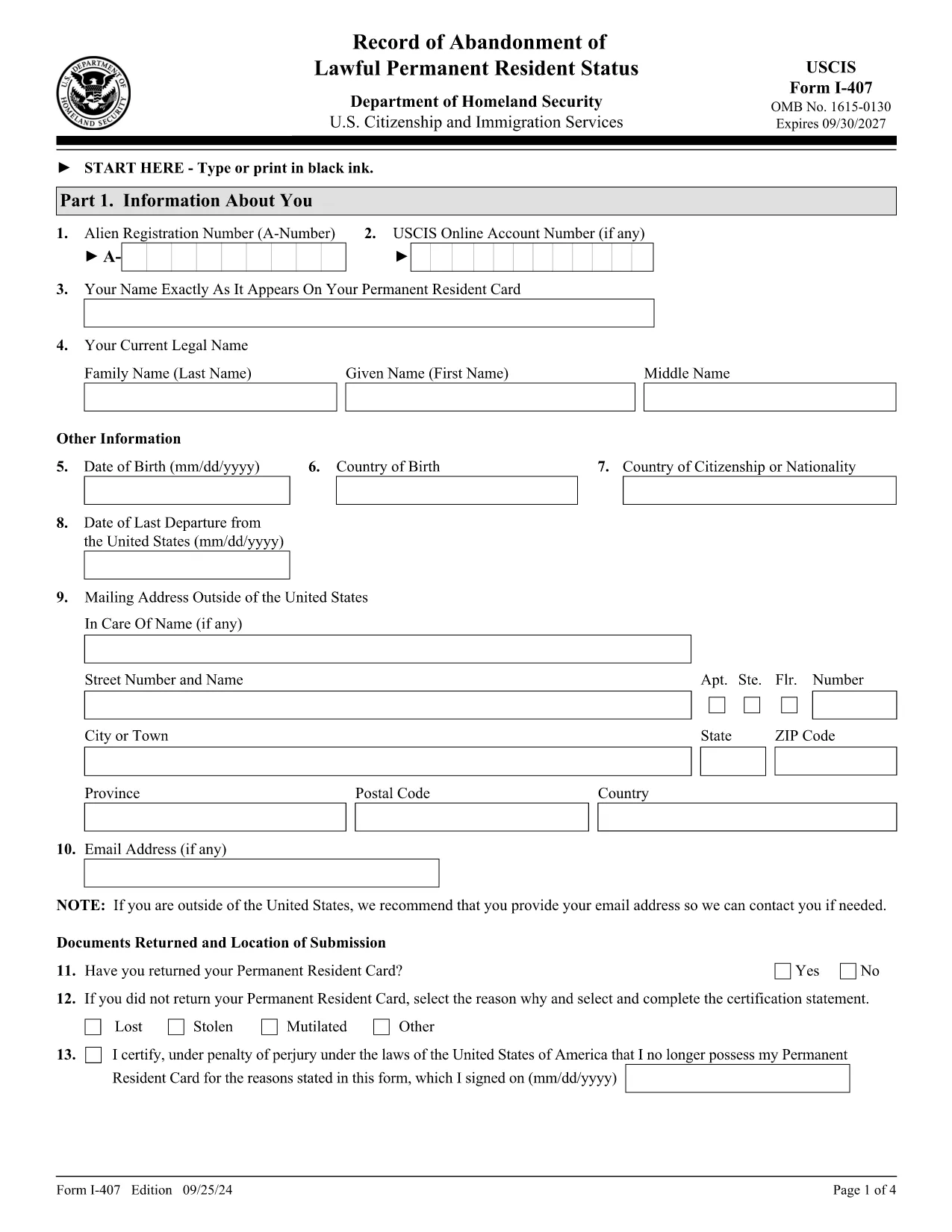
I-407 Record of Abandonment of Lawful Permanent Resident Status – Fillable PDF

  1. Ülke Amerika Birleşik Devletleri
  2. Dil İngilizce
  3. Departman Amerika Birleşik Devletleri Vatandaşlık ve Göçmenlik Hizmetleri
I-407 Record of Abandonment of Lawful Permanent Resident Status – Fillable PDF

The Form I-407 is the official USCIS document used to voluntarily abandon lawful permanent resident (LPR) status in the United States. Whether you are moving abroad, changing visa categories, or need proof of abandonment for tax reasons, completing this form correctly is essential.

What Is Form I-407 and When Is It Required?

I-407, Record of Abandonment of Lawful Permanent Resident Status, notifies USCIS that you are giving up your green‑card rights. You should file it when:

  • You are leaving the U.S. permanently and will not maintain LPR status.
  • You need official proof of abandonment for an A or G visa, U.S. consular services, or tax filings.
  • You are a minor (under 14) or an incapacitated adult; a parent, guardian, or legal representative must sign.

How to Complete the I-407 Online with Formize

Instead of printing, signing, and scanning, use Formize’s built‑in PDF filler. Follow these simple steps:

  1. Click the "Fill out this form" button on this page.
  2. Wait a few seconds while the Formize PDF Filler app loads the official I-407 PDF.
  3. Enter your personal information, LPR details, and reason for abandonment directly in the browser.
  4. Review each field for accuracy; the filler highlights required fields.
  5. Electronically sign the form (or print to add a handwritten signature if required).
  6. Download the completed PDF or send it directly to USCIS via email if your office allows electronic submission.

Common Mistakes to Avoid When Submitting I-407

  • Missing Signature: An unsigned form is automatically rejected.
  • Incorrect Edition Date: Use the most recent edition (09/25/24) – visible at the bottom of each page.
  • Wrong Mailing Address: Send to the USCIS Lee’s Summit, MO facility unless you have specific instructions from a field office.
  • Including Unnecessary Documents: Only submit the I-407 form; do not attach driver’s licenses, SS cards, or other IDs.
  • Failing to Provide Guardian Proof: For minors or incapacitated adults, attach proof of relationship or legal guardianship.

Where to Mail or Submit Your Completed Form

Standard filing is by mail to:

USCIS
Attn: I-407
7 Product Way
Lee’s Summit, MO 64002
USA

In rare cases, you may submit the form in person to a USCIS international field office, a U.S. embassy/consulate, or a U.S. Customs and Border Protection officer at a port of entry.

After filing, USCIS will notify the Internal Revenue Service of your abandonment date, which may affect your tax obligations.

SSS
  • Do I have to pay a fee to file Form I-407?

    No. The I-407 filing is free of charge. However, you may incur postage costs when mailing the form.

  • Can I submit I-407 electronically?

    USCIS currently requires a physical copy for most cases. You can fill it out online, then print and mail it.

  • What happens to my green card after I file I-407?

    USCIS will cancel the card and update its records to show you are no longer a lawful permanent resident.

  • Do I need to inform the IRS after abandoning LPR status?

    Yes. USCIS notifies the IRS of your abandonment date, which may trigger expatriation tax filing requirements.

  • Can a minor file I-407 without a parent?

    No. A parent, custodial parent, or legal guardian must sign and provide proof of relationship.

  • How long does USCIS take to process I-407?

    Processing times vary, but most cases are confirmed within 30 days of receipt.

  • Is the I-407 form the same as the I-407A?

    No. I-407 is the abandonment record. I-407A is a supplemental form used in very limited circumstances.

  • What if I make a mistake on the form?

    Correct the error, sign again, and resend the corrected form. USCIS may reject forms with visible errors.

  • Can I use the I-407 form to apply for a new visa?

    The I-407 itself does not grant a visa, but it provides proof of abandonment which may be required for certain visa applications.

  • Where can I find the official I-407 PDF?

    The official, up‑to‑date PDF is available from USCIS and linked below.

NASıL

I-407 form formunu ücretsiz, çevrimiçi olarak 5 kolay adımda nasıl doldurabilirsiniz:

  1. 1
    Open the Fillable Form
    Click the "Fill out this form" button on the page. The Formize PDF Filler will open the official I-407 PDF.
  2. 2
    Enter Your Information
    Type your name, A‑Number, address, and reason for abandonment into the highlighted fields.
  3. 3
    Add Required Signatures
    If you are the applicant, sign electronically. For minors or incapacitated adults, have the parent or guardian sign.
  4. 4
    Review and Validate
    Use the built‑in validation to ensure all required fields are completed and the edition date is correct.
  5. 5
    Download or Submit
    Save the completed PDF to your computer or print it for mailing to the USCIS Lee’s Summit address.
PDF Filler uygulamasını biçimlendirin
HAKKıNDA

I-407 form şablonu

Bir PDF belgesini görüntülemeye ve doldurmaya yönelik geleneksel özellikler grubuyla, bir web uygulamasının ve uyumlu mizanpajın avantajlarıyla birleştiğinde, I-407 form kelimesini dakikalar içinde tamamlayabilirsiniz.

ÖZELLIKLERI

PDF Doldurucu

PDF formlarını çevrimiçi doldurmanın en kolay yolu

  • I-407 form'ü hızlıca doldurun
    I-407 form çevrimiçi olarak hızlı bir şekilde doldurmanın bir yolunu mu arıyorsunuz? Çevrimiçi ücretsiz PDF form doldurucumuzla, bu pdf belgesini nasıl düzenleyeceğinizi ve dolduracağınızı bir dakikadan kısa sürede öğreneceksiniz.
  • Kullanımı kolay çevrimiçi PDF düzenleyici
    PDF dosyalarını yeniden tarayıp geri göndermeden önce düzenleyebilmek için yazdırmaktan bıktınız mı? PDF belgelerini çevrimiçi olarak ücretsiz düzenleyin. Zamandan ve kağıttan tasarruf etmek için çevrimiçi pdf editörümüzü kullanın.
  • Harika araçlar, tüm platformlar
    Bir Mac'te I-407 form'ü nasıl dolduracağınızı veya PDF doldurucuyu ücretsiz olarak nasıl kullanacağınızı mı merak ediyorsunuz? Çevrimiçi PDF araçlarımız tüm platformlarda çalışır.
  • Güvenli dosya depolama
    Tamamlanan "I-407 form" dosyaları, Amazon Cloud barındırma tarafından yönetilen güvenli bir veritabanında depolanır. Dosyalarınızı istediğiniz zaman sistemimizden silebilirsiniz. Her durumda, bu dosyalar 24 saat sonra otomatik olarak silinir.
  • I-407 form ile sohbet et
    Ücretsiz bir PDF okuyucu asistanı olan Chatize'da "I-407 form" ile sohbet edin. "I-407 form" adlı kişiden sorular sorun ve yanıtlar alın. Yukarıdaki Belgeyle Sohbet Et düğmesini tıklamanız yeterlidir.

Doldurma oturumunu sil

Seçilen doldurma oturumunu silin mi? Bu durumda, formu doldurmadaki ilerlemeniz kaybolacaktır.

Düzenleme oturumunu sil

Seçilen düzenleme oturumu silinsin mi? Bu durumda formu oluşturma ve düzenleme konusundaki ilerlemeniz kaybolacaktır.