Dil Seçin

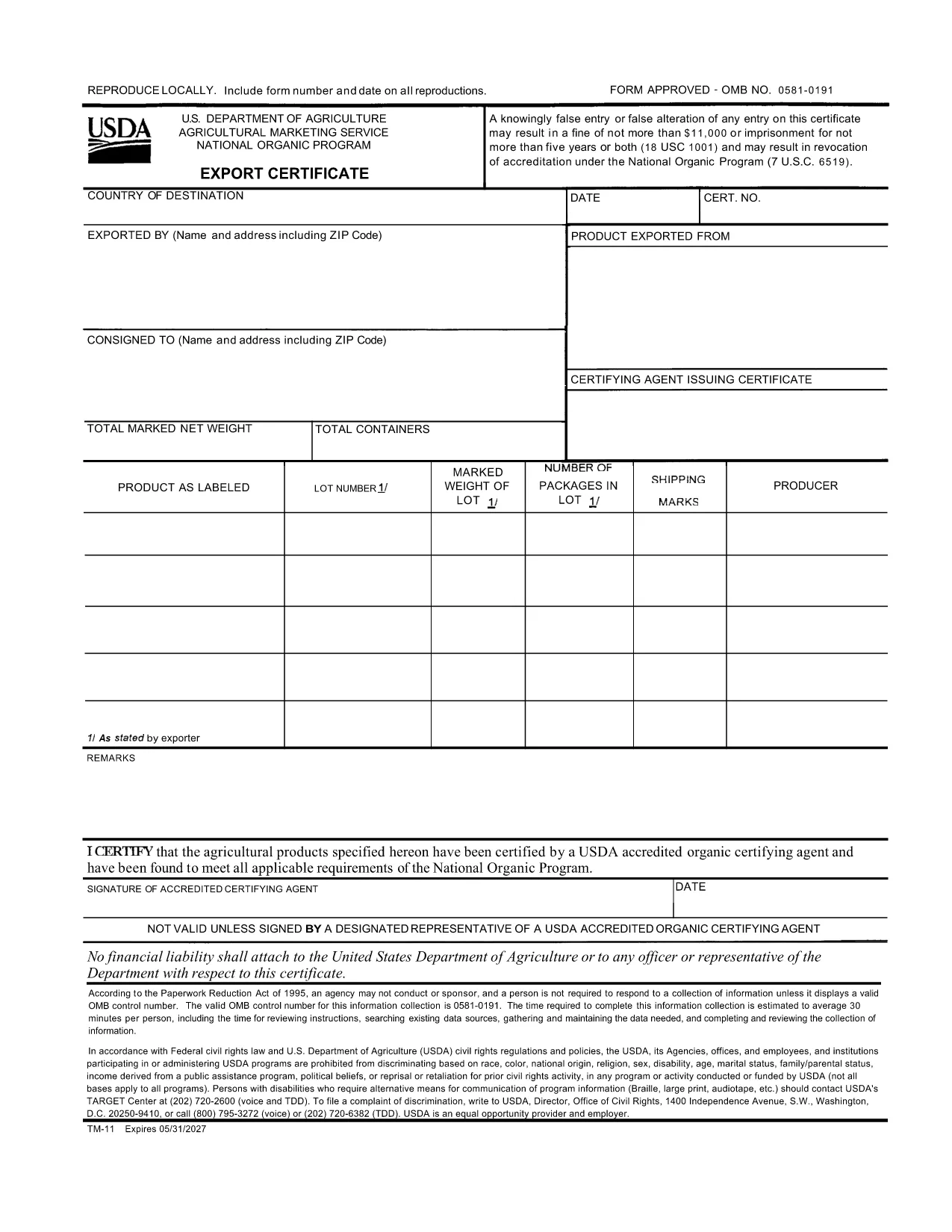
USDA TM-11 Export Certificate – Fillable PDF Form

  1. Dil İngilizce
  2. Ülke Amerika Birleşik Devletleri
  3. Aktivite Agriculture
  4. Departman USDA
USDA TM-11 Export Certificate – Fillable PDF Form

The TM-11 Export Certificate is the USDA‑approved document required for exporting organic products to certain foreign markets. Whether you are shipping to Taiwan, Japan, or other USDA‑recognized trade partners, a correctly completed TM-11 ensures your shipment meets all organic compliance standards.

What Is the TM-11 Export Certificate?

Form TM‑11 is issued by the U.S. Department of Agriculture (USDA) Agricultural Marketing Service (AMS). It verifies that the goods being exported comply with the organic regulations of both the United States and the destination country. The form must be signed by an accredited certifying agent (ACA) and accompany the shipment.

How to Complete the TM-11 Form Online

With Formize’s built‑in PDF filler, you can complete the TM‑11 without downloading any software. Just click the “Fill out this form” button, wait for the Formize PDF Filler to load, and start entering your information directly in the browser.

Common Mistakes to Avoid

  • Leaving required fields blank – every section marked with an asterisk must be completed.
  • Incorrect certification numbers – double‑check the ACA’s certification number before submitting.
  • Signature errors – the ACA must sign the form electronically or print, sign, and scan the final PDF.
  • Mismatched product descriptions – ensure the product name matches the USDA organic certification.

Download the Fillable PDF Instantly

Click the button below to open the official USDA TM‑11 PDF in the Formize filler. When you finish, download the completed form and attach it to your export documentation package.

SSS
  • What is the purpose of Form TM‑11?

    Form TM‑11 serves as the official USDA Export Certificate for organic products, confirming compliance with U.S. and foreign organic standards.

  • Can I sign the TM‑11 electronically?

    Yes. The Formize filler allows electronic signatures for the exporter. The certifying agent must still provide a handwritten signature or an approved electronic signature.

  • Do I need a separate PDF for each shipment?

    A new TM‑11 must be completed for each export batch. Re‑using an old certificate can lead to compliance violations.

  • Is the TM‑11 form free to download?

    Yes. The USDA provides the TM‑11 PDF at no cost. Formize hosts the fillable version for free use.

  • What countries accept the USDA TM‑11?

    Countries with USDA organic trade agreements—such as Taiwan, Japan, and others listed in the USDA Export Arrangement—accept the TM‑11.

  • What if I make a mistake after submitting?

    Correct the error on a new TM‑11 form and attach it to the shipment. Keep both the original and corrected copies for records.

NASıL

TM-11 formunu ücretsiz, çevrimiçi olarak 3 kolay adımda nasıl doldurabilirsiniz:

  1. 1
    Open the TM-11 Form
    Click the “Fill out this form” button on this page. The Formize PDF Filler will load directly in your browser.
  2. 2
    Enter Your Information
    Fill in each required field—exporter details, product description, destination country, and certification numbers.
  3. 3
    Save and Download
    When all fields are completed, click “Save” to download the filled PDF. Attach the file to your export paperwork.
PDF Filler uygulamasını biçimlendirin
HAKKıNDA

TM-11 şablonu

Bir PDF belgesini görüntülemeye ve doldurmaya yönelik geleneksel özellikler grubuyla, bir web uygulamasının ve uyumlu mizanpajın avantajlarıyla birleştiğinde, TM-11 kelimesini dakikalar içinde tamamlayabilirsiniz.

ÖZELLIKLERI

PDF Doldurucu

PDF formlarını çevrimiçi doldurmanın en kolay yolu

  • TM-11'ü hızlıca doldurun
    TM-11 çevrimiçi olarak hızlı bir şekilde doldurmanın bir yolunu mu arıyorsunuz? Çevrimiçi ücretsiz PDF form doldurucumuzla, bu pdf belgesini nasıl düzenleyeceğinizi ve dolduracağınızı bir dakikadan kısa sürede öğreneceksiniz.
  • Kullanımı kolay çevrimiçi PDF düzenleyici
    PDF dosyalarını yeniden tarayıp geri göndermeden önce düzenleyebilmek için yazdırmaktan bıktınız mı? PDF belgelerini çevrimiçi olarak ücretsiz düzenleyin. Zamandan ve kağıttan tasarruf etmek için çevrimiçi pdf editörümüzü kullanın.
  • Harika araçlar, tüm platformlar
    Bir Mac'te TM-11'ü nasıl dolduracağınızı veya PDF doldurucuyu ücretsiz olarak nasıl kullanacağınızı mı merak ediyorsunuz? Çevrimiçi PDF araçlarımız tüm platformlarda çalışır.
  • Güvenli dosya depolama
    Tamamlanan "TM-11" dosyaları, Amazon Cloud barındırma tarafından yönetilen güvenli bir veritabanında depolanır. Dosyalarınızı istediğiniz zaman sistemimizden silebilirsiniz. Her durumda, bu dosyalar 24 saat sonra otomatik olarak silinir.
  • TM-11 ile sohbet et
    Ücretsiz bir PDF okuyucu asistanı olan Chatize'da "TM-11" ile sohbet edin. "TM-11" adlı kişiden sorular sorun ve yanıtlar alın. Yukarıdaki Belgeyle Sohbet Et düğmesini tıklamanız yeterlidir.

Doldurma oturumunu sil

Seçilen doldurma oturumunu silin mi? Bu durumda, formu doldurmadaki ilerlemeniz kaybolacaktır.

Düzenleme oturumunu sil

Seçilen düzenleme oturumu silinsin mi? Bu durumda formu oluşturma ve düzenleme konusundaki ilerlemeniz kaybolacaktır.