
Dil Seçin

MV216 – Application for Title Correction (Delaware)

  1. Dil İngilizce
  2. Ülke Amerika Birleşik Devletleri
  3. Aktivite Araç Kaydı
  4. Belirtmek, bildirmek Delaware
MV216 – Application for Title Correction (Delaware)

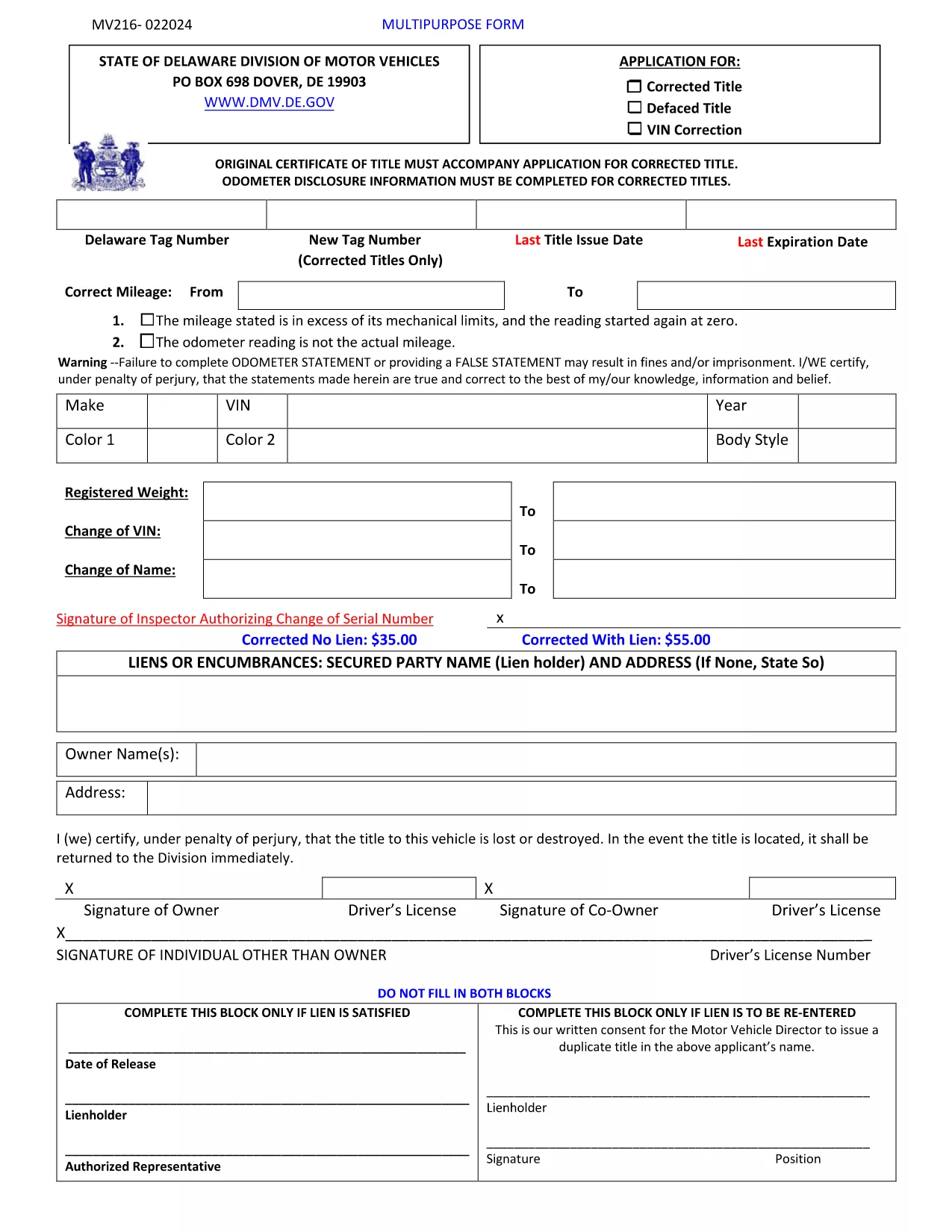
The MV216 is the Delaware Division of Motor Vehicles (DMV) application used to correct errors on a vehicle title or to request a multipurpose title change. Whether you need to fix a misspelled name, update a VIN, or change ownership details, this form is required before the DMV can issue a corrected title.

What Is the MV216 Form?

MV216 is a government‑issued, fillable PDF that captures the vehicle’s current title information, the correction needed, and the owner's signature. The form is used for:

  • Correcting misspelled names or addresses
  • Fixing VIN transcription errors
  • Updating lienholder details
  • Other multipurpose title adjustments

How to Complete the MV216 Online

Instead of downloading, printing, and scanning, you can fill the form directly in your browser using Formize’s PDF Filler app. Follow these simple steps:

  1. Click the "Fill out this form" button on this page.
  2. The Formize PDF Filler loads the MV216 PDF instantly.
  3. Enter your information in the highlighted fields.
  4. Review the data, add your electronic signature, and click Submit.
  5. Download the completed PDF for your records or print it for in‑person submission.

Common Mistakes & Tips

Avoid these pitfalls to ensure a smooth processing time:

  • Incorrect VIN: Double‑check the 17‑character VIN against the vehicle’s registration.
  • Missing signatures: Both the owner and, if applicable, the lienholder must sign.
  • Unsupported file types: Use the built‑in Formize filler; do not attach separate PDFs.
  • Out‑of‑date information: Make sure your address and contact details match DMV records.

Where to Submit Your Completed Form

After filling out MV216, you have two options:

  • In‑person: Bring the printed form to any Delaware DMV office.
  • Mail: Send the completed PDF (or printed copy) to:
    Division of Motor Vehicles
    PO Box 698
    Dover, DE 19903

Include any supporting documentation (e.g., proof of identity) to avoid delays.

Download the Official PDF Instructions

If you prefer the original instructions, you can download the official PDF directly from the Delaware DMV website.

SSS
  • Do I need to print the MV216 after filling it out online?

    Printing is required only if you plan to submit the form in person. For mail submissions, a printed copy is also recommended.

  • Can I submit the MV216 electronically?

    Delaware DMV currently accepts mailed or in‑person submissions. However, using Formize lets you complete the form quickly and ensures all fields are correctly filled before printing.

  • What supporting documents do I need with MV216?

    Include a copy of the current title, proof of identity (driver’s license or state ID), and any lienholder documentation if applicable.

  • How long does it take for the corrected title to arrive?

    Processing typically takes 7‑10 business days after the DMV receives a complete MV216 application.

  • Is there a fee for filing MV216?

    Yes, the Delaware DMV charges a title correction fee. Check the latest fee schedule on the DMV website or the form instructions.

  • What if I make a mistake after submitting?

    Contact the Delaware DMV immediately. You may need to submit a new MV216 with the correct information and pay an additional fee.

  • Can I use a mobile device to fill out MV216?

    Yes, the Formize PDF Filler works on most modern smartphones and tablets, allowing you to complete the form on the go.

NASıL

MV216 form formunu ücretsiz, çevrimiçi olarak 5 kolay adımda nasıl doldurabilirsiniz:

  1. 1
    Open the Fillable Form
    Click the “Fill out this form” button on the page. The Formize PDF Filler app will load the MV216 PDF instantly in your browser.
  2. 2
    Enter Your Information
    Fill in all highlighted fields – owner details, vehicle information, and the specific correction you need.
  3. 3
    Add Your Signature
    Use the built‑in signature tool to sign electronically. If a lienholder signature is required, have them sign the same way.
  4. 4
    Review and Submit
    Double‑check every entry, then click the Submit button. The completed PDF will be saved to your device.
  5. 5
    Print or Email
    Print the completed form for in‑person DMV submission, or email the PDF to the Delaware DMV if they accept electronic filings.
PDF Filler uygulamasını biçimlendirin
HAKKıNDA

Araç Tescil Formları

MV216 form motorlu taşıtlarla ilgili çeşitli işlem ve süreçlerde kullanılan belgeler olan Motorlu Araçlar Daire Başkanlığı formları olarak da bilinen DMV formlarından biridir. DMV, sürücü ehliyeti, araç tescili ve motorlu araç yasalarının uygulanmasından sorumlu bir devlet kurumudur. Mevcut belirli DMV formları yargı yetkisine göre değişiklik gösterebilir, ancak burada bazı yaygın örnekler verilmiştir:

Sürücü Belgesi Formları: Bu formlar sürücü belgesi başvurusunda bulunmak veya değişiklik ya da yenileme talebinde bulunmak için kullanılır. Genellikle kişisel bilgiler ve kimlik kanıtı gerektirirler ve tıbbi bilgiler veya sürüş geçmişine ilişkin bölümler içerebilirler.

Araç Kayıt Formları: Bu formlar bir motorlu taşıtın DMV'ye tescili için kullanılır. Araç bilgileri, sahiplik ayrıntıları ve sigorta kanıtı gerektirirler.

Tapu Devir Formları: Bir araç alırken veya satarken bu formlar mülkiyeti bir taraftan diğerine aktarmak için kullanılır. Alıcı, satıcı, araç detayları hakkında bilgi gerektirirler ve bir satış faturası içerebilirler.

Araç Sorumluluktan İbra Formları: Bir aracın satılması veya mülkiyetinin devredilmesi sırasında, bu formlar DMV'ye satıcının artık araçtan sorumlu olmadığını bildirir. Satıştan sonra aracın karıştığı kaza veya olaylardan dolayı satıcının sorumluluktan korunmasına yardımcı olur.

Plaka ve Kayıt Yenileme Formları: Bu formlar araç tescilini yenilemek veya yeni plaka istemek için kullanılır. Genellikle kayıtlı sahibi, mevcut kayıt ayrıntıları ve geçerli ücretlerin ödenmesi hakkında bilgi gerektirirler.

Sürüş Kayıtları Talep Formları: Bu formlar, bireylerin sürüş ihlalleri, ehliyet durumu ve diğer ilgili ayrıntılar hakkında bilgi sağlayan sürüş kayıtlarını DMV'den talep etmelerine olanak tanır.

Özel veya Kişiselleştirilmiş Plaka Formları: Bu formlar, kişilerin plakalarını belirli karakter veya tasarımlarla kişiselleştirmelerine olanak tanıyan kişiselleştirilmiş veya özel plaka başvurusunda bulunmak için kullanılır.

Bunlar DMV aracılığıyla sağlanabilecek birçok formdan sadece birkaç örnektir. Özel formlar ve gereklilikler yargı yetkisine göre değişiklik gösterebilir; bu nedenle, özel ihtiyaçlarınıza uygun doğru formları edinmek için yerel DMV web sitesine başvurmanız veya bir DMV ofisini ziyaret etmeniz önemlidir.

ÖZELLIKLERI

PDF Doldurucu

PDF formlarını çevrimiçi doldurmanın en kolay yolu

  • MV216 form'ü hızlıca doldurun
    MV216 form çevrimiçi olarak hızlı bir şekilde doldurmanın bir yolunu mu arıyorsunuz? Çevrimiçi ücretsiz PDF form doldurucumuzla, bu pdf belgesini nasıl düzenleyeceğinizi ve dolduracağınızı bir dakikadan kısa sürede öğreneceksiniz.
  • Kullanımı kolay çevrimiçi PDF düzenleyici
    PDF dosyalarını yeniden tarayıp geri göndermeden önce düzenleyebilmek için yazdırmaktan bıktınız mı? PDF belgelerini çevrimiçi olarak ücretsiz düzenleyin. Zamandan ve kağıttan tasarruf etmek için çevrimiçi pdf editörümüzü kullanın.
  • Harika araçlar, tüm platformlar
    Bir Mac'te MV216 form'ü nasıl dolduracağınızı veya PDF doldurucuyu ücretsiz olarak nasıl kullanacağınızı mı merak ediyorsunuz? Çevrimiçi PDF araçlarımız tüm platformlarda çalışır.
  • Güvenli dosya depolama
    Tamamlanan "MV216 form" dosyaları, Amazon Cloud barındırma tarafından yönetilen güvenli bir veritabanında depolanır. Dosyalarınızı istediğiniz zaman sistemimizden silebilirsiniz. Her durumda, bu dosyalar 24 saat sonra otomatik olarak silinir.
  • MV216 form ile sohbet et
    Ücretsiz bir PDF okuyucu asistanı olan Chatize'da "MV216 form" ile sohbet edin. "MV216 form" adlı kişiden sorular sorun ve yanıtlar alın. Yukarıdaki Belgeyle Sohbet Et düğmesini tıklamanız yeterlidir.

Doldurma oturumunu sil

Seçilen doldurma oturumunu silin mi? Bu durumda, formu doldurmadaki ilerlemeniz kaybolacaktır.

Düzenleme oturumunu sil

Seçilen düzenleme oturumu silinsin mi? Bu durumda formu oluşturma ve düzenleme konusundaki ilerlemeniz kaybolacaktır.