
Dil Seçin

BLC-54 Blue Light Permit Application – Fillable PDF

  1. Dil İngilizce
  2. Ülke Amerika Birleşik Devletleri
  3. Aktivite Araç Kaydı
  4. Belirtmek, bildirmek New Jersey
BLC-54 Blue Light Permit Application – Fillable PDF

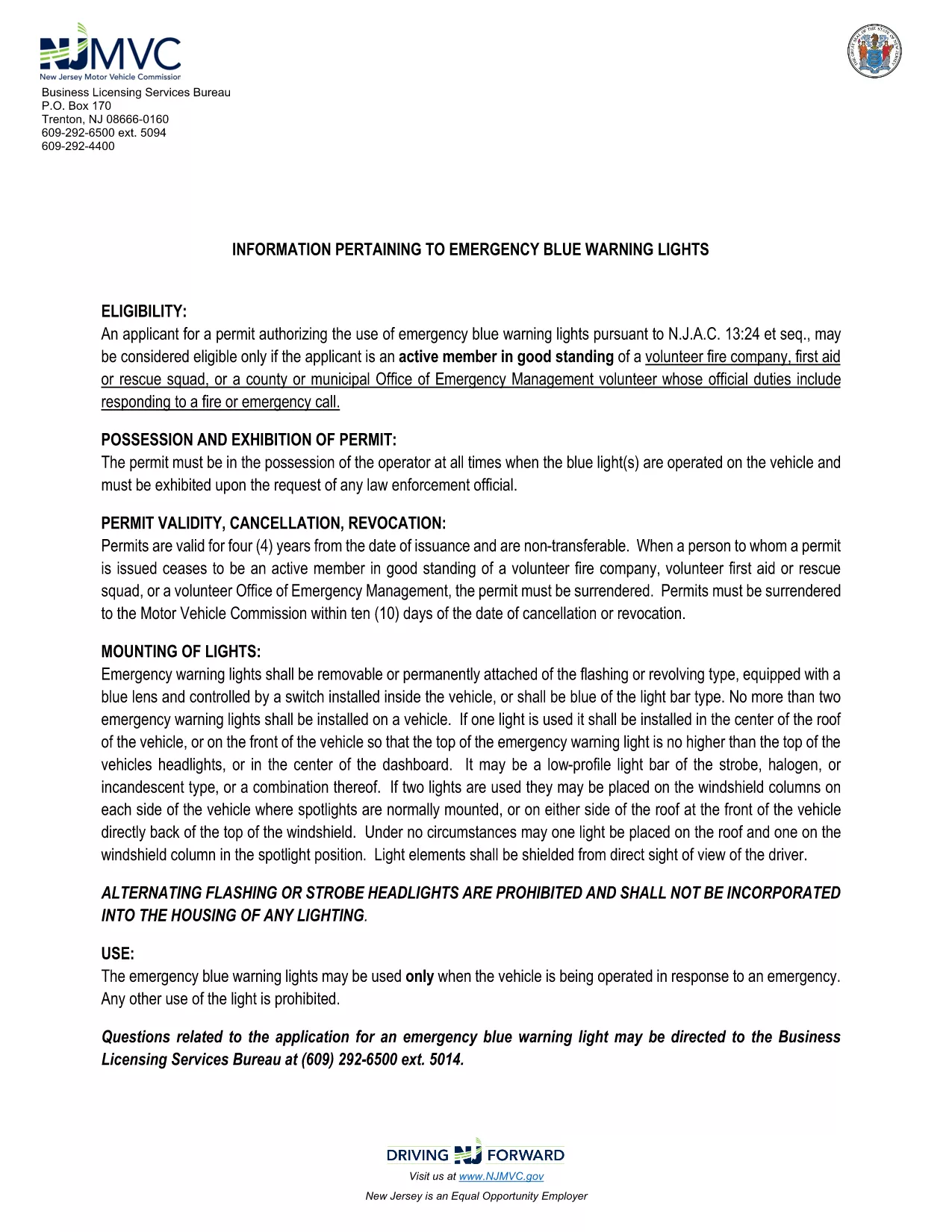
The BLC-54 is the official New Jersey Motor Vehicle Commission (MVC) application for a blue light permit. This permit allows volunteer fire companies, first‑aid squads, rescue units, and municipal emergency management officials to use emergency blue warning lights on their response vehicles.

What Is the BLC-54 Form?

The BLC-54 is a fillable PDF that captures essential information about the applicant, the volunteer organization, and the vehicle that will display the blue lights. It includes sections for:

  • Applicant’s name, title, and contact details
  • Volunteer fire or rescue organization details
  • Vehicle description, VIN, and registration information
  • Signature of the mayor, chief executive officer, or authorized municipal official

Who Can Apply for a Blue Light Permit?

Eligibility is limited to active members in good standing of:

  • Volunteer fire companies
  • First‑aid or rescue squads
  • County or municipal Office of Emergency Management volunteers whose duties include fire response

The application must be signed by the municipality’s mayor or chief executive officer.

How to Complete the BLC-54 Online

Instead of downloading the PDF and editing it in a separate program, simply click the “Fill out this form” button on this page. The Formize PDF Filler app will load automatically, letting you complete every field directly in your browser.

Common Mistakes to Avoid

  • Leaving required fields blank – the form will not submit until all mandatory sections are filled.
  • Incorrect vehicle VIN – double‑check the VIN on the vehicle registration.
  • Missing signatures – the mayor or authorized official must sign; an unsigned form is rejected.

Submit Your Application

After completing the form, review all entries for accuracy, then click the “Submit” button. You can either download the completed PDF for mailing or submit it electronically if your municipality accepts digital submissions.

Need help? Review the FAQs below or contact your local municipal office for further assistance.

SSS
  • What does BLC-54 stand for?

    BLC-54 is the New Jersey MVC’s Blue Light Permit application used by volunteer fire, rescue, and emergency management organizations.

  • Can I submit the form electronically?

    Many municipalities accept electronic submissions. Check with your local office; the Formize filler lets you download a completed PDF for mailing if needed.

  • Who must sign the BLC-54 form?

    The form must be signed by the mayor, chief executive officer, or another authorized municipal official responsible for the volunteer fire department.

  • Is the PDF truly fillable online?

    Yes. By clicking the “Fill out this form” button, Formize loads a secure, browser‑based PDF filler that lets you type, select, and sign without extra software.

  • What happens after I submit the form?

    Your municipal office will review the application. If approved, they will issue a blue light permit and provide instructions for attaching the lights to your vehicle.

  • Can I edit the form after I’ve submitted it?

    Once submitted, you’ll need to request a new application from your municipality for any changes.

NASıL

BLC-54 formunu ücretsiz, çevrimiçi olarak 5 kolay adımda nasıl doldurabilirsiniz:

  1. 1
    Click the Fill Out Button
    On this page, click the “Fill out this form” button. The Formize PDF Filler will open instantly in your browser.
  2. 2
    Wait for the Filler to Load
    The app loads the fillable BLC-54 PDF. This usually takes a few seconds depending on your connection.
  3. 3
    Enter Your Information
    Complete each section: applicant details, organization info, vehicle data, and required signatures.
  4. 4
    Review and Sign
    Double‑check all entries for accuracy, then use the digital signature field for the mayor or authorized official.
  5. 5
    Submit or Download
    Click “Submit” to send the form to your municipal office, or download the completed PDF for mailing.
PDF Filler uygulamasını biçimlendirin
HAKKıNDA

Araç Tescil Formları

Bir motorlu araca, karavana veya tekneye sahipseniz veya kiralıyorsanız, aracınızı yasal olarak kayıtlı ve güvende tutmak için belirli yükümlülükleri yerine getirmelisiniz.

BLC-54, ​​bir motorlu taşıtı ilgili eyalet veya il makamına kaydettirmek için kullanılan belgeler olan Araç tescil formlarından biridir. Bu formlar genellikle bir kişi yeni veya kullanılmış bir araç satın aldığında veya bir araçla yeni bir eyalete veya ile taşındığında gereklidir.

Araç tescili için gereken kesin gereksinimler ve formlar bölgeye göre değişebilir, ancak genellikle süreç araç, araç sahibi ve araç üzerindeki herhangi bir haciz hakkında bilgi verilmesini içerir.

Tescil formları ve harçlar teslim edildikten sonra, eyalet veya il makamı araç sahibine bir tescil belgesi veya plaka verir. Bu kayıt, aracın kamuya açık yollarda ve otoyollarda yasal olarak çalıştırılmasına izin verir.

ÖZELLIKLERI

PDF Doldurucu

PDF formlarını çevrimiçi doldurmanın en kolay yolu

  • BLC-54'ü hızlıca doldurun
    BLC-54 çevrimiçi olarak hızlı bir şekilde doldurmanın bir yolunu mu arıyorsunuz? Çevrimiçi ücretsiz PDF form doldurucumuzla, bu pdf belgesini nasıl düzenleyeceğinizi ve dolduracağınızı bir dakikadan kısa sürede öğreneceksiniz.
  • Kullanımı kolay çevrimiçi PDF düzenleyici
    PDF dosyalarını yeniden tarayıp geri göndermeden önce düzenleyebilmek için yazdırmaktan bıktınız mı? PDF belgelerini çevrimiçi olarak ücretsiz düzenleyin. Zamandan ve kağıttan tasarruf etmek için çevrimiçi pdf editörümüzü kullanın.
  • Harika araçlar, tüm platformlar
    Bir Mac'te BLC-54'ü nasıl dolduracağınızı veya PDF doldurucuyu ücretsiz olarak nasıl kullanacağınızı mı merak ediyorsunuz? Çevrimiçi PDF araçlarımız tüm platformlarda çalışır.
  • Güvenli dosya depolama
    Tamamlanan "BLC-54" dosyaları, Amazon Cloud barındırma tarafından yönetilen güvenli bir veritabanında depolanır. Dosyalarınızı istediğiniz zaman sistemimizden silebilirsiniz. Her durumda, bu dosyalar 24 saat sonra otomatik olarak silinir.
  • BLC-54 ile sohbet et
    Ücretsiz bir PDF okuyucu asistanı olan Chatize'da "BLC-54" ile sohbet edin. "BLC-54" adlı kişiden sorular sorun ve yanıtlar alın. Yukarıdaki Belgeyle Sohbet Et düğmesini tıklamanız yeterlidir.

Doldurma oturumunu sil

Seçilen doldurma oturumunu silin mi? Bu durumda, formu doldurmadaki ilerlemeniz kaybolacaktır.

Düzenleme oturumunu sil

Seçilen düzenleme oturumu silinsin mi? Bu durumda formu oluşturma ve düzenleme konusundaki ilerlemeniz kaybolacaktır.