
Dil Seçin

MVR-181 Damage Disclosure Statement – Fillable PDF

  1. Dil İngilizce
  2. Ülke Amerika Birleşik Devletleri
  3. Aktivite Araç Kaydı
  4. Belirtmek, bildirmek kuzey Carolina
MVR-181 Damage Disclosure Statement – Fillable PDF

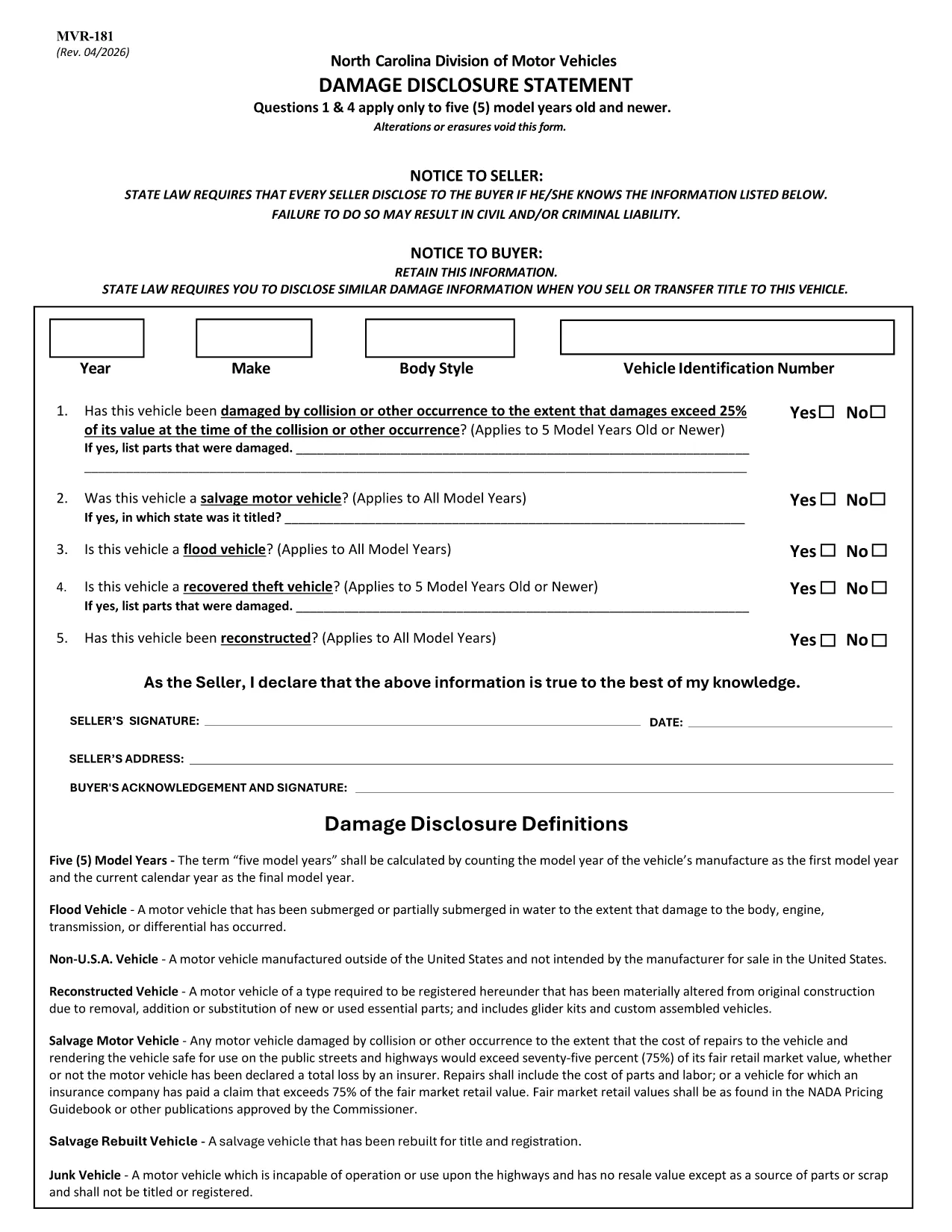
The MVR-181 Damage Disclosure Statement is a legally required form in North Carolina that sellers must complete to disclose any known damage, salvage status, or alterations to a motor vehicle before a sale. Providing accurate information protects both the seller and the buyer from future disputes.

What Is the MVR-181 Damage Disclosure Statement?

The form asks for details such as:

  • Vehicle identification (VIN, make, model, year)
  • Any prior collision or flood damage
  • Whether the vehicle has been declared a total loss or salvaged
  • Signatures of both seller and buyer confirming the information is true

Questions 1 & 4 only apply to vehicles that are five model years old or newer.

Why Choose a Fillable PDF for MVR-181?

Using a fillable PDF saves time, eliminates illegible handwriting, and ensures every required field is completed before submission. With Formize’s online editor you can:

  • Enter data directly on the form
  • Add a legally binding electronic signature
  • Validate the form instantly
  • Download or email the completed PDF in seconds

How to Complete the MVR-181 Online

Follow the simple steps below to fill out the form without leaving your browser.

Common Mistakes to Avoid

  • Leaving any required checkbox unchecked – the form will not validate.
  • Altering or erasing printed text – any changes void the statement.
  • Forgetting both signatures – an unsigned form is not enforceable.

Download the Official NC MVR-181 PDF

Click the button below to open the official North Carolina MVR‑181 PDF in Formize’s secure filler. No software download is required.

SSS
  • Who is required to complete the MVR-181?

    Any private seller or dealer transferring ownership of a motor vehicle in North Carolina must complete the Damage Disclosure Statement.

  • Is an electronic signature accepted on the MVR-181?

    Yes. North Carolina law recognizes ESIGN‑compliant electronic signatures as valid for the MVR‑181.

  • Can I use the same MVR-181 for multiple vehicles?

    No. Each vehicle requires its own completed form with the specific VIN and damage details.

  • What happens if I leave a required box unchecked?

    The form will not validate, and the transaction could be considered non‑compliant, exposing both parties to liability.

  • Do I need to submit the form to a government agency?

    The completed MVR‑181 is kept with the vehicle’s title paperwork. It is not filed with the DMV, but it must be presented at the time of sale.

  • Can I edit the form after I’ve signed it?

    Once an electronic signature is applied, the document is locked to preserve integrity. If changes are needed, create a new form.

  • Is the PDF provided by Formize the official version?

    Yes. The download link points to the official North Carolina Department of Transportation version of MVR‑181.

  • Do I need special software to fill out the PDF?

    No. Formize’s online filler works in any modern browser – no additional software is required.

NASıL

MVR-181 formunu ücretsiz, çevrimiçi olarak 5 kolay adımda nasıl doldurabilirsiniz:

  1. 1
    Open the Fillable Form
    Click the “Fill out this form” button on the page. The Formize PDF Filler app loads the MVR‑181 directly in your browser.
  2. 2
    Enter the Required Information
    Type into each fillable field – VIN, make, model, damage details, etc. The form highlights any missing required fields.
  3. 3
    Add Your Electronic Signature
    Use the built‑in e‑sign tool to sign as the seller and the buyer. The signature is legally binding and compliant with ESIGN.
  4. 4
    Review and Validate
    Click “Validate” to let Formize check for incomplete sections or unchecked boxes. Correct any issues before proceeding.
  5. 5
    Download or Email the Completed PDF
    When validation passes, choose “Download” to save a copy or “Email” to send the completed form directly to the other party.
PDF Filler uygulamasını biçimlendirin
HAKKıNDA

Araç Tescil Formları

Bir motorlu araca, karavana veya tekneye sahipseniz veya kiralıyorsanız, aracınızı yasal olarak kayıtlı ve güvende tutmak için belirli yükümlülükleri yerine getirmelisiniz.

MVR-181, ​​bir motorlu taşıtı ilgili eyalet veya il makamına kaydettirmek için kullanılan belgeler olan Araç tescil formlarından biridir. Bu formlar genellikle bir kişi yeni veya kullanılmış bir araç satın aldığında veya bir araçla yeni bir eyalete veya ile taşındığında gereklidir.

Araç tescili için gereken kesin gereksinimler ve formlar bölgeye göre değişebilir, ancak genellikle süreç araç, araç sahibi ve araç üzerindeki herhangi bir haciz hakkında bilgi verilmesini içerir.

Tescil formları ve harçlar teslim edildikten sonra, eyalet veya il makamı araç sahibine bir tescil belgesi veya plaka verir. Bu kayıt, aracın kamuya açık yollarda ve otoyollarda yasal olarak çalıştırılmasına izin verir.

ÖZELLIKLERI

PDF Doldurucu

PDF formlarını çevrimiçi doldurmanın en kolay yolu

  • MVR-181'ü hızlıca doldurun
    MVR-181 çevrimiçi olarak hızlı bir şekilde doldurmanın bir yolunu mu arıyorsunuz? Çevrimiçi ücretsiz PDF form doldurucumuzla, bu pdf belgesini nasıl düzenleyeceğinizi ve dolduracağınızı bir dakikadan kısa sürede öğreneceksiniz.
  • Kullanımı kolay çevrimiçi PDF düzenleyici
    PDF dosyalarını yeniden tarayıp geri göndermeden önce düzenleyebilmek için yazdırmaktan bıktınız mı? PDF belgelerini çevrimiçi olarak ücretsiz düzenleyin. Zamandan ve kağıttan tasarruf etmek için çevrimiçi pdf editörümüzü kullanın.
  • Harika araçlar, tüm platformlar
    Bir Mac'te MVR-181'ü nasıl dolduracağınızı veya PDF doldurucuyu ücretsiz olarak nasıl kullanacağınızı mı merak ediyorsunuz? Çevrimiçi PDF araçlarımız tüm platformlarda çalışır.
  • Güvenli dosya depolama
    Tamamlanan "MVR-181" dosyaları, Amazon Cloud barındırma tarafından yönetilen güvenli bir veritabanında depolanır. Dosyalarınızı istediğiniz zaman sistemimizden silebilirsiniz. Her durumda, bu dosyalar 24 saat sonra otomatik olarak silinir.
  • MVR-181 ile sohbet et
    Ücretsiz bir PDF okuyucu asistanı olan Chatize'da "MVR-181" ile sohbet edin. "MVR-181" adlı kişiden sorular sorun ve yanıtlar alın. Yukarıdaki Belgeyle Sohbet Et düğmesini tıklamanız yeterlidir.

Doldurma oturumunu sil

Seçilen doldurma oturumunu silin mi? Bu durumda, formu doldurmadaki ilerlemeniz kaybolacaktır.

Düzenleme oturumunu sil

Seçilen düzenleme oturumu silinsin mi? Bu durumda formu oluşturma ve düzenleme konusundaki ilerlemeniz kaybolacaktır.