
Dil Seçin

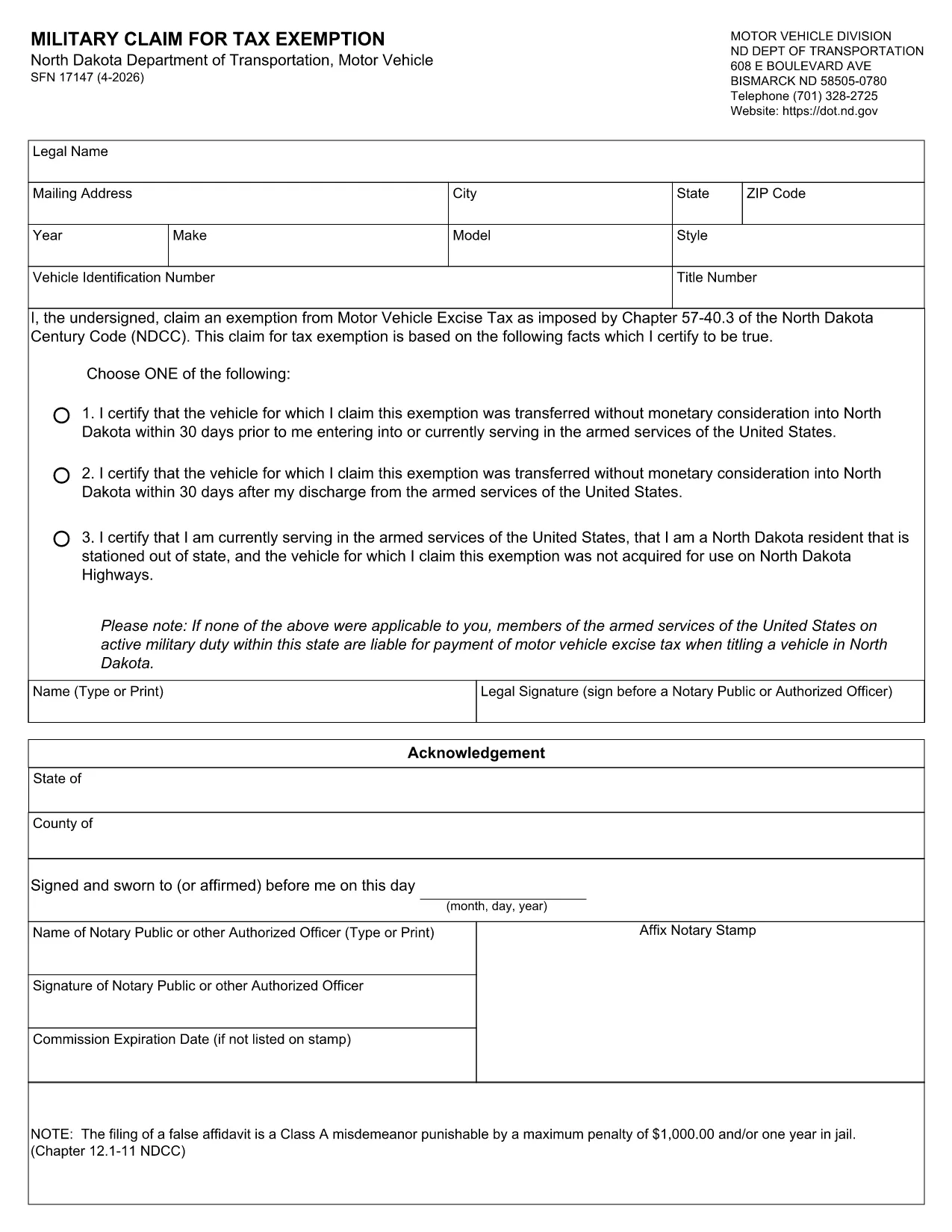
SFN 17147 – Fillable Military Tax Exemption Form (North Dakota)

  1. Dil İngilizce
  2. Ülke Amerika Birleşik Devletleri
  3. Aktivite Araç Kaydı
  4. Belirtmek, bildirmek Kuzey Dakota
SFN 17147 – Fillable Military Tax Exemption Form (North Dakota)

The SFN 17147 is the North Dakota Department of Transportation’s official “Military Claim for Tax Exemption” form. It allows eligible service members and veterans to request exemption from motor vehicle taxes on qualified vehicles.

Instead of printing, printing, and hand‑writing, you can fill this form directly in your browser using Formize’s secure online PDF filler. The fillable version retains all calculations, field validations, and tab order, ensuring a clean, error‑free submission.

What Is SFN 17147?

SFN 17147 is a state‑specific form used by the North Dakota Motor Vehicle Division. It captures personal information, military service details, and vehicle data to determine tax‑exempt eligibility.

How to Complete the Form Online

Follow the simple steps below – no PDF editor required.

  • Click the Fill out this form button on this page.
  • Wait a few seconds while the Formize PDF Filler loads.
  • Enter the requested information in each highlighted field.
  • Use the built‑in validation prompts to correct any errors.
  • When finished, click Submit to download a completed copy or print it for mailing.

Common Mistakes & Tips

  • Incorrect service dates: Double‑check your enlistment and discharge dates; the form will flag mismatches.
  • Missing vehicle VIN: The VIN must match the title exactly; copy it from your registration document.
  • Skipping the signature field: The online filler includes a digital signature box – be sure to sign before saving.
  • Using an outdated PDF: Always use the latest version provided below or via the online filler.

Where to Submit the Completed Form

After you’ve saved the completed PDF, mail it to:

North Dakota Department of Transportation
Motor Vehicle Division
608 E. Boulevard Ave
Bismarck, ND 58505‑0780

Alternatively, you may submit the form in person at any ND DOT office.

Download the Original PDF (Optional)

If you prefer a hard copy, you can download the original fillable PDF directly from the state website:

Download SFN 17147 PDF

Using Formize’s online filler is recommended for faster, error‑free completion.

SSS
  • Do I need a PDF reader to fill out SFN 17147?

    No. The Formize online filler works in any modern browser, so you never need to install a separate PDF reader.

  • Is the online filler secure?

    Yes. Formize uses SSL encryption, and your data never leaves your browser unless you choose to download or email the completed form.

  • Can I save my progress and finish later?

    While the filler does not store data on our servers, you can download a partially completed PDF at any time and reload it later.

  • What if I make a mistake after submitting?

    Simply reopen the saved PDF, correct the fields, and re‑save. The form includes built‑in validation to help you avoid common errors.

  • Do I still need to mail the form after filling it online?

    Yes. North Dakota requires a hard‑copy submission. Print the completed PDF and mail it to the Motor Vehicle Division address provided.

  • Is there a fee to use Formize’s filler?

    No. Formize’s fillable PDF service is completely free for public forms like SFN 17147.

NASıL

SFN 17147 formunu ücretsiz, çevrimiçi olarak 5 kolay adımda nasıl doldurabilirsiniz:

  1. 1
    Click the Fill‑out Button
    Press the “Fill out this form” button on the page to launch Formize’s secure PDF filler.
  2. 2
    Wait for the Filler to Load
    A few seconds later the fillable form appears; all fields are interactive and validated automatically.
  3. 3
    Enter Your Information
    Complete each section – personal details, military service, and vehicle information – using the highlighted fields.
  4. 4
    Review and Sign
    Check for any validation warnings, then add your digital signature in the designated box.
  5. 5
    Save or Print
    Click “Submit” to download the finished PDF or print it directly for mailing to the ND DOT.
PDF Filler uygulamasını biçimlendirin
HAKKıNDA

Araç Tescil Formları

Bir motorlu araca, karavana veya tekneye sahipseniz veya kiralıyorsanız, aracınızı yasal olarak kayıtlı ve güvende tutmak için belirli yükümlülükleri yerine getirmelisiniz.

SFN 17147, ​​bir motorlu taşıtı ilgili eyalet veya il makamına kaydettirmek için kullanılan belgeler olan Araç tescil formlarından biridir. Bu formlar genellikle bir kişi yeni veya kullanılmış bir araç satın aldığında veya bir araçla yeni bir eyalete veya ile taşındığında gereklidir.

Araç tescili için gereken kesin gereksinimler ve formlar bölgeye göre değişebilir, ancak genellikle süreç araç, araç sahibi ve araç üzerindeki herhangi bir haciz hakkında bilgi verilmesini içerir.

Tescil formları ve harçlar teslim edildikten sonra, eyalet veya il makamı araç sahibine bir tescil belgesi veya plaka verir. Bu kayıt, aracın kamuya açık yollarda ve otoyollarda yasal olarak çalıştırılmasına izin verir.

ÖZELLIKLERI

PDF Doldurucu

PDF formlarını çevrimiçi doldurmanın en kolay yolu

  • SFN 17147'ü hızlıca doldurun
    SFN 17147 çevrimiçi olarak hızlı bir şekilde doldurmanın bir yolunu mu arıyorsunuz? Çevrimiçi ücretsiz PDF form doldurucumuzla, bu pdf belgesini nasıl düzenleyeceğinizi ve dolduracağınızı bir dakikadan kısa sürede öğreneceksiniz.
  • Kullanımı kolay çevrimiçi PDF düzenleyici
    PDF dosyalarını yeniden tarayıp geri göndermeden önce düzenleyebilmek için yazdırmaktan bıktınız mı? PDF belgelerini çevrimiçi olarak ücretsiz düzenleyin. Zamandan ve kağıttan tasarruf etmek için çevrimiçi pdf editörümüzü kullanın.
  • Harika araçlar, tüm platformlar
    Bir Mac'te SFN 17147'ü nasıl dolduracağınızı veya PDF doldurucuyu ücretsiz olarak nasıl kullanacağınızı mı merak ediyorsunuz? Çevrimiçi PDF araçlarımız tüm platformlarda çalışır.
  • Güvenli dosya depolama
    Tamamlanan "SFN 17147" dosyaları, Amazon Cloud barındırma tarafından yönetilen güvenli bir veritabanında depolanır. Dosyalarınızı istediğiniz zaman sistemimizden silebilirsiniz. Her durumda, bu dosyalar 24 saat sonra otomatik olarak silinir.
  • SFN 17147 ile sohbet et
    Ücretsiz bir PDF okuyucu asistanı olan Chatize'da "SFN 17147" ile sohbet edin. "SFN 17147" adlı kişiden sorular sorun ve yanıtlar alın. Yukarıdaki Belgeyle Sohbet Et düğmesini tıklamanız yeterlidir.

Doldurma oturumunu sil

Seçilen doldurma oturumunu silin mi? Bu durumda, formu doldurmadaki ilerlemeniz kaybolacaktır.

Düzenleme oturumunu sil

Seçilen düzenleme oturumu silinsin mi? Bu durumda formu oluşturma ve düzenleme konusundaki ilerlemeniz kaybolacaktır.