
Dil Seçin

VSA-59 Rebuilt Vehicle Disclosure Form – Fill Online

  1. Dil İngilizce
  2. Ülke Amerika Birleşik Devletleri
  3. Aktivite Araç Kaydı
  4. Belirtmek, bildirmek Virjinya
VSA-59 Rebuilt Vehicle Disclosure Form – Fill Online

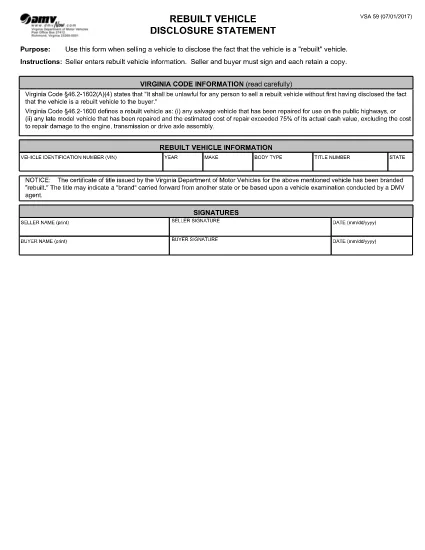
The VSA-59 is the official Virginia Department of Motor Vehicles (DMV) disclosure statement used when selling a rebuilt vehicle. It ensures the buyer is informed that the vehicle has a rebuilt title, protecting both parties during the title transfer.

What Is the VSA-59 Form?

This fillable PDF requires the seller to provide detailed information about the rebuilt vehicle, including VIN, make, model, year, and the nature of the reconstruction. Both the seller and buyer must sign, and each party keeps a copy.

How to Complete the VSA-59 Online

Instead of downloading the PDF and editing it manually, simply click the "Fill out this form" button on this page. The Formize PDF Filler app will load instantly, allowing you to type directly into each field, add signatures, and save a completed copy.

Common Mistakes to Avoid

  • Leaving any required field blank – the form will not submit.
  • Using an illegible handwritten signature – digital signatures are clearer and accepted.
  • Mismatching the VIN on the title with the VIN entered on the form.
  • Forgetting to attach the rebuilt title documentation when filing with the DMV.

Where to Submit the Completed Form

After filling out the VSA-59, print a copy for your records and bring the original, along with the rebuilt title, to any Virginia DMV customer service center. You can also mail the documents to the address listed on the form.

Frequently Asked Questions

Find quick answers to the most common queries below. If you need more help, consult the Virginia DMV website or your local DMV office.

SSS
  • Who must sign the VSA-59 form?

    Both the seller and the buyer must sign the VSA-59. Each party should retain a signed copy for their records.

  • Can I submit a digital signature?

    Yes. The Formize PDF Filler app allows you to add a legally accepted digital signature, which the Virginia DMV accepts.

  • Do I need to attach the rebuilt title when I file?

    Yes. The rebuilt title must accompany the VSA-59 when you submit it to the DMV. It proves the vehicle’s rebuilt status.

  • What if I make a mistake after saving?

    Open the saved PDF in the Formize filler again, correct the error, and re‑save. Do not use a handwritten correction on the printed form.

  • Is the VSA-59 required for all rebuilt vehicles?

    Yes. Virginia law mandates that any rebuilt vehicle being sold must have a completed VSA-59 disclosure statement.

  • How long does the Formize filler take to load?

    The app loads within seconds on most browsers. A stable internet connection ensures the fastest experience.

  • Can I file the VSA-59 online without printing?

    The Virginia DMV still requires a physical copy for record‑keeping, so printing the completed form is recommended.

  • Where can I find a list of DMV offices?

    Visit the Virginia DMV website’s "Office Locations" page for the nearest service center.

NASıL

VSA-59 formunu ücretsiz, çevrimiçi olarak 4 kolay adımda nasıl doldurabilirsiniz:

  1. 1
    Click the Fill‑out Button
    On this page, locate the "Fill out this form" button and click it. The Formize PDF Filler app will open in a new window.
  2. 2
    Enter Information
    Type directly into each highlighted field—VIN, make, model, year, reconstruction details, and signatures.
  3. 3
    Save and Download
    When all required fields are completed, click "Save". Download the finished PDF for your records and print a copy for the DMV.
  4. 4
    Submit to the DMV
    Take the printed form, the rebuilt title, and any supporting documents to a Virginia DMV office or mail them as instructed on the form.
PDF Filler uygulamasını biçimlendirin
HAKKıNDA

Araç Tescil Formları

Bir motorlu araca, karavana veya tekneye sahipseniz veya kiralıyorsanız, aracınızı yasal olarak kayıtlı ve güvende tutmak için belirli yükümlülükleri yerine getirmelisiniz.

VSA-59, ​​bir motorlu taşıtı ilgili eyalet veya il makamına kaydettirmek için kullanılan belgeler olan Araç tescil formlarından biridir. Bu formlar genellikle bir kişi yeni veya kullanılmış bir araç satın aldığında veya bir araçla yeni bir eyalete veya ile taşındığında gereklidir.

Araç tescili için gereken kesin gereksinimler ve formlar bölgeye göre değişebilir, ancak genellikle süreç araç, araç sahibi ve araç üzerindeki herhangi bir haciz hakkında bilgi verilmesini içerir.

Tescil formları ve harçlar teslim edildikten sonra, eyalet veya il makamı araç sahibine bir tescil belgesi veya plaka verir. Bu kayıt, aracın kamuya açık yollarda ve otoyollarda yasal olarak çalıştırılmasına izin verir.

ÖZELLIKLERI

PDF Doldurucu

PDF formlarını çevrimiçi doldurmanın en kolay yolu

  • VSA-59'ü hızlıca doldurun
    VSA-59 çevrimiçi olarak hızlı bir şekilde doldurmanın bir yolunu mu arıyorsunuz? Çevrimiçi ücretsiz PDF form doldurucumuzla, bu pdf belgesini nasıl düzenleyeceğinizi ve dolduracağınızı bir dakikadan kısa sürede öğreneceksiniz.
  • Kullanımı kolay çevrimiçi PDF düzenleyici
    PDF dosyalarını yeniden tarayıp geri göndermeden önce düzenleyebilmek için yazdırmaktan bıktınız mı? PDF belgelerini çevrimiçi olarak ücretsiz düzenleyin. Zamandan ve kağıttan tasarruf etmek için çevrimiçi pdf editörümüzü kullanın.
  • Harika araçlar, tüm platformlar
    Bir Mac'te VSA-59'ü nasıl dolduracağınızı veya PDF doldurucuyu ücretsiz olarak nasıl kullanacağınızı mı merak ediyorsunuz? Çevrimiçi PDF araçlarımız tüm platformlarda çalışır.
  • Güvenli dosya depolama
    Tamamlanan "VSA-59" dosyaları, Amazon Cloud barındırma tarafından yönetilen güvenli bir veritabanında depolanır. Dosyalarınızı istediğiniz zaman sistemimizden silebilirsiniz. Her durumda, bu dosyalar 24 saat sonra otomatik olarak silinir.
  • VSA-59 ile sohbet et
    Ücretsiz bir PDF okuyucu asistanı olan Chatize'da "VSA-59" ile sohbet edin. "VSA-59" adlı kişiden sorular sorun ve yanıtlar alın. Yukarıdaki Belgeyle Sohbet Et düğmesini tıklamanız yeterlidir.

Doldurma oturumunu sil

Seçilen doldurma oturumunu silin mi? Bu durumda, formu doldurmadaki ilerlemeniz kaybolacaktır.

Düzenleme oturumunu sil

Seçilen düzenleme oturumu silinsin mi? Bu durumda formu oluşturma ve düzenleme konusundaki ilerlemeniz kaybolacaktır.