Оберіть мову

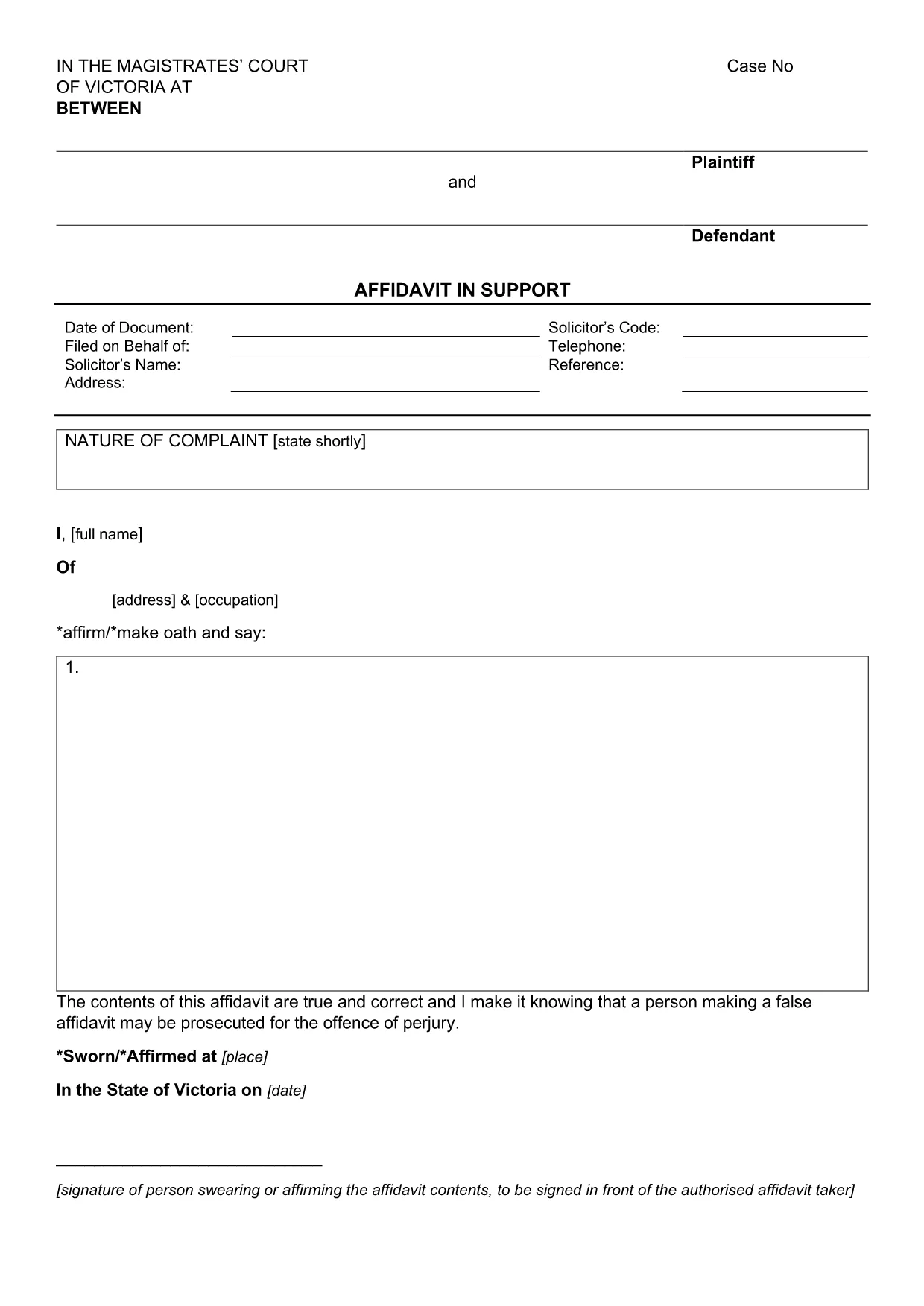
Affidavit in Support of Application – Fillable PDF Form

  1. Країна Австралія
  2. Мова англійська
  3. відділ Courts
  4. діяльність Legal Documents
Affidavit in Support of Application – Fillable PDF Form

An affidavit is a written, sworn statement of facts that can be used as evidence in court or other legal proceedings. The Affidavit in Support of Application is specifically designed to accompany a court application, providing the tribunal with a clear, factual narrative.

This fillable PDF form meets the requirements of the Magistrates' Court of Victoria and can be completed entirely online using Formize’s PDF Filler app. No extra software is needed – just click the button, fill the fields, and download or print your completed affidavit.

Why choose a fillable PDF? It ensures consistent formatting, reduces the chance of missing information, and speeds up the filing process. Once completed, you can save a digital copy for your records or print a hard‑copy for submission.

Below you’ll find a step‑by‑step guide, tips for each section, and a checklist of common errors to avoid.

FAQ
  • What is an affidavit and why do I need one?

    An affidavit is a written statement made under oath. It is used to present facts to a court or tribunal when you cannot appear in person.

  • Can I edit the PDF on my phone or tablet?

    Yes. The Formize PDF Filler works on all modern browsers, including mobile devices, so you can complete the form on a smartphone or tablet.

  • Do I need a lawyer to fill out this affidavit?

    While legal advice is recommended for complex cases, the fillable PDF includes prompts and guidance to help you complete it yourself.

  • How many pages does the affidavit have?

    The standard Affidavit in Support of Application is a single‑page PDF with space for your personal details, case information, and a sworn statement.

  • What should I do if I make a mistake?

    Use the Formize editor’s “Undo” button or clear the field and re‑enter the correct information. Save a new copy before submitting.

  • Is the e‑signature legally binding?

    Yes. In most Australian courts, an electronic signature created through a reputable PDF filler is accepted as a valid signature.

  • Can I submit the PDF electronically to the court?

    Check your local court’s filing rules. Many courts now accept electronic filings, but some still require a printed, signed copy.

  • Is there a cost to download or use the form?

    No. The PDF is free to download, and the Formize filler is available at no charge for basic use.

ЯК

Як безкоштовно заповнити affidavit form онлайн за 5 простих кроків:

  1. 1
    Open the Fillable Form
    Click the “Fill out this form” button on the page. The Formize PDF Filler app will launch in your browser.
  2. 2
    Wait for the Filler to Load
    A few seconds may pass while the PDF loads. You’ll see editable fields highlighted in blue.
  3. 3
    Enter Your Information
    Type directly into each field – name, address, case details, and sworn statements. Use the Tab key to move quickly between fields.
  4. 4
    Review and Sign
    Check every entry for accuracy. When finished, use the built‑in e‑signature tool to sign the affidavit.
  5. 5
    Save or Print
    Click “Download” to save a PDF copy or “Print” to produce a hard‑copy for court filing.
Програма Formize PDF Filler
ПРО

шаблон affidavit form

Завдяки традиційному набору функцій для перегляду та заповнення PDF-документа в поєднанні з перевагами веб-додатку та адаптивного макета ви можете виконати affidavit form за лічені хвилини.

ОСОБЛИВОСТІ

Наповнювач PDF

Найпростіший спосіб заповнювати PDF-форми онлайн

  • Швидко заповніть affidavit form
    Шукаєте спосіб швидко заповнити affidavit form онлайн? За допомогою нашого безкоштовного онлайн-заповнювача PDF-форм ви знатимете, як редагувати та заповнювати цей PDF-документ менш ніж за хвилину.
  • Простий у використанні онлайн-редактор PDF
    Набридло роздруковувати PDF-файли, щоб ви могли їх редагувати, перш ніж сканувати повторно та надсилати назад? Безкоштовно редагуйте PDF-документи онлайн. Використовуйте наш онлайн-редактор PDF, щоб заощадити час і папір.
  • Чудові інструменти, усі платформи
    Хочете знати, як заповнити affidavit form на комп’ютері Mac або, можливо, як використовувати PDF-заповнювач безкоштовно? Наші онлайн-інструменти PDF працюють на всіх платформах.
  • Безпечне зберігання файлів
    Завершені файли "affidavit form" зберігаються в захищеній базі даних, якою керує хостинг Amazon Cloud. Ви можете будь-коли видалити свої файли з нашої системи. У будь-якому випадку ці файли автоматично видаляються через 24 години.
  • Чат із affidavit form
    Спілкуйтеся з "affidavit form" у Chatize, який є безкоштовним помічником для читання PDF. Ставте запитання та отримуйте відповіді від "affidavit form". Просто натисніть кнопку Chat With Document вище.

Видалити сеанс заповнення

Видалити вибраний сеанс заповнення? В цьому випадку ваш прогрес у заповненні форми буде втрачений.

Видалити сеанс редагування

Видалити вибраний сеанс редагування? У цьому випадку ваш прогрес у створенні та редагуванні форми буде втрачено.