
Оберіть мову

LTOPF Application Form – Fillable PDF Ready for Immediate Use

  1. Мова англійська
  2. Країна Австралія
  3. відділ Transport for NSW
  4. діяльність Реєстрація транспортного засобу
LTOPF Application Form – Fillable PDF Ready for Immediate Use

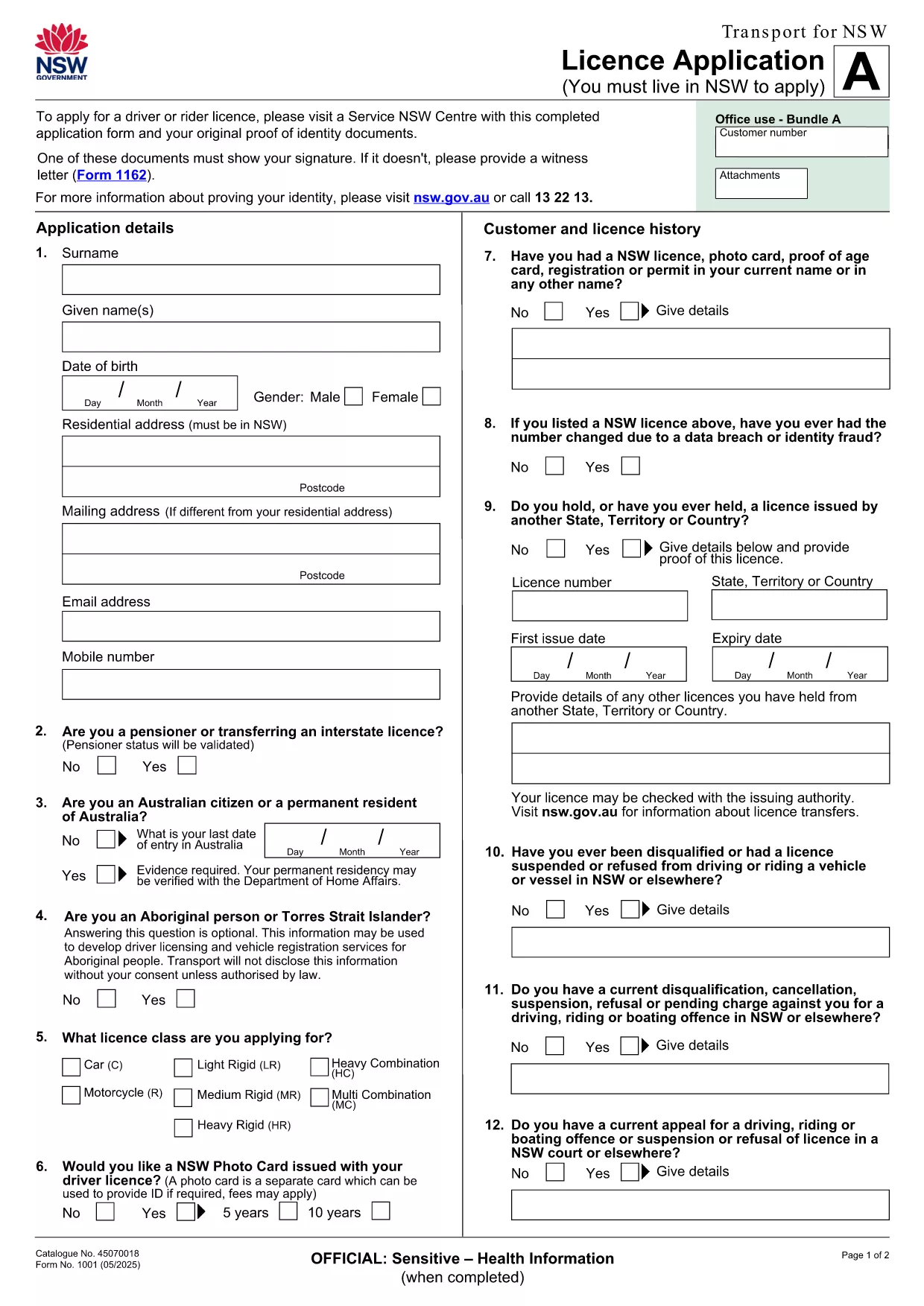
The LTOPF application form is required for certain transport‑related licences in New South Wales. Instead of printing, printing‑then‑scanning, or hand‑writing, you can now complete the official form directly in your browser using our secure Formize PDF Filler app.

Our fillable PDF mirrors the exact layout of the original Transport for NSW licence application, ensuring every field aligns with government requirements. The PDF linked below is the official document provided by Transport for NSW, so you can trust its authenticity.

What Is the LTOPF Application Form?

The LTOPF (Licence Transfer or Permission Form) is used when you need to transfer a licence, update personal details, or apply for a new transport licence. It includes sections for personal identification, licence history, and supporting documentation.

How to Fill the Form Online with Formize

Follow these simple steps to complete the form without leaving your browser:

  • Click the "Fill out this form" button on this page.
  • Wait a few seconds while the Formize PDF Filler loads the official licence‑application PDF.
  • Enter your information in each fillable field – the interface validates dates, numbers, and required fields automatically.
  • Attach scanned copies of your identity documents directly in the designated upload sections.
  • When you’re finished, click "Submit" to download a completed PDF that you can email or print.

Common Mistakes & Tips for a Successful Submission

  • Missing signature: Every page that requires a signature must have one. Use the "Draw Signature" tool in Formize.
  • Incorrect document format: Upload only PDF, JPG, or PNG files for identity proof.
  • Skipping mandatory fields: Required fields are highlighted in red until they are filled.
  • Using an outdated version: This page always links to the latest Transport for NSW licence‑application PDF, so you won’t need to search for updates.

Where to Submit the Completed LTOPF Form

After downloading the completed PDF, you can submit it via the official Transport for NSW online portal, email it to the address listed on the form, or deliver a printed copy to your nearest Service Centre.

Need more guidance? Review the official instructions on the Transport for NSW website or contact their help line for specific queries about licence transfers.

FAQ
  • Is the LTOPF form free to download?

    Yes. The official licence‑application PDF provided by Transport for NSW is free to download and complete.

  • Can I edit the form on a mobile device?

    Absolutely. The Formize PDF Filler works on all modern browsers, including iOS and Android, allowing you to fill the form on phones or tablets.

  • Do I need Adobe Acrobat to fill the form?

    No. The form is fully editable within the Formize online filler, so you don’t need any additional software.

  • What if I make a mistake after submitting?

    Download a fresh copy of the PDF, correct the error, and re‑submit. The online filler validates entries to reduce mistakes.

  • How long does the Formize PDF Filler take to load?

    The PDF loads in under 5 seconds on a typical broadband connection.

  • Do I need to print the form after completing it online?

    Only if the receiving agency requires a hard copy. Otherwise, you can email the completed PDF directly.

  • Is my personal data safe when using Formize?

    Yes. All data is processed locally in your browser and never stored on our servers unless you choose to download the file.

ЯК

Як безкоштовно заповнити LTOPF application form онлайн за 5 простих кроків:

  1. 1
    Open the Fillable Form
    Click the "Fill out this form" button on the page. The Formize PDF Filler loads the official licence‑application PDF automatically.
  2. 2
    Enter Your Details
    Complete each highlighted field. Use the built‑in validation to ensure dates, numbers, and required fields are correct.
  3. 3
    Upload Supporting Documents
    Attach scans of your identity proof, signature, or any additional paperwork in the designated upload sections.
  4. 4
    Review & Submit
    Double‑check all entries, then click "Submit" to generate a completed PDF you can download, email, or print.
  5. 5
    Send the Form
    Follow the submission instructions on the last page of the PDF—online portal, email, or Service Centre.
Програма Formize PDF Filler
ПРО

Форми реєстрації транспортних засобів

Якщо ви володієте або орендуєте автомобіль, причіп або човен, ви повинні виконати певні зобов’язання, щоб ваш транспортний засіб був законно зареєстрованим і безпечним.

LTOPF application form – це одна з форм реєстрації транспортних засобів, які є документами, які використовуються для реєстрації автомобіля у відповідному державному або провінційному органі влади. Ці форми зазвичай потрібні, коли особа купує новий або вживаний автомобіль або коли вона переїжджає в новий штат чи провінцію з автомобілем.

Точні вимоги та форми, необхідні для реєстрації транспортного засобу, можуть відрізнятися залежно від місця, але, як правило, процес передбачає надання інформації про транспортний засіб, власника та будь-які права застави на транспортний засіб.

Після подання реєстраційних форм і зборів державний або провінційний орган влади видасть свідоцтво про реєстрацію або номерний знак власнику автомобіля. Ця реєстрація дозволяє легально експлуатувати транспортний засіб на дорогах загального користування та магістралях.

ОСОБЛИВОСТІ

Наповнювач PDF

Найпростіший спосіб заповнювати PDF-форми онлайн

  • Швидко заповніть LTOPF application form
    Шукаєте спосіб швидко заповнити LTOPF application form онлайн? За допомогою нашого безкоштовного онлайн-заповнювача PDF-форм ви знатимете, як редагувати та заповнювати цей PDF-документ менш ніж за хвилину.
  • Простий у використанні онлайн-редактор PDF
    Набридло роздруковувати PDF-файли, щоб ви могли їх редагувати, перш ніж сканувати повторно та надсилати назад? Безкоштовно редагуйте PDF-документи онлайн. Використовуйте наш онлайн-редактор PDF, щоб заощадити час і папір.
  • Чудові інструменти, усі платформи
    Хочете знати, як заповнити LTOPF application form на комп’ютері Mac або, можливо, як використовувати PDF-заповнювач безкоштовно? Наші онлайн-інструменти PDF працюють на всіх платформах.
  • Безпечне зберігання файлів
    Завершені файли "LTOPF application form" зберігаються в захищеній базі даних, якою керує хостинг Amazon Cloud. Ви можете будь-коли видалити свої файли з нашої системи. У будь-якому випадку ці файли автоматично видаляються через 24 години.
  • Чат із LTOPF application form
    Спілкуйтеся з "LTOPF application form" у Chatize, який є безкоштовним помічником для читання PDF. Ставте запитання та отримуйте відповіді від "LTOPF application form". Просто натисніть кнопку Chat With Document вище.

Видалити сеанс заповнення

Видалити вибраний сеанс заповнення? В цьому випадку ваш прогрес у заповненні форми буде втрачений.

Видалити сеанс редагування

Видалити вибраний сеанс редагування? У цьому випадку ваш прогрес у створенні та редагуванні форми буде втрачено.