Оберіть мову

Revival Application Form – Fillable PDF

  1. Мова англійська
  2. Країна Канада
  3. діяльність Corporate Law
  4. відділ Corporations Canada
Revival Application Form – Fillable PDF

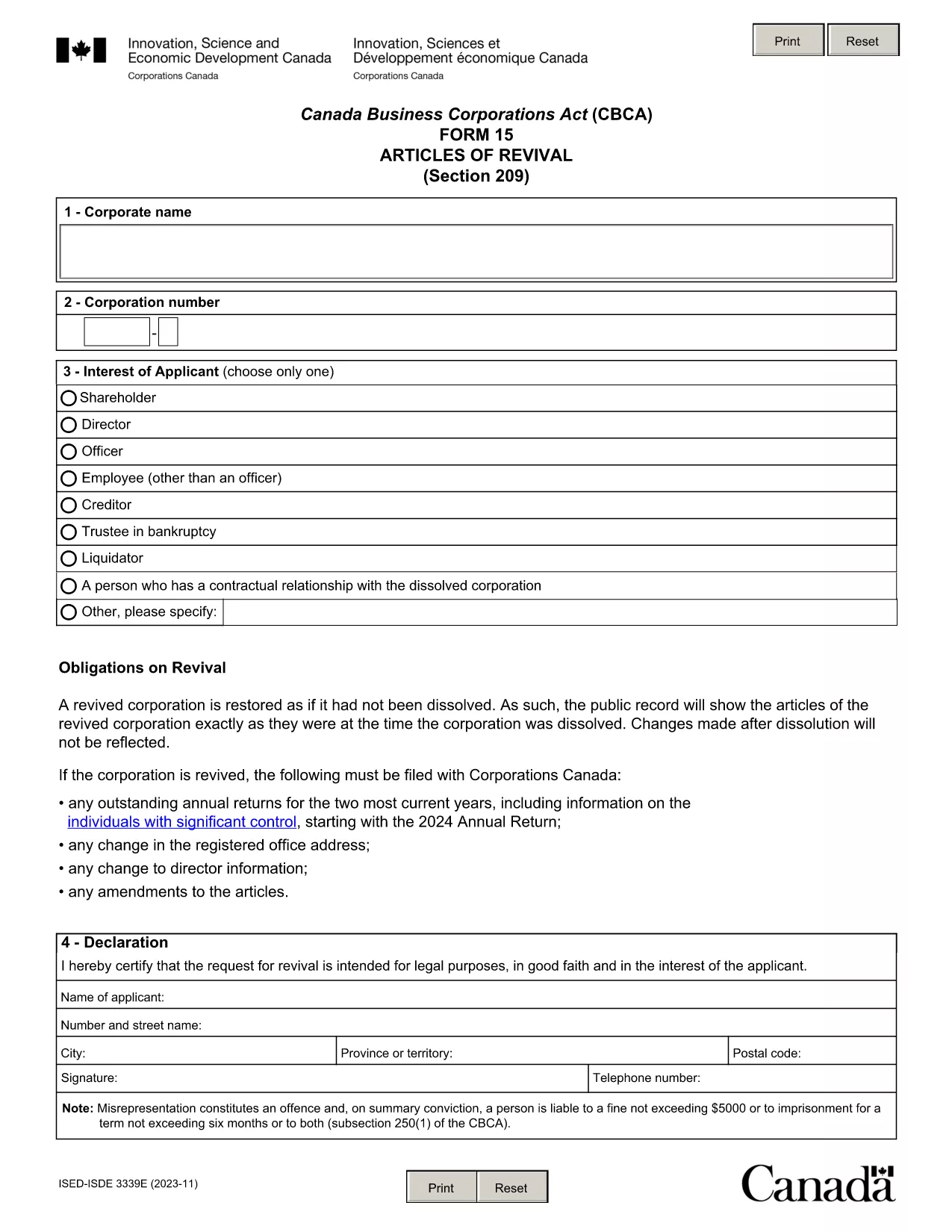
Need to bring a dissolved corporation or lapsed policy back to life? The Revival Application Form is the legal document you submit to request reinstatement. Our fillable PDF version lets you complete the form quickly, securely, and without any extra software.

What Is a Revival Application?

A revival (or reinstatement) application is filed when a business, corporation, or insurance policy has been dissolved, cancelled, or become inactive and the owner wishes to reactivate it. The form typically requires details such as the applicant’s name, registration number, reason for revival, and a declaration of good‑faith intent.

How to Complete the Revival Form Online

Instead of downloading the PDF and opening it in a separate editor, simply click the "Fill out this form" button on this page. The Formize PDF Filler app will load directly in your browser, allowing you to:

  • Enter information into each fillable field.
  • Save your progress at any time.
  • Validate the data before final submission.
  • Download a completed copy for your records.

Common Mistakes to Avoid

  • Leaving required fields blank: The form will not accept submission if mandatory sections are empty.
  • Incorrect registration numbers: Double‑check corporate or policy numbers to avoid processing delays.
  • Missing signatures: The declaration must be signed by the applicant or an authorized representative.
  • Using the wrong version: Ensure you are using the latest PDF – the link below always points to the current official document.

Download the Official PDF

The PDF linked below is the official revival application provided by Corporations Canada. It is fully fillable and updated as of 2023‑12.

Download the Revival Application Form (PDF)

FAQ
  • What is a revival application used for?

    It is filed to reactivate a dissolved corporation, cancelled insurance policy, or any legal entity that has become inactive.

  • Do I need a lawyer to fill out the revival form?

    A lawyer is not required, but you may consult one to ensure the information is accurate and meets legal requirements.

  • Can I save my progress and finish later?

    Yes. The Formize PDF Filler lets you save the partially completed form and return to it at any time.

  • Is there a filing fee for a revival application?

    Fees vary by jurisdiction. Check the Corporations Canada fee schedule for the most current amount.

  • How long does the revival process take?

    Processing times depend on the completeness of the application; typically, it ranges from a few days to several weeks.

  • What happens if I submit an incomplete form?

    The filing will be rejected, and you will be asked to correct the missing or erroneous sections before resubmission.

  • Can I submit the form electronically?

    Yes. After completing the fillable PDF, you can upload the file directly through the Corporations Canada online portal.

  • Is the PDF version always up‑to‑date?

    The link provided points to the latest official version (as of December 2023). We regularly update the page when newer versions are released.

ЯК

Як безкоштовно заповнити revival application form онлайн за 5 простих кроків:

  1. 1
    Click the Fill‑out Button
    Press the "Fill out this form" button on the page. The Formize PDF Filler loads instantly in your browser.
  2. 2
    Enter Your Information
    Complete each fillable field with the required details—company name, registration number, reason for revival, and your signature.
  3. 3
    Validate and Review
    Use the built‑in validation to check for missing or incorrect data, then review the entire form before finalizing.
  4. 4
    Download or Save
    When you’re satisfied, click "Download" to save a copy of the completed PDF or store it securely in the cloud.
  5. 5
    Submit to the Authority
    Print the saved PDF if a hard copy is required, or submit the electronic file directly to Corporations Canada as instructed.
Програма Formize PDF Filler
ПРО

шаблон revival application form

Завдяки традиційному набору функцій для перегляду та заповнення PDF-документа в поєднанні з перевагами веб-додатку та адаптивного макета ви можете виконати revival application form за лічені хвилини.

ОСОБЛИВОСТІ

Наповнювач PDF

Найпростіший спосіб заповнювати PDF-форми онлайн

  • Швидко заповніть revival application form
    Шукаєте спосіб швидко заповнити revival application form онлайн? За допомогою нашого безкоштовного онлайн-заповнювача PDF-форм ви знатимете, як редагувати та заповнювати цей PDF-документ менш ніж за хвилину.
  • Простий у використанні онлайн-редактор PDF
    Набридло роздруковувати PDF-файли, щоб ви могли їх редагувати, перш ніж сканувати повторно та надсилати назад? Безкоштовно редагуйте PDF-документи онлайн. Використовуйте наш онлайн-редактор PDF, щоб заощадити час і папір.
  • Чудові інструменти, усі платформи
    Хочете знати, як заповнити revival application form на комп’ютері Mac або, можливо, як використовувати PDF-заповнювач безкоштовно? Наші онлайн-інструменти PDF працюють на всіх платформах.
  • Безпечне зберігання файлів
    Завершені файли "revival application form" зберігаються в захищеній базі даних, якою керує хостинг Amazon Cloud. Ви можете будь-коли видалити свої файли з нашої системи. У будь-якому випадку ці файли автоматично видаляються через 24 години.
  • Чат із revival application form
    Спілкуйтеся з "revival application form" у Chatize, який є безкоштовним помічником для читання PDF. Ставте запитання та отримуйте відповіді від "revival application form". Просто натисніть кнопку Chat With Document вище.

Видалити сеанс заповнення

Видалити вибраний сеанс заповнення? В цьому випадку ваш прогрес у заповненні форми буде втрачений.

Видалити сеанс редагування

Видалити вибраний сеанс редагування? У цьому випадку ваш прогрес у створенні та редагуванні форми буде втрачено.