
Оберіть мову

China Visa Application Form – Fillable PDF

  1. Мова англійська
  2. Країна China
  3. відділ Consular Services
  4. діяльність Візи
China Visa Application Form – Fillable PDF

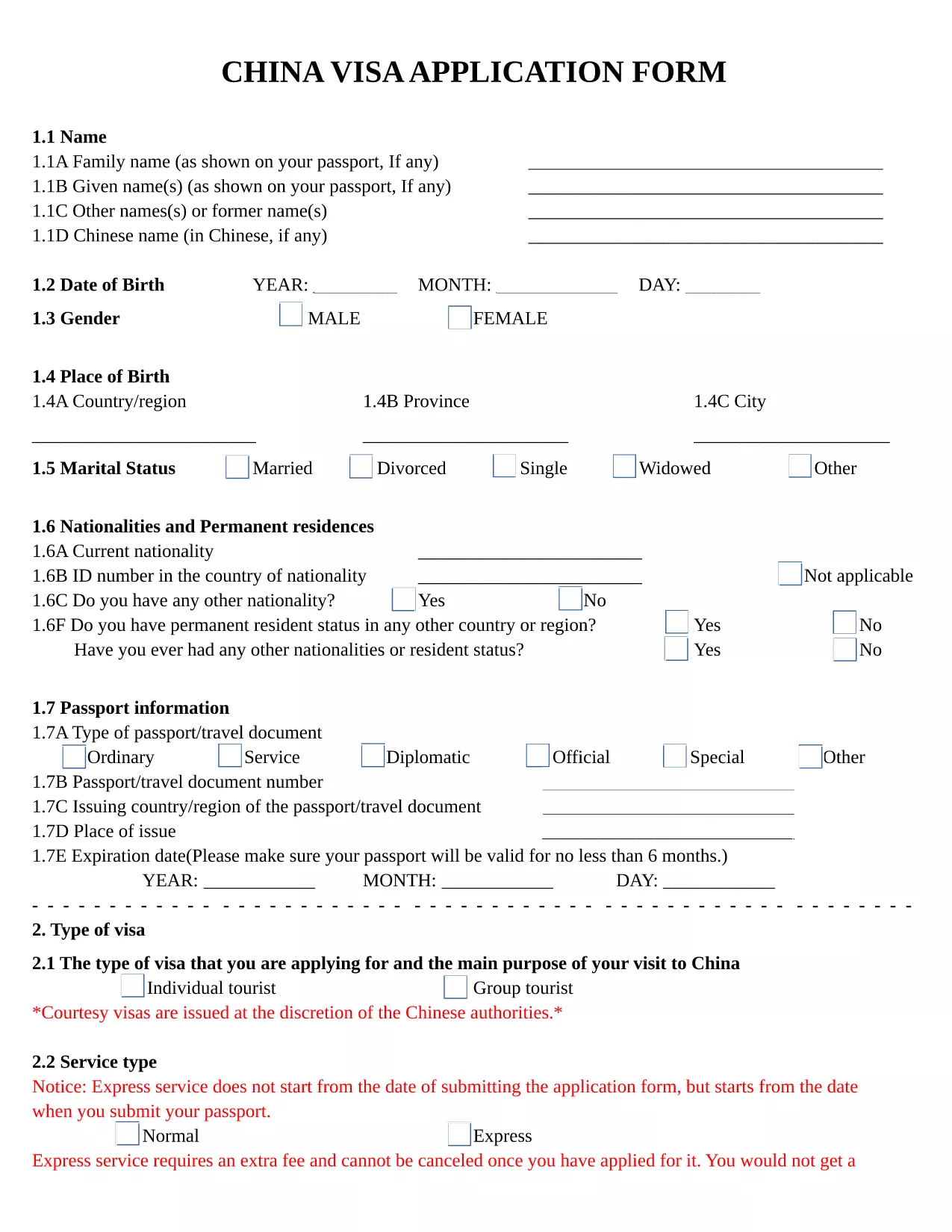
Planning a trip to China? The first step is completing the official China Visa Application Form. Our fillable PDF version lets you enter all required details directly in your browser, eliminates the need for printing, and ensures a clean, error‑free submission.

Why Use the Fillable PDF Form?

The fillable version is identical to the paper form used by Chinese consulates, but it offers several advantages:

  • Instant validation of required fields
  • Automatic saving so you can return later
  • Easy export to PDF for upload to the embassy portal
  • No messy handwriting or smudges

How to Complete the China Visa Application Online

Follow these simple steps to fill out the form using the Formize PDF Filler app:

  1. Click the "Fill out this form" button on this page.
  2. Wait a few seconds while the Formize PDF Filler loads the document.
  3. Enter your personal information, passport details, travel itinerary, and any additional notes directly into the fields.
  4. Use the Save button to download a completed PDF or to store it in your browser for later editing.
  5. Print the saved PDF (if required) and attach it to your visa package, or upload it to the embassy’s online portal.

Common Mistakes to Avoid

  • Incorrect passport number: Double‑check each digit; a single typo can delay processing.
  • Leaving mandatory fields blank: The fillable PDF highlights missing information before you can save.
  • Using the wrong date format: Follow the DD/MM/YYYY format as shown in the sample.
  • Submitting an outdated version: This page always hosts the latest official form; always use the link provided here.

Required Supporting Documents

In addition to the completed application, you will need to provide:

  • Valid passport (at least 6 months remaining)
  • Recent passport‑size photo (white background)
  • Invitation letter or travel itinerary
  • Proof of accommodation and round‑trip tickets

What Happens After You Submit?

Once your application package is complete, submit it to the Chinese Visa Application Service Center or the nearest Chinese embassy/consulate. Processing times vary from 4 to 7 business days for standard visas. Track your status online using the reference number provided on the receipt.

FAQ
  • Do I need to print the fillable PDF after completing it?

    Most Chinese consulates accept a printed version of the completed form. Check the specific requirements of the embassy where you will submit your application.

  • Can I edit the form after I have saved it?

    Yes. Open the saved PDF again with the Formize PDF Filler app, make any changes, and re‑save.

  • Is there a fee to download the fillable China visa form?

    No. The PDF is provided free of charge; visa processing fees are paid directly to the visa center.

  • What passport details are required?

    Enter the passport number exactly as it appears, the date of issue, and the expiration date. Use the DD/MM/YYYY format.

  • How long does a Chinese visa take to process?

    Standard processing usually takes 4‑7 business days. Express or rush services may be available for an additional fee.

  • Can I use the same form for a tourist and business visa?

    The form is the same, but you must select the correct visa type in the "Purpose of Visit" section and provide supporting documents relevant to that purpose.

  • What should I do if I make a mistake on the form?

    If the mistake is discovered before submission, simply edit the field in the Formize PDF Filler and save again. If you have already printed it, cross out the error neatly, write the correction, and initial the change.

  • Is the fillable PDF compatible with mobile devices?

    Yes. The Formize PDF Filler works on most modern browsers, including mobile Chrome and Safari, allowing you to complete the form on a tablet or phone.

ЯК

Як безкоштовно заповнити China visa application form онлайн за 5 простих кроків:

  1. 1
    Open the Fillable Form
    Click the "Fill out this form" button on the page. The Formize PDF Filler app will open in a new tab.
  2. 2
    Load the PDF
    Wait a few seconds while the PDF loads. All fields become editable automatically.
  3. 3
    Enter Your Information
    Type your personal details, passport number, travel dates, and any additional notes directly into the highlighted fields.
  4. 4
    Save or Download
    When you finish, click the Save button to download the completed PDF or store it in your browser for later editing.
  5. 5
    Submit to the Embassy
    Print the saved PDF (if required) and include it with your supporting documents when you submit your visa application.
Програма Formize PDF Filler
ПРО

Візові бланки

China visa application form — це одна з візових форм, які є документами, які використовуються для подання заяви на отримання візи для в'їзду в іншу країну. Віза - це документ, який дозволяє іноземному громадянину в'їхати, перебувати, а іноді і працювати в іноземній країні протягом певного періоду часу. Точні форми та вимоги для отримання візи залежать від країни та типу візи.

Візові форми зазвичай вимагають особисту інформацію, таку як ім’я, дата народження та паспортні дані, а також інформацію про мету та тривалість поїздки, запланований пункт призначення та інформацію про те, чи було заявникові раніше відмовлено у візі чи депортовано з країни. Форми також можуть вимагати підтверджуючих документів, таких як паспорт, фотографії та підтвердження фінансової підтримки.

У Сполучених Штатах найпоширенішими візовими формами є форми DS-160 і DS-260. Форма DS-160 використовується для подання заяви на отримання неімміграційної візи, тоді як форма DS-260 використовується для подання заяви на отримання імміграційної візи. Ці форми вимагають детальної інформації про особисту історію та історію подорожей заявника, а також підтверджуючих документів, таких як паспорт, маршрут подорожі та фінансові записи.

Інші країни можуть мати інші форми та вимоги до віз, але основний процес зазвичай включає заповнення візової анкети, надання супровідної документації та проходження співбесіди з консульським працівником у посольстві чи консульстві США. Важливо зазначити, що процес оформлення візи може бути складним і трудомістким, тому особам, які бажають отримати візу, рекомендується проконсультуватися з імміграційним адвокатом або іншим кваліфікованим фахівцем, щоб переконатися, що всі необхідні форми та вимоги дотримані.

ОСОБЛИВОСТІ

Наповнювач PDF

Найпростіший спосіб заповнювати PDF-форми онлайн

  • Швидко заповніть China visa application form
    Шукаєте спосіб швидко заповнити China visa application form онлайн? За допомогою нашого безкоштовного онлайн-заповнювача PDF-форм ви знатимете, як редагувати та заповнювати цей PDF-документ менш ніж за хвилину.
  • Простий у використанні онлайн-редактор PDF
    Набридло роздруковувати PDF-файли, щоб ви могли їх редагувати, перш ніж сканувати повторно та надсилати назад? Безкоштовно редагуйте PDF-документи онлайн. Використовуйте наш онлайн-редактор PDF, щоб заощадити час і папір.
  • Чудові інструменти, усі платформи
    Хочете знати, як заповнити China visa application form на комп’ютері Mac або, можливо, як використовувати PDF-заповнювач безкоштовно? Наші онлайн-інструменти PDF працюють на всіх платформах.
  • Безпечне зберігання файлів
    Завершені файли "China visa application form" зберігаються в захищеній базі даних, якою керує хостинг Amazon Cloud. Ви можете будь-коли видалити свої файли з нашої системи. У будь-якому випадку ці файли автоматично видаляються через 24 години.
  • Чат із China visa application form
    Спілкуйтеся з "China visa application form" у Chatize, який є безкоштовним помічником для читання PDF. Ставте запитання та отримуйте відповіді від "China visa application form". Просто натисніть кнопку Chat With Document вище.

Видалити сеанс заповнення

Видалити вибраний сеанс заповнення? В цьому випадку ваш прогрес у заповненні форми буде втрачений.

Видалити сеанс редагування

Видалити вибраний сеанс редагування? У цьому випадку ваш прогрес у створенні та редагуванні форми буде втрачено.