
Оберіть мову

SB-101 India Fillable PDF – Claim Protected Savings

  1. Мова англійська
  2. Країна Індія
  3. відділ Департамент пошт
SB-101 India Fillable PDF – Claim Protected Savings

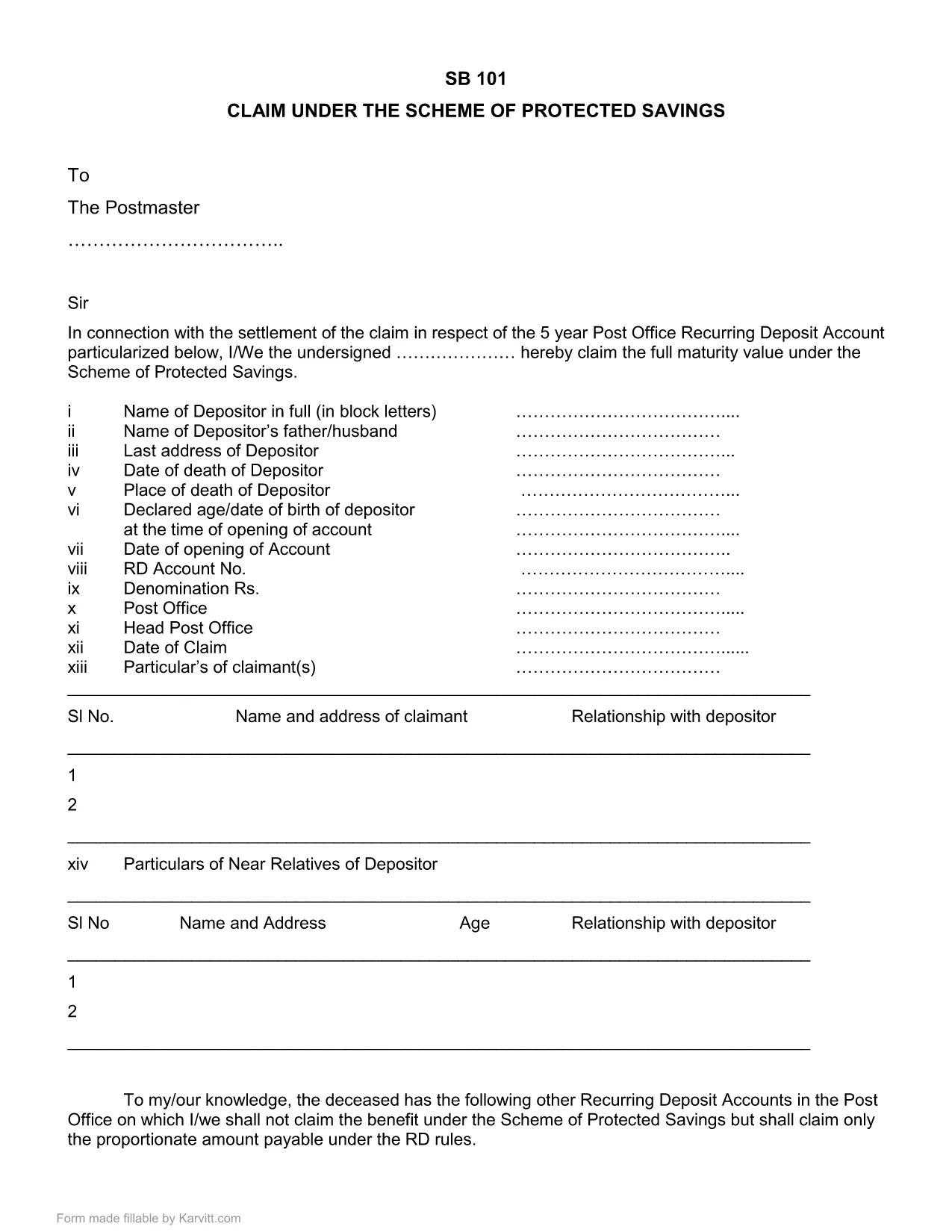
The SB-101 form is the official Post Office document used in India to claim benefits under the Scheme of Protected Savings. Whether you are a first‑time claimant or need to submit a renewal, a fillable PDF version saves you time and reduces errors.

What is Form SB-101?

SB-101 is issued by the Indian Post Office and is required to:

  • Validate your protected savings account.
  • Apply for interest benefits and withdrawals.
  • Update personal details linked to your savings scheme.

The form is recognized nationwide and must be completed in the exact format prescribed by the Post Office.

How to Fill SB-101 Online with Formize

Instead of downloading, printing, and scanning, use the Formize PDF Filler for a seamless experience:

  1. Click the "Fill out this form" button on this page.
  2. The Formize PDF Filler loads directly in your browser – no extra software needed.
  3. Enter your information in each highlighted field. The interface guides you through mandatory sections.
  4. When you finish, review the summary screen for any missing or incorrect entries.
  5. Save the completed form to your device or submit it electronically to your nearest Post Office.

Common Mistakes to Avoid When Completing SB-101

  • Incorrect Account Number: Double‑check the 12‑digit number printed on your passbook.
  • Missing Signature: The form is invalid without a clear, legible signature.
  • Outdated Address: Ensure the address matches the one on record with the Post Office.
  • Skipping Optional Fields: Even optional fields can help speed up verification if filled correctly.

Download & Save the Official SB-101 PDF

If you prefer a traditional approach, you can still download the official fillable PDF version below. The file retains the original layout and can be opened with any modern PDF reader.

Download SB-101 Fillable PDF (India)

Remember, using the Formize PDF Filler ensures your data is captured accurately and saves you a trip to the printer.

FAQ
  • What is the purpose of SB-101?

    SB-101 is used to claim benefits, update personal details, and manage withdrawals under the Scheme of Protected Savings offered by the Indian Post Office.

  • Can I fill SB-101 on a mobile device?

    Yes. The Formize PDF Filler works on all modern browsers, including mobile phones and tablets.

  • Do I need Adobe Acrobat to use the fillable PDF?

    No. While the PDF can be opened with Adobe Reader, the Formize online filler lets you complete the form without any additional software.

  • Is the downloaded PDF version still valid?

    Absolutely. The PDF retains the official layout and is accepted by all Post Office branches, provided it is fully completed and signed.

  • What should I do if I make a mistake?

    Use the Formize filler's reset option to clear fields, or download a fresh copy of the PDF and start over.

  • How long does it take to process SB-101 after submission?

    Processing time varies by branch, but most offices complete verification within 7‑10 business days.

ЯК

Як безкоштовно заповнити SB-101 India онлайн за 5 простих кроків:

  1. 1
    Click the Fill Out Button
    Press the "Fill out this form" button on the page to launch the Formize PDF Filler.
  2. 2
    Load the Formize PDF Filler
    The web‑based filler loads instantly in your browser—no downloads required.
  3. 3
    Enter Your Details
    Complete each highlighted field with accurate information. The filler highlights required sections.
  4. 4
    Review & Validate
    Check the summary view for any missing or incorrect entries before finalizing.
  5. 5
    Save or Submit
    Download the finished PDF to your device or submit it electronically to your local Post Office.
Програма Formize PDF Filler
ПРО

Бланки заяв Департаменту пошт

SB-101 India – це одна з офіційних форм Департаменту пошти Індії, яка пропонує різні форми заявок на різні послуги. Деякі поширені форми заявки включають:

Поштове страхування життя: ця форма використовується для подання заявки на поліси поштового страхування життя, запропоновані Департаментом пошт.

Ощадний банківський рахунок: ця форма використовується для відкриття ощадного банківського рахунку в поштовому відділенні.

Грошовий переказ: ця форма використовується для надсилання грошових переказів через поштову службу.

Зареєстрована пошта: ця форма використовується для надсилання рекомендованих листів і посилок через поштову службу.

Швидка пошта: ця форма використовується для надсилання посилок і документів через службу швидкої пошти.

Схема місячного доходу поштового відділення: ця форма використовується для відкриття рахунку за схемою місячного доходу в поштовому відділенні.

ОСОБЛИВОСТІ

Наповнювач PDF

Найпростіший спосіб заповнювати PDF-форми онлайн

  • Швидко заповніть SB-101 India
    Шукаєте спосіб швидко заповнити SB-101 India онлайн? За допомогою нашого безкоштовного онлайн-заповнювача PDF-форм ви знатимете, як редагувати та заповнювати цей PDF-документ менш ніж за хвилину.
  • Простий у використанні онлайн-редактор PDF
    Набридло роздруковувати PDF-файли, щоб ви могли їх редагувати, перш ніж сканувати повторно та надсилати назад? Безкоштовно редагуйте PDF-документи онлайн. Використовуйте наш онлайн-редактор PDF, щоб заощадити час і папір.
  • Чудові інструменти, усі платформи
    Хочете знати, як заповнити SB-101 India на комп’ютері Mac або, можливо, як використовувати PDF-заповнювач безкоштовно? Наші онлайн-інструменти PDF працюють на всіх платформах.
  • Безпечне зберігання файлів
    Завершені файли "SB-101 India" зберігаються в захищеній базі даних, якою керує хостинг Amazon Cloud. Ви можете будь-коли видалити свої файли з нашої системи. У будь-якому випадку ці файли автоматично видаляються через 24 години.
  • Чат із SB-101 India
    Спілкуйтеся з "SB-101 India" у Chatize, який є безкоштовним помічником для читання PDF. Ставте запитання та отримуйте відповіді від "SB-101 India". Просто натисніть кнопку Chat With Document вище.

Видалити сеанс заповнення

Видалити вибраний сеанс заповнення? В цьому випадку ваш прогрес у заповненні форми буде втрачений.

Видалити сеанс редагування

Видалити вибраний сеанс редагування? У цьому випадку ваш прогрес у створенні та редагуванні форми буде втрачено.