
Оберіть мову

Form 26Q – Quarterly TDS Statement (Fillable PDF)

  1. Мова англійська
  2. Країна Індія
  3. діяльність податки
Form 26Q – Quarterly TDS Statement (Fillable PDF)

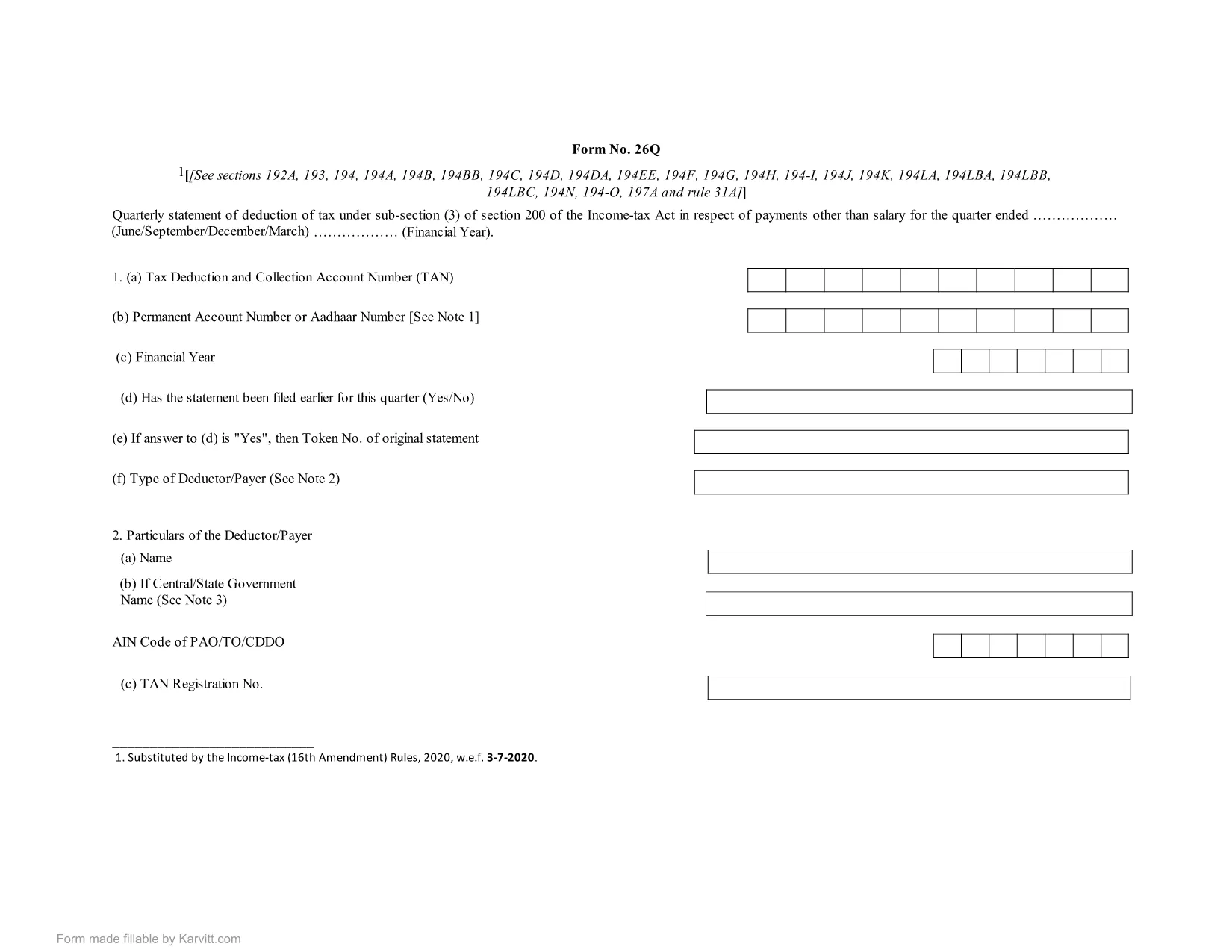
Form 26Q is the quarterly statement of tax deducted at source (TDS) that deductors must file under sub‑section (3) of Section 200 of the Income Tax Act, India. It details the TDS on payments such as salaries, interest, rent, and professional fees for a specific quarter.

Using a fillable PDF saves time, eliminates manual errors, and ensures the format matches the official requirement. With Formize’s built‑in PDF Filler, you can complete the form directly in your browser—no extra software needed.

What is Form 26Q?

  • Quarterly return for TDS deductors.
  • Covers all payments made in the quarter and the tax deducted.
  • Submitted to the Income Tax Department for each quarter of the financial year.

How to Fill Form 26Q Online

Simply click the "Fill out this form" button on this page. The Formize PDF Filler will load, presenting you with editable fields that mirror the original form.

Common Mistakes to Avoid

  • Entering the wrong PAN for deductees – double‑check each PAN.
  • Mismatching the quarter dates – use the exact fiscal quarter (Q1: Apr‑Jun, Q2: Jul‑Sep, etc.).
  • Leaving mandatory fields blank – the filler highlights required fields.
  • Using an outdated version of the form – the download link always provides the latest PDF.

Download & Use the Fillable PDF

For offline work, you can download the official fillable PDF below. Open it in any modern PDF reader (Adobe Acrobat Reader 9+ or a compatible browser) and fill it manually, or use the online Formize filler for a smoother experience.

Download Form 26Q Fillable PDF

FAQ
  • Who needs to file Form 26Q?

    Any deductor who has deducted tax at source on payments like salary, interest, rent, or professional fees must file Form 26Q for each quarter.

  • Can I edit the PDF on my phone?

    Yes. The fillable PDF works on modern mobile browsers and the Formize online filler is fully responsive.

  • Is there a fee to download the fillable PDF?

    No. The PDF is available for free download for personal and business use.

  • What should I do if I make a mistake after submission?

    Correct the error in a revised Form 26Q and file it as a revised return for the same quarter, following the Income Tax Department’s guidelines.

  • Do I need Adobe Acrobat to fill the form?

    Not necessarily. While Adobe Acrobat Reader works, you can also fill the form directly in the Formize PDF Filler without any additional software.

  • How often is the PDF updated?

    The PDF is updated whenever the Income Tax Department releases a new version. Our download link always points to the latest official file.

ЯК

Як безкоштовно заповнити Form 26Q онлайн за 5 простих кроків:

  1. 1
    Click the Fill button
    Press the “Fill out this form” button on the page to launch the Formize PDF Filler.
  2. 2
    Wait for the filler to load
    The web app loads the fillable PDF in a few seconds. All fields become editable.
  3. 3
    Enter your details
    Complete each highlighted field with the required information, such as PAN, amounts, and dates.
  4. 4
    Validate and review
    Use the built‑in validation to check for missing or incorrect entries, then review the entire form.
  5. 5
    Download the completed form
    When you’re satisfied, click “Save” to download the filled PDF for your records or submission.
Програма Formize PDF Filler
ПРО

Податкові форми

Form 26Q – це одна з податкових форм, які є документами, які використовуються для подання відомостей про податки до відповідного податкового органу. Існують різні типи податкових форм, у тому числі федеральні, штатні та місцеві податкові форми, які можуть відрізнятися залежно від обставин і місцезнаходження платника податків.

ОСОБЛИВОСТІ

Наповнювач PDF

Найпростіший спосіб заповнювати PDF-форми онлайн

  • Швидко заповніть Form 26Q
    Шукаєте спосіб швидко заповнити Form 26Q онлайн? За допомогою нашого безкоштовного онлайн-заповнювача PDF-форм ви знатимете, як редагувати та заповнювати цей PDF-документ менш ніж за хвилину.
  • Простий у використанні онлайн-редактор PDF
    Набридло роздруковувати PDF-файли, щоб ви могли їх редагувати, перш ніж сканувати повторно та надсилати назад? Безкоштовно редагуйте PDF-документи онлайн. Використовуйте наш онлайн-редактор PDF, щоб заощадити час і папір.
  • Чудові інструменти, усі платформи
    Хочете знати, як заповнити Form 26Q на комп’ютері Mac або, можливо, як використовувати PDF-заповнювач безкоштовно? Наші онлайн-інструменти PDF працюють на всіх платформах.
  • Безпечне зберігання файлів
    Завершені файли "Form 26Q" зберігаються в захищеній базі даних, якою керує хостинг Amazon Cloud. Ви можете будь-коли видалити свої файли з нашої системи. У будь-якому випадку ці файли автоматично видаляються через 24 години.
  • Чат із Form 26Q
    Спілкуйтеся з "Form 26Q" у Chatize, який є безкоштовним помічником для читання PDF. Ставте запитання та отримуйте відповіді від "Form 26Q". Просто натисніть кнопку Chat With Document вище.

Видалити сеанс заповнення

Видалити вибраний сеанс заповнення? В цьому випадку ваш прогрес у заповненні форми буде втрачений.

Видалити сеанс редагування

Видалити вибраний сеанс редагування? У цьому випадку ваш прогрес у створенні та редагуванні форми буде втрачено.