Оберіть мову

Application Form Adalah – Fillable PDF Download

  1. Країна Індонезія
  2. Мова індонезійська
  3. діяльність Recruitment
  4. відділ Education
Application Form Adalah – Fillable PDF Download

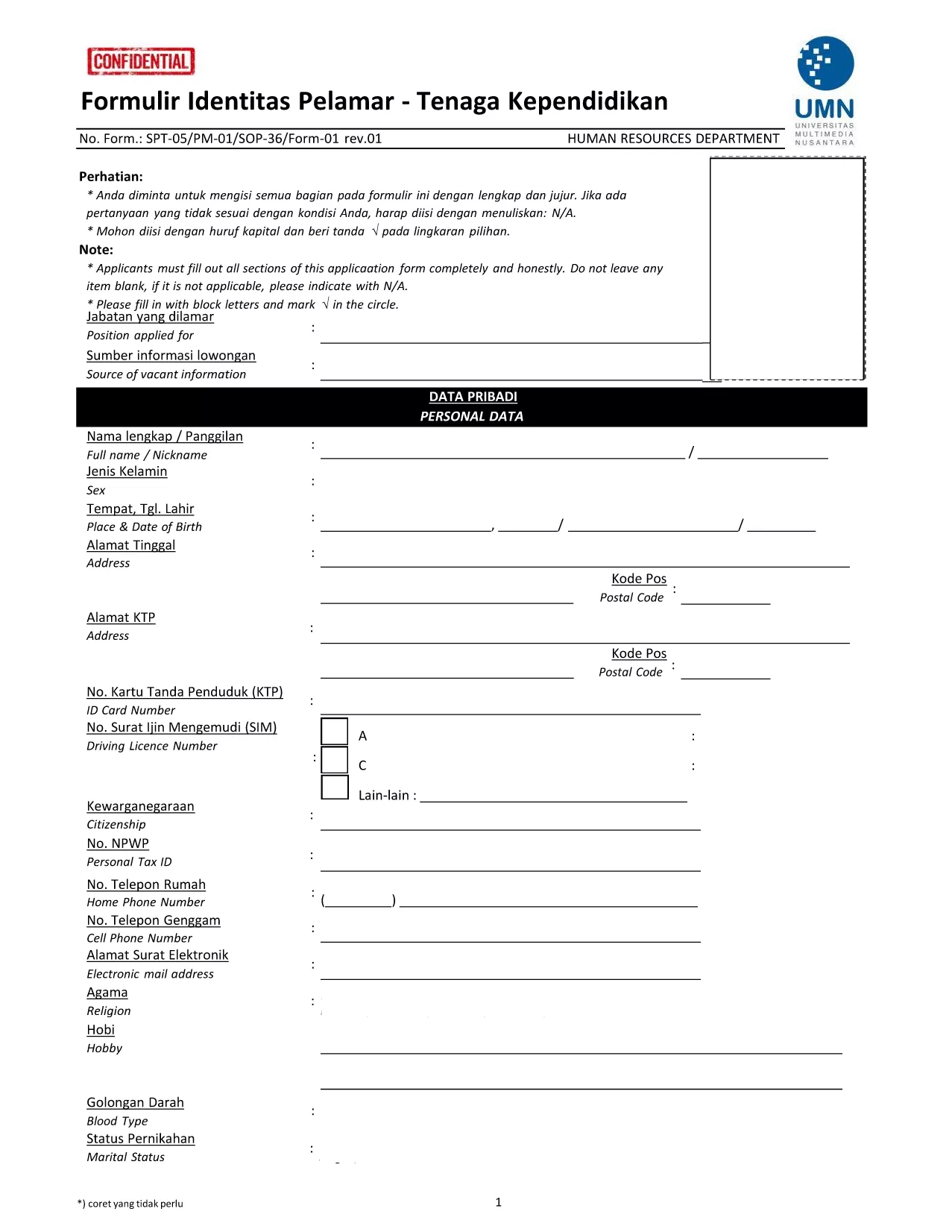
The Application Form Adalah is the official Indonesian document used by Universitas Negeri Malang (UMN) to collect personal and professional details from prospective teaching staff. This fillable PDF lets you enter data directly on the page, eliminating the need for printing, scanning, or manual entry.

What Is the Application Form Adalah?

Designed for the Tenaga Kependidikan (educational personnel) recruitment process, the form captures identity, education, work experience, and certification information. It is required for every candidate who wishes to be considered for a teaching or support position at UMN.

How to Fill the Form Online with Formize

Instead of downloading the PDF and opening it in a separate editor, simply click the "Fill out this form" button on this page. The Formize PDF Filler app will load in your browser, allowing you to type, select dates, and upload supporting documents instantly.

Key Sections and Required Information

  • Personal Data – Full name, National ID (NIK), place and date of birth.
  • Contact Details – Address, phone number, and email.
  • Education Background – Highest degree, institution, and graduation year.
  • Work Experience – Previous positions, employer names, and duration.
  • Certificates & Licenses – Upload scanned copies of teaching certificates.

Common Mistakes to Avoid

  • Leaving any mandatory field blank – the form will not submit.
  • Using an invalid email format – double‑check for “@” and domain.
  • Uploading files larger than 5 MB – resize scans before uploading.
  • Mismatching NIK numbers with official documents – verify against your ID.

Download and Save Your Completed Form

After you finish, click "Submit" within the Formize interface. The system will generate a completed PDF that you can download, store, and attach to your application email.

Need a hard copy? Use the same download link to print the final PDF for your records.

FAQ
  • Do I need Adobe Acrobat to fill this form?

    No. The Formize PDF Filler works in any modern browser, so you can complete the form without installing additional software.

  • Can I edit the form after I submit it?

    Once you submit, the PDF is locked. If you need changes, reopen the original fillable PDF via the "Fill out this form" button and edit again.

  • What file formats are accepted for uploads?

    Only PDF, JPG, and PNG files are accepted, and each file must be under 5 MB.

  • Is my personal data safe?

    Formize uses SSL encryption for all data transmitted between your browser and our servers, ensuring your information remains private.

  • Can I save a draft and finish later?

    Yes. Use the "Save Draft" button in the Formize interface to download a partially completed PDF, then reload it later to continue.

  • What should I do if I encounter an error?

    Refresh the page and try again. If the problem persists, ensure your browser is up to date and clear the cache.

ЯК

Як безкоштовно заповнити application form adalah онлайн за 4 простих кроків:

  1. 1
    Click the Fill‑out Button
    Press the "Fill out this form" button on this page. The Formize PDF Filler loads directly in your browser.
  2. 2
    Enter Your Information
    Type into each field, select dates from the calendar widget, and upload required documents where indicated.
  3. 3
    Review and Submit
    Double‑check all entries for accuracy, then click the "Submit" button. A completed PDF will be generated for download.
  4. 4
    Save or Print
    Download the final PDF to your computer, save it for future reference, or print a hard copy for your records.
Програма Formize PDF Filler
ПРО

шаблон application form adalah

Завдяки традиційному набору функцій для перегляду та заповнення PDF-документа в поєднанні з перевагами веб-додатку та адаптивного макета ви можете виконати application form adalah за лічені хвилини.

ОСОБЛИВОСТІ

Наповнювач PDF

Найпростіший спосіб заповнювати PDF-форми онлайн

  • Швидко заповніть application form adalah
    Шукаєте спосіб швидко заповнити application form adalah онлайн? За допомогою нашого безкоштовного онлайн-заповнювача PDF-форм ви знатимете, як редагувати та заповнювати цей PDF-документ менш ніж за хвилину.
  • Простий у використанні онлайн-редактор PDF
    Набридло роздруковувати PDF-файли, щоб ви могли їх редагувати, перш ніж сканувати повторно та надсилати назад? Безкоштовно редагуйте PDF-документи онлайн. Використовуйте наш онлайн-редактор PDF, щоб заощадити час і папір.
  • Чудові інструменти, усі платформи
    Хочете знати, як заповнити application form adalah на комп’ютері Mac або, можливо, як використовувати PDF-заповнювач безкоштовно? Наші онлайн-інструменти PDF працюють на всіх платформах.
  • Безпечне зберігання файлів
    Завершені файли "application form adalah" зберігаються в захищеній базі даних, якою керує хостинг Amazon Cloud. Ви можете будь-коли видалити свої файли з нашої системи. У будь-якому випадку ці файли автоматично видаляються через 24 години.
  • Чат із application form adalah
    Спілкуйтеся з "application form adalah" у Chatize, який є безкоштовним помічником для читання PDF. Ставте запитання та отримуйте відповіді від "application form adalah". Просто натисніть кнопку Chat With Document вище.

Видалити сеанс заповнення

Видалити вибраний сеанс заповнення? В цьому випадку ваш прогрес у заповненні форми буде втрачений.

Видалити сеанс редагування

Видалити вибраний сеанс редагування? У цьому випадку ваш прогрес у створенні та редагуванні форми буде втрачено.