Оберіть мову

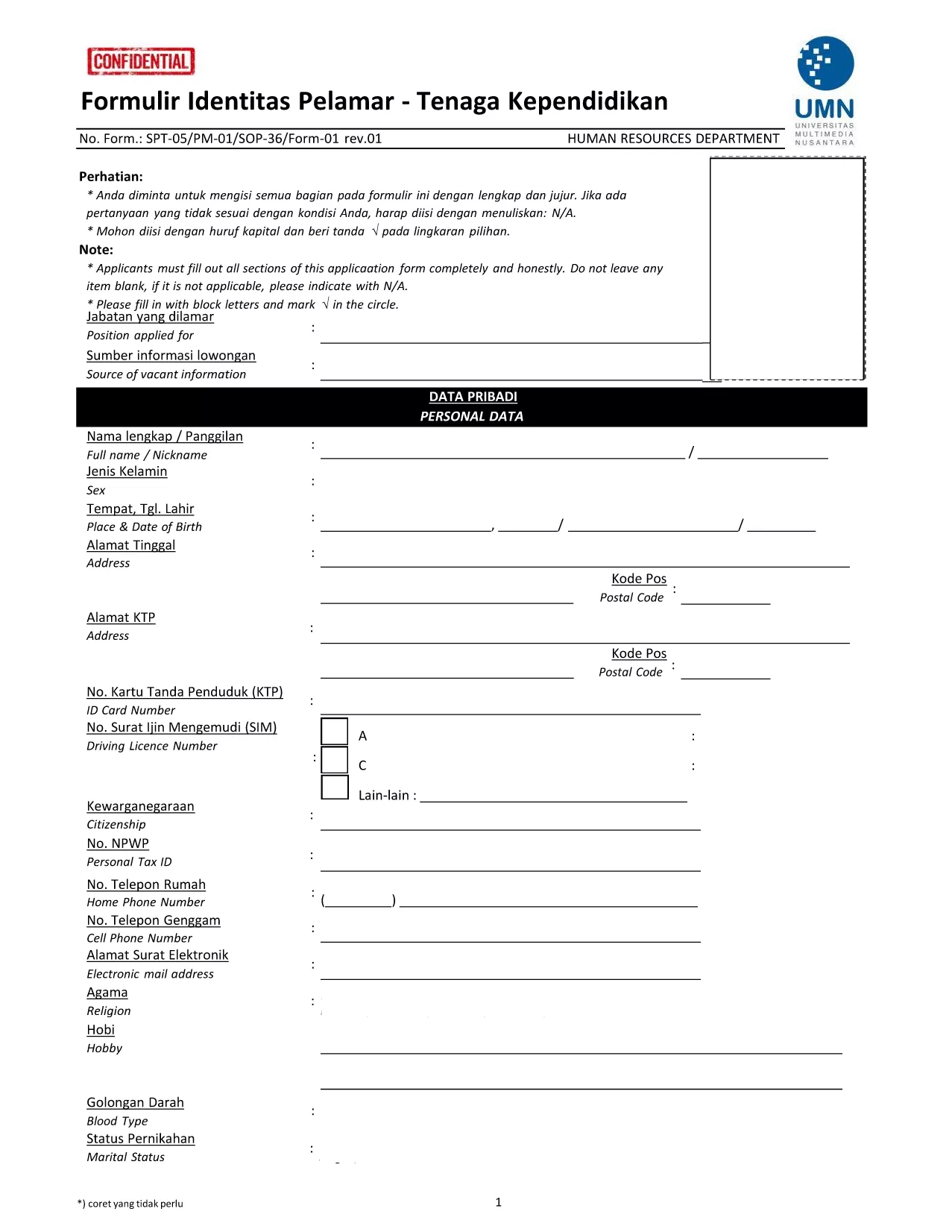
Fillable Application Form – Formulir Identitas Pelamar

  1. Мова індонезійська
  2. Країна Індонезія
  3. діяльність Job Recruitment
  4. відділ Higher Education
Fillable Application Form – Formulir Identitas Pelamar

Looking for an easy way to complete the Formulir Identitas Pelamar (Applicant Identity Form) without printing, scanning, or worrying about formatting? Our online fillable PDF solution lets you fill the form directly in your browser using the Formize PDF Filler app.

This form is required by many Indonesian universities and educational institutions when applying for teaching or staff positions. It collects personal data, education background, and work experience, and must be signed accurately to avoid application delays.

Why Use This Fillable PDF Form?

  • Fully interactive fields – type, check, and sign directly online.
  • Automatic validation helps prevent missing or incorrect information.
  • Secure cloud processing – your data never leaves the browser.
  • Instant PDF download of the completed form for easy submission.

How to Complete the Form in Seconds

Simply click the "Fill out this form" button below. The Formize PDF Filler will load, and you can start entering your details immediately. No extra software or plug‑ins are required.

Common Mistakes to Avoid

  • Leaving required fields blank – the filler highlights them in red.
  • Using unofficial abbreviations for degree names.
  • Forgetting to add a digital signature at the end of the document.

Where to Submit the Completed Form

After saving the completed PDF, attach it to your application portal or email it to the HR department of the university you are applying to. Always keep a copy for your records.

Ready to start? Click the button below and let Formize do the heavy lifting.

FAQ
  • Do I need to install any software to fill this form?

    No. The Formize PDF Filler runs completely in your web browser, so there is nothing to install.

  • Can I edit the form after I have saved it?

    Yes. Open the saved PDF again with the Formize filler, make changes, and re‑save.

  • Is my personal data safe?

    All processing occurs locally in your browser; the data never leaves your device unless you choose to download or share it.

  • What if I make a mistake while filling the form?

    Use the "Undo" button or simply click into the field and correct the entry before saving.

  • Do I need a digital signature?

    Yes. The form requires a signature. You can draw it with your mouse, touchpad, or upload an image of your handwritten signature.

  • Can I print the completed form?

    Absolutely. After saving, you can open the PDF in any viewer and print it as needed.

  • Is this the official version of the Formulir Identitas Pelamar?

    Yes. The PDF linked below is the latest revision provided by Universitas Multimedia Nusantara.

  • What browsers are supported?

    All modern browsers – Chrome, Edge, Firefox, Safari – support the Formize filler.

ЯК

Як безкоштовно заповнити application form онлайн за 5 простих кроків:

  1. 1
    Click the Fill button
    Press the "Fill out this form" button on the page. The Formize PDF Filler app will open in a new tab.
  2. 2
    Enter your information
    Type directly into each field, select dates from the calendar widget, and check the appropriate boxes.
  3. 3
    Add your digital signature
    Use the signature pad at the bottom of the form to draw or upload your signature.
  4. 4
    Review and save
    Double‑check all entries, then click "Save PDF" to download the completed, fillable document.
  5. 5
    Submit the form
    Attach the saved PDF to your university or HR portal, or email it according to the instructions provided by the institution.
Програма Formize PDF Filler
ПРО

шаблон application form

Завдяки традиційному набору функцій для перегляду та заповнення PDF-документа в поєднанні з перевагами веб-додатку та адаптивного макета ви можете виконати application form за лічені хвилини.

ОСОБЛИВОСТІ

Наповнювач PDF

Найпростіший спосіб заповнювати PDF-форми онлайн

  • Швидко заповніть application form
    Шукаєте спосіб швидко заповнити application form онлайн? За допомогою нашого безкоштовного онлайн-заповнювача PDF-форм ви знатимете, як редагувати та заповнювати цей PDF-документ менш ніж за хвилину.
  • Простий у використанні онлайн-редактор PDF
    Набридло роздруковувати PDF-файли, щоб ви могли їх редагувати, перш ніж сканувати повторно та надсилати назад? Безкоштовно редагуйте PDF-документи онлайн. Використовуйте наш онлайн-редактор PDF, щоб заощадити час і папір.
  • Чудові інструменти, усі платформи
    Хочете знати, як заповнити application form на комп’ютері Mac або, можливо, як використовувати PDF-заповнювач безкоштовно? Наші онлайн-інструменти PDF працюють на всіх платформах.
  • Безпечне зберігання файлів
    Завершені файли "application form" зберігаються в захищеній базі даних, якою керує хостинг Amazon Cloud. Ви можете будь-коли видалити свої файли з нашої системи. У будь-якому випадку ці файли автоматично видаляються через 24 години.
  • Чат із application form
    Спілкуйтеся з "application form" у Chatize, який є безкоштовним помічником для читання PDF. Ставте запитання та отримуйте відповіді від "application form". Просто натисніть кнопку Chat With Document вище.

Видалити сеанс заповнення

Видалити вибраний сеанс заповнення? В цьому випадку ваш прогрес у заповненні форми буде втрачений.

Видалити сеанс редагування

Видалити вибраний сеанс редагування? У цьому випадку ваш прогрес у створенні та редагуванні форми буде втрачено.