
Оберіть мову

Form 5498‑ESA Fillable PDF – Coverdell Education Savings Account Reporting

  1. Країна США
  2. Мова англійська
  3. діяльність податки
  4. відділ Служба внутрішніх доходів
Form 5498‑ESA Fillable PDF – Coverdell Education Savings Account Reporting

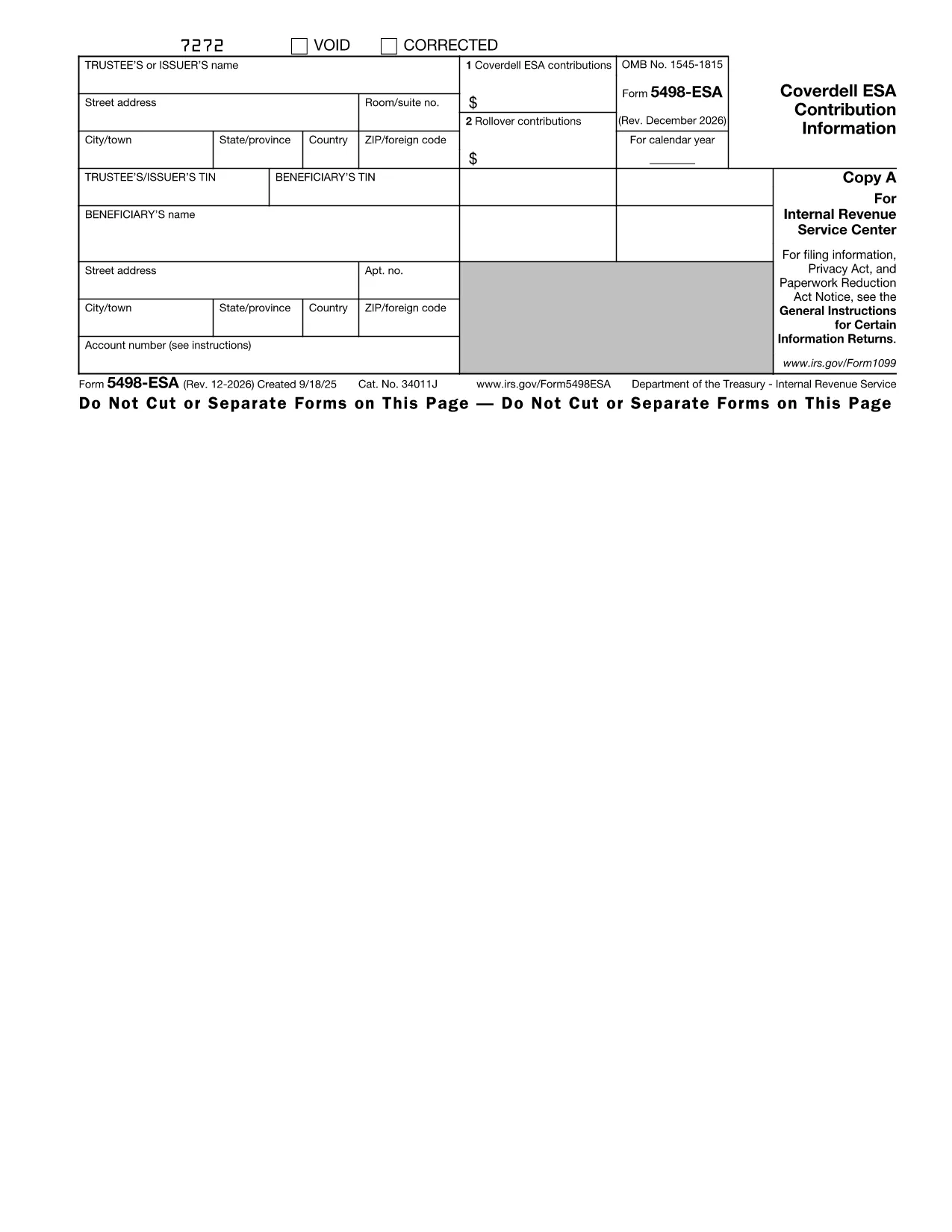
The IRS Form 5498‑ESA (Coverdell Education Savings Account Contribution Information) is the official document trustees or issuers use to report contributions, rollovers, and the year‑end fair market value of a Coverdell ESA. Accurate reporting helps the IRS track education‑savings contributions and ensures beneficiaries stay within the $2,000 annual limit.

What Is Form 5498‑ESA?

Form 5498‑ESA provides a yearly snapshot of all activity in a Coverdell ESA. It includes:

  • Trustee/issuer name, address, and TIN
  • Beneficiary name and TIN
  • Total contributions for the tax year (Box 1)
  • Rollover contributions, if any (Box 2)
  • Fair market value of the account on December 31

How to Fill Out Form 5498‑ESA Online

Instead of printing, downloading, and editing the PDF in a separate editor, simply click the "Fill out this form" button on this page. The Formize PDF Filler app will load instantly, letting you:

  1. Enter trustee and beneficiary details directly into fillable fields.
  2. Upload supporting documents if needed.
  3. Validate the data with built‑in checks that flag common mistakes.
  4. Save a completed copy or export it as a PDF for your records.

Key Deadlines and Common Errors

Deadline: Trustees must provide Copy B of Form 5498‑ESA to the beneficiary by May 31 of the year following the tax year.

Common mistakes to avoid:

  • Entering the wrong beneficiary Social Security number.
  • Reporting contributions that exceed the $2,000 limit.
  • Leaving Box 2 blank when a rollover actually occurred.
  • Failing to include the fair market value as of December 31.

Download the Fillable PDF

If you prefer to work offline, you can download the official fillable PDF directly from the IRS:

Download Form 5498‑ESA (PDF)

Why Use Formize PDF Filler?

Formize provides a secure, browser‑based environment that eliminates the need for separate PDF software. Your data never leaves the encrypted session unless you choose to save or export it. Plus, the built‑in validation helps you submit a clean, error‑free form the first time.

Ready to get started? Click the button below and let Formize guide you through every field.

Інструкції

FAQ
  • Who must file Form 5498‑ESA?

    The trustee or issuer of the Coverdell ESA files the form. A copy (Copy B) is provided to the beneficiary by May 31 of the following year.

  • Is Form 5498‑ESA deductible on my tax return?

    No. Contributions reported on Form 5498‑ESA are not deductible, but they are important for tracking contribution limits.

  • Can I file Form 5498‑ESA electronically?

    Yes. If you have 250 or more forms, electronic filing is required. For a single form, you can submit a paper copy or use an online filler like Formize.

  • What happens if I exceed the $2,000 contribution limit?

    Excess contributions plus earnings must be withdrawn by June 1 of the following year to avoid a 6% excise tax on the excess amount.

  • Do I need to attach any supporting documents?

    Generally, no supporting documents are attached to Form 5498‑ESA, but you should keep records of contributions and rollovers for your own files.

  • How do I correct an error on a filed Form 5498‑ESA?

    Submit a corrected Form 5498‑ESA with the label "Corrected" at the top of the form. The IRS provides instructions for filing amended information returns.

ЯК

Як безкоштовно заповнити Form 5498-ESA онлайн за 4 простих кроків:

  1. 1
    Click the Fill‑out Button
    On this page, click the "Fill out this form" button. The Formize PDF Filler will open in a new tab.
  2. 2
    Enter Required Information
    Type the trustee’s name, address, TIN, and the beneficiary’s details into the fillable fields. The form automatically moves you to the next section.
  3. 3
    Review and Validate
    Use the built‑in validation to check for missing or incorrect entries. Fix any highlighted errors before proceeding.
  4. 4
    Save or Export
    When all fields are complete, click "Save" to store a copy in your Formize account or "Export PDF" to download a finished PDF for your records.
Програма Formize PDF Filler
ПРО

Федеральні податкові форми

Form 5498-ESA – це одна з федеральних податкових форм, які є документами, які використовуються для звітування та подання федеральних податків на прибуток до Служби внутрішніх доходів (IRS) у Сполучених Штатах. Ці форми використовуються окремими особами, підприємствами та організаціями, щоб повідомити про свої доходи, відрахування та іншу відповідну інформацію, необхідну для розрахунку їхніх федеральних податкових зобов’язань.

Найбільш поширеною федеральною податковою формою є Форма 1040, яка використовується окремими платниками податків для звітування про податок на доходи фізичних осіб. Інші форми, які часто використовуються, включають форму 1065 для партнерства, Форма 1120 для корпорацій і Форма 990 для організацій, звільнених від податків.

Форми федерального оподаткування зазвичай вимагають від платників податків звітувати про різні джерела доходу, такі як заробітна плата, зарплата та чайові, а також дохід від інвестицій, оренди нерухомості та інших джерел. Форми також дозволяють платникам податків вимагати відрахувань і кредитів на різні витрати, такі як благодійні внески, відсотки по іпотеці та витрати на охорону здоров'я.

Важливо подавати федеральні податкові форми точно та вчасно, оскільки недотримання цього правила може призвести до стягнення пені та відсотків з боку IRS.

ОСОБЛИВОСТІ

Наповнювач PDF

Найпростіший спосіб заповнювати PDF-форми онлайн

  • Швидко заповніть Form 5498-ESA
    Шукаєте спосіб швидко заповнити Form 5498-ESA онлайн? За допомогою нашого безкоштовного онлайн-заповнювача PDF-форм ви знатимете, як редагувати та заповнювати цей PDF-документ менш ніж за хвилину.
  • Простий у використанні онлайн-редактор PDF
    Набридло роздруковувати PDF-файли, щоб ви могли їх редагувати, перш ніж сканувати повторно та надсилати назад? Безкоштовно редагуйте PDF-документи онлайн. Використовуйте наш онлайн-редактор PDF, щоб заощадити час і папір.
  • Чудові інструменти, усі платформи
    Хочете знати, як заповнити Form 5498-ESA на комп’ютері Mac або, можливо, як використовувати PDF-заповнювач безкоштовно? Наші онлайн-інструменти PDF працюють на всіх платформах.
  • Безпечне зберігання файлів
    Завершені файли "Form 5498-ESA" зберігаються в захищеній базі даних, якою керує хостинг Amazon Cloud. Ви можете будь-коли видалити свої файли з нашої системи. У будь-якому випадку ці файли автоматично видаляються через 24 години.
  • Чат із Form 5498-ESA
    Спілкуйтеся з "Form 5498-ESA" у Chatize, який є безкоштовним помічником для читання PDF. Ставте запитання та отримуйте відповіді від "Form 5498-ESA". Просто натисніть кнопку Chat With Document вище.

Видалити сеанс заповнення

Видалити вибраний сеанс заповнення? В цьому випадку ваш прогрес у заповненні форми буде втрачений.

Видалити сеанс редагування

Видалити вибраний сеанс редагування? У цьому випадку ваш прогрес у створенні та редагуванні форми буде втрачено.