
Оберіть мову

Form 637 – Application for Excise Tax Registration (Fillable PDF)

  1. Країна США
  2. Мова англійська
  3. діяльність податки
  4. відділ Служба внутрішніх доходів
Form 637 – Application for Excise Tax Registration (Fillable PDF)

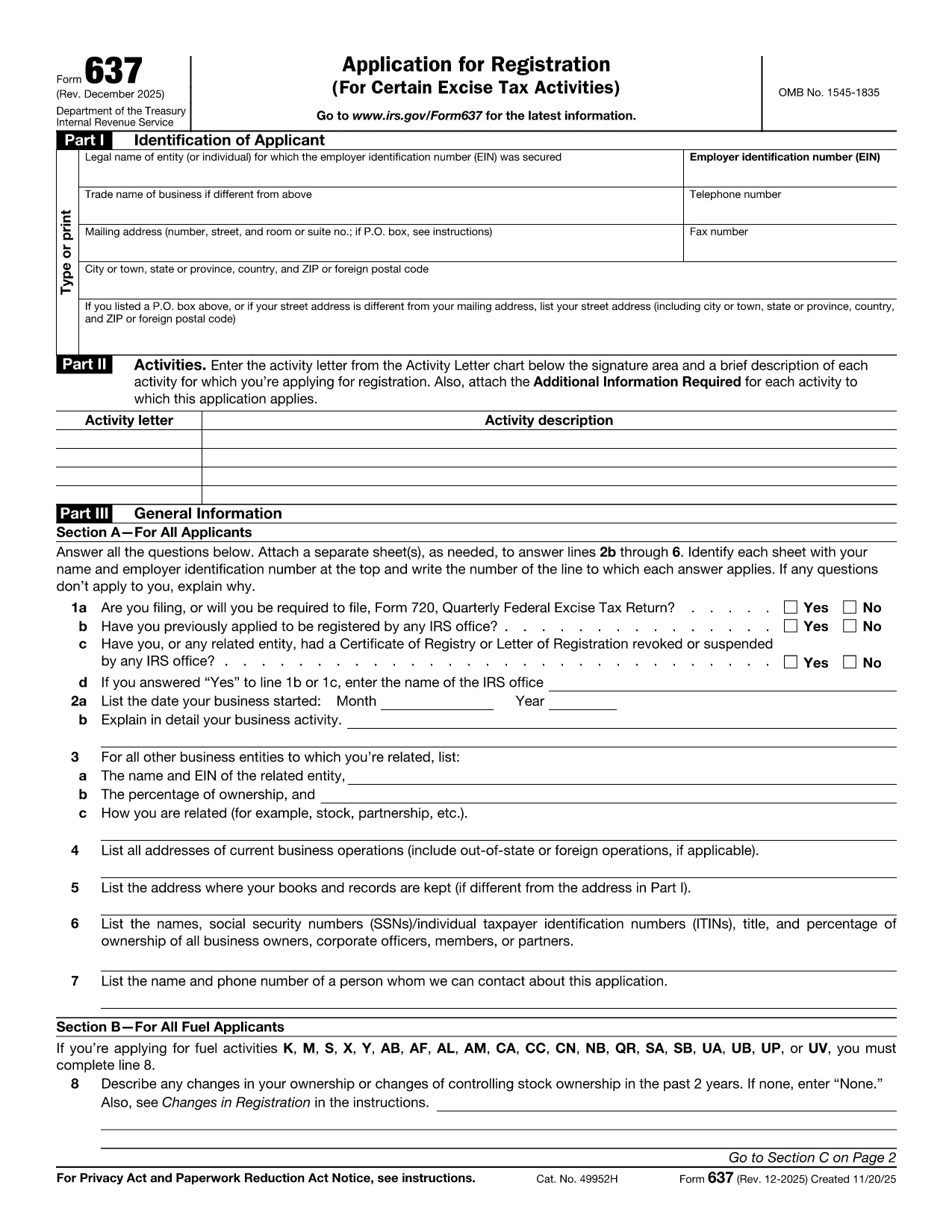
Form 637, Application for Registration (For Certain Excise Tax Activities), is the IRS’s official request to register for activities subject to federal excise taxes. Whether you are a manufacturer, importer, fuel seller, or any other entity that handles taxable products, you need this form to stay compliant.

On Formize.com you can fill the form directly in the browser—no PDF editor required. Just click the Fill out this form button, let the Formize PDF Filler load, and start entering your information.

Who Must File Form 637

  • Manufacturers, producers, or importers of excise‑taxed products.
  • Sellers or purchasers of taxable fuel.
  • Exporters of excise‑taxed goods.
  • Any entity using products that require a Certificate of Registration.

How to Complete Form 637 Online

Follow these simple steps to finish the application without printing a single page:

  1. Click the Fill out this form button on this page.
  2. Wait for the Formize PDF Filler to load (usually a few seconds).
  3. Enter your legal name, EIN, trade name, and contact information.
  4. Select the appropriate activity letter (M, S, etc.) and provide a brief description.
  5. Answer the general information questions in Part III.
  6. Upload any required supporting documents directly in the filler.
  7. Review the completed form, then click Submit to download a signed PDF or mail it to the IRS address shown in the instructions.

Common Mistakes & Tips

  • Incorrect EIN: Double‑check the number; a typo will delay approval.
  • Missing activity letter: Use the chart on pages 2‑5 of the form to pick the right letter.
  • Skipping supporting documents: Attach licenses, permits, or prior registration letters as required.
  • Out‑of‑date form: Always use the latest PDF – the link below points to the current IRS version.

Download the Fillable PDF

If you prefer to work offline, you can download the official PDF from the IRS and open it with any PDF editor. However, the online filler is faster, error‑proof, and saves you a trip to the printer.

FAQs About Form 637

Below are the most frequently asked questions. Click each question to see the answer.

FAQ
  • What is Form 637 used for?

    Form 637 is the IRS application to register for activities subject to federal excise taxes, such as manufacturing or selling taxable fuel.

  • Who is required to file Form 637?

    Manufacturers, producers, importers, fuel sellers, exporters, and any entity that uses products requiring excise tax registration must file Form 637.

  • Can I file Form 637 electronically?

    Yes. On Formize.com you can fill the PDF online, then download the completed form to mail to the IRS. The IRS does not accept direct e‑filing, but the online filler streamlines the process.

  • Do I need an EIN to complete Form 637?

    An Employer Identification Number (EIN) is required. If you don’t have one, apply using Form SS‑4 before completing Form 637.

  • What supporting documents are required?

    Typically you must attach business licenses, permits, prior registration letters, and any documents that prove the activity you’re registering for.

  • How long does the IRS take to approve the registration?

    Processing times vary, but most applicants receive a response within 30‑45 days after the IRS receives the complete application.

  • Is there a fee to file Form 637?

    No filing fee is required for Form 637 itself. However, excise taxes will be due based on the activity once registration is approved.

  • What should I do if I make a mistake on the form?

    Correct the error in the online filler before downloading the final PDF. If you’ve already mailed the form, submit a corrected Form 637 with a cover letter explaining the changes.

  • Where do I mail the completed Form 637?

    The mailing address is listed in the form’s instructions. It is typically the IRS Office of Excise Tax at the address shown on page 1 of the PDF.

  • Can I save my progress while filling the form online?

    Yes. The Formize PDF Filler allows you to save a draft and return later to finish the application.

ЯК

Як безкоштовно заповнити Form 637 онлайн за 5 простих кроків:

  1. 1
    Click "Fill out this form"
    Locate the button on this page and click it to launch the Formize PDF Filler.
  2. 2
    Wait for the filler to load
    The web app loads the fillable version of Form 637 in a few seconds.
  3. 3
    Enter required information
    Complete each field—legal name, EIN, activity letter, and any supporting details.
  4. 4
    Review and validate
    Use the built‑in validation to catch missing or incorrectly formatted entries.
  5. 5
    Submit or download
    When finished, either submit the form directly to the IRS address shown or download the completed PDF for your records.
Програма Formize PDF Filler
ПРО

Податкові форми

Form 637 – це одна з податкових форм, які є документами, які використовуються для подання відомостей про доходи фізичних осіб або компаній, відрахування та податкові зобов’язання відповідному податковому органу. Ці форми необхідні для дотримання податкового законодавства та виконання податкових зобов’язань. Форми оподаткування відрізняються залежно від країни та конкретних податкових вимог. Ось кілька поширених типів податкових форм:

Індивідуальні податкові форми: ці форми використовуються окремими платниками податків, щоб звітувати про свої особисті доходи та вимагати відрахувань, кредитів і звільнень. Приклади включають форму 1040 у Сполучених Штатах або форму податкової декларації з самооцінкою у Великобританії.

Податкові форми для бізнесу. Податкові форми для бізнесу використовуються компаніями, товариствами чи самозайнятими особами для звітування про доходи, витрати та іншу пов’язану з податками інформацію. Приклади включають форму Додатку C (Прибуток або збиток від бізнесу) у Сполучених Штатах або форму CT600 (Податкова декларація компанії) у Сполученому Королівстві.

Форми податку на заробітну плату: ці форми використовуються роботодавцями для звітування про заробітну плату, зарплату та податки, утримані із зарплат їхніх працівників. Приклади включають форму W-2 у Сполучених Штатах або форму P60 у Великобританії.

Форми податку з продажу: форми податку з продажу використовуються компаніями для звітування та сплати податку з продажу, стягненого з оподатковуваних товарів або послуг. Конкретні форми податку з продажів залежать від юрисдикції.

Форми податку на додану вартість (ПДВ). Форми ПДВ використовуються в країнах, де стягується податок на додану вартість, щоб звітувати та перераховувати ПДВ, зібраний із продажів, і вимагати кредиту з ПДВ для покупок. Приклади включають форми декларації з ПДВ, які використовуються в багатьох країнах.

Приблизні податкові форми. Приблизні податкові форми використовуються для звітування та сплати приблизних податків на доходи, які не підлягають утриманню, як-от дохід від самозайнятості чи дохід від інвестицій.

Це лише кілька прикладів численних податкових форм, які можуть існувати. Конкретні форми, які потрібні, залежать від податкового законодавства та норм у вашій країні чи юрисдикції. Важливо проконсультуватися з інструкціями податкового органу або отримати професійну пораду, щоб визначити, які форми застосовуються у вашій ситуації.

ОСОБЛИВОСТІ

Наповнювач PDF

Найпростіший спосіб заповнювати PDF-форми онлайн

  • Швидко заповніть Form 637
    Шукаєте спосіб швидко заповнити Form 637 онлайн? За допомогою нашого безкоштовного онлайн-заповнювача PDF-форм ви знатимете, як редагувати та заповнювати цей PDF-документ менш ніж за хвилину.
  • Простий у використанні онлайн-редактор PDF
    Набридло роздруковувати PDF-файли, щоб ви могли їх редагувати, перш ніж сканувати повторно та надсилати назад? Безкоштовно редагуйте PDF-документи онлайн. Використовуйте наш онлайн-редактор PDF, щоб заощадити час і папір.
  • Чудові інструменти, усі платформи
    Хочете знати, як заповнити Form 637 на комп’ютері Mac або, можливо, як використовувати PDF-заповнювач безкоштовно? Наші онлайн-інструменти PDF працюють на всіх платформах.
  • Безпечне зберігання файлів
    Завершені файли "Form 637" зберігаються в захищеній базі даних, якою керує хостинг Amazon Cloud. Ви можете будь-коли видалити свої файли з нашої системи. У будь-якому випадку ці файли автоматично видаляються через 24 години.
  • Чат із Form 637
    Спілкуйтеся з "Form 637" у Chatize, який є безкоштовним помічником для читання PDF. Ставте запитання та отримуйте відповіді від "Form 637". Просто натисніть кнопку Chat With Document вище.

Видалити сеанс заповнення

Видалити вибраний сеанс заповнення? В цьому випадку ваш прогрес у заповненні форми буде втрачений.

Видалити сеанс редагування

Видалити вибраний сеанс редагування? У цьому випадку ваш прогрес у створенні та редагуванні форми буде втрачено.