
Оберіть мову

Form 6729-D – Fillable PDF for VITA/TCE Site Review

  1. Країна США
  2. Мова англійська
  3. діяльність податки
  4. відділ Служба внутрішніх доходів
Form 6729-D – Fillable PDF for VITA/TCE Site Review

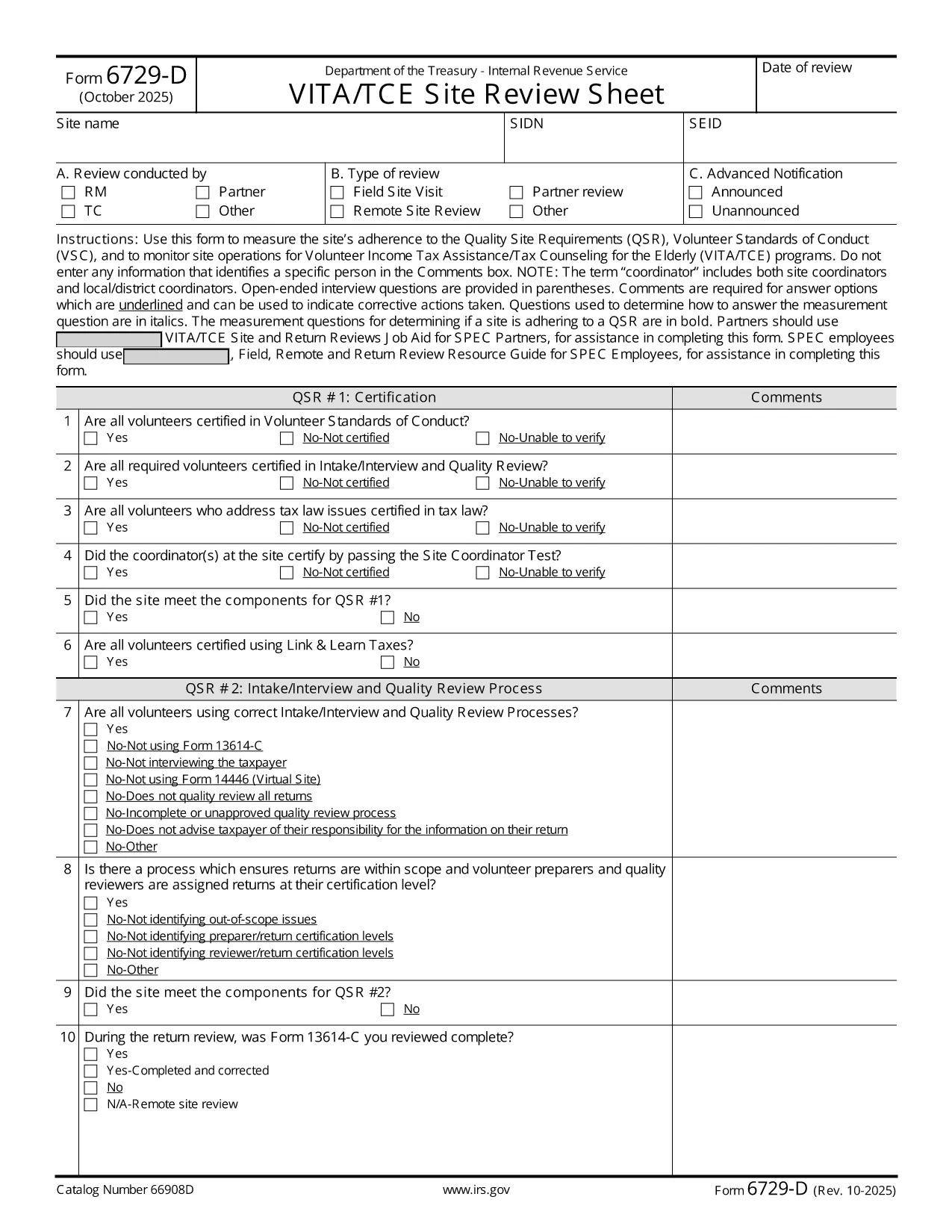
The IRS Form 6729-D (Site Review Sheet) is used by Volunteer Income Tax Assistance (VITA) and Tax Counseling for the Elderly (TCE) programs to evaluate a site’s compliance with the Quality Site Requirements (QSR) and Volunteer Standards of Conduct (VSC). This fillable PDF version lets you complete the form instantly in your browser—no extra PDF editor required.

What Is Form 6729-D?

Form 6729-D records the results of a site review, covering:

  • Adherence to Quality Site Requirements (QSR)
  • Volunteer Standards of Conduct (VSC)
  • Operational observations for VITA/TCE sites
  • Comments from the site coordinator (without personal identifiers)

The form is mandatory for any VITA/TCE location that receives IRS funding or oversight.

How to Complete the Form Online

Instead of downloading the PDF and opening a separate editor, simply click the "Fill out this form" button on this page. Our Formize PDF Filler app will load the document directly in your browser. Follow these steps:

  1. Click the blue Fill out this form button.
  2. Wait a few seconds while the Formize PDF Filler loads.
  3. Enter the required information in each field. Required fields are marked with an asterisk (*).
  4. Use the Comments box for observations—avoid entering names or personal data.
  5. When finished, click Save & Download to get a completed copy, or click Submit if your organization has integrated a secure upload.

Common Mistakes to Avoid

  • Including personal identifiers in the Comments section – the IRS prohibits names, SSNs, or any data that could identify a specific volunteer or client.
  • Leaving required fields blank – an asterisk (*) indicates a mandatory entry; the form will not save until these are completed.
  • Using an outdated version – always verify the revision date (current revision is Rev. 10‑2025).
  • Incorrect date format – use MM/DD/YYYY as shown in the example field.

Where to Submit the Completed Form

After saving the filled PDF, email it to your regional VITA/TCE coordinator or upload it through your organization’s secure portal. Keep a copy for your records in case the IRS requests follow‑up documentation.

Need more guidance? Review the IRS instructions linked below or contact your local VITA/TCE supervisor.

FAQ
  • Do I need Adobe Acrobat to fill Form 6729-D?

    No. The Formize PDF Filler works in any modern browser, so you can complete the form without installing additional software.

  • Can I edit the form after I download it?

    Yes, you can reopen the saved PDF in the Formize filler or any compatible PDF editor, but it’s easier to make changes before downloading.

  • What revision of Form 6729-D is this?

    The PDF linked is the latest revision, Rev. 10‑2025, as published by the IRS.

  • Is it okay to type a volunteer’s name in the Comments box?

    No. The IRS explicitly forbids entering any personal identifiers, including names, in the Comments section.

  • Where should I send the completed form?

    Email the saved PDF to your regional VITA/TCE coordinator or upload it via your organization’s secure portal, following your local procedures.

  • What if I make a mistake after submitting?

    Contact your coordinator immediately. You can submit a corrected version of the form with a brief note explaining the change.

  • Is there a paper version of Form 6729-D?

    Yes, the IRS provides a printable PDF, but the fillable version saves time and reduces errors.

  • Do I need to sign the form electronically?

    If your organization requires an electronic signature, use the signature field provided in the filler. Otherwise, a printed signature after printing is acceptable.

ЯК

Як безкоштовно заповнити Form 6729-D онлайн за 3 простих кроків:

  1. 1
    Open the Fillable Form
    Click the blue “Fill out this form” button on the page. The Formize PDF Filler loads the Form 6729-D directly in your browser.
  2. 2
    Enter Required Information
    Complete each field marked with an asterisk (*). Use the Comments box for observations, but do not include personal identifiers.
  3. 3
    Save or Submit
    When all fields are filled, click “Save & Download” to keep a copy, or click “Submit” if your organization provides a secure upload option.
Програма Formize PDF Filler
ПРО

Податкові форми

Form 6729-D – це одна з податкових форм, які є документами, які використовуються для подання відомостей про податки до відповідного податкового органу. Існують різні типи податкових форм, у тому числі федеральні, штатні та місцеві податкові форми, які можуть відрізнятися залежно від обставин і місцезнаходження платника податків.

ОСОБЛИВОСТІ

Наповнювач PDF

Найпростіший спосіб заповнювати PDF-форми онлайн

  • Швидко заповніть Form 6729-D
    Шукаєте спосіб швидко заповнити Form 6729-D онлайн? За допомогою нашого безкоштовного онлайн-заповнювача PDF-форм ви знатимете, як редагувати та заповнювати цей PDF-документ менш ніж за хвилину.
  • Простий у використанні онлайн-редактор PDF
    Набридло роздруковувати PDF-файли, щоб ви могли їх редагувати, перш ніж сканувати повторно та надсилати назад? Безкоштовно редагуйте PDF-документи онлайн. Використовуйте наш онлайн-редактор PDF, щоб заощадити час і папір.
  • Чудові інструменти, усі платформи
    Хочете знати, як заповнити Form 6729-D на комп’ютері Mac або, можливо, як використовувати PDF-заповнювач безкоштовно? Наші онлайн-інструменти PDF працюють на всіх платформах.
  • Безпечне зберігання файлів
    Завершені файли "Form 6729-D" зберігаються в захищеній базі даних, якою керує хостинг Amazon Cloud. Ви можете будь-коли видалити свої файли з нашої системи. У будь-якому випадку ці файли автоматично видаляються через 24 години.
  • Чат із Form 6729-D
    Спілкуйтеся з "Form 6729-D" у Chatize, який є безкоштовним помічником для читання PDF. Ставте запитання та отримуйте відповіді від "Form 6729-D". Просто натисніть кнопку Chat With Document вище.

Видалити сеанс заповнення

Видалити вибраний сеанс заповнення? В цьому випадку ваш прогрес у заповненні форми буде втрачений.

Видалити сеанс редагування

Видалити вибраний сеанс редагування? У цьому випадку ваш прогрес у створенні та редагуванні форми буде втрачено.