
Оберіть мову

IRS Form 6781 – Fillable PDF for Gains & Losses from Section 1256 Contracts

  1. Країна США
  2. Мова англійська
  3. діяльність податки
  4. відділ Служба внутрішніх доходів
IRS Form 6781 – Fillable PDF for Gains & Losses from Section 1256 Contracts

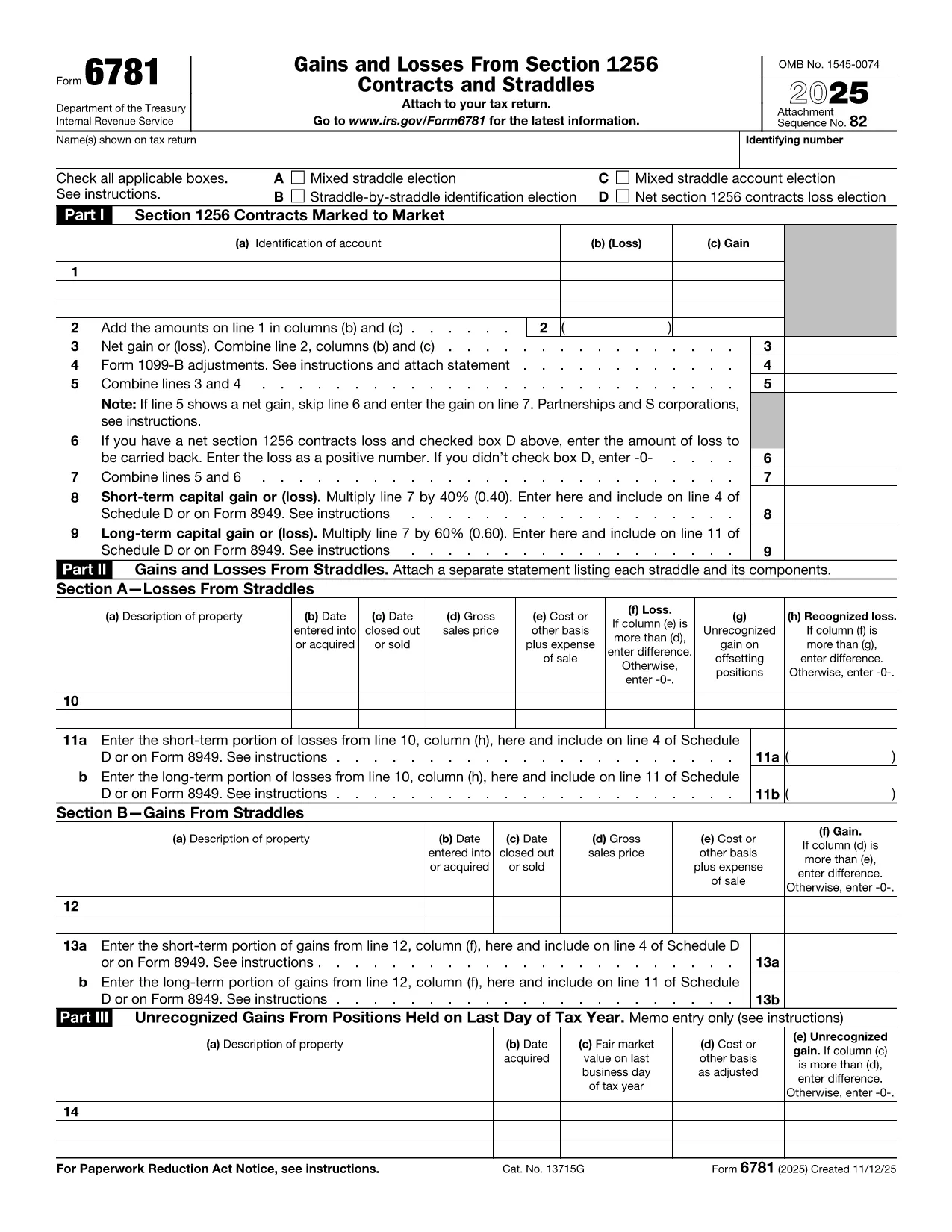
Form 6781, officially titled Gains and Losses From Section 1256 Contracts and Straddles, is required for traders, investors, and any taxpayer who holds regulated futures, options, foreign‑currency contracts, or other Section 1256 instruments. This one‑page form reports both short‑term and long‑term capital results, and it includes election boxes for mixed‑straddle and loss‑carryback options.

What Is IRS Form 6781?

The form captures three distinct sections:

  • Part I – Section 1256 Contracts Marked to Market
  • Part II – Gains and Losses from Straddles
  • Part III – Unrecognized Gains on Positions Held at Year‑End

Each part helps the IRS calculate the correct mix of short‑term (40%) and long‑term (60%) capital treatment, regardless of the actual holding period.

How to Fill Out the Form Using Formize

Instead of printing, scanning, or editing the PDF in a desktop editor, you can complete the form directly in your browser:

  1. Click "Fill out this form" on the page – the Formize PDF Filler loads instantly.
  2. Enter your name, Social Security or EIN, and the tax year.
  3. Select any applicable election boxes (Mixed Straddle, Straddle‑by‑Straddle, etc.).
  4. Enter contract identifiers, gains, and losses for each line item.
  5. Review the calculations, then click Save to download a completed PDF or Print to file with your return.

The online filler validates numeric fields and ensures required boxes are checked, reducing the chance of IRS rejections.

Common Mistakes to Avoid

  • Leaving election boxes unchecked when a mixed straddle exists.
  • Reporting the same contract in both Part I and Part II.
  • Mis‑calculating the 60/40 split of long‑term vs. short‑term gains.
  • Forgetting to attach a statement when you elect a net Section 1256 loss carryback.

When to File and Who Needs This Form

Form 6781 is attached to your individual, corporate, partnership, or trust tax return (Form 1040, 1120, 1065, or 1041). The filing deadline matches the underlying return – typically April 15 for individuals, with extensions available.

If you traded any Section 1256 contracts during the tax year, you must file Form 6781, even if the net result is a zero gain or loss.

Ready to get started? Click the button below to open the fillable version and complete it in seconds.

FAQ
  • What types of contracts are reported on Form 6781?

    Section 1256 contracts include regulated futures, foreign‑currency contracts, non‑equity options, dealer equity options, and dealer securities futures contracts.

  • Do I need to file Form 6781 if I had no gain or loss?

    Yes. If you held any Section 1256 contracts during the year, you must file Form 6781 even if the net result is zero.

  • Can I e‑file Form 6781 with my return?

    Form 6781 is attached to the main tax return (Form 1040, 1120, etc.). When you e‑file the return, the completed PDF is included automatically.

  • What is the deadline for filing Form 6781?

    The deadline matches the filing deadline of the associated tax return – typically April 15 for individuals, with extensions available.

  • How does the 60/40 long‑term/short‑term split work?

    Regardless of how long you held the contract, 60% of the gain or loss is treated as long‑term capital, and 40% as short‑term capital.

  • Can I carry back a net Section 1256 loss?

    Yes, individuals may carry back a net Section 1256 loss up to three prior years, but corporations, partnerships, estates, and trusts are not eligible.

  • What common errors should I watch for?

    Common mistakes include forgetting to check required election boxes, double‑reporting contracts in both Part I and Part II, and mis‑calculating the 60/40 split.

  • Is there a printable version if I prefer paper?

    The fillable PDF can be downloaded, printed, and mailed, but using the online filler reduces errors and speeds up the process.

ЯК

Як безкоштовно заповнити Form 6781 онлайн за 5 простих кроків:

  1. 1
    Open the Fillable Form
    Click the "Fill out this form" button on the page. The Formize PDF Filler will load instantly in your browser.
  2. 2
    Enter Taxpayer Information
    Provide your name, Social Security Number (or EIN), and the tax year at the top of the form.
  3. 3
    Select Election Boxes
    Check any applicable boxes for mixed straddle elections, straddle‑by‑straddle identification, or net loss carryback.
  4. 4
    Report Gains and Losses
    Enter each contract’s identification, mark‑to‑market gain or loss, and let the filler calculate the 60% long‑term / 40% short‑term split.
  5. 5
    Save or Print
    When all fields are complete, click "Save" to download the finished PDF or "Print" to attach it to your tax return.
Програма Formize PDF Filler
ПРО

Федеральні податкові форми

Form 6781 – це одна з федеральних податкових форм, які є документами, які використовуються для звітування та подання федеральних податків на прибуток до Служби внутрішніх доходів (IRS) у Сполучених Штатах. Ці форми використовуються окремими особами, підприємствами та організаціями, щоб повідомити про свої доходи, відрахування та іншу відповідну інформацію, необхідну для розрахунку їхніх федеральних податкових зобов’язань.

Найбільш поширеною федеральною податковою формою є Форма 1040, яка використовується окремими платниками податків для звітування про податок на доходи фізичних осіб. Інші форми, які часто використовуються, включають форму 1065 для партнерства, Форма 1120 для корпорацій і Форма 990 для організацій, звільнених від податків.

Форми федерального оподаткування зазвичай вимагають від платників податків звітувати про різні джерела доходу, такі як заробітна плата, зарплата та чайові, а також дохід від інвестицій, оренди нерухомості та інших джерел. Форми також дозволяють платникам податків вимагати відрахувань і кредитів на різні витрати, такі як благодійні внески, відсотки по іпотеці та витрати на охорону здоров'я.

Важливо подавати федеральні податкові форми точно та вчасно, оскільки недотримання цього правила може призвести до стягнення пені та відсотків з боку IRS.

ОСОБЛИВОСТІ

Наповнювач PDF

Найпростіший спосіб заповнювати PDF-форми онлайн

  • Швидко заповніть Form 6781
    Шукаєте спосіб швидко заповнити Form 6781 онлайн? За допомогою нашого безкоштовного онлайн-заповнювача PDF-форм ви знатимете, як редагувати та заповнювати цей PDF-документ менш ніж за хвилину.
  • Простий у використанні онлайн-редактор PDF
    Набридло роздруковувати PDF-файли, щоб ви могли їх редагувати, перш ніж сканувати повторно та надсилати назад? Безкоштовно редагуйте PDF-документи онлайн. Використовуйте наш онлайн-редактор PDF, щоб заощадити час і папір.
  • Чудові інструменти, усі платформи
    Хочете знати, як заповнити Form 6781 на комп’ютері Mac або, можливо, як використовувати PDF-заповнювач безкоштовно? Наші онлайн-інструменти PDF працюють на всіх платформах.
  • Безпечне зберігання файлів
    Завершені файли "Form 6781" зберігаються в захищеній базі даних, якою керує хостинг Amazon Cloud. Ви можете будь-коли видалити свої файли з нашої системи. У будь-якому випадку ці файли автоматично видаляються через 24 години.
  • Чат із Form 6781
    Спілкуйтеся з "Form 6781" у Chatize, який є безкоштовним помічником для читання PDF. Ставте запитання та отримуйте відповіді від "Form 6781". Просто натисніть кнопку Chat With Document вище.

Видалити сеанс заповнення

Видалити вибраний сеанс заповнення? В цьому випадку ваш прогрес у заповненні форми буде втрачений.

Видалити сеанс редагування

Видалити вибраний сеанс редагування? У цьому випадку ваш прогрес у створенні та редагуванні форми буде втрачено.