
Оберіть мову

Form 8862 (SP) – Fillable PDF for Claiming Tax Credits

  1. Країна США
  2. Мова Іспанська
  3. діяльність податки
  4. відділ Служба внутрішніх доходів
Form 8862 (SP) – Fillable PDF for Claiming Tax Credits

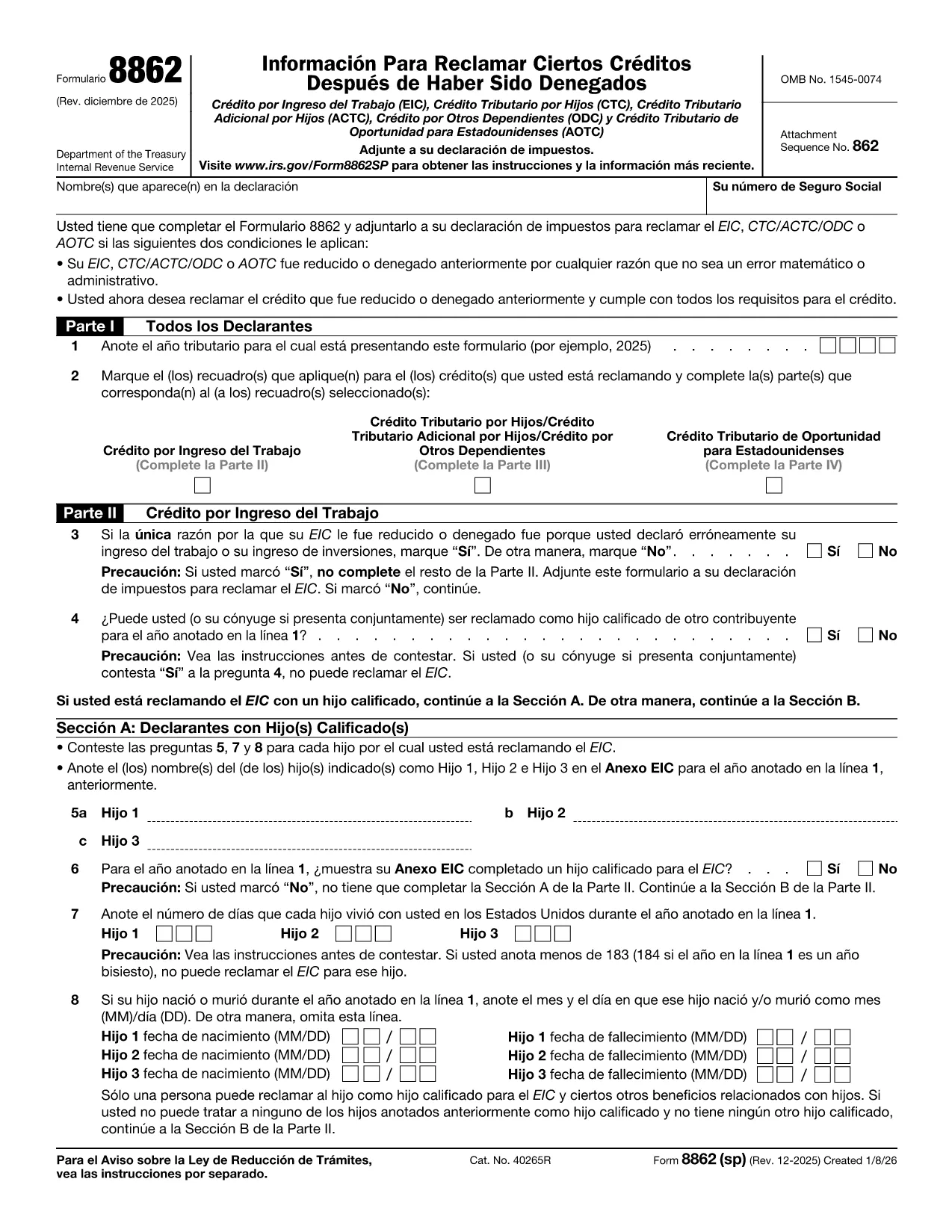
Form 8862 (SP) – "Información para reclamar ciertos créditos después de una denegación" – is the Spanish version of the IRS form used when a taxpayer wants to claim credits that were previously disallowed. It covers the Earned Income Credit (EIC), Child Tax Credit (CTC), American Opportunity Tax Credit (AOTC) and other important credits.

What Is Form 8862 (SP)?

This form tells the IRS that you now meet all eligibility requirements for the credits you are re‑claiming. You must file it with your tax return for the year you are correcting the earlier denial.

How to Complete Form 8862 (SP) Online

Instead of printing and filling out a paper copy, you can use Formize’s built‑in PDF filler:

  1. Click the **"Fill out this form"** button on this page.
  2. Wait a few seconds while the Formize PDF Filler app loads the fillable version of Form 8862 (SP).
  3. Enter the required information in each field. The form automatically validates dates and numeric entries.
  4. When you’re done, click **"Save & Download"** to get a completed PDF that you can attach to your tax return.

Common Mistakes to Avoid

  • Skipping Part IV (AOTC) questions. The IRS requires detailed answers for each student you are claiming.
  • Incorrect residency information. Make sure the days each child lived in the U.S. are accurate.
  • Leaving blanks. Even if a question does not apply, write “N/A” to avoid processing delays.

Download & Fill the Form in Seconds

The fillable PDF is hosted directly from the IRS, guaranteeing you have the latest revision (Rev. December 2025). Click the button below to start the online filling process – no PDF editor needed.

Where to Find Help

If you have questions about eligibility, consult the IRS instructions for Form 8862 or contact a qualified tax professional. Remember, Formize only provides the filling tool; it does not offer tax advice.

Інструкції

FAQ
  • Do I need to file Form 8862 (SP) for every credit I want to claim?

    Yes. You must attach a separate Form 8862 (SP) for each credit that was previously denied, unless the denial was due only to a math or clerical error.

  • Can I use the English version of Form 8862 instead of the Spanish one?

    If you filed your original return in Spanish, the IRS expects the Spanish version. Using the correct language avoids processing delays.

  • Is the Formize filler free to use?

    Filling out the form with Formize is free. You only need to download the completed PDF, which you can attach to your return at no cost.

  • What if I make a mistake after saving the PDF?

    Open the saved PDF in any PDF editor, correct the error, and re‑save. Or simply start a new fill session on Formize.

  • How long does it take for the IRS to process Form 8862 (SP)?

    Processing time varies, but most returns with a correctly completed Form 8862 are processed within 4‑6 weeks.

  • Do I need to attach supporting documents?

    Yes. Include any required statements, such as proof of residency or school enrollment for the AOTC, as indicated in the form instructions.

ЯК

Як безкоштовно заповнити Form 8862 SP онлайн за 4 простих кроків:

  1. 1
    Click the Fill‑out Button
    Press the **"Fill out this form"** button on the page to launch the Formize PDF Filler.
  2. 2
    Wait for the Filler to Load
    The fillable version of Form 8862 (SP) loads in a few seconds—no download needed.
  3. 3
    Enter Your Information
    Complete each section, answering all eligibility questions. The tool validates dates and numbers automatically.
  4. 4
    Save and Download
    When finished, click **"Save & Download"** to get a completed PDF ready to attach to your tax return.
Програма Formize PDF Filler
ПРО

Податкові форми

Form 8862 SP – це одна з податкових форм, які є документами, які використовуються для подання відомостей про податки до відповідного податкового органу. Існують різні типи податкових форм, у тому числі федеральні, штатні та місцеві податкові форми, які можуть відрізнятися залежно від обставин і місцезнаходження платника податків.

ОСОБЛИВОСТІ

Наповнювач PDF

Найпростіший спосіб заповнювати PDF-форми онлайн

  • Швидко заповніть Form 8862 SP
    Шукаєте спосіб швидко заповнити Form 8862 SP онлайн? За допомогою нашого безкоштовного онлайн-заповнювача PDF-форм ви знатимете, як редагувати та заповнювати цей PDF-документ менш ніж за хвилину.
  • Простий у використанні онлайн-редактор PDF
    Набридло роздруковувати PDF-файли, щоб ви могли їх редагувати, перш ніж сканувати повторно та надсилати назад? Безкоштовно редагуйте PDF-документи онлайн. Використовуйте наш онлайн-редактор PDF, щоб заощадити час і папір.
  • Чудові інструменти, усі платформи
    Хочете знати, як заповнити Form 8862 SP на комп’ютері Mac або, можливо, як використовувати PDF-заповнювач безкоштовно? Наші онлайн-інструменти PDF працюють на всіх платформах.
  • Безпечне зберігання файлів
    Завершені файли "Form 8862 SP" зберігаються в захищеній базі даних, якою керує хостинг Amazon Cloud. Ви можете будь-коли видалити свої файли з нашої системи. У будь-якому випадку ці файли автоматично видаляються через 24 години.
  • Чат із Form 8862 SP
    Спілкуйтеся з "Form 8862 SP" у Chatize, який є безкоштовним помічником для читання PDF. Ставте запитання та отримуйте відповіді від "Form 8862 SP". Просто натисніть кнопку Chat With Document вище.

Видалити сеанс заповнення

Видалити вибраний сеанс заповнення? В цьому випадку ваш прогрес у заповненні форми буде втрачений.

Видалити сеанс редагування

Видалити вибраний сеанс редагування? У цьому випадку ваш прогрес у створенні та редагуванні форми буде втрачено.