Оберіть мову

IRS Form 990-PF Fillable PDF – Free Download & Online Completion

  1. Країна США
  2. Мова англійська
  3. діяльність податки
  4. відділ Служба внутрішніх доходів
IRS Form 990-PF Fillable PDF – Free Download & Online Completion

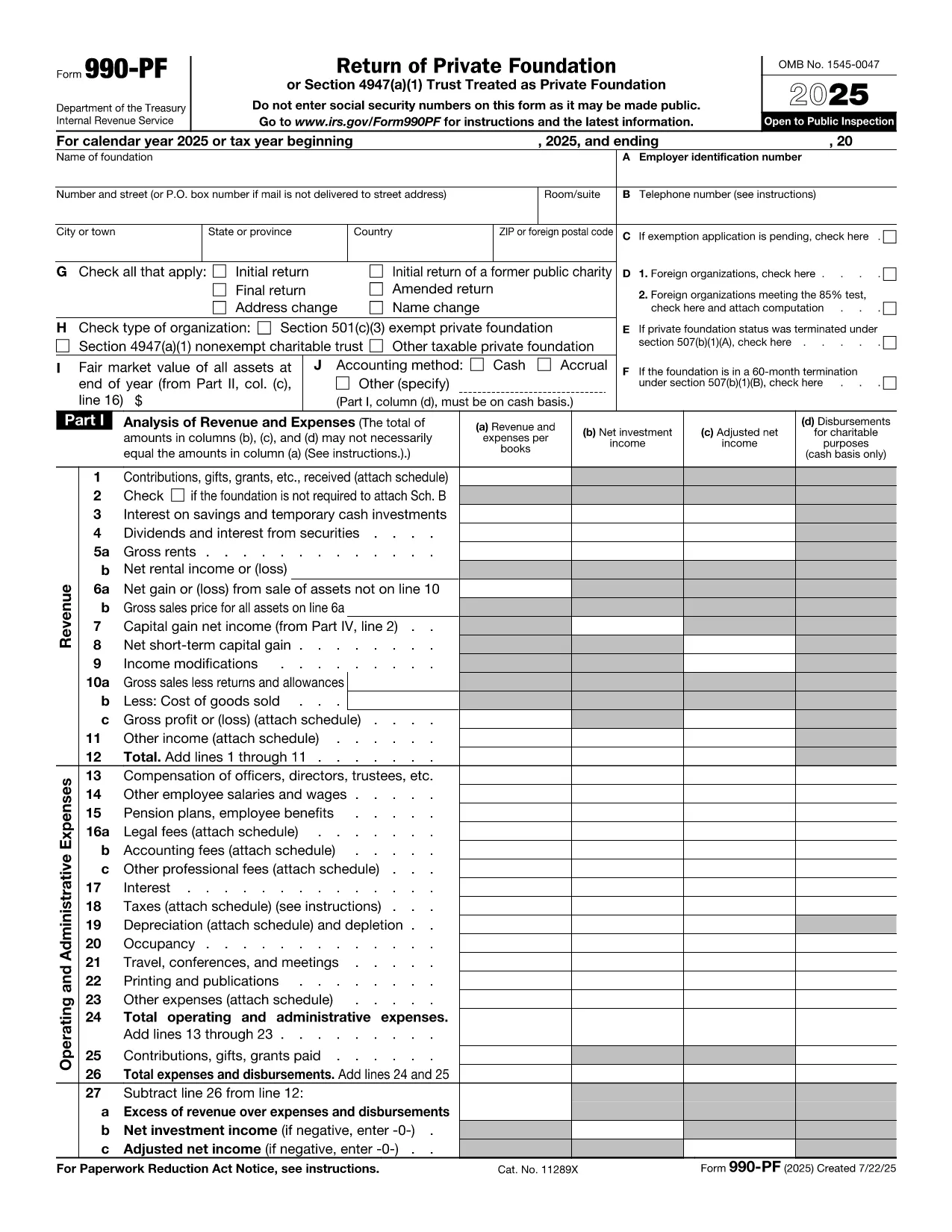
The IRS Form 990-PF is the annual information return required from private foundations and other exempt organizations. It reports financial activities, grants, assets, and compliance with tax‑exempt rules. Using a fillable PDF saves time, reduces errors, and lets you submit a clean, professional document.

What Is Form 990-PF and Who Needs It?

Form 990-PF is filed by:

  • Private foundations (Section 501(c)(3) organizations)
  • Non‑exempt charitable trusts (Section 4947(a)(1))
  • Other taxable private foundations

The form includes sections on revenue, expenses, assets, and compliance questions. It must be filed by the 15th day of the 5th month after the foundation’s fiscal year ends.

How to Fill Out Form 990-PF Using Formize

Instead of downloading the PDF and opening a separate editor, simply click the "Fill out this form" button on this page. The Formize PDF Filler app will load directly in your browser, providing smart fillable fields, real‑time validation, and electronic signature capability.

Download the Official Fillable PDF

If you prefer a local copy, you can download the official IRS fillable PDF below. The file is identical to the one used in the online editor.

Download Form 990-PF (PDF)

Common Mistakes & Tips for Accurate Filing

  • Missing signatures: The form requires an authorized officer’s signature and date.
  • Incorrect accounting method: Verify whether your foundation uses cash or accrual accounting and check the appropriate box.
  • Asset valuation errors: Use fair market value for assets at year‑end; do not use book value.
  • State filing omissions: Some states require a copy of Form 990-PF to be filed with the Attorney General.

Where to Find Help and Resources

The IRS provides detailed instructions on the Form 990-PF PDF. For additional guidance, consult a qualified tax professional or visit the IRS Charities & Non‑Profits page.

FAQ
  • What is the filing deadline for Form 990-PF?

    Form 990-PF is due by the 15th day of the 5th month after the foundation’s fiscal year ends. Extensions may be requested using Form 8868.

  • Can I file Form 990-PF electronically?

    Yes, if you have approved e‑file software. The fillable PDF can be saved and uploaded through the IRS e‑file system.

  • Do I need to attach supporting documents?

    Generally, you do not attach schedules unless the IRS specifically requests them. Keep supporting records for at least three years in case of an audit.

  • What accounting methods are acceptable?

    You must select either cash or accrual accounting and use the same method consistently each year.

  • Is there a penalty for filing late?

    Late filing can result in a penalty of $10 per day, up to a maximum of $10,000, plus interest on any unpaid taxes.

  • Do I need to file a separate state copy of Form 990-PF?

    Many states require a copy of the federal Form 990-PF to be filed with the state Attorney General or tax agency. Check your state’s requirements.

  • Can I use the same PDF for multiple years?

    Each tax year has its own version of Form 990-PF. Use the version that matches your filing year to ensure compliance.

ЯК

Як безкоштовно заповнити Form 990-PF онлайн за 5 простих кроків:

  1. 1
    Open the Fillable Form
    Click the "Fill out this form" button on the page. The Formize PDF Filler app will open in a new browser tab.
  2. 2
    Enter Your Information
    Use the smart fillable fields to type in the required data. The app validates entries in real‑time, helping you avoid common errors.
  3. 3
    Add Your Electronic Signature
    When you reach the signature section, click the signature box, draw or type your signature, and confirm.
  4. 4
    Review and Save
    Click "Review" to see a preview of the completed form. If everything looks correct, save the PDF to your computer or cloud storage.
  5. 5
    Submit to the IRS
    Print the signed PDF and mail it to the IRS address listed in the form instructions, or submit electronically if you have an approved e‑file method.
Програма Formize PDF Filler
ПРО

Податкові форми

Form 990-PF – це одна з податкових форм, які є документами, які використовуються для подання відомостей про податки до відповідного податкового органу. Існують різні типи податкових форм, у тому числі федеральні, штатні та місцеві податкові форми, які можуть відрізнятися залежно від обставин і місцезнаходження платника податків.

ОСОБЛИВОСТІ

Наповнювач PDF

Найпростіший спосіб заповнювати PDF-форми онлайн

  • Швидко заповніть Form 990-PF
    Шукаєте спосіб швидко заповнити Form 990-PF онлайн? За допомогою нашого безкоштовного онлайн-заповнювача PDF-форм ви знатимете, як редагувати та заповнювати цей PDF-документ менш ніж за хвилину.
  • Простий у використанні онлайн-редактор PDF
    Набридло роздруковувати PDF-файли, щоб ви могли їх редагувати, перш ніж сканувати повторно та надсилати назад? Безкоштовно редагуйте PDF-документи онлайн. Використовуйте наш онлайн-редактор PDF, щоб заощадити час і папір.
  • Чудові інструменти, усі платформи
    Хочете знати, як заповнити Form 990-PF на комп’ютері Mac або, можливо, як використовувати PDF-заповнювач безкоштовно? Наші онлайн-інструменти PDF працюють на всіх платформах.
  • Безпечне зберігання файлів
    Завершені файли "Form 990-PF" зберігаються в захищеній базі даних, якою керує хостинг Amazon Cloud. Ви можете будь-коли видалити свої файли з нашої системи. У будь-якому випадку ці файли автоматично видаляються через 24 години.
  • Чат із Form 990-PF
    Спілкуйтеся з "Form 990-PF" у Chatize, який є безкоштовним помічником для читання PDF. Ставте запитання та отримуйте відповіді від "Form 990-PF". Просто натисніть кнопку Chat With Document вище.

Видалити сеанс заповнення

Видалити вибраний сеанс заповнення? В цьому випадку ваш прогрес у заповненні форми буде втрачений.

Видалити сеанс редагування

Видалити вибраний сеанс редагування? У цьому випадку ваш прогрес у створенні та редагуванні форми буде втрачено.