Оберіть мову

Lifetime History Request Form – Fillable PDF

  1. Мова англійська
  2. Країна США
  3. діяльність Vehicle Records
  4. відділ Department of Motor Vehicles
Lifetime History Request Form – Fillable PDF

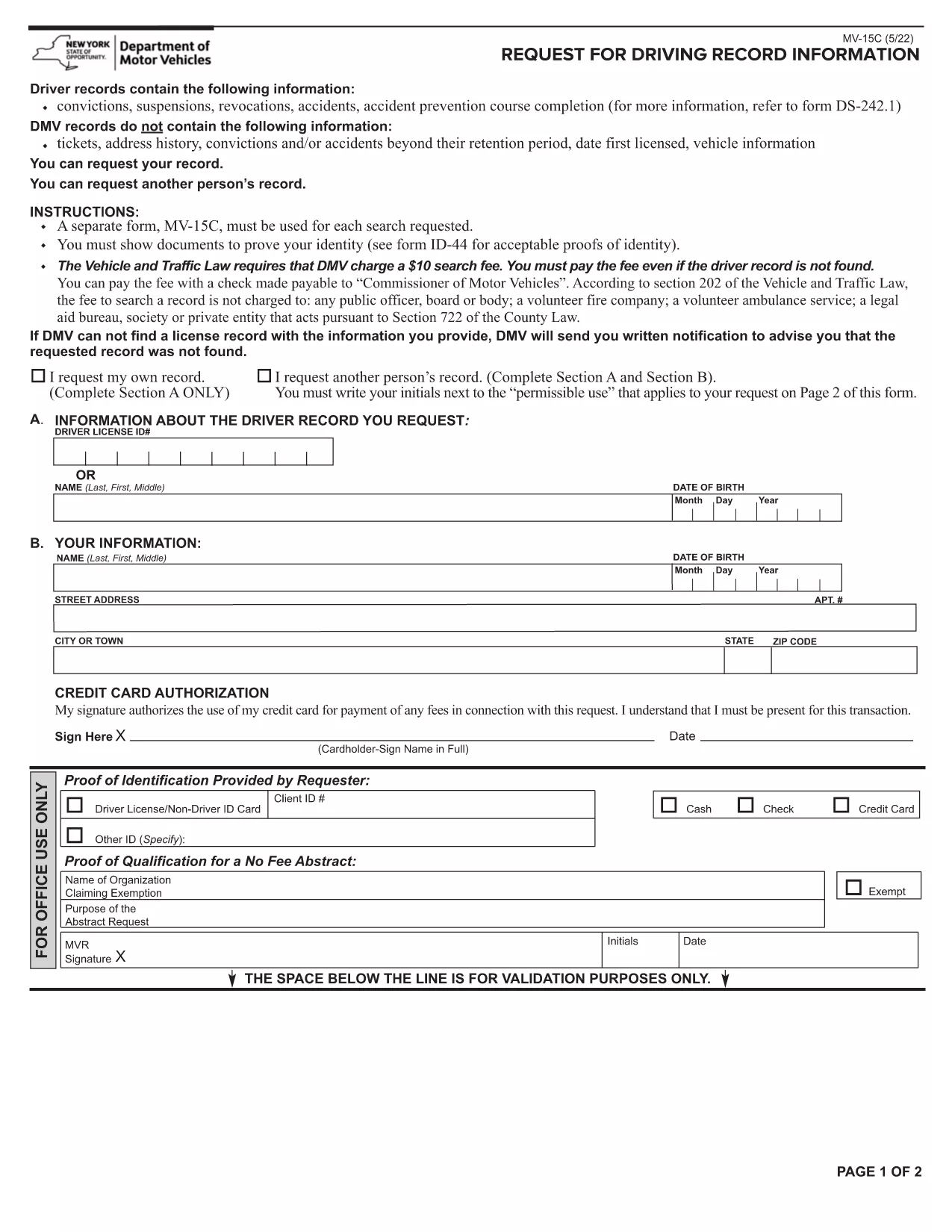
Need a complete record of every ticket, suspension, or accident ever listed on your driving file? The Lifetime History Request Form lets you request a full, permanent abstract of your motor vehicle history from the New York State Department of Motor Vehicles (DMV).

What Is a Lifetime History Request Form?

This form (PDF MV‑15C) is the official DMV request used to obtain a Lifetime Driving Record. Unlike a standard abstract that only shows recent activity, a lifetime record includes every conviction, accident, and point ever recorded.

Who Needs a Lifetime Driving Record?

  • Employers conducting background checks for commercial driver positions.
  • Insurance companies assessing risk for high‑value policies.
  • Legal professionals needing a complete history for court cases.
  • Drivers who suspect errors in their current record and need proof of correction.

How to Fill Out the Form Online with Formize

Instead of printing, signing, and scanning, you can complete the form directly in your browser:

  1. Click the "Fill out this form" button on this page.
  2. Wait a few seconds while the Formize PDF Filler app loads.
  3. Enter your personal information exactly as it appears on your driver's license.
  4. Choose the Lifetime Record option, review the fee, and submit.
  5. When the DMV processes your request, you’ll receive a downloadable PDF via email.

Common Mistakes to Avoid

  • Incorrect ID numbers: Double‑check your Client ID and license number.
  • Missing signature: The Formize filler adds a digital signature field—make sure to sign before submitting.
  • Wrong record type: Select "Lifetime" rather than "Standard" if you need the full history.

Download, Save, and Submit Your Completed Form

After you finish filling the form, click Download PDF to keep a copy for your records. You can then mail the signed form with payment, or follow the DMV’s online payment instructions directly from the filler.

Need a quick start? The fillable PDF is ready below.

FAQ
  • What is the difference between a standard and a lifetime driving record?

    A standard record shows recent activity (typically the last 3‑5 years). A lifetime record includes every violation, accident, and suspension ever recorded on your file.

  • How long does it take to receive the lifetime record?

    Processing usually takes 5‑7 business days after the DMV receives your completed form and payment.

  • Can I request a lifetime record for someone else?

    Only the record holder or a legally authorized representative may request a lifetime record, and proper consent documentation is required.

  • Is there a fee for the lifetime history request?

    Yes, the DMV charges a fee (currently $10) for a lifetime abstract. The exact amount is displayed in the form before you submit.

  • Do I need to print the PDF after filling it online?

    No. The Formize filler lets you sign digitally and submit electronically. You can download a copy for your records if you wish.

  • What identification is required with the request?

    You must provide your driver’s license number, date of birth, and a valid photo ID (driver’s license or passport) when the DMV verifies your identity.

  • Can I correct errors on my lifetime record?

    Yes. After receiving your record, you can file a correction request with the DMV if you find inaccurate information.

  • Is the form available for other states?

    This specific MV‑15C form is for New York State. Other states have their own versions; check the local DMV website for details.

ЯК

Як безкоштовно заповнити lifetime history request form онлайн за 5 простих кроків:

  1. 1
    Open the Fillable Form
    Click the "Fill out this form" button on the page. The Formize PDF Filler will open in a new tab.
  2. 2
    Enter Your Information
    Complete each field – name, address, driver’s license number, and date of birth – exactly as shown on your ID.
  3. 3
    Select Lifetime Record
    Choose the "Lifetime" option from the record‑type dropdown and verify the applicable fee.
  4. 4
    Sign and Submit
    Use the digital signature field, then click "Submit". The form will be securely sent to the DMV.
  5. 5
    Download Confirmation
    When the DMV processes your request, you’ll receive a confirmation email with a downloadable copy of your lifetime record.
Програма Formize PDF Filler
ПРО

шаблон lifetime history request form

Завдяки традиційному набору функцій для перегляду та заповнення PDF-документа в поєднанні з перевагами веб-додатку та адаптивного макета ви можете виконати lifetime history request form за лічені хвилини.

ОСОБЛИВОСТІ

Наповнювач PDF

Найпростіший спосіб заповнювати PDF-форми онлайн

  • Швидко заповніть lifetime history request form
    Шукаєте спосіб швидко заповнити lifetime history request form онлайн? За допомогою нашого безкоштовного онлайн-заповнювача PDF-форм ви знатимете, як редагувати та заповнювати цей PDF-документ менш ніж за хвилину.
  • Простий у використанні онлайн-редактор PDF
    Набридло роздруковувати PDF-файли, щоб ви могли їх редагувати, перш ніж сканувати повторно та надсилати назад? Безкоштовно редагуйте PDF-документи онлайн. Використовуйте наш онлайн-редактор PDF, щоб заощадити час і папір.
  • Чудові інструменти, усі платформи
    Хочете знати, як заповнити lifetime history request form на комп’ютері Mac або, можливо, як використовувати PDF-заповнювач безкоштовно? Наші онлайн-інструменти PDF працюють на всіх платформах.
  • Безпечне зберігання файлів
    Завершені файли "lifetime history request form" зберігаються в захищеній базі даних, якою керує хостинг Amazon Cloud. Ви можете будь-коли видалити свої файли з нашої системи. У будь-якому випадку ці файли автоматично видаляються через 24 години.
  • Чат із lifetime history request form
    Спілкуйтеся з "lifetime history request form" у Chatize, який є безкоштовним помічником для читання PDF. Ставте запитання та отримуйте відповіді від "lifetime history request form". Просто натисніть кнопку Chat With Document вище.

Видалити сеанс заповнення

Видалити вибраний сеанс заповнення? В цьому випадку ваш прогрес у заповненні форми буде втрачений.

Видалити сеанс редагування

Видалити вибраний сеанс редагування? У цьому випадку ваш прогрес у створенні та редагуванні форми буде втрачено.