
Оберіть мову

DS-157 Supplemental Nonimmigrant Visa Application – Fillable PDF

  1. Мова англійська
  2. Країна США
  3. відділ Державний департамент
  4. діяльність Візи
DS-157 Supplemental Nonimmigrant Visa Application – Fillable PDF

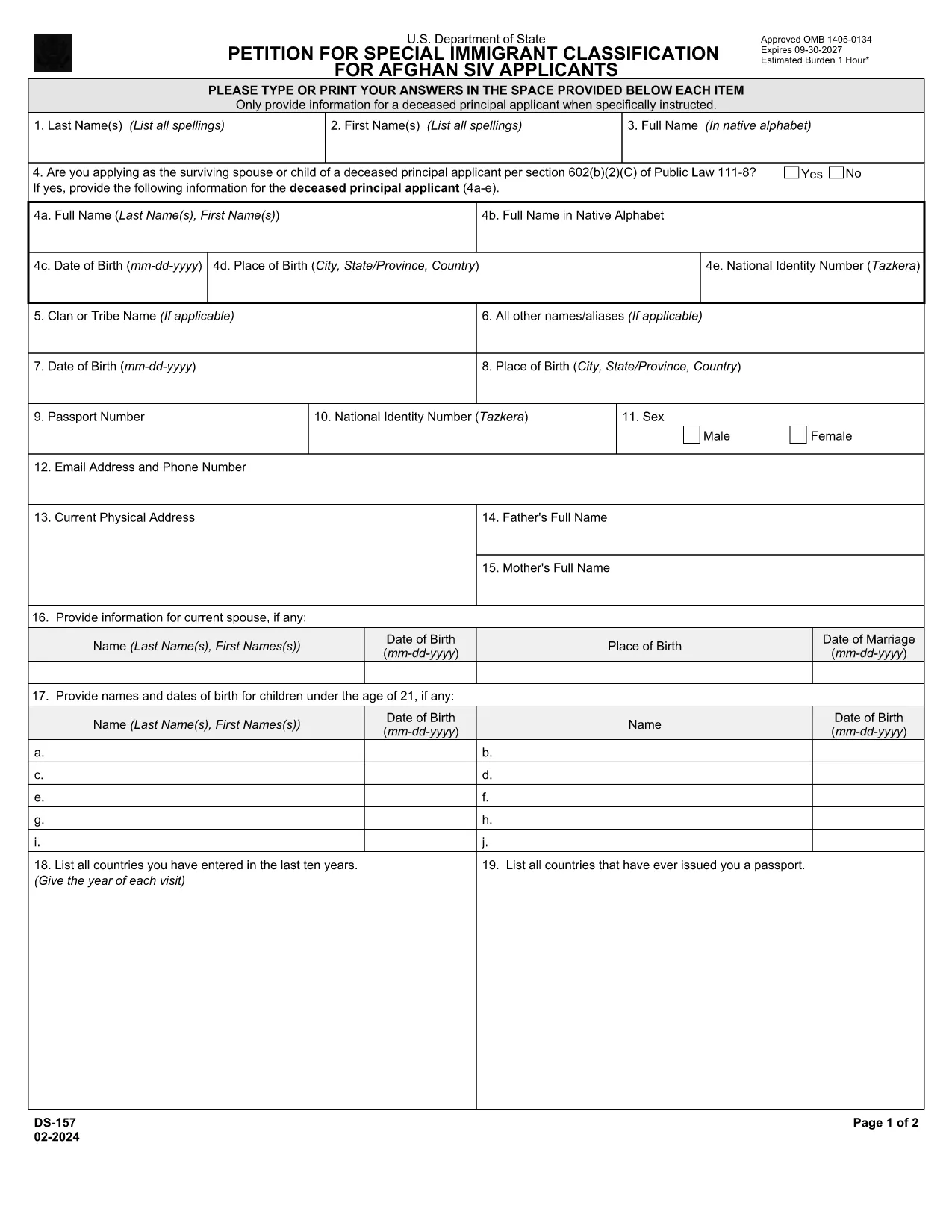
The DS-157 (Supplemental Nonimmigrant Visa Application) is required for certain male visa applicants, especially Afghan Special Immigrant Visa (SIV) candidates. It collects detailed personal, employment, and travel information that supports the main DS-160 application.

What is the DS-157 Form?

Issued by the U.S. Department of State, the DS-157 is a supplemental questionnaire that must be submitted with your visa packet. It is a fillable PDF that can be completed electronically, printed, signed, and attached to your visa interview documents.

How to Fill the DS-157 Online with Formize

Formize provides a secure, browser‑based PDF filler so you never need to download, print, or scan the form. Follow these steps:

  • Click the **"Fill out this form"** button on this page.
  • Wait a few seconds while the Formize PDF Filler app loads.
  • Enter your information in the highlighted fields. Use the tab key or click to move between sections.
  • When finished, click **"Save & Download"** to get a copy you can print or email.
  • Sign the form with your finger (touchscreen) or type your signature, then download the completed PDF.

Common Mistakes to Avoid

  • Leaving fields blank – every question must be answered, even if the answer is “None” or “N/A”.
  • Incorrect dates – double‑check birth dates, travel dates, and employment periods.
  • Illegible signatures – use the built‑in e‑signature tool for a clear, legal signature.
  • Mismatched information – ensure details match those on your DS‑160 and supporting documents.

Where to Submit the Completed Form

Print the filled DS-157, sign it in ink if you printed a hard copy, and attach it to your visa interview packet. Submit the package to the U.S. Embassy or Consulate handling your case. Some posts now accept the PDF electronically; verify the specific instructions on your appointment notice.

Download the Official PDF

For reference or offline use, you can download the official, government‑issued PDF directly from the Department of State:

Download DS-157 PDF

Using Formize’s online filler saves you time, reduces errors, and eliminates the need for a scanner.

FAQ
  • Who must complete the DS-157 form?

    All male non‑immigrant visa applicants between ages 16‑45, including Afghan SIV applicants, must submit a DS-157 in addition to the DS‑160.

  • Is the DS-157 form available in languages other than English?

    The official form is only provided in English. If you need translation assistance, you must provide an accurate English version for the U.S. Embassy.

  • Can I submit the DS-157 electronically?

    Some U.S. posts accept an electronic PDF, but most still require a printed, signed copy. Check the instructions on your appointment notice.

  • Do I need a notarized signature on the DS-157?

    No notarization is required. A regular signature (ink or e‑signature) is sufficient as long as it matches the signature on your other visa documents.

  • What happens if I make a mistake on the DS-157?

    Correct the error by crossing out the mistake neatly, writing the correct information, and initialing the change. If the mistake is extensive, download a fresh copy and refill the form.

  • How long is the DS-157 valid?

    The DS-157 is tied to a specific visa application. If your application is withdrawn or denied, you must obtain a new form for any future applications.

ЯК

Як безкоштовно заповнити ds-157 онлайн за 4 простих кроків:

  1. 1
    Open the Formize filler
    Click the "Fill out this form" button on the page. The Formize PDF Filler will open in a new tab.
  2. 2
    Enter your information
    Type directly into each highlighted field. Use the tab key or click to move to the next question.
  3. 3
    Add your signature
    Use the built‑in e‑signature tool to sign with your finger or mouse. The signature is legally binding.
  4. 4
    Save and download
    When all fields are complete, click "Save & Download" to get a copy of the filled PDF. Print it if a hard copy is required.
Програма Formize PDF Filler
ПРО

Візові бланки

ds-157 — це одна з візових форм, які є документами, які використовуються для подання заяви на отримання візи для в'їзду в іншу країну. Віза - це документ, який дозволяє іноземному громадянину в'їхати, перебувати, а іноді і працювати в іноземній країні протягом певного періоду часу. Точні форми та вимоги для отримання візи залежать від країни та типу візи.

Візові форми зазвичай вимагають особисту інформацію, таку як ім’я, дата народження та паспортні дані, а також інформацію про мету та тривалість поїздки, запланований пункт призначення та інформацію про те, чи було заявникові раніше відмовлено у візі чи депортовано з країни. Форми також можуть вимагати підтверджуючих документів, таких як паспорт, фотографії та підтвердження фінансової підтримки.

У Сполучених Штатах найпоширенішими візовими формами є форми DS-160 і DS-260. Форма DS-160 використовується для подання заяви на отримання неімміграційної візи, тоді як форма DS-260 використовується для подання заяви на отримання імміграційної візи. Ці форми вимагають детальної інформації про особисту історію та історію подорожей заявника, а також підтверджуючих документів, таких як паспорт, маршрут подорожі та фінансові записи.

Інші країни можуть мати інші форми та вимоги до віз, але основний процес зазвичай включає заповнення візової анкети, надання супровідної документації та проходження співбесіди з консульським працівником у посольстві чи консульстві США. Важливо зазначити, що процес оформлення візи може бути складним і трудомістким, тому особам, які бажають отримати візу, рекомендується проконсультуватися з імміграційним адвокатом або іншим кваліфікованим фахівцем, щоб переконатися, що всі необхідні форми та вимоги дотримані.

ОСОБЛИВОСТІ

Наповнювач PDF

Найпростіший спосіб заповнювати PDF-форми онлайн

  • Швидко заповніть ds-157
    Шукаєте спосіб швидко заповнити ds-157 онлайн? За допомогою нашого безкоштовного онлайн-заповнювача PDF-форм ви знатимете, як редагувати та заповнювати цей PDF-документ менш ніж за хвилину.
  • Простий у використанні онлайн-редактор PDF
    Набридло роздруковувати PDF-файли, щоб ви могли їх редагувати, перш ніж сканувати повторно та надсилати назад? Безкоштовно редагуйте PDF-документи онлайн. Використовуйте наш онлайн-редактор PDF, щоб заощадити час і папір.
  • Чудові інструменти, усі платформи
    Хочете знати, як заповнити ds-157 на комп’ютері Mac або, можливо, як використовувати PDF-заповнювач безкоштовно? Наші онлайн-інструменти PDF працюють на всіх платформах.
  • Безпечне зберігання файлів
    Завершені файли "ds-157" зберігаються в захищеній базі даних, якою керує хостинг Amazon Cloud. Ви можете будь-коли видалити свої файли з нашої системи. У будь-якому випадку ці файли автоматично видаляються через 24 години.
  • Чат із ds-157
    Спілкуйтеся з "ds-157" у Chatize, який є безкоштовним помічником для читання PDF. Ставте запитання та отримуйте відповіді від "ds-157". Просто натисніть кнопку Chat With Document вище.

Видалити сеанс заповнення

Видалити вибраний сеанс заповнення? В цьому випадку ваш прогрес у заповненні форми буде втрачений.

Видалити сеанс редагування

Видалити вибраний сеанс редагування? У цьому випадку ваш прогрес у створенні та редагуванні форми буде втрачено.