
Оберіть мову

California DMV DL 546 Health Questionnaire – Fillable PDF

  1. Мова англійська
  2. Країна США
  3. діяльність Водійські права
  4. Держава Каліфорнія
California DMV DL 546 Health Questionnaire – Fillable PDF

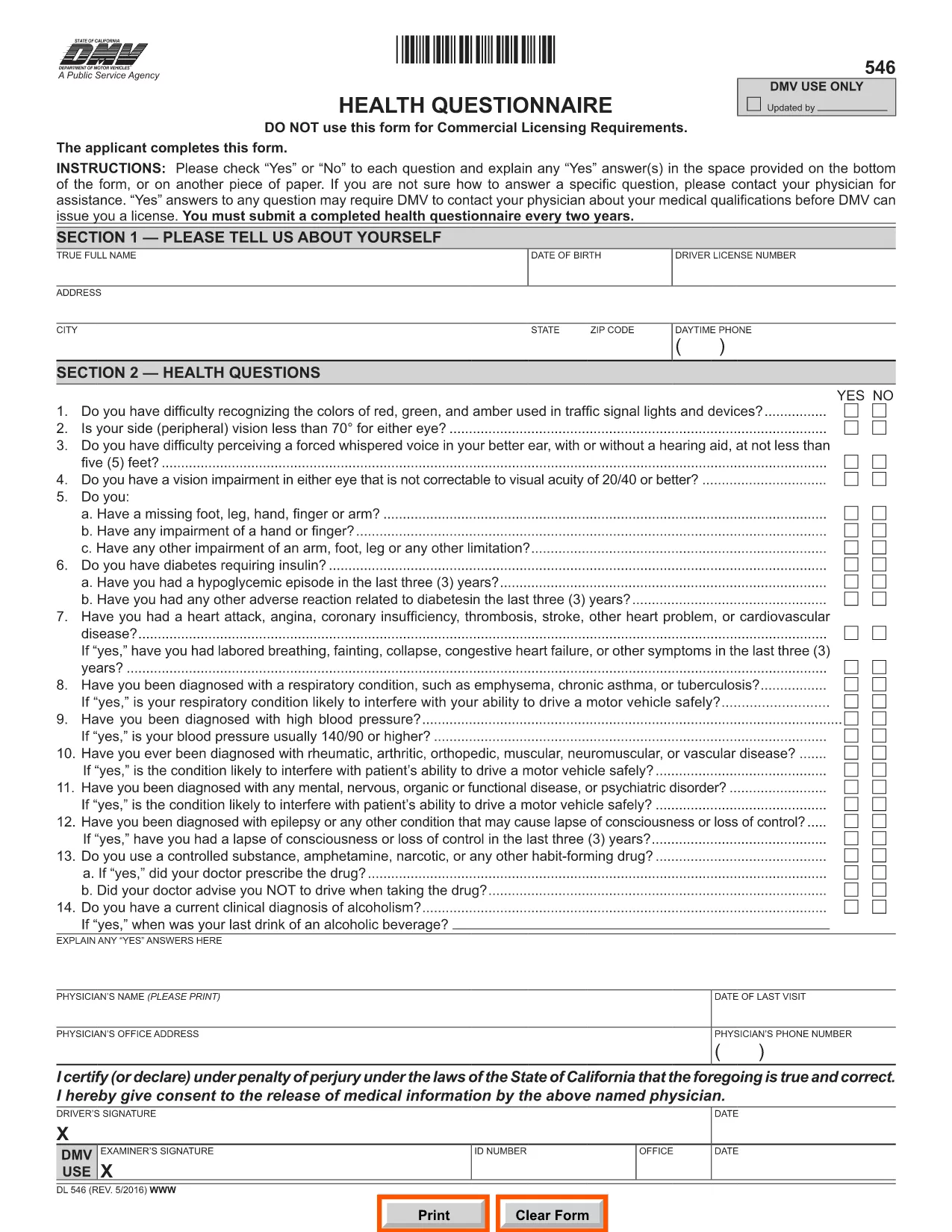
The DL 546 health questionnaire is the California Department of Motor Vehicles (DMV) form that collects medical information from anyone applying for or renewing a driver’s license. The DMV uses this form to ensure that drivers meet safety standards and can operate a vehicle without risking public health.

What Is the DL 546 Form and Who Needs It?

DL 546 is required for:

  • New driver’s license applicants
  • License renewals when the DMV requests a health update
  • Commercial driver’s license (CDL) holders needing a medical review

The questionnaire asks simple “Yes/No” questions about vision, seizures, heart conditions, and other health issues that could affect driving.

How to Complete the DL 546 Online with Formize

Formize makes the fillable PDF DL 546 experience fast and paper‑free. Follow these steps:

  1. Click the "Fill out this form" button on this page.
  2. The Formize PDF Filler app loads in your browser – no download required.
  3. Complete each question by selecting Yes or No and add any explanations in the provided text boxes.
  4. When you’re done, click Save & Sign to add an electronic signature.
  5. Download the completed form or email it directly to the DMV.

Common Mistakes to Avoid When Filling DL 546

  • Leaving a field blank: Every question must be answered, even if the answer is "No."
  • Illegible handwriting: Using the fillable PDF eliminates this risk.
  • Missing signatures or dates: The Formize app prompts you to sign before you can submit.
  • Submitting the wrong version: Ensure you are using the official California DMV PDF (linked below).

Where to Submit the Completed Form

After saving your completed DL 546, you have three submission options:

  • Online: Upload the PDF through the DMV’s MyDMV portal if available.
  • Mail: Print the PDF and send it to the address printed on the form.
  • In‑person: Bring the printed form to any California DMV office.

Choosing the online or fillable PDF route speeds up processing and reduces the chance of lost paperwork.

FAQ
  • What is the purpose of the DL 546 form?

    The DL 546 health questionnaire collects medical information to confirm that a driver meets California safety standards before a license is issued or renewed.

  • Do I need to submit the DL 546 every time I renew my license?

    Only when the DMV specifically requests an updated health questionnaire. Some renewals may not require a new DL 546.

  • Can I fill out DL 546 on a mobile device?

    Yes. Formize’s PDF Filler is fully responsive, so you can complete the form on a smartphone, tablet, or computer.

  • Is an electronic signature accepted by the California DMV?

    The DMV accepts electronic signatures for the DL 546 when the form is submitted online or emailed. Always verify the latest DMV guidelines.

  • What should I do if I answer "Yes" to a health question?

    Provide a clear explanation in the space provided and, if necessary, attach a physician’s statement or medical records as instructed on the form.

  • How long does the DMV keep my DL 546 on file?

    The DMV retains health questionnaires for the period required by California law, typically several years, to verify driver fitness.

  • Can I print the completed DL 546 after filling it online?

    Yes. After saving, you can download and print the PDF for mailing or in‑person submission if you prefer a hard copy.

ЯК

Як безкоштовно заповнити DL 546 онлайн за 4 простих кроків:

  1. 1
    Open the Fillable Form
    Click the "Fill out this form" button on this page. The Formize PDF Filler will open directly in your browser.
  2. 2
    Enter Your Information
    Answer each Yes/No question, add any required explanations, and fill in your personal details in the provided fields.
  3. 3
    Add Your Electronic Signature
    When all fields are complete, click the "Sign" button to apply an e‑signature that meets DMV requirements.
  4. 4
    Save or Email the Completed PDF
    Download the finished DL 546 or use the built‑in email option to send it directly to the DMV or your physician.
Програма Formize PDF Filler
ПРО

Бланки заяв на отримання водійських прав

У більшості країн водійське посвідчення є обов’язковим, перш ніж вирушати в дорогу. Отримання водійських прав є важливою віхою для кожного, хто хоче керувати автомобілем.

DL 546 – одна з форм заявки на отримання водійських прав, які є документами, які використовуються для збору інформації від людей, які хочуть подати заявку на отримання водійських прав. Зазвичай він містить поля для імені заявника, дати народження, ідентифікаційного номера, контактної інформації, а також історії та досвіду водійських прав.

ОСОБЛИВОСТІ

Наповнювач PDF

Найпростіший спосіб заповнювати PDF-форми онлайн

  • Швидко заповніть DL 546
    Шукаєте спосіб швидко заповнити DL 546 онлайн? За допомогою нашого безкоштовного онлайн-заповнювача PDF-форм ви знатимете, як редагувати та заповнювати цей PDF-документ менш ніж за хвилину.
  • Простий у використанні онлайн-редактор PDF
    Набридло роздруковувати PDF-файли, щоб ви могли їх редагувати, перш ніж сканувати повторно та надсилати назад? Безкоштовно редагуйте PDF-документи онлайн. Використовуйте наш онлайн-редактор PDF, щоб заощадити час і папір.
  • Чудові інструменти, усі платформи
    Хочете знати, як заповнити DL 546 на комп’ютері Mac або, можливо, як використовувати PDF-заповнювач безкоштовно? Наші онлайн-інструменти PDF працюють на всіх платформах.
  • Безпечне зберігання файлів
    Завершені файли "DL 546" зберігаються в захищеній базі даних, якою керує хостинг Amazon Cloud. Ви можете будь-коли видалити свої файли з нашої системи. У будь-якому випадку ці файли автоматично видаляються через 24 години.
  • Чат із DL 546
    Спілкуйтеся з "DL 546" у Chatize, який є безкоштовним помічником для читання PDF. Ставте запитання та отримуйте відповіді від "DL 546". Просто натисніть кнопку Chat With Document вище.

Видалити сеанс заповнення

Видалити вибраний сеанс заповнення? В цьому випадку ваш прогрес у заповненні форми буде втрачений.

Видалити сеанс редагування

Видалити вибраний сеанс редагування? У цьому випадку ваш прогрес у створенні та редагуванні форми буде втрачено.