
Оберіть мову

Missouri Form 4201 – Assignment of Securities (Fillable PDF)

  1. Мова англійська
  2. Країна США
  3. діяльність Водійські права
  4. Держава Міссурі
Missouri Form 4201 – Assignment of Securities (Fillable PDF)

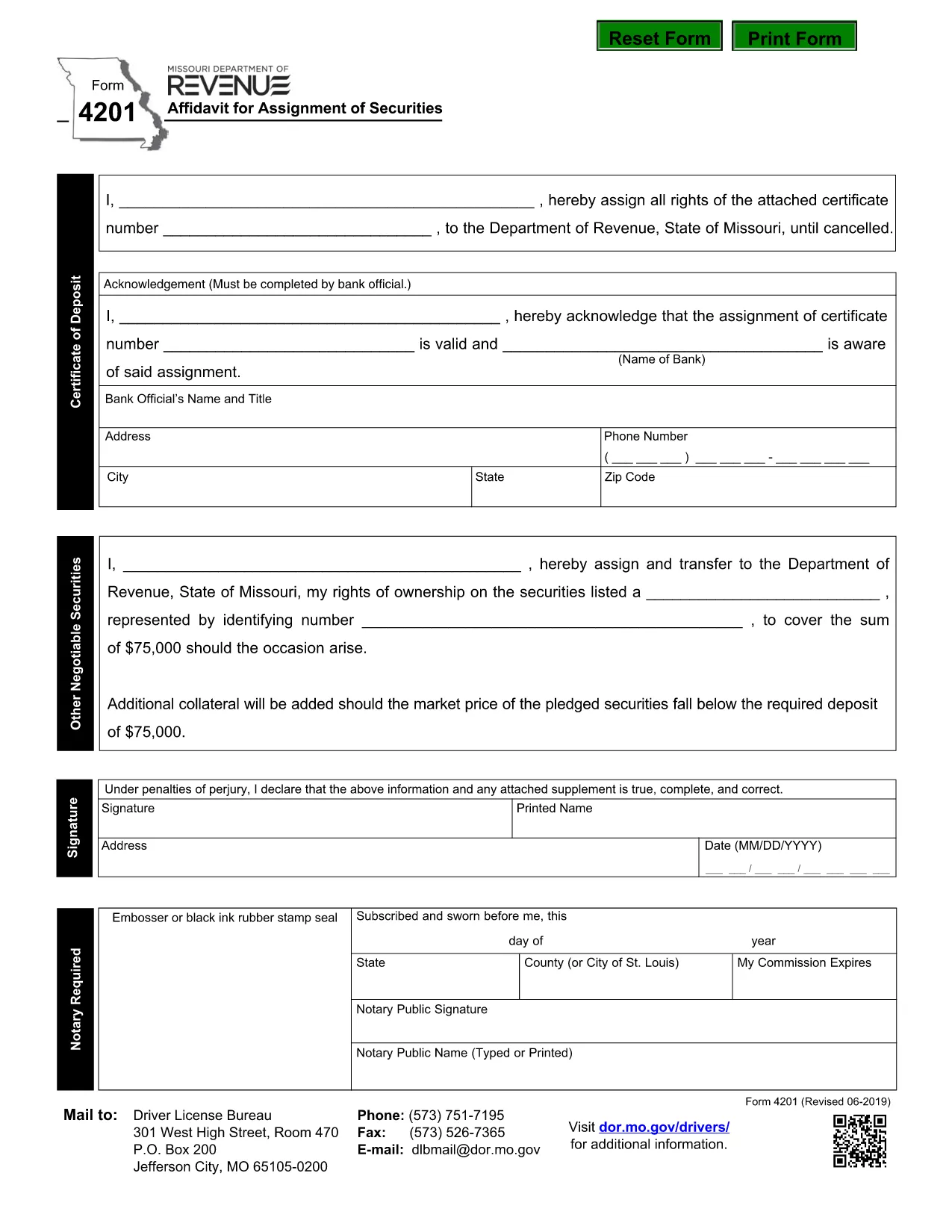
Form 4201 is the Missouri Department of Revenue’s official Affidavit for Assignment of Securities. This fillable PDF lets you complete the form online, save a copy, and submit it without printing.

What Is Form 4201?

Form 4201 records the transfer of securities (such as stocks, bonds, or other financial instruments) from one party to another for tax purposes. The Missouri Department of Revenue uses it to verify the assignment and ensure proper reporting.

Who Needs to File Form 4201?

  • Individuals or entities assigning securities that are subject to Missouri tax.
  • Trustees, executors, or legal representatives handling a transfer.
  • Businesses that need to document a securities assignment on their state tax return.

How to Complete the Fillable PDF

Instead of downloading the PDF and opening a separate editor, simply click the "Fill out this form" button on this page. The Formize PDF Filler app will load directly in your browser.

  1. Click Fill out this form.
  2. Wait a few seconds for the Formize PDF Filler to appear.
  3. Enter the required information in each highlighted field.
  4. Use the built‑in validation to check for missing or incorrect entries.
  5. When finished, click Download Completed PDF or Submit as instructed.

Common Mistakes & Tips

  • Missing signatures: The form requires a signature from the assignor; the filler lets you type a digital signature.
  • Incorrect dates: Use the format MM/DD/YYYY.
  • Wrong security description: Provide the full legal name and identification number.
  • Double‑check the “Assignment Amount” field for accuracy before saving.

Where to Submit the Completed Form

After saving the completed PDF, mail or fax it to the Missouri Department of Revenue address shown on the form, or upload it through the department’s online portal if you have an account.

Need help? Review the instructions on the form itself or contact the Missouri Department of Revenue directly.

FAQ
  • What is the purpose of Missouri Form 4201?

    Form 4201 documents the assignment of securities for tax reporting. It ensures the Missouri Department of Revenue records the transfer correctly.

  • Who is required to file Form 4201?

    Anyone assigning securities that are subject to Missouri tax—individuals, trusts, executors, or businesses—must file this form.

  • Can I file Form 4201 electronically?

    Yes. Use the Formize fillable PDF to complete the form online, then download and upload it through the Missouri Department of Revenue’s electronic portal.

  • Is a handwritten signature still needed?

    A digital signature entered in the fillable PDF is accepted. If you print the form, you must sign it manually.

  • What happens if I make a mistake on the form?

    Correct the error in the Formize filler before downloading. If you submit a printed copy with errors, you may need to file an amended form.

  • Where do I send the completed Form 4201?

    Mail or fax the completed PDF to the address listed on the form, or upload it via the Missouri Department of Revenue’s online portal.

ЯК

Як безкоштовно заповнити Form 4201 онлайн за 5 простих кроків:

  1. 1
    Open the Fillable Form
    Click the "Fill out this form" button on the page. The Formize PDF Filler will open in a new browser window.
  2. 2
    Load the Form
    Wait a few seconds while the fillable PDF loads. All fields will be highlighted for easy entry.
  3. 3
    Enter Your Information
    Type the required data into each field. Use the built‑in validation to correct any errors.
  4. 4
    Review & Save
    Check the completed form for accuracy, then click "Download Completed PDF" to save a copy or "Submit" to send it directly.
  5. 5
    Submit or Print
    Print and mail the form, fax it, or upload it through the Missouri Department of Revenue portal as instructed.
Програма Formize PDF Filler
ПРО

Бланки заяв на отримання водійських прав

У більшості країн водійське посвідчення є обов’язковим, перш ніж вирушати в дорогу. Отримання водійських прав є важливою віхою для кожного, хто хоче керувати автомобілем.

Form 4201 – одна з форм заявки на отримання водійських прав, які є документами, які використовуються для збору інформації від людей, які хочуть подати заявку на отримання водійських прав. Зазвичай він містить поля для імені заявника, дати народження, ідентифікаційного номера, контактної інформації, а також історії та досвіду водійських прав.

ОСОБЛИВОСТІ

Наповнювач PDF

Найпростіший спосіб заповнювати PDF-форми онлайн

  • Швидко заповніть Form 4201
    Шукаєте спосіб швидко заповнити Form 4201 онлайн? За допомогою нашого безкоштовного онлайн-заповнювача PDF-форм ви знатимете, як редагувати та заповнювати цей PDF-документ менш ніж за хвилину.
  • Простий у використанні онлайн-редактор PDF
    Набридло роздруковувати PDF-файли, щоб ви могли їх редагувати, перш ніж сканувати повторно та надсилати назад? Безкоштовно редагуйте PDF-документи онлайн. Використовуйте наш онлайн-редактор PDF, щоб заощадити час і папір.
  • Чудові інструменти, усі платформи
    Хочете знати, як заповнити Form 4201 на комп’ютері Mac або, можливо, як використовувати PDF-заповнювач безкоштовно? Наші онлайн-інструменти PDF працюють на всіх платформах.
  • Безпечне зберігання файлів
    Завершені файли "Form 4201" зберігаються в захищеній базі даних, якою керує хостинг Amazon Cloud. Ви можете будь-коли видалити свої файли з нашої системи. У будь-якому випадку ці файли автоматично видаляються через 24 години.
  • Чат із Form 4201
    Спілкуйтеся з "Form 4201" у Chatize, який є безкоштовним помічником для читання PDF. Ставте запитання та отримуйте відповіді від "Form 4201". Просто натисніть кнопку Chat With Document вище.

Видалити сеанс заповнення

Видалити вибраний сеанс заповнення? В цьому випадку ваш прогрес у заповненні форми буде втрачений.

Видалити сеанс редагування

Видалити вибраний сеанс редагування? У цьому випадку ваш прогрес у створенні та редагуванні форми буде втрачено.