
Оберіть мову

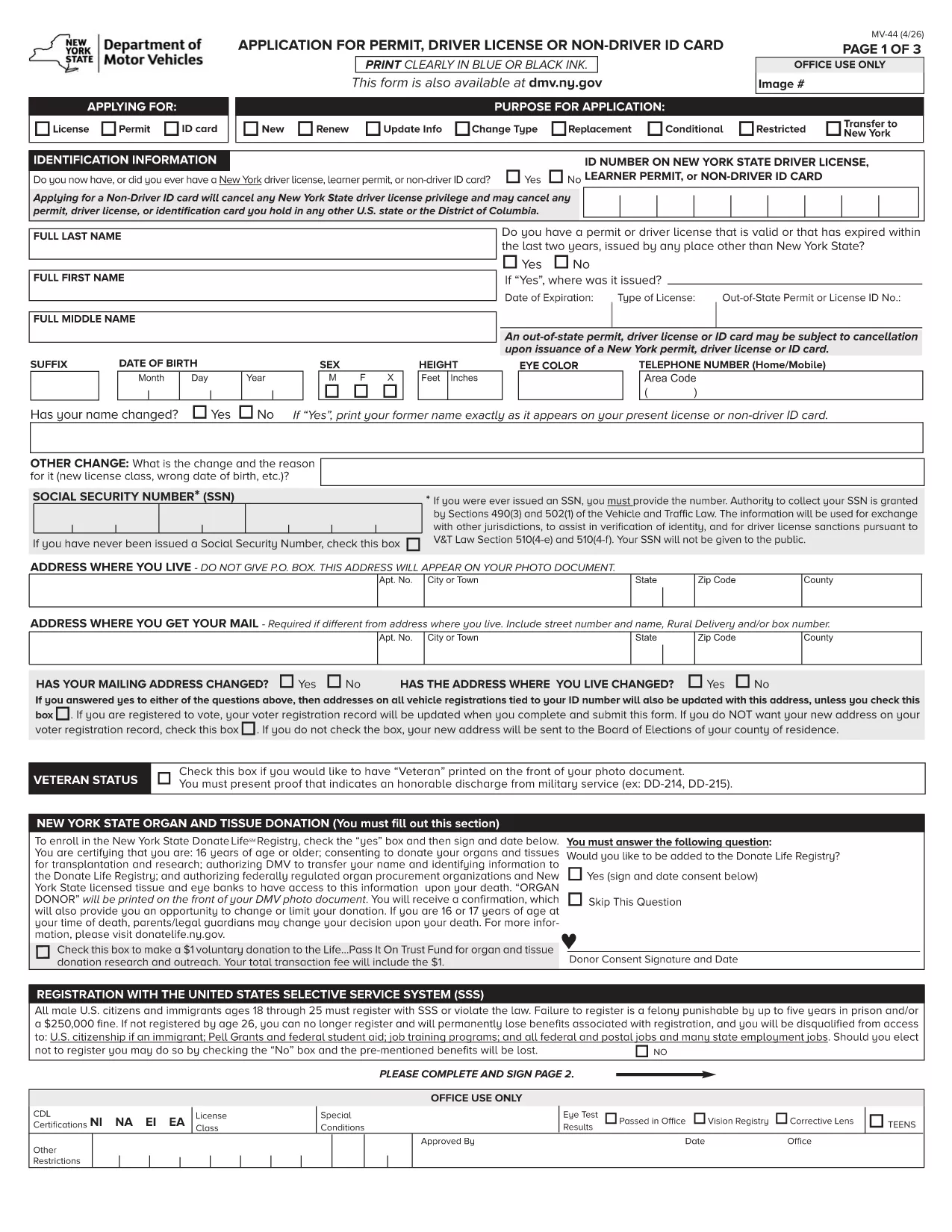
MV-44 Application Form – Permit, Driver License & Non‑Driver ID

  1. Мова англійська
  2. Країна США
  3. діяльність Водійські права
  4. Держава Нью-Йорк
MV-44 Application Form – Permit, Driver License & Non‑Driver ID

The MV-44 is the official New York State application used to request a learner’s permit, a driver’s license, or a non‑driver identification card. This form is required for first‑time applicants, renewals, and certain name‑change situations.

Formize.com offers a fully fillable PDF version of the MV‑44, so you can complete the entire application directly in your web browser—no Adobe Acrobat needed.

Below you’ll find everything you need to know about the MV‑44, step‑by‑step instructions for filling it out online, and tips to avoid common errors that can delay processing.

Key benefits of using the Formize fillable PDF:

  • Instant loading in the Formize PDF Filler app
  • Auto‑save as you type, preventing data loss
  • Built‑in validation to catch missing or incorrect information
  • Easy electronic signature and direct download of the completed form

Ready to start? Simply click the "Fill out this form" button and let the Formize PDF Filler do the rest.

FAQ
  • Can I save my progress and finish the MV‑44 later?

    Yes. The Formize PDF Filler auto‑saves your entries locally. Simply close the tab and reopen the form to continue where you left off.

  • Do I need a PDF reader to use this form?

    No. The fillable version runs entirely in your browser via the Formize PDF Filler, eliminating the need for Adobe Acrobat or other PDF software.

  • What identification documents do I need to attach?

    You’ll need a valid photo ID (passport, existing NY driver’s license, or non‑driver ID) and proof of residency such as a utility bill or lease agreement. Upload scans after completing the form.

  • How long does the DMV take to process the MV‑44?

    Processing times vary, but most applications are reviewed within 7‑10 business days after the completed form and required documents are submitted.

  • Is the MV‑44 form free to download?

    Yes. The MV‑44 is a free, government‑provided form. Formize only hosts the fillable version at no cost.

  • Can I submit the completed MV‑44 electronically?

    The NY DMV currently requires a printed and signed copy. After downloading, print the form, sign it, and mail or deliver it to your local DMV office.

  • What should I do if I make a mistake on the form?

    If you notice an error before printing, simply go back in the Formize filler, correct the field, and re‑download the PDF. Once printed and signed, you’ll need to start a new form.

  • Do I need a separate form for a duplicate license?

    For a duplicate or replacement, you must complete Form MV‑44 and check the “Duplicate” box. Additional documentation may be required.

ЯК

Як безкоштовно заповнити MV-44 онлайн за 4 простих кроків:

  1. 1
    Click the Fill‑out Button
    On this page, locate the bright "Fill out this form" button and click it. The Formize PDF Filler will open in a new tab.
  2. 2
    Wait for the PDF Filler to Load
    The fillable MV‑44 PDF loads automatically. A loading spinner indicates the app is preparing the document.
  3. 3
    Enter Your Information
    Complete each field using the on‑screen prompts. Required fields are marked with an asterisk. The filler validates dates, numbers, and signatures in real time.
  4. 4
    Review, Sign & Download
    After filling all sections, review the data, add your electronic signature, and click "Download Completed Form". You can then print or submit the PDF as instructed by the DMV.
Програма Formize PDF Filler
ПРО

Бланки заяв на отримання водійських прав

У більшості країн водійське посвідчення є обов’язковим, перш ніж вирушати в дорогу. Отримання водійських прав є важливою віхою для кожного, хто хоче керувати автомобілем.

MV-44 – одна з форм заявки на отримання водійських прав, які є документами, які використовуються для збору інформації від людей, які хочуть подати заявку на отримання водійських прав. Зазвичай він містить поля для імені заявника, дати народження, ідентифікаційного номера, контактної інформації, а також історії та досвіду водійських прав.

ОСОБЛИВОСТІ

Наповнювач PDF

Найпростіший спосіб заповнювати PDF-форми онлайн

  • Швидко заповніть MV-44
    Шукаєте спосіб швидко заповнити MV-44 онлайн? За допомогою нашого безкоштовного онлайн-заповнювача PDF-форм ви знатимете, як редагувати та заповнювати цей PDF-документ менш ніж за хвилину.
  • Простий у використанні онлайн-редактор PDF
    Набридло роздруковувати PDF-файли, щоб ви могли їх редагувати, перш ніж сканувати повторно та надсилати назад? Безкоштовно редагуйте PDF-документи онлайн. Використовуйте наш онлайн-редактор PDF, щоб заощадити час і папір.
  • Чудові інструменти, усі платформи
    Хочете знати, як заповнити MV-44 на комп’ютері Mac або, можливо, як використовувати PDF-заповнювач безкоштовно? Наші онлайн-інструменти PDF працюють на всіх платформах.
  • Безпечне зберігання файлів
    Завершені файли "MV-44" зберігаються в захищеній базі даних, якою керує хостинг Amazon Cloud. Ви можете будь-коли видалити свої файли з нашої системи. У будь-якому випадку ці файли автоматично видаляються через 24 години.
  • Чат із MV-44
    Спілкуйтеся з "MV-44" у Chatize, який є безкоштовним помічником для читання PDF. Ставте запитання та отримуйте відповіді від "MV-44". Просто натисніть кнопку Chat With Document вище.

Видалити сеанс заповнення

Видалити вибраний сеанс заповнення? В цьому випадку ваш прогрес у заповненні форми буде втрачений.

Видалити сеанс редагування

Видалити вибраний сеанс редагування? У цьому випадку ваш прогрес у створенні та редагуванні форми буде втрачено.