
Оберіть мову

SFN 61560 – North Dakota CDL Third‑Party Tester Form (Fillable PDF)

  1. Мова англійська
  2. Країна США
  3. діяльність Водійські права
  4. Держава Північна Дакота
SFN 61560 – North Dakota CDL Third‑Party Tester Form (Fillable PDF)

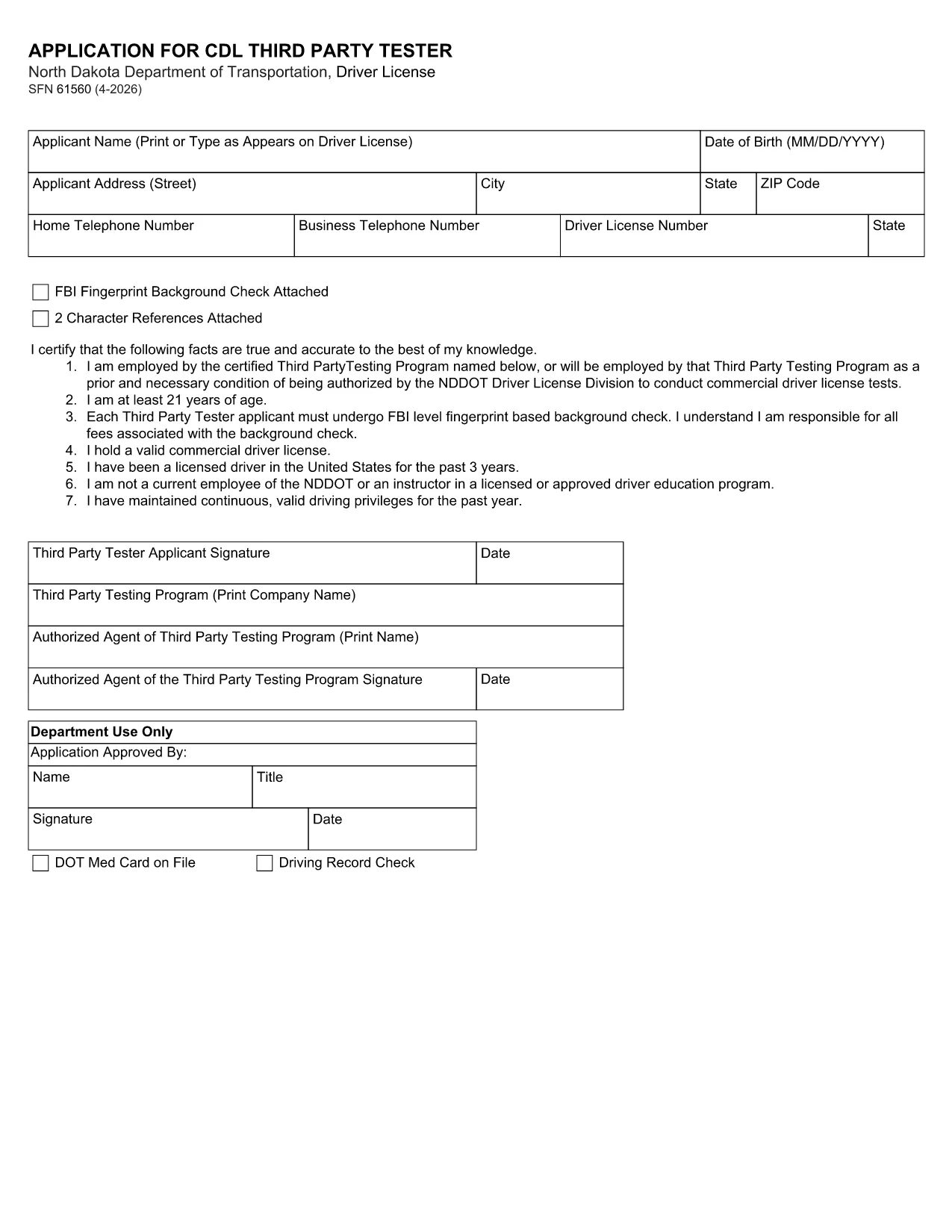
The SFN 61560 is the North Dakota Department of Transportation (ND DOT) application used by third‑party testers to request a Commercial Driver’s License (CDL) testing authorization. This form is now available as a fully fillable PDF, so you can complete it from any device without printing.

What Is the SFN 61560 Form?

SFN 61560 is the official ND DOT application for CDL third‑party testers. It collects personal information, licensing history, and the required FBI fingerprint background check. The completed form is submitted to the ND DOT to verify eligibility before you can administer CDL skills tests.

Who Needs to Complete SFN 61560?

  • Independent CDL testing companies
  • Driving schools that provide third‑party testing services
  • Any individual or organization seeking ND approval to conduct CDL skills examinations

How to Fill Out the Form Online

Instead of downloading, printing, and scanning, simply click the "Fill out this form" button on this page. The Formize PDF Filler will load in seconds, letting you type directly into each field.

Common Mistakes to Avoid

  • Leaving the FBI fingerprint section blank – a background check is mandatory.
  • Using an expired driver’s license number.
  • Forgetting to attach the two required character references.
  • Submitting the form without a notarized signature where required.

Download & Fill the Form Instantly

When you’re ready, click the button below to open the fillable PDF in Formize. After completing all fields, review the data, then either print for mail‑in submission or save a PDF copy for electronic upload if your local ND DOT office accepts it.

FAQ
  • What is the purpose of the SFN 61560 form?

    It authorizes a third‑party tester to administer CDL skills tests in North Dakota after a background check and verification of qualifications.

  • Is the PDF fillable online?

    Yes. Using Formize’s PDF Filler you can type directly into the PDF fields without printing.

  • Do I need to submit a hard copy?

    Most ND DOT offices require a printed, signed form. Save the completed PDF and print it for mailing unless you receive electronic submission instructions.

  • What supporting documents are required?

    A recent FBI fingerprint background check, two character references, and a notarized signature (if required).

  • How long does the approval process take?

    After the ND DOT receives a complete form, processing typically takes 10‑14 business days.

  • Can I edit the form after I’ve saved it?

    Yes. Open the saved PDF again in Formize or any PDF editor to make changes before final submission.

  • Is there a filing fee?

    There is no fee for the SFN 61560 application itself, but any required background‑check fees are paid to the FBI.

  • Where do I send the completed form?

    Mail it to the North Dakota Department of Transportation, Driver Licensing Division, 600 East Boulevard Ave, Bismarck, ND 58501.

  • What if I make a mistake on the form?

    Correct the error in the PDF, re‑save, and submit a clean copy. If you’ve already mailed it, contact the ND DOT licensing office for guidance.

  • Can I get help filling out SFN 61560?

    Contact the ND DOT Driver Licensing Division at (701) 328‑2725 for questions about required information.

ЯК

Як безкоштовно заповнити SFN 61560 онлайн за 5 простих кроків:

  1. 1
    Step 1 – Click “Fill out this form”
    Press the button on this page to launch the Formize PDF Filler. No software download is required.
  2. 2
    Step 2 – Wait for the filler to load
    The fillable PDF loads in your browser within a few seconds. All fields become editable.
  3. 3
    Step 3 – Complete each field
    Enter your personal data, licensing details, and attach the required fingerprint and character reference documents.
  4. 4
    Step 4 – Review and save
    Double‑check every entry, then click “Save” to download a completed PDF or “Print” to send a hard copy to ND DOT.
  5. 5
    Step 5 – Submit
    Mail the printed form to the address on the ND DOT website, or upload the saved PDF if electronic submission is accepted.
Програма Formize PDF Filler
ПРО

Бланки заяв на отримання водійських прав

У більшості країн водійське посвідчення є обов’язковим, перш ніж вирушати в дорогу. Отримання водійських прав є важливою віхою для кожного, хто хоче керувати автомобілем.

SFN 61560 – одна з форм заявки на отримання водійських прав, які є документами, які використовуються для збору інформації від людей, які хочуть подати заявку на отримання водійських прав. Зазвичай він містить поля для імені заявника, дати народження, ідентифікаційного номера, контактної інформації, а також історії та досвіду водійських прав.

ОСОБЛИВОСТІ

Наповнювач PDF

Найпростіший спосіб заповнювати PDF-форми онлайн

  • Швидко заповніть SFN 61560
    Шукаєте спосіб швидко заповнити SFN 61560 онлайн? За допомогою нашого безкоштовного онлайн-заповнювача PDF-форм ви знатимете, як редагувати та заповнювати цей PDF-документ менш ніж за хвилину.
  • Простий у використанні онлайн-редактор PDF
    Набридло роздруковувати PDF-файли, щоб ви могли їх редагувати, перш ніж сканувати повторно та надсилати назад? Безкоштовно редагуйте PDF-документи онлайн. Використовуйте наш онлайн-редактор PDF, щоб заощадити час і папір.
  • Чудові інструменти, усі платформи
    Хочете знати, як заповнити SFN 61560 на комп’ютері Mac або, можливо, як використовувати PDF-заповнювач безкоштовно? Наші онлайн-інструменти PDF працюють на всіх платформах.
  • Безпечне зберігання файлів
    Завершені файли "SFN 61560" зберігаються в захищеній базі даних, якою керує хостинг Amazon Cloud. Ви можете будь-коли видалити свої файли з нашої системи. У будь-якому випадку ці файли автоматично видаляються через 24 години.
  • Чат із SFN 61560
    Спілкуйтеся з "SFN 61560" у Chatize, який є безкоштовним помічником для читання PDF. Ставте запитання та отримуйте відповіді від "SFN 61560". Просто натисніть кнопку Chat With Document вище.

Видалити сеанс заповнення

Видалити вибраний сеанс заповнення? В цьому випадку ваш прогрес у заповненні форми буде втрачений.

Видалити сеанс редагування

Видалити вибраний сеанс редагування? У цьому випадку ваш прогрес у створенні та редагуванні форми буде втрачено.