Оберіть мову

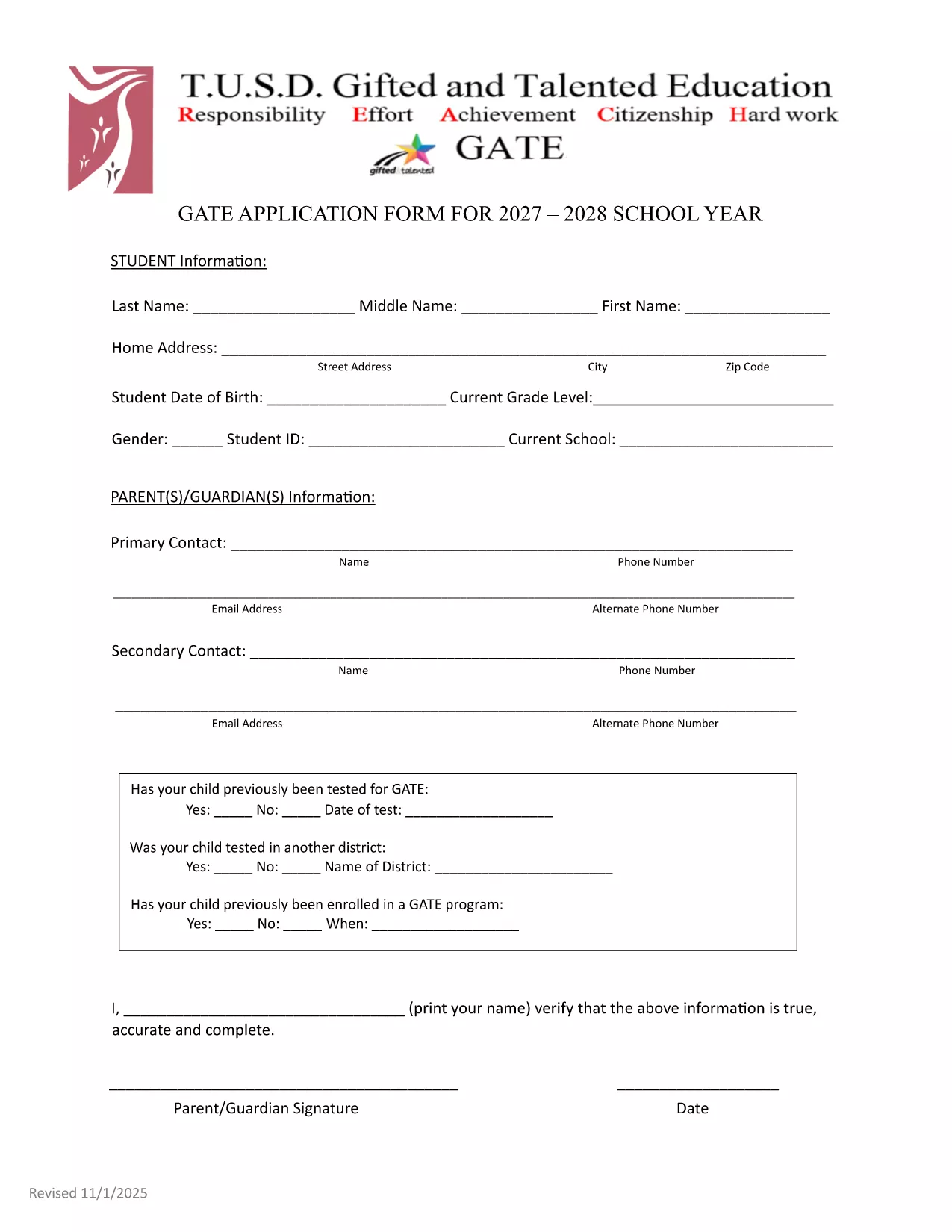
GATE 2027‑28 Application Form – Fillable PDF

  1. Мова англійська
  2. Країна США
  3. відділ Education
  4. діяльність School Admissions
GATE 2027‑28 Application Form – Fillable PDF

The GATE 2027‑28 Application Form is now available as a fully fillable PDF. Whether you’re a parent, guardian, or student, you can complete the form directly in your browser using the Formize PDF Filler – no extra software required.

Why Choose the Fillable GATE 2027 Form?

  • Instant online editing – start typing as soon as the page loads.
  • Built‑in validation to reduce errors.
  • Secure, cloud‑based processing ensures your data stays private.
  • Printable version available for hard‑copy submission if needed.

How to Complete the GATE Application Online

Follow the simple steps below to fill out the form quickly and accurately.

Common Mistakes to Avoid

  • Leaving the "Date of Test" field blank when a prior GATE test was taken.
  • Using unofficial abbreviations for school names.
  • Submitting incomplete contact information – double‑check phone numbers and email addresses.

Submission Guidelines & Deadlines

After completing the form, review all entries, sign electronically, and submit according to your district’s instructions. The deadline for the 2027‑28 cycle is May 15, 2027. Late submissions may not be considered.

Need help? Refer to the official PDF guide for detailed explanations of each section.

FAQ
  • Do I need Adobe Acrobat to fill out the GATE 2027 form?

    No. The Formize PDF Filler works in any modern browser, so you can complete the form without installing additional software.

  • Can I save my progress and finish later?

    Yes. Use the "Save Draft" button in the Formize app to store your work securely, then return with the same link to finish.

  • What if I make a mistake after submitting?

    Contact your district’s GATE coordinator immediately. They can provide a corrected form or allow you to resubmit a revised PDF.

  • Is the information I enter encrypted?

    All data transmitted through Formize is encrypted with SSL/TLS, keeping your personal details safe.

  • Do I need to print and mail the form after filling it online?

    Most districts accept the electronic submission directly. Check your local guidelines; a printed copy is only needed if explicitly requested.

  • What if my student was tested for GATE before 2027?

    Enter the previous test date in the "Date of Test" field and attach the original test report if required.

ЯК

Як безкоштовно заповнити GATE application 2027 онлайн за 4 простих кроків:

  1. 1
    Click the "Fill out this form" button
    On this page, press the highlighted button to launch the Formize PDF Filler app.
  2. 2
    Wait for the Formize PDF Filler to load
    The app loads in seconds; a progress bar will show when it’s ready.
  3. 3
    Enter your information
    Type directly into each field, use dropdowns where provided, and upload any required documents.
  4. 4
    Review, sign, and submit
    Double‑check all entries, add your electronic signature, then click Submit to send the completed application.
Програма Formize PDF Filler
ПРО

шаблон GATE application 2027

Завдяки традиційному набору функцій для перегляду та заповнення PDF-документа в поєднанні з перевагами веб-додатку та адаптивного макета ви можете виконати GATE application 2027 за лічені хвилини.

ОСОБЛИВОСТІ

Наповнювач PDF

Найпростіший спосіб заповнювати PDF-форми онлайн

  • Швидко заповніть GATE application 2027
    Шукаєте спосіб швидко заповнити GATE application 2027 онлайн? За допомогою нашого безкоштовного онлайн-заповнювача PDF-форм ви знатимете, як редагувати та заповнювати цей PDF-документ менш ніж за хвилину.
  • Простий у використанні онлайн-редактор PDF
    Набридло роздруковувати PDF-файли, щоб ви могли їх редагувати, перш ніж сканувати повторно та надсилати назад? Безкоштовно редагуйте PDF-документи онлайн. Використовуйте наш онлайн-редактор PDF, щоб заощадити час і папір.
  • Чудові інструменти, усі платформи
    Хочете знати, як заповнити GATE application 2027 на комп’ютері Mac або, можливо, як використовувати PDF-заповнювач безкоштовно? Наші онлайн-інструменти PDF працюють на всіх платформах.
  • Безпечне зберігання файлів
    Завершені файли "GATE application 2027" зберігаються в захищеній базі даних, якою керує хостинг Amazon Cloud. Ви можете будь-коли видалити свої файли з нашої системи. У будь-якому випадку ці файли автоматично видаляються через 24 години.
  • Чат із GATE application 2027
    Спілкуйтеся з "GATE application 2027" у Chatize, який є безкоштовним помічником для читання PDF. Ставте запитання та отримуйте відповіді від "GATE application 2027". Просто натисніть кнопку Chat With Document вище.

Видалити сеанс заповнення

Видалити вибраний сеанс заповнення? В цьому випадку ваш прогрес у заповненні форми буде втрачений.

Видалити сеанс редагування

Видалити вибраний сеанс редагування? У цьому випадку ваш прогрес у створенні та редагуванні форми буде втрачено.