Оберіть мову

Harvard College First‑Year Application Form (Fillable PDF)

  1. Мова англійська
  2. Країна США
  3. діяльність College Admissions
  4. відділ Education
Harvard College First‑Year Application Form (Fillable PDF)

Harvard College’s first‑year application is the gateway to one of the world’s most prestigious undergraduate programs. This fillable PDF lets you complete every required field online, save progress, and submit without printing.

What Is This Application Form?

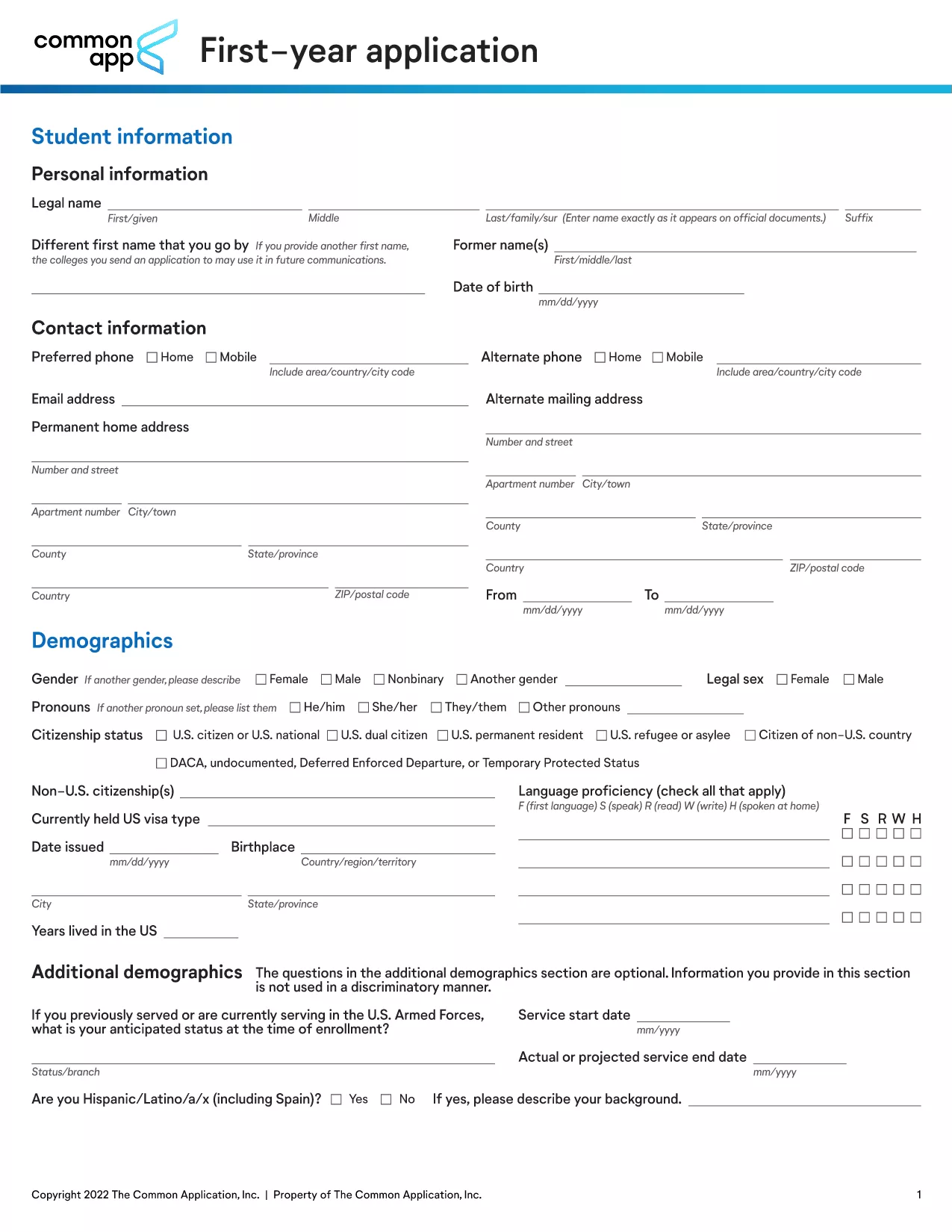
The PDF (FY_APP.pdf) is the official first‑year application used by Harvard College for the upcoming academic year. It gathers personal details, academic records, essays, and supplemental information.

How to Fill Out the Form Online

Instead of downloading the PDF and opening a desktop editor, simply click the “Fill out this form” button on this page. The Formize PDF Filler app loads directly in your browser, allowing you to type, select, and save without any additional software.

Key Sections to Complete

  • Personal Information – name, address, contact details.
  • Academic History – schools attended, GPA, test scores.
  • Essays – personal statement and supplemental questions.
  • Extracurricular Activities – leadership roles, community service.

Common Mistakes to Avoid

  • Leaving required fields blank.
  • Using non‑standard date formats.
  • Exceeding word limits on essays.
  • Forgetting to save your progress before closing the browser.

Download vs. Fill Online – Which Is Faster?

Downloading the PDF is an option, but filling it out online with Formize eliminates the need for a PDF editor, reduces errors, and lets you submit instantly. Choose the online method for the quickest, most reliable experience.

FAQ
  • Do I need Adobe Acrobat to fill this form?

    No. The Formize PDF Filler works entirely in your web browser, so you don’t need any additional software.

  • Can I save my work and return later?

    Yes. Use the “Save” button at any time. Your progress is stored in the browser, and you can reopen the form later to continue.

  • What file formats are accepted for supplemental documents?

    Harvard accepts PDF, JPG, and PNG for transcripts, essays, and other supporting files.

  • Is there a deadline for submitting the first‑year application?

    Harvard’s regular admission deadline is typically in early January. Check the official Harvard admissions calendar for the exact date each year.

  • Will my data be secure while using Formize?

    Formize uses SSL encryption to protect your information during transmission. Your data is never stored on our servers after you submit the form.

ЯК

Як безкоштовно заповнити Harvard application form онлайн за 4 простих кроків:

  1. 1
    Click the Fill Button
    On this page, locate the bright “Fill out this form” button and click it. The Formize PDF Filler will open in a new browser tab.
  2. 2
    Wait for the Filler to Load
    The app loads the PDF automatically. You’ll see all fields highlighted and ready for input.
  3. 3
    Complete Each Section
    Type directly into the fields, use drop‑down menus where provided, and upload any required documents (e.g., transcripts).
  4. 4
    Save and Submit
    Periodically click “Save” to store your progress. When finished, click “Submit” to send the completed application to Harvard College.
Програма Formize PDF Filler
ПРО

шаблон Harvard application form

Завдяки традиційному набору функцій для перегляду та заповнення PDF-документа в поєднанні з перевагами веб-додатку та адаптивного макета ви можете виконати Harvard application form за лічені хвилини.

ОСОБЛИВОСТІ

Наповнювач PDF

Найпростіший спосіб заповнювати PDF-форми онлайн

  • Швидко заповніть Harvard application form
    Шукаєте спосіб швидко заповнити Harvard application form онлайн? За допомогою нашого безкоштовного онлайн-заповнювача PDF-форм ви знатимете, як редагувати та заповнювати цей PDF-документ менш ніж за хвилину.
  • Простий у використанні онлайн-редактор PDF
    Набридло роздруковувати PDF-файли, щоб ви могли їх редагувати, перш ніж сканувати повторно та надсилати назад? Безкоштовно редагуйте PDF-документи онлайн. Використовуйте наш онлайн-редактор PDF, щоб заощадити час і папір.
  • Чудові інструменти, усі платформи
    Хочете знати, як заповнити Harvard application form на комп’ютері Mac або, можливо, як використовувати PDF-заповнювач безкоштовно? Наші онлайн-інструменти PDF працюють на всіх платформах.
  • Безпечне зберігання файлів
    Завершені файли "Harvard application form" зберігаються в захищеній базі даних, якою керує хостинг Amazon Cloud. Ви можете будь-коли видалити свої файли з нашої системи. У будь-якому випадку ці файли автоматично видаляються через 24 години.
  • Чат із Harvard application form
    Спілкуйтеся з "Harvard application form" у Chatize, який є безкоштовним помічником для читання PDF. Ставте запитання та отримуйте відповіді від "Harvard application form". Просто натисніть кнопку Chat With Document вище.

Видалити сеанс заповнення

Видалити вибраний сеанс заповнення? В цьому випадку ваш прогрес у заповненні форми буде втрачений.

Видалити сеанс редагування

Видалити вибраний сеанс редагування? У цьому випадку ваш прогрес у створенні та редагуванні форми буде втрачено.