
Оберіть мову

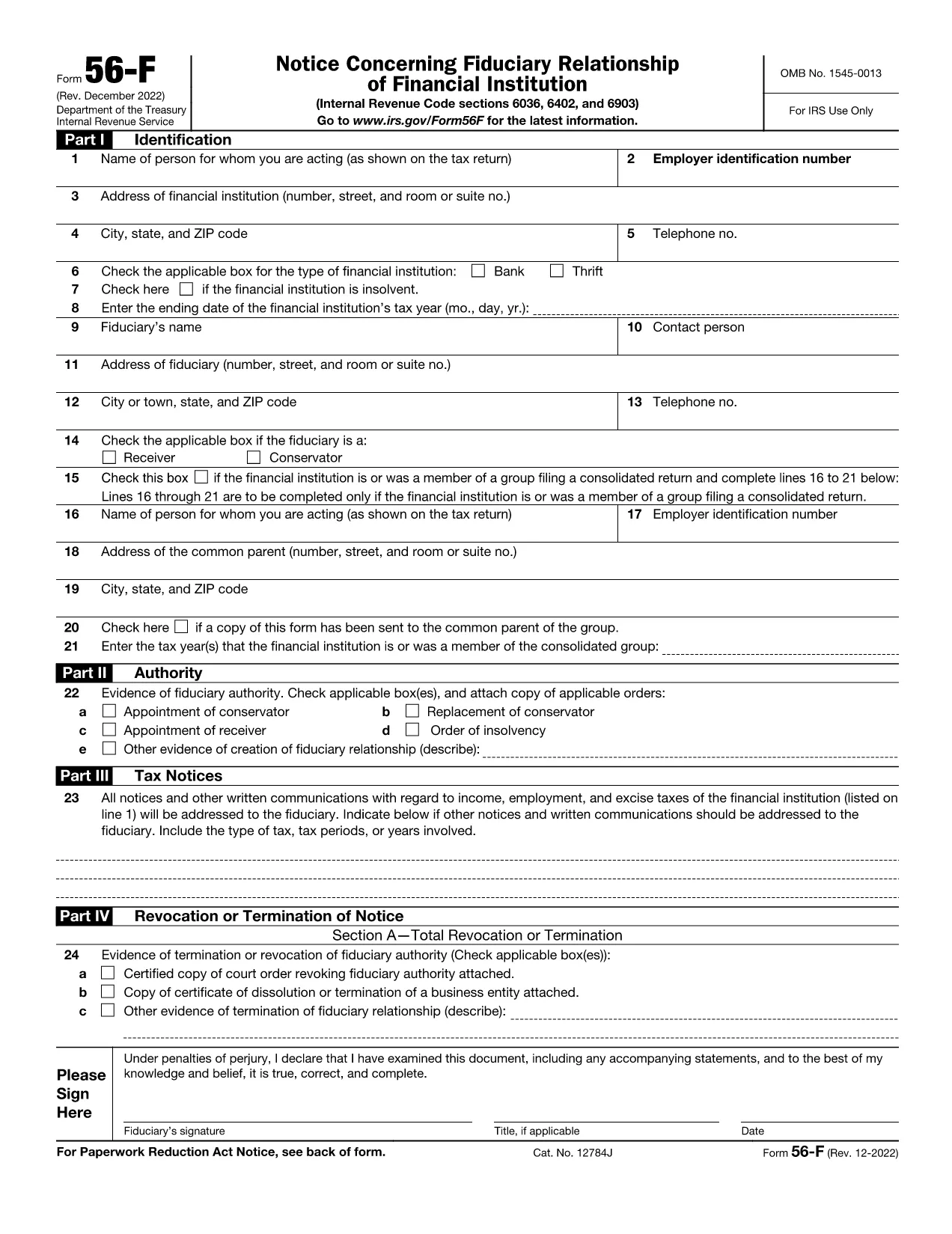
IRS Form 56F – Fillable PDF Fiduciary Notice

  1. Країна США
  2. Мова англійська
  3. діяльність податки
  4. відділ IRS
IRS Form 56F – Fillable PDF Fiduciary Notice

The IRS Form 56F (Fiduciary Notice) is used to inform the Internal Revenue Service of a fiduciary relationship for tax purposes. Whether you are an executor, trustee, or administrator, the form lets the IRS know who is responsible for filing tax returns on behalf of another person or estate.

What Is IRS Form 56F?

Form 56F is required when a fiduciary is appointed to manage the tax affairs of a decedent, an estate, a trust, or another taxpayer. It establishes a clear line of communication between the fiduciary and the IRS, helping prevent mis‑filings and potential penalties.

How to Fill Out Form 56F Online

Instead of downloading the PDF and opening a separate editor, simply click the "Fill out this form" button on this page. The Formize PDF Filler app loads directly in your browser, allowing you to:

  • Enter information into each field with auto‑save.
  • Upload supporting documents.
  • Add an electronic signature that meets IRS requirements.
  • Download, print, or email the completed form instantly.

Common Mistakes to Avoid

  • Leaving fields blank: Every required box must be completed; otherwise, the IRS may reject the submission.
  • Missing signature: Both the fiduciary and, when applicable, the person for whom you act must sign.
  • Incorrect SSN/EIN: Double‑check the numbers to avoid processing delays.
  • Outdated form version: Use the latest PDF (linked below) to ensure compliance.

Where to Submit the Completed Form

After you finish the online fillable version, you can:

  • Mail the printed form to the IRS service center listed in the instructions.
  • Fax the form if you have a fax number for the relevant IRS office.
  • Submit electronically through the IRS e‑file system (if your tax professional supports it).

Download the Fillable PDF

For users who prefer a traditional download, the official fillable PDF is available below. It is the same document that powers the Formize online editor.

Download IRS Form 56F (PDF)

FAQ
  • Who must file IRS Form 56F?

    Any fiduciary—such as an executor, administrator, or trustee—who is responsible for filing tax returns on behalf of another person, estate, or trust must file Form 56F.

  • Can I submit Form 56F electronically?

    Yes. After completing the fillable PDF with Formize, you can download the file and submit it electronically through an authorized e‑file service or fax it to the IRS if permitted.

  • Do I need a wet ink signature?

    The IRS accepts electronic signatures that meet the requirements of the Electronic Signatures in Global and National Commerce (ESIGN) Act. Formize’s e‑sign tool provides a compliant signature.

  • What supporting documents should I attach?

    Attach a copy of the legal document that appointed you as fiduciary (will, court order, trust agreement) and a valid ID for the fiduciary. Include the decedent’s Social Security number or EIN.

  • How long does it take for the IRS to process Form 56F?

    Processing time varies, but the IRS typically acknowledges receipt within 30 days. Keep a copy of the filed form for your records.

  • Is there a fee to use Formize’s fillable PDF editor?

    Formize offers a free, no‑login version for basic fillable forms like Form 56F. Advanced features are available in paid plans, but the basic fill‑out and e‑sign functions are free.

  • What if I make a mistake after submitting?

    You can file a corrected Form 56F using the same process. Clearly mark the corrected form as “Amended” in the top margin and include an explanation of the changes.

  • Where can I find the official instructions for Form 56F?

    The official IRS instructions are included in the PDF linked above or can be accessed on the IRS website under “Form 56F Instructions.”

ЯК

Як безкоштовно заповнити IRS Form 56F онлайн за 5 простих кроків:

  1. 1
    Click the Fill‑out Button
    Press the “Fill out this form” button on the page. The Formize PDF Filler loads instantly in your browser.
  2. 2
    Enter Your Information
    Complete each field. The editor auto‑saves your entries, so you won’t lose data if you navigate away.
  3. 3
    Add Your Electronic Signature
    Use the built‑in e‑sign tool to sign the form. The signature complies with IRS electronic filing rules.
  4. 4
    Review and Submit
    Double‑check all entries, then click “Download” to save a copy, or use the “Email” option to send it directly to your tax professional.
  5. 5
    Print or Mail (if required)
    If the IRS requires a hard copy, print the completed PDF and mail it to the address indicated in the form instructions.
Програма Formize PDF Filler
ПРО

Податкові форми

IRS Form 56F – одна з податкових форм, які є документами, які використовуються для звітування про доходи, відрахування та податкові зобов’язання відповідному податковому органу. Ці форми є важливою частиною процесу подання податкової декларації та використовуються для забезпечення дотримання фізичними та юридичними особами податкового законодавства та точного розрахунку своїх податкових зобов’язань.

Потрібні конкретні податкові форми можуть відрізнятися залежно від таких факторів, як статус фізичної особи, джерела доходу та податкове законодавство країни. Однак ось деякі поширені типи податкових форм:

Форми податку на доходи фізичних осіб: ці форми, як-от 1040 серії, використовуються в Сполучених Штатах фізичними особами звітувати про свої доходи, вимагати відрахування та кредити та обчислювати свої податкові зобов’язання.

Податкові форми для бізнесу. Підприємствам, зокрема приватним підприємцям, товариствам, корпораціям і самозайнятим особам, можливо, доведеться подавати різні форми, щоб звітувати про свої доходи, витрати та податки. Приклади включають додаток C (прибуток або збиток від бізнесу) і форму 1120 (декларація про прибуток корпорацій США).

Форми податку на працевлаштування: роботодавці зобов’язані звітувати про заробітну плату працівників, а також утримувати та перераховувати податки із заробітної плати. Для цього використовуються такі форми, як W-2 (декларація про заробітну плату та податки) і 941 (квартальна федеральна податкова декларація роботодавця).

Форми інвестиційного та пенсійного рахунків: ці форми використовуються для звітування про інвестиційний дохід, приріст капіталу та збитки, а також внески та розподіл із пенсійних рахунків. Приклади включають форму 1099-DIV (Дивіденди та розподіл) і Форма 5498 (Інформація про внески IRA).

Форми податку на майно та подарунки: якщо особа помирає або робить значні подарунки, спеціальні форми, наприклад Форма 706 (Податкова декларація про нерухоме майно (та передачу від покоління) у США) і форму 709 (Подарунок у Сполучених Штатах (і покоління- Skipping Transfer) Tax Return) використовуються для звітування та розрахунку будь-яких застосовних податків на майно чи дарування.

Важливо зазначити, що податкове законодавство та форми можуть змінюватися з часом, тому фізичні особи та підприємства повинні проконсультуватися з відповідним податковим органом або отримати професійну податкову консультацію, щоб забезпечити відповідність поточним вимогам.

ОСОБЛИВОСТІ

Наповнювач PDF

Найпростіший спосіб заповнювати PDF-форми онлайн

  • Швидко заповніть IRS Form 56F
    Шукаєте спосіб швидко заповнити IRS Form 56F онлайн? За допомогою нашого безкоштовного онлайн-заповнювача PDF-форм ви знатимете, як редагувати та заповнювати цей PDF-документ менш ніж за хвилину.
  • Простий у використанні онлайн-редактор PDF
    Набридло роздруковувати PDF-файли, щоб ви могли їх редагувати, перш ніж сканувати повторно та надсилати назад? Безкоштовно редагуйте PDF-документи онлайн. Використовуйте наш онлайн-редактор PDF, щоб заощадити час і папір.
  • Чудові інструменти, усі платформи
    Хочете знати, як заповнити IRS Form 56F на комп’ютері Mac або, можливо, як використовувати PDF-заповнювач безкоштовно? Наші онлайн-інструменти PDF працюють на всіх платформах.
  • Безпечне зберігання файлів
    Завершені файли "IRS Form 56F" зберігаються в захищеній базі даних, якою керує хостинг Amazon Cloud. Ви можете будь-коли видалити свої файли з нашої системи. У будь-якому випадку ці файли автоматично видаляються через 24 години.
  • Чат із IRS Form 56F
    Спілкуйтеся з "IRS Form 56F" у Chatize, який є безкоштовним помічником для читання PDF. Ставте запитання та отримуйте відповіді від "IRS Form 56F". Просто натисніть кнопку Chat With Document вище.

Видалити сеанс заповнення

Видалити вибраний сеанс заповнення? В цьому випадку ваш прогрес у заповненні форми буде втрачений.

Видалити сеанс редагування

Видалити вибраний сеанс редагування? У цьому випадку ваш прогрес у створенні та редагуванні форми буде втрачено.