
Оберіть мову

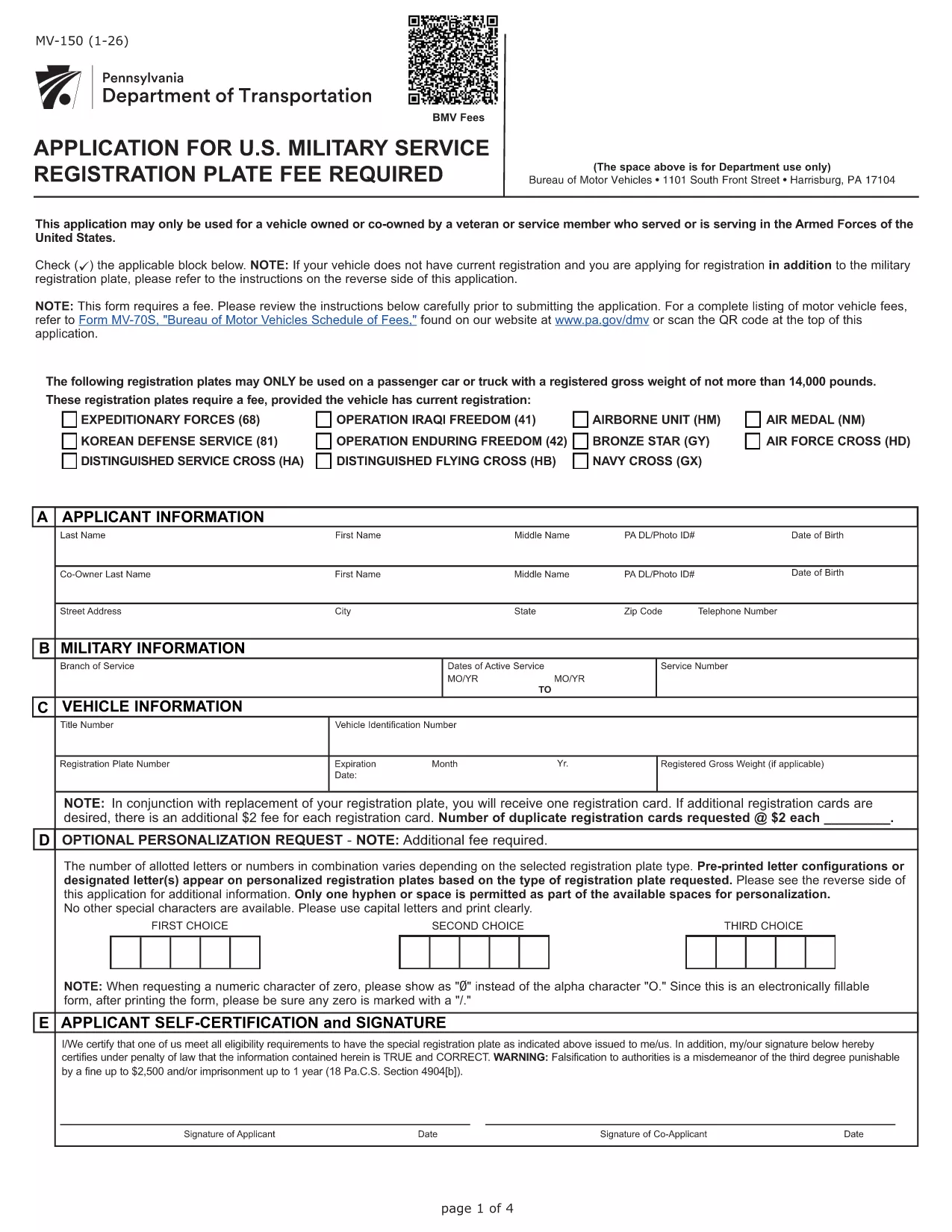
Pennsylvania MV-150 Vehicle Registration Form – Fillable PDF

  1. Мова англійська
  2. Країна США
  3. відділ PennDOT
  4. діяльність Реєстрація транспортного засобу
Pennsylvania MV-150 Vehicle Registration Form – Fillable PDF

The MV-150 is Pennsylvania’s official vehicle registration application used by the Department of Transportation (PennDOT). Whether you are registering a new vehicle, renewing a plate, or updating ownership information, the MV-150 must be completed accurately and submitted with the appropriate fee.

What Is the MV-150 Form?

The MV-150 collects essential details about the vehicle, the owner, and any lienholders. It is required for:

  • Initial registration of a newly purchased vehicle
  • Renewal of an existing registration
  • Transfer of ownership
  • Adding or removing a license plate

How to Complete the MV-150 Online with Formize

Instead of downloading the PDF and editing it with a separate program, you can fill it out directly on our page using the Formize PDF Filler app:

  1. Click the "Fill out this form" button below the description.
  2. Wait a few seconds while the Formize PDF Filler loads the MV-150.
  3. Enter your information in each fillable field – the interface is intuitive and saves your progress automatically.
  4. Review the entered data, then click Submit to download the completed PDF.
  5. Print the filled PDF and attach it to your payment (check or money order) before mailing it to PennDOT.

Common Mistakes & Tips for a Smooth Submission

  • Incorrect VIN or Plate Number: Double‑check the Vehicle Identification Number (VIN) and license plate details before submitting.
  • Missing Signature: The owner’s signature is required; use the signature field in Formize or print and sign the downloaded PDF.
  • Wrong Fee Amount: Verify the current registration fee on the PennDOT website; attaching an incorrect payment may delay processing.
  • Incomplete Owner Information: Provide full name, address, and phone number; partial entries cause the form to be returned.

Where to Submit Your Completed MV-150

After filling out the form, mail the printed PDF together with your payment to:

Pennsylvania Department of Transportation
Bureau of Motor Vehicles
1101 North Front Street
Harrisburg, PA 17120

For faster processing, you may also take the completed form to any PennDOT Driver & Vehicle Service Center.

Frequently Asked Questions

Below are answers to the most common questions about the MV-150.

FAQ
  • Do I need a PennDOT account to use the Formize filler?

    No. The Formize filler works directly in your browser without any login or account.

  • Can I save my progress and finish the form later?

    Yes. The filler automatically stores your entries locally. When you return, click "Load saved data" to continue.

  • Is the MV-150 form free to download?

    The PDF itself is provided by PennDOT at no cost. You only pay the registration fee when you submit the form.

  • What if I make a mistake after downloading the PDF?

    Print a new copy using the Formize filler, correct the error, and submit the updated version. Avoid hand‑editing the PDF with external editors.

  • How long does it take for PennDOT to process my MV-150?

    Processing typically takes 7‑10 business days after receipt, provided all information and payment are correct.

  • Can I submit the MV-150 electronically?

    PennDOT currently requires a printed, signed form with payment. Electronic submission is not accepted for this form.

  • What fee should I include with my MV-150?

    Visit the PennDOT fee schedule page for the latest registration fees based on vehicle type and weight.

  • Do I need to attach the MV-140 with the MV-150?

    If you are renewing registration, you must also submit the MV-140 (Request for Registration) along with the MV-150.

ЯК

Як безкоштовно заповнити MV-150 онлайн за 5 простих кроків:

  1. 1
    Open the Fillable Form
    Click the "Fill out this form" button on the page. The Formize PDF Filler will load the MV-150 automatically.
  2. 2
    Enter Your Information
    Fill in each field – owner details, vehicle data, and lienholder information if applicable. The app saves your entries in real time.
  3. 3
    Review and Download
    Check all entries for accuracy, then click the "Download Completed PDF" button to get a printable version of the filled form.
  4. 4
    Print and Sign
    Print the completed PDF, sign where required, and attach it to your payment.
  5. 5
    Mail to PennDOT
    Send the package to the PennDOT address listed on the page or bring it to a local Driver & Vehicle Service Center.
Програма Formize PDF Filler
ПРО

Форми реєстрації транспортних засобів

Якщо ви володієте або орендуєте автомобіль, причіп або човен, ви повинні виконати певні зобов’язання, щоб ваш транспортний засіб був законно зареєстрованим і безпечним.

MV-150 – це одна з форм реєстрації транспортних засобів, які є документами, які використовуються для реєстрації автомобіля у відповідному державному або провінційному органі влади. Ці форми зазвичай потрібні, коли особа купує новий або вживаний автомобіль або коли вона переїжджає в новий штат чи провінцію з автомобілем.

Точні вимоги та форми, необхідні для реєстрації транспортного засобу, можуть відрізнятися залежно від місця, але, як правило, процес передбачає надання інформації про транспортний засіб, власника та будь-які права застави на транспортний засіб.

Після подання реєстраційних форм і зборів державний або провінційний орган влади видасть свідоцтво про реєстрацію або номерний знак власнику автомобіля. Ця реєстрація дозволяє легально експлуатувати транспортний засіб на дорогах загального користування та магістралях.

ОСОБЛИВОСТІ

Наповнювач PDF

Найпростіший спосіб заповнювати PDF-форми онлайн

  • Швидко заповніть MV-150
    Шукаєте спосіб швидко заповнити MV-150 онлайн? За допомогою нашого безкоштовного онлайн-заповнювача PDF-форм ви знатимете, як редагувати та заповнювати цей PDF-документ менш ніж за хвилину.
  • Простий у використанні онлайн-редактор PDF
    Набридло роздруковувати PDF-файли, щоб ви могли їх редагувати, перш ніж сканувати повторно та надсилати назад? Безкоштовно редагуйте PDF-документи онлайн. Використовуйте наш онлайн-редактор PDF, щоб заощадити час і папір.
  • Чудові інструменти, усі платформи
    Хочете знати, як заповнити MV-150 на комп’ютері Mac або, можливо, як використовувати PDF-заповнювач безкоштовно? Наші онлайн-інструменти PDF працюють на всіх платформах.
  • Безпечне зберігання файлів
    Завершені файли "MV-150" зберігаються в захищеній базі даних, якою керує хостинг Amazon Cloud. Ви можете будь-коли видалити свої файли з нашої системи. У будь-якому випадку ці файли автоматично видаляються через 24 години.
  • Чат із MV-150
    Спілкуйтеся з "MV-150" у Chatize, який є безкоштовним помічником для читання PDF. Ставте запитання та отримуйте відповіді від "MV-150". Просто натисніть кнопку Chat With Document вище.

Видалити сеанс заповнення

Видалити вибраний сеанс заповнення? В цьому випадку ваш прогрес у заповненні форми буде втрачений.

Видалити сеанс редагування

Видалити вибраний сеанс редагування? У цьому випадку ваш прогрес у створенні та редагуванні форми буде втрачено.