Оберіть мову

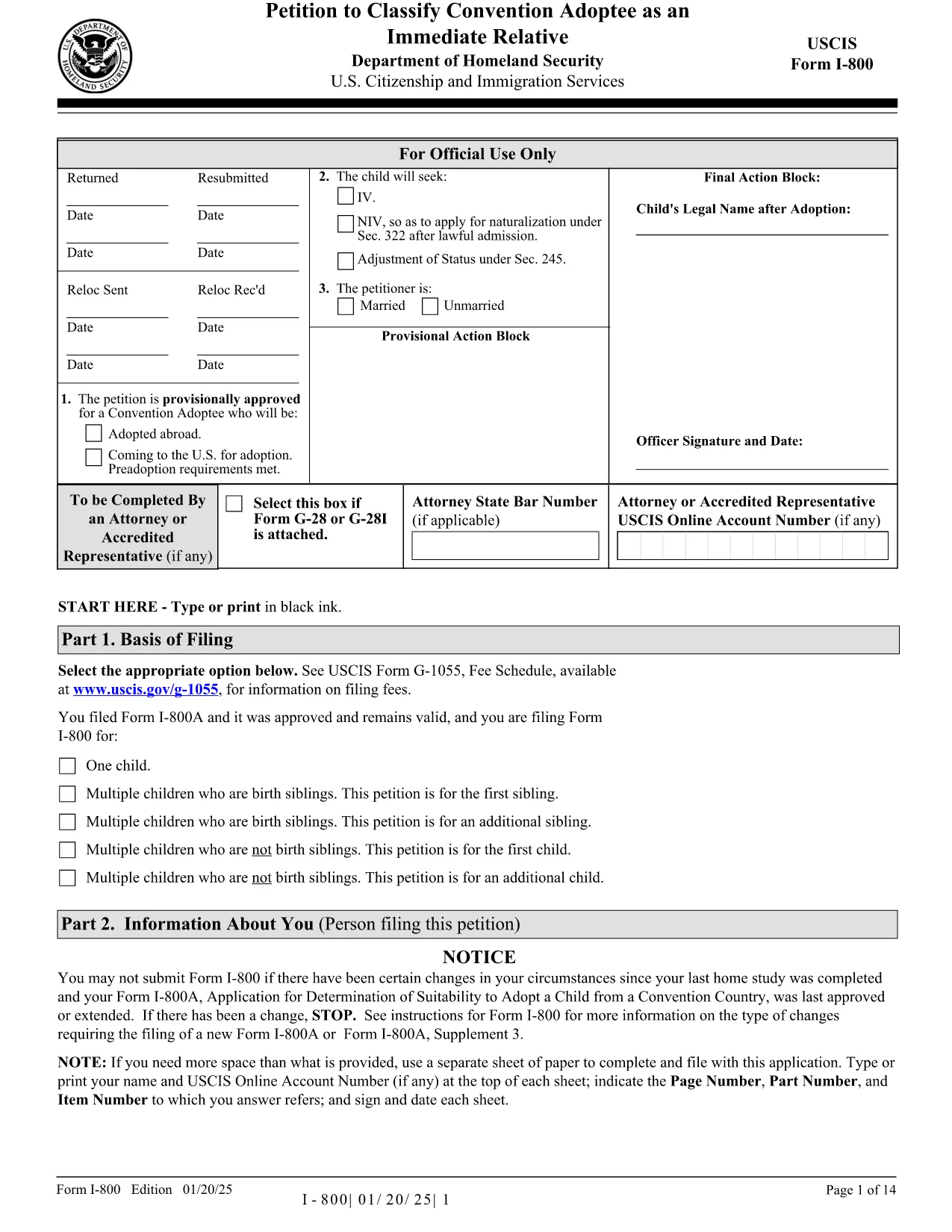
Form I-800 – Petition to Classify a Convention Adoptee

  1. Країна США
  2. Мова англійська
  3. відділ Служба громадянства та імміграції США
Form I-800 – Petition to Classify a Convention Adoptee

The Form I-800 (Petition to Classify Convention Adoptee as an Immediate Relative) is used by U.S. citizen prospective adoptive parents to finalize the immigration process for a child adopted from a Hague Convention country. This page provides the official fillable PDF, step‑by‑step instructions, and tips to ensure a smooth filing.

What is Form I-800?

Form I-800 is filed after you have an approved Form I-800A (Application for Determination of Suitability to Adopt a Child from a Convention Country). It requests the U.S. Citizenship and Immigration Services (USCIS) to recognize the child as an immediate relative, allowing the child to obtain an immigrant visa.

Eligibility & Required Documents

  • U.S. citizen petitioner (adoptive parent) – must be at least 21 years old.
  • Approved Form I-800A approval notice.
  • Proof of the child’s habitually residing in a Convention country.
  • Article 16 report, adoption agency statements, and post‑placement plans (if applicable).
  • Form I-864 (Affidavit of Support) or I-864EZ.
  • Any required medical examinations, translations, and certifications.

How to Complete the Fillable Form Online

Instead of downloading the PDF and editing it with a separate editor, simply click the "Fill out this form" button on this page. The Formize PDF Filler app will load the fillable version instantly. Follow the on‑screen prompts, save your progress, and download the completed PDF ready for submission.

Common Mistakes to Avoid

  • Using pages from different edition dates – all pages must match the edition date shown at the bottom of the form.
  • Leaving required fields blank (e.g., Part 2 – Information About You).
  • Submitting original documents unless specifically requested.
  • Failing to attach English translations for foreign‑language documents.
  • Paying the filing fee with a personal check – USCIS now requires electronic payment methods.

Where to File & Pay the Fee

Mail the completed Form I-800 and supporting evidence to the USCIS Adoption Lockbox (Dallas, TX). Payment can be made with a credit/debit card using Form G‑1450, or via ACH with Form G‑1650. Check the latest fee schedule on the USCIS website before filing.

Ready to start? Click the button below to open the fillable version and begin your adoption petition today.

FAQ
  • Do I need an approved Form I-800A before filing Form I-800?

    Yes. USCIS requires an approved Form I-800A before you can submit Form I-800.

  • Can I file Form I-800 online?

    Form I-800 itself must be submitted as a PDF by mail, but you can fill it out online using the Formize fillable version.

  • What is the current filing fee for Form I-800?

    Check the USCIS Fee Schedule for the most up‑to‑date amount. Payment must be made electronically (credit/debit card or ACH).

  • How long does USCIS take to process Form I-800?

    Processing times vary; typically 6‑12 months. You can check real‑time estimates on the USCIS case status page.

  • What should I do if I receive a Request for Evidence (RFE)?

    Respond promptly with the requested documents, following the RFE deadline. Include the RFE notice number on all correspondence.

  • Can I submit original documents with my Form I-800?

    Only submit originals if USCIS specifically asks for them. Otherwise, provide clear photocopies and certified translations.

  • Is there a way to track my mailed Form I-800?

    Yes. Use a traceable mailing service (USPS Certified Mail, FedEx, UPS) and keep the receipt for your records.

  • What if the child is adopted from a non‑Convention country?

    Form I-800 is only for Convention adoptees. For non‑Convention cases, you must file Form I-600 or I-600A.

ЯК

Як безкоштовно заповнити Form I-800 онлайн за 5 простих кроків:

  1. 1
    Open the Fillable Form
    Click the "Fill out this form" button on the page. The Formize PDF Filler app loads the official Form I-800 instantly.
  2. 2
    Enter Your Information
    Complete each section, following the on‑screen prompts. Required fields are highlighted in red.
  3. 3
    Save and Review
    Use the "Save" button to store your progress. Review all entries for accuracy before finalizing.
  4. 4
    Download the Completed PDF
    When all fields are filled, click "Download" to get a PDF ready for mailing to USCIS.
  5. 5
    Submit to USCIS
    Mail the downloaded Form I-800 with supporting documents and the correct filing fee to the USCIS Adoption Lockbox.
Програма Formize PDF Filler
ПРО

шаблон Form I-800

Завдяки традиційному набору функцій для перегляду та заповнення PDF-документа в поєднанні з перевагами веб-додатку та адаптивного макета ви можете виконати Form I-800 за лічені хвилини.

ОСОБЛИВОСТІ

Наповнювач PDF

Найпростіший спосіб заповнювати PDF-форми онлайн

  • Швидко заповніть Form I-800
    Шукаєте спосіб швидко заповнити Form I-800 онлайн? За допомогою нашого безкоштовного онлайн-заповнювача PDF-форм ви знатимете, як редагувати та заповнювати цей PDF-документ менш ніж за хвилину.
  • Простий у використанні онлайн-редактор PDF
    Набридло роздруковувати PDF-файли, щоб ви могли їх редагувати, перш ніж сканувати повторно та надсилати назад? Безкоштовно редагуйте PDF-документи онлайн. Використовуйте наш онлайн-редактор PDF, щоб заощадити час і папір.
  • Чудові інструменти, усі платформи
    Хочете знати, як заповнити Form I-800 на комп’ютері Mac або, можливо, як використовувати PDF-заповнювач безкоштовно? Наші онлайн-інструменти PDF працюють на всіх платформах.
  • Безпечне зберігання файлів
    Завершені файли "Form I-800" зберігаються в захищеній базі даних, якою керує хостинг Amazon Cloud. Ви можете будь-коли видалити свої файли з нашої системи. У будь-якому випадку ці файли автоматично видаляються через 24 години.
  • Чат із Form I-800
    Спілкуйтеся з "Form I-800" у Chatize, який є безкоштовним помічником для читання PDF. Ставте запитання та отримуйте відповіді від "Form I-800". Просто натисніть кнопку Chat With Document вище.

Видалити сеанс заповнення

Видалити вибраний сеанс заповнення? В цьому випадку ваш прогрес у заповненні форми буде втрачений.

Видалити сеанс редагування

Видалити вибраний сеанс редагування? У цьому випадку ваш прогрес у створенні та редагуванні форми буде втрачено.