Оберіть мову

APS Energy Support Program Application Form (Fillable PDF)

  1. Мова англійська
  2. Країна США
  3. відділ Utility
  4. діяльність Energy Assistance
APS Energy Support Program Application Form (Fillable PDF)

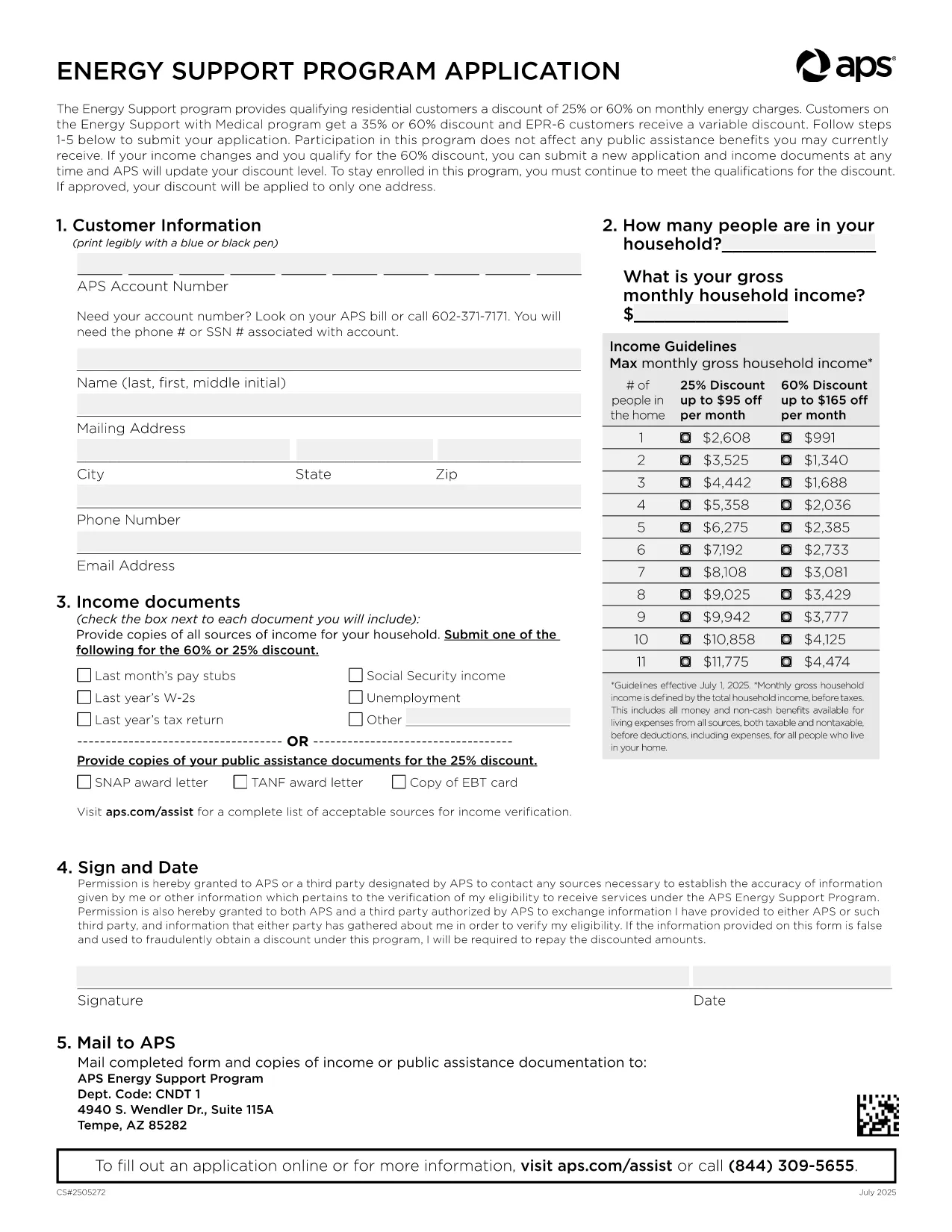
Arizona Public Service (APS) offers the Energy Support Program to help qualifying households lower their monthly electric bill. The official Application Form APS is now available as a fillable PDF that you can complete directly on this page.

Why Choose the APS Energy Support Application?

The APS Energy Support Program provides a discount of up to 60% on your electricity charges. Using the online fillable PDF saves you time, eliminates printing errors, and speeds up processing—your application can be submitted in minutes.

How to Fill the APS Application Form Online

Simply click the "Fill out this form" button below. The Formize PDF Filler will load, allowing you to type, select, and sign directly in your browser. No additional software is required.

Common Mistakes to Avoid

  • Leaving required fields blank – the filler highlights missing information.
  • Submitting incomplete income documents – attach clear scans or photos of each document.
  • Forgetting the signature – the digital signature field must be completed before submission.

Eligibility & Required Documents

To qualify, you must meet the household income guidelines and provide proof for every adult in the home. Acceptable documents include recent pay stubs, tax returns, Social Security statements, SNAP benefits letters, or other listed income sources.

Submit Your Completed Form

After filling the form, click Submit. Your application will be securely sent to APS for processing. You’ll receive a confirmation email with a reference number and next‑step instructions.

Need help? Review the FAQs below or contact APS Customer Care at (602) 371‑7171.

FAQ
  • What is the APS Energy Support Program?

    It is a discount program offered by Arizona Public Service that reduces eligible households' electric bills by up to 60% based on income.

  • Do I need to print the form?

    No. The fillable PDF can be completed entirely online using the Formize PDF Filler, then submitted electronically.

  • Which documents are required?

    Proof of income for every adult (pay stubs, tax returns, Social Security statements, SNAP letters, etc.) and a valid signature from the account holder.

  • How long does processing take?

    APS typically processes online applications within 10‑15 business days. You will receive an email notification of the decision.

  • Can I edit the form after submitting?

    Once submitted, the form cannot be edited. If you need to make changes, contact APS Customer Care to request a new application.

  • Is my information secure?

    Yes. Formize uses SSL encryption to protect all data entered in the PDF filler. APS also follows strict privacy standards.

  • How often do I need to reapply?

    Eligibility must be recertified every 24 months. APS will mail a re‑certification form before your current enrollment expires.

  • What if I have trouble with the online filler?

    Refresh the page, ensure your browser is up‑to‑date, and try again. If the issue persists, you can download the PDF (link below) and complete it manually.

ЯК

Як безкоштовно заповнити APS application form онлайн за 5 простих кроків:

  1. 1
    Open the Fillable Form
    Click the "Fill out this form" button on the page. The Formize PDF Filler loads instantly in your browser.
  2. 2
    Enter Your Information
    Type directly into each field, select options from dropdowns, and upload required documents using the attachment icons.
  3. 3
    Add Your Digital Signature
    Use the signature field to draw or type your name. The filler validates the signature before allowing submission.
  4. 4
    Review and Submit
    Check all entered data, ensure every required document is attached, then click the Submit button to send your application to APS.
  5. 5
    Save a Copy
    After submission, download a PDF copy for your records by clicking the "Download Completed Form" link.
Програма Formize PDF Filler
ПРО

шаблон APS application form

Завдяки традиційному набору функцій для перегляду та заповнення PDF-документа в поєднанні з перевагами веб-додатку та адаптивного макета ви можете виконати APS application form за лічені хвилини.

ОСОБЛИВОСТІ

Наповнювач PDF

Найпростіший спосіб заповнювати PDF-форми онлайн

  • Швидко заповніть APS application form
    Шукаєте спосіб швидко заповнити APS application form онлайн? За допомогою нашого безкоштовного онлайн-заповнювача PDF-форм ви знатимете, як редагувати та заповнювати цей PDF-документ менш ніж за хвилину.
  • Простий у використанні онлайн-редактор PDF
    Набридло роздруковувати PDF-файли, щоб ви могли їх редагувати, перш ніж сканувати повторно та надсилати назад? Безкоштовно редагуйте PDF-документи онлайн. Використовуйте наш онлайн-редактор PDF, щоб заощадити час і папір.
  • Чудові інструменти, усі платформи
    Хочете знати, як заповнити APS application form на комп’ютері Mac або, можливо, як використовувати PDF-заповнювач безкоштовно? Наші онлайн-інструменти PDF працюють на всіх платформах.
  • Безпечне зберігання файлів
    Завершені файли "APS application form" зберігаються в захищеній базі даних, якою керує хостинг Amazon Cloud. Ви можете будь-коли видалити свої файли з нашої системи. У будь-якому випадку ці файли автоматично видаляються через 24 години.
  • Чат із APS application form
    Спілкуйтеся з "APS application form" у Chatize, який є безкоштовним помічником для читання PDF. Ставте запитання та отримуйте відповіді від "APS application form". Просто натисніть кнопку Chat With Document вище.

Видалити сеанс заповнення

Видалити вибраний сеанс заповнення? В цьому випадку ваш прогрес у заповненні форми буде втрачений.

Видалити сеанс редагування

Видалити вибраний сеанс редагування? У цьому випадку ваш прогрес у створенні та редагуванні форми буде втрачено.