
Оберіть мову

VR-095 Multipurpose Vehicle Form – Download & Fill Online

  1. Мова англійська
  2. Країна США
  3. діяльність Реєстрація транспортного засобу
  4. Держава Меріленд
VR-095 Multipurpose Vehicle Form – Download & Fill Online

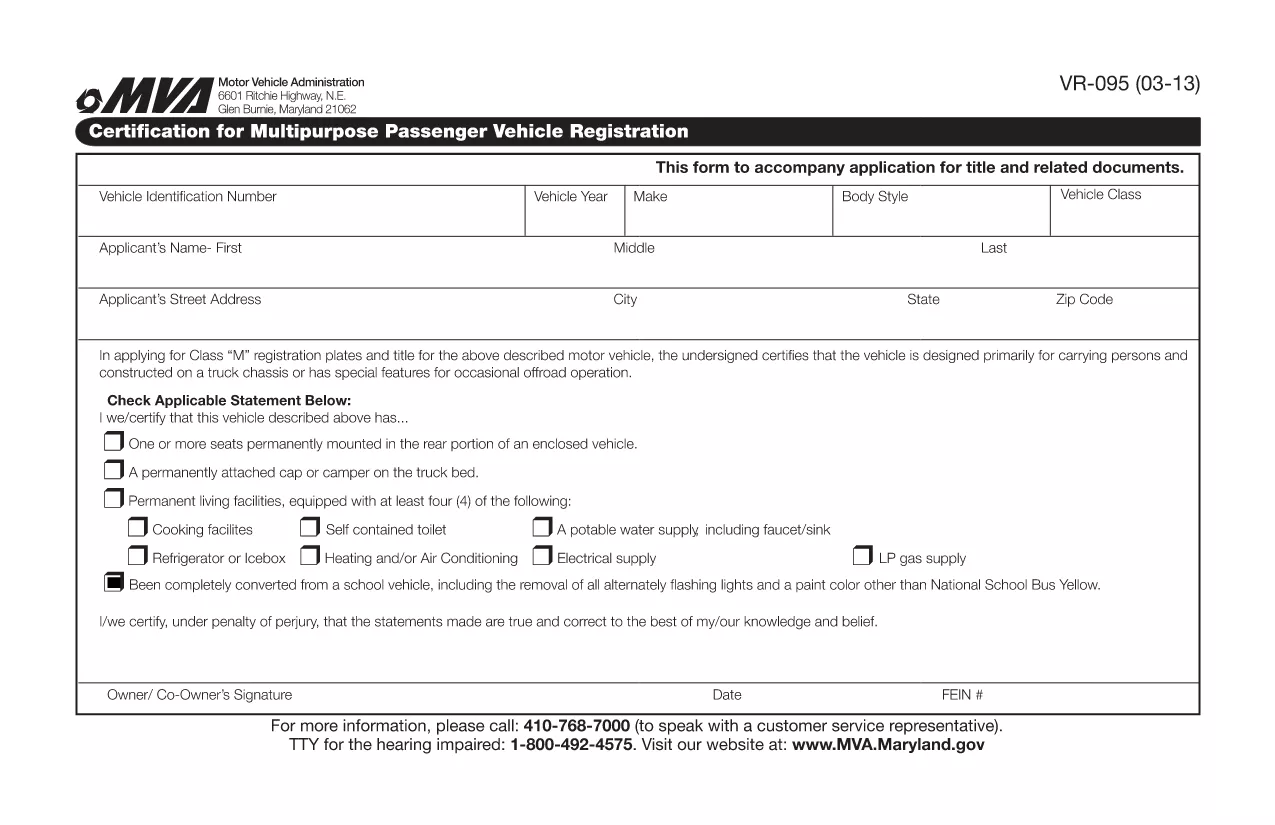
The VR-095 is Maryland’s official application for registering a multipurpose vehicle, such as a utility truck, golf cart, or a custom‑built vehicle that does not fit standard classifications. This form is required by the Maryland Motor Vehicle Administration (MVA) before the vehicle can receive a title, license plates, and registration stickers.

Formize.com hosts a fully fillable PDF version of the VR-095, so you can complete the entire application from any web browser—no need to print, write, or scan.

What is the VR-095 Form?

The VR-095 collects essential information about the vehicle (VIN, weight, dimensions, intended use) and the owner (name, address, insurance). It also includes sections for safety certifications, emissions testing, and any required exemptions.

How to Complete the VR-095 Online

Follow the simple steps below to fill out the form directly on Formize:

  • Click the “Fill out this form” button on the page.
  • Wait for the Formize PDF Filler app to load (usually a few seconds).
  • Enter the required data in each field – the filler automatically validates formats for VIN, dates, and numeric entries.
  • Save your progress at any time, or click Submit to generate a completed PDF.
  • Print the finished document or download it to attach to your MVA submission.

Common Mistakes to Avoid

  • Incorrect VIN entry: Double‑check the 17‑character VIN; a single typo will cause the MVA to reject the form.
  • Missing signatures: The owner and, if applicable, the dealer must sign the form; the online filler lets you add a digital signature.
  • Weight or dimension errors: Use the vehicle’s official weight sticker; inaccurate numbers can delay registration.
  • Out‑of‑date insurance info: Ensure the policy dates cover the registration period.

Download the Fillable PDF

If you prefer to work offline, you can download the original VR-095 PDF from the link below. The file is compatible with Adobe Acrobat Reader and other PDF editors.

Download VR-095 Fillable PDF

Need Help?

For additional guidance, visit the Maryland MVA website or contact your local MVA office. The Formize filler includes tooltips on every field to help you understand exactly what information is required.

FAQ
  • What is the purpose of the VR-095 form?

    VR-095 is used to register multipurpose vehicles in Maryland, allowing the MVA to issue a title, plates, and registration stickers.

  • Can I submit the VR-095 online?

    No. After filling the form online with Formize, you must print the completed PDF and submit it in person or by mail to your local MVA office.

  • Do I need a certified mechanic’s signature?

    If the vehicle’s weight or safety equipment differs from the manufacturer’s specifications, a certified mechanic must sign the appropriate section.

  • Is the PDF truly fillable on mobile devices?

    Yes. Formize’s PDF filler works on most modern smartphones and tablets, but for best experience we recommend a desktop browser.

  • What if I make a mistake after submitting?

    You can download a fresh copy of the VR-095 PDF, correct the error, and re‑submit. The MVA does not accept handwritten corrections on the original.

  • How long does the registration process take after I submit VR-095?

    Processing typically takes 7‑10 business days, provided all required documents and fees are included.

ЯК

Як безкоштовно заповнити VR-095 онлайн за 4 простих кроків:

  1. 1
    Click the Fill‑Out Button
    On the landing page, click the bright “Fill out this form” button to launch the Formize PDF Filler.
  2. 2
    Wait for the Filler to Load
    The browser will load the fillable PDF in a secure iframe. This usually takes 2‑5 seconds.
  3. 3
    Enter Your Information
    Complete each highlighted field. The filler validates VINs, dates, and numeric entries in real time.
  4. 4
    Save, Print, or Download
    When you’re finished, click “Save” to store a copy, “Print” for a hard copy, or “Download” to get the finished PDF for MVA submission.
Програма Formize PDF Filler
ПРО

Форми реєстрації транспортних засобів

Якщо ви володієте або орендуєте автомобіль, причіп або човен, ви повинні виконати певні зобов’язання, щоб ваш транспортний засіб був законно зареєстрованим і безпечним.

VR-095 – це одна з форм реєстрації транспортних засобів, які є документами, які використовуються для реєстрації автомобіля у відповідному державному або провінційному органі влади. Ці форми зазвичай потрібні, коли особа купує новий або вживаний автомобіль або коли вона переїжджає в новий штат чи провінцію з автомобілем.

Точні вимоги та форми, необхідні для реєстрації транспортного засобу, можуть відрізнятися залежно від місця, але, як правило, процес передбачає надання інформації про транспортний засіб, власника та будь-які права застави на транспортний засіб.

Після подання реєстраційних форм і зборів державний або провінційний орган влади видасть свідоцтво про реєстрацію або номерний знак власнику автомобіля. Ця реєстрація дозволяє легально експлуатувати транспортний засіб на дорогах загального користування та магістралях.

ОСОБЛИВОСТІ

Наповнювач PDF

Найпростіший спосіб заповнювати PDF-форми онлайн

  • Швидко заповніть VR-095
    Шукаєте спосіб швидко заповнити VR-095 онлайн? За допомогою нашого безкоштовного онлайн-заповнювача PDF-форм ви знатимете, як редагувати та заповнювати цей PDF-документ менш ніж за хвилину.
  • Простий у використанні онлайн-редактор PDF
    Набридло роздруковувати PDF-файли, щоб ви могли їх редагувати, перш ніж сканувати повторно та надсилати назад? Безкоштовно редагуйте PDF-документи онлайн. Використовуйте наш онлайн-редактор PDF, щоб заощадити час і папір.
  • Чудові інструменти, усі платформи
    Хочете знати, як заповнити VR-095 на комп’ютері Mac або, можливо, як використовувати PDF-заповнювач безкоштовно? Наші онлайн-інструменти PDF працюють на всіх платформах.
  • Безпечне зберігання файлів
    Завершені файли "VR-095" зберігаються в захищеній базі даних, якою керує хостинг Amazon Cloud. Ви можете будь-коли видалити свої файли з нашої системи. У будь-якому випадку ці файли автоматично видаляються через 24 години.
  • Чат із VR-095
    Спілкуйтеся з "VR-095" у Chatize, який є безкоштовним помічником для читання PDF. Ставте запитання та отримуйте відповіді від "VR-095". Просто натисніть кнопку Chat With Document вище.

Видалити сеанс заповнення

Видалити вибраний сеанс заповнення? В цьому випадку ваш прогрес у заповненні форми буде втрачений.

Видалити сеанс редагування

Видалити вибраний сеанс редагування? У цьому випадку ваш прогрес у створенні та редагуванні форми буде втрачено.