
Chọn ngôn ngữ

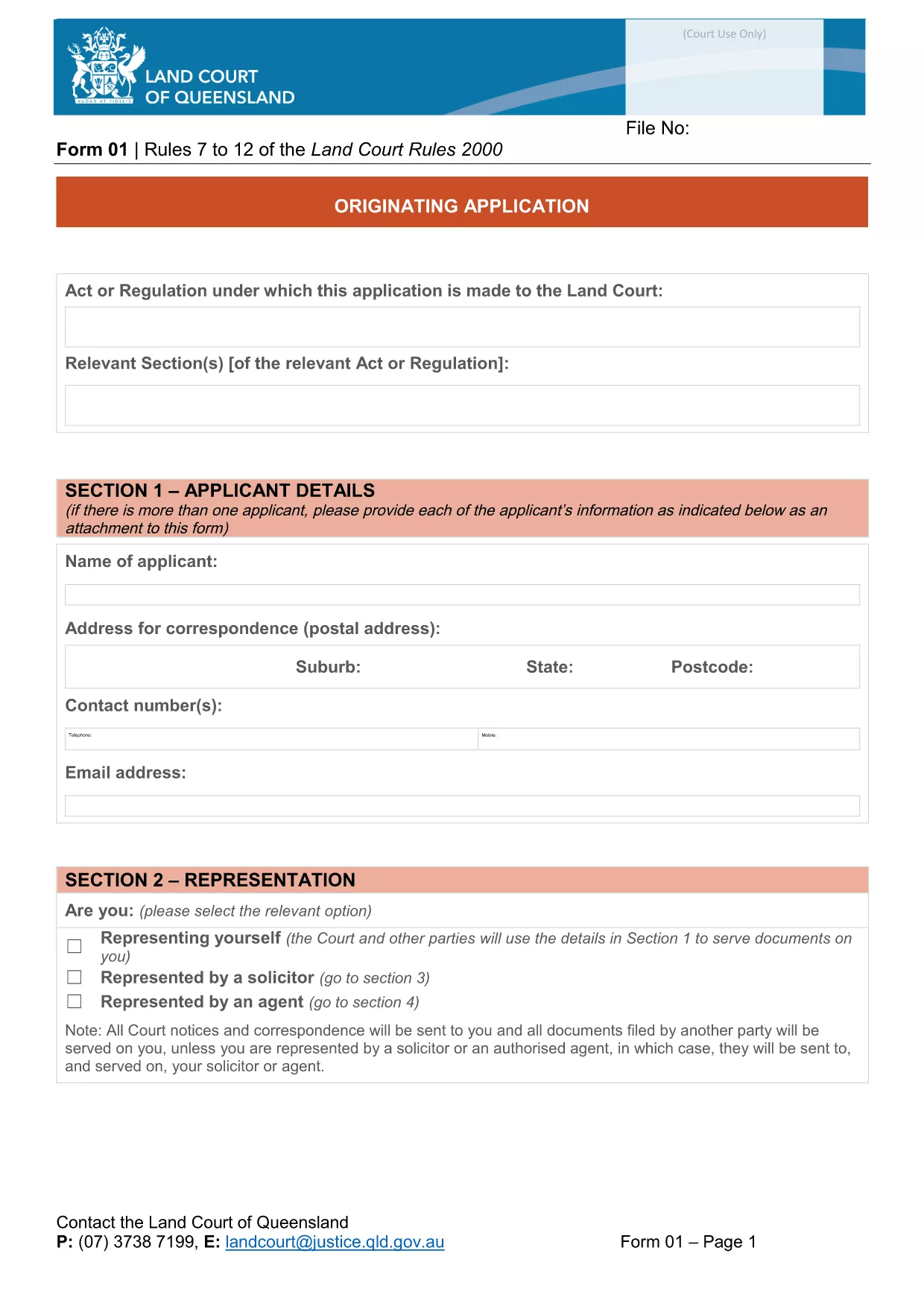
Originating Application Form Part 1 (Fillable PDF)

  1. Ngôn ngữ Tiếng Anh
  2. Quốc gia Châu Úc
  3. Hoạt động Legal Forms
  4. Phòng Sở tư pháp
Originating Application Form Part 1 (Fillable PDF)

The Originating Application Form Part 1 is the first step in initiating a matter before the Queensland Land Court. Traditionally this PDF had to be printed, filled by hand, and scanned back in – a time‑consuming process that often led to errors.

With Formize’s free Fillable PDF feature, the same form is now completely editable online. The document is not locked, meaning you can type directly into every field, add dates, and even attach supporting files without ever opening a separate PDF editor.

Why Choose a Fillable PDF?

  • Instant validation – required fields are highlighted.
  • Save time – no printing, scanning, or faxing.
  • Reduce mistakes – auto‑formatting for dates, numbers, and checkboxes.
  • Secure storage – your completed form is saved in the cloud until you download it.

How to Complete the Form Online

Simply click the "Fill out this form" button on this page. The Formize PDF Filler app will load in seconds, presenting the exact layout of the official Queensland Courts form.

Enter your details, attach any required documents, and use the navigation tabs to move between sections. When you’re finished, click Save & Download to get a completed PDF ready for submission.

Common Mistakes & Tips

  • Leaving required fields blank: The filler highlights missing information in red.
  • Incorrect date format: Use the calendar picker to avoid format errors.
  • Uploading oversized files: Keep attachments under 5 MB for faster upload.
  • Not saving frequently: The app auto‑saves every 30 seconds, but a manual save gives peace of mind.

Download vs. Online Fill – What’s Best?

If you prefer to keep a local copy, you can still download the original PDF from the link below and fill it with any PDF editor. However, the online filler guarantees that the form stays unlocked and fully editable, which many other PDF viewers lock after the first edit.

Legal Use & Submission Guidelines

Once completed, the form must be signed (electronic signatures are accepted by the Queensland Land Court) and lodged according to the court’s filing instructions. Keep a copy for your records and submit the original as directed.

Ready to start? Click the button below and let Formize handle the rest.

CÂU HỎI THƯỜNG GẶP
  • Do I need to download the PDF before I can fill it?

    No. Click the "Fill out this form" button and the Formize online filler will let you edit the document directly in your browser.

  • Is the form compatible with Adobe Acrobat?

    Yes. After you finish online, you can download the PDF and open it in Adobe Acrobat or any other PDF viewer.

  • Can I save my progress and return later?

    The Formize filler auto‑saves every 30 seconds. You can also manually click "Save" to download a draft and continue later.

  • Are electronic signatures accepted?

    The Queensland Land Court accepts electronic signatures on this form. Use the built‑in signature field in the filler or attach a scanned signature image.

  • What if I upload the wrong document?

    Simply delete the attachment in the filler and re‑upload the correct file. The app supports most common formats (PDF, JPG, PNG).

  • Is there a size limit for attachments?

    Each attachment must be under 5 MB to ensure quick upload and processing.

  • Do I need an account to use Formize?

    No account is required for this form. The filler works anonymously and does not store any personal data after you download the completed PDF.

  • Can I print the form after filling it online?

    Absolutely. Once you download the completed PDF, you can print it on any standard printer.

LÀM THẾ NÀO ĐỂ

Cách điền fillable PDF miễn phí, trực tuyến trong 4 bước đơn giản:

  1. 1
    Open the Fillable Form
    Click the "Fill out this form" button on the page. The Formize PDF Filler loads instantly in your browser.
  2. 2
    Enter Your Information
    Type directly into each field, use the date picker for dates, and attach supporting documents where required.
  3. 3
    Validate & Save
    The filler highlights any missing required fields. Click "Save & Download" when all sections are complete.
  4. 4
    Download the Completed PDF
    A fully completed, unlocked PDF will be saved to your device. You can now print, sign electronically, or lodge it with the court.
Định dạng ứng dụng PDF Filler
TRONG KHOẢNG

Các Biểu mẫu của Bộ Tư pháp (DOJ)

fillable PDF là một trong những biểu mẫu chính thức được Bộ Tư pháp Hoa Kỳ và các bộ phận, cơ quan và bộ phận khác nhau sử dụng. DOJ là cơ quan điều hành liên bang chịu trách nhiệm thực thi luật liên bang, bảo vệ lợi ích của Hoa Kỳ trong các vấn đề pháp lý và quản lý công lý.

Dưới đây là một số ví dụ về các biểu mẫu của Bộ Tư pháp:

Đơn xin Hỗ trợ Liên bang (SF-424): Biểu mẫu này được sử dụng bởi các tổ chức nộp đơn xin trợ cấp liên bang hoặc hỗ trợ tài chính do DOJ hoặc các bộ phận của DOJ quản lý. Nó thu thập thông tin về tổ chức, dự án đề xuất và ngân sách.

Mẫu đơn khiếu nại về quyền dân sự: Biểu mẫu này được sử dụng để gửi khiếu nại lên Phòng Dân quyền của DOJ về các cáo buộc vi phạm luật dân quyền, chẳng hạn như phân biệt đối xử dựa trên chủng tộc, giới tính, khuyết tật hoặc nguồn gốc quốc gia.

Mẫu yêu cầu thông báo cho nạn nhân: Biểu mẫu này được nạn nhân tội phạm sử dụng để yêu cầu thông báo về tình trạng và thủ tục tố tụng của một vụ án hình sự liên bang, như một phần trong nỗ lực của DOJ nhằm cung cấp thông tin và hỗ trợ cho nạn nhân tội phạm.

Mẫu đơn nhập cư: Văn phòng điều hành xét duyệt nhập cư (EOIR) của DOJ quản lý các tòa án nhập cư và các thủ tục tố tụng liên quan đến nhập cư. Nhiều mẫu đơn khác nhau được sử dụng trong các thủ tục tố tụng tại tòa án di trú, chẳng hạn như Mẫu EOIR-42B để nộp đơn xin miễn trừ việc bị trục xuất hoặc Mẫu EOIR-28 để kháng cáo.

Biểu mẫu ATF: Cục Rượu, Thuốc lá, Súng và Chất nổ (ATF), một bộ phận của DOJ, có bộ biểu mẫu riêng cho nhiều mục đích khác nhau, như đã đề cập trong phản hồi trước đó.

Biểu mẫu Quản lý Thực thi Ma túy (DEA): DEA, một cơ quan khác của DOJ, sử dụng các biểu mẫu riêng của mình cho các vấn đề liên quan đến các chất bị kiểm soát, bao gồm các yêu cầu đăng ký, báo cáo và lưu giữ hồ sơ.

Những ví dụ này nêu bật một số loại biểu mẫu DOJ, nhưng các biểu mẫu cụ thể được Bộ Tư pháp sử dụng có thể khác nhau tùy thuộc vào bộ phận, cơ quan hoặc thành phần liên quan và tính chất của dịch vụ hoặc thủ tục tố tụng. Bạn nên tham khảo trang web chính thức của bộ phận hoặc cơ quan cụ thể trong DOJ hoặc tìm kiếm tư vấn pháp lý để có được thông tin chính xác và cập nhật về các biểu mẫu DOJ cụ thể liên quan đến trường hợp của bạn.

ĐẶC TRƯNG

Trình điền PDF

Cách dễ nhất để điền vào các mẫu PDF trực tuyến

  • Nhanh chóng điền vào fillable PDF
    Bạn đang tìm cách điền nhanh fillable PDF trực tuyến? Với trình điền biểu mẫu PDF miễn phí trực tuyến của chúng tôi, bạn sẽ biết cách chỉnh sửa và điền vào tài liệu pdf này trong vòng chưa đầy một phút.
  • Trình chỉnh sửa PDF trực tuyến dễ sử dụng
    Chán nản với việc in ra các tệp PDF để bạn có thể chỉnh sửa chúng trước khi quét lại và gửi lại? Chỉnh sửa tài liệu PDF trực tuyến miễn phí. Sử dụng trình chỉnh sửa pdf trực tuyến của chúng tôi để tiết kiệm thời gian và giấy.
  • Công cụ tuyệt vời, tất cả các nền tảng
    Bạn muốn biết cách điền fillable PDF trên máy Mac hoặc có thể là cách sử dụng trình điền PDF miễn phí? Các công cụ PDF trực tuyến của chúng tôi hoạt động trên tất cả các nền tảng.
  • Lưu trữ tệp an toàn
    Các tệp "fillable PDF" đã hoàn thành được lưu trữ trong cơ sở dữ liệu bảo mật do dịch vụ lưu trữ Amazon Cloud quản lý. Bạn có thể xóa các tệp của mình khỏi hệ thống của chúng tôi bất cứ lúc nào. Trong mọi trường hợp, các tệp này sẽ tự động bị xóa sau 24 giờ.
  • Trò chuyện với fillable PDF
    Trò chuyện với "fillable PDF" trên Trò chuyện, một trợ lý đọc PDF miễn phí. Đặt câu hỏi và nhận câu trả lời từ "fillable PDF". Chỉ cần nhấp vào nút Trò chuyện với tài liệu ở trên.

Xóa phiên điền

Xóa phiên điền đã chọn? Trong trường hợp này, tiến độ của bạn trong việc hoàn thành biểu mẫu sẽ bị mất.

Xóa phiên chỉnh sửa

Xóa phiên chỉnh sửa đã chọn? Trong trường hợp này, tiến trình tạo và chỉnh sửa biểu mẫu của bạn sẽ bị mất.