Chọn ngôn ngữ

Positive/Refused Drug and Alcohol Test Report (Fillable PDF)

  1. Ngôn ngữ Tiếng Anh
  2. Quốc gia Châu Úc
  3. Phòng Transport
  4. Hoạt động Safety Compliance
Positive/Refused Drug and Alcohol Test Report (Fillable PDF)

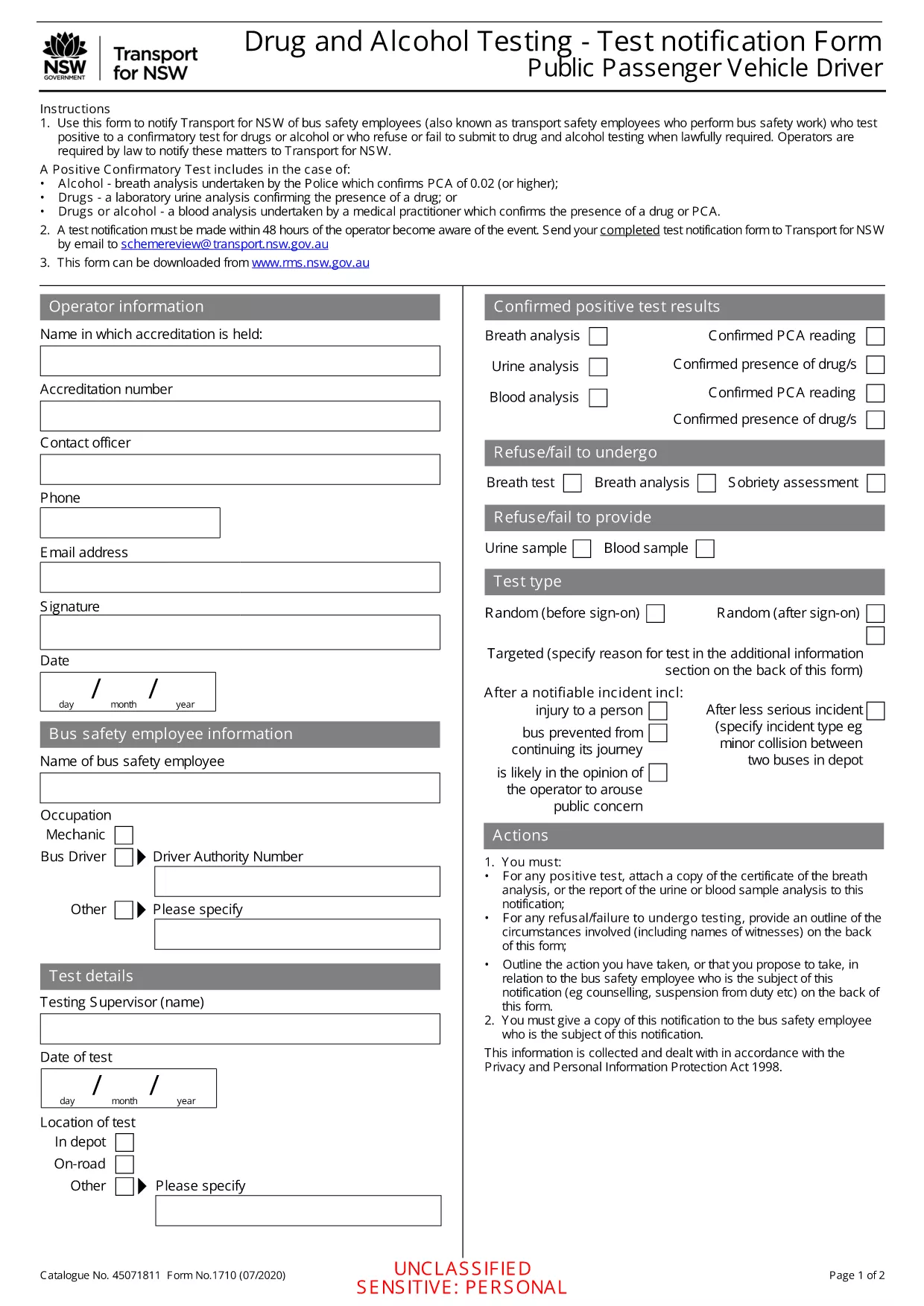
Employers, transport agencies, and safety managers often need to document a worker’s positive, refused, or failed drug/alcohol test. The Positive/Refused Drug and Alcohol Test Report is a mandatory notification form used across Australian jurisdictions, especially for public passenger vehicle operators.

When to Use This Test Report

This form is required whenever a driver or safety‑critical employee:

  • Tests positive for drugs or alcohol after a confirmatory analysis.
  • Refuses to submit a sample when lawfully required.
  • Fails to appear for a scheduled test without a valid excuse.

Submitting the report promptly helps maintain compliance with the National Heavy Vehicle Regulator (NHVR) and state transport regulations.

Key Sections of the Form

The fillable PDF is divided into clear sections:

  1. Employer & Employee Details – names, licence numbers, and contact information.
  2. Test Information – date, time, type of test, and laboratory results.
  3. Outcome – Positive, Refused, or Failed to Test.
  4. Follow‑up Actions – suspension dates, medical review, and notification dates.
  5. Signature & Declaration – authorised signatory acknowledgment.

How to Fill Out the Form Online

Instead of downloading and editing the PDF in a separate editor, simply click the "Fill out this form" button on this page. The Formize PDF Filler app will load instantly, allowing you to complete every field directly in your browser.

Common Mistakes & Tips

  • Missing licence numbers – double‑check the driver’s licence and vehicle registration numbers.
  • Incorrect test type – specify whether the test was urine, breath, or blood.
  • Skipping the signature – the form is invalid without an authorised signature.
  • Delays in submission – submit within 24 hours of the test result to stay compliant.

Follow these tips to ensure a smooth, error‑free submission.

CÂU HỎI THƯỜNG GẶP
  • What qualifies as a "refused" test?

    A refusal occurs when the employee declines to provide a sample after being lawfully directed to do so, or when they intentionally obstruct the collection process.

  • Do I need a laboratory report to submit this form?

    Yes. For a positive result, attach the confirmatory laboratory report. For a refusal, include a written statement of the employee’s refusal.

  • Can I edit the PDF after I download it?

    The form is fully fillable online via Formize. After downloading, you can still edit it with any standard PDF editor, but online completion is recommended for accuracy.

  • How long must I keep the completed report?

    Regulations require retention for at least 3 years, or longer if stipulated by your state’s transport authority.

  • Is the online filler secure?

    Formize uses SSL encryption and stores data only in your browser session. No information is transmitted to third parties unless you choose to email or upload the file.

  • What if I make an error after submitting?

    Contact your compliance officer immediately. You can submit a corrected form with a clear note indicating it supersedes the previous submission.

  • Do I need a digital signature?

    A typed name in the signature field is acceptable when the form is submitted electronically. For hard‑copy submissions, print and sign the document.

LÀM THẾ NÀO ĐỂ

Cách điền drug test report PDF miễn phí, trực tuyến trong 5 bước đơn giản:

  1. 1
    Click the Fill‑out Button
    On this page, click the "Fill out this form" button. The Formize PDF Filler will open in a new tab.
  2. 2
    Wait for the Filler to Load
    The app loads the fillable PDF automatically. No download or extra software is required.
  3. 3
    Enter All Required Information
    Complete each highlighted field with accurate employer, employee, and test details.
  4. 4
    Save and Download
    When finished, click "Save" to store a copy in your browser, then download the completed PDF for your records.
  5. 5
    Submit to the Authority
    Email or upload the saved PDF to the relevant transport authority as instructed in your organisation’s policy.
Định dạng ứng dụng PDF Filler
TRONG KHOẢNG

mẫu drug test report PDF

Với bộ tính năng truyền thống để xem và điền vào tài liệu PDF, kết hợp với các lợi ích của ứng dụng web và bố cục đáp ứng, bạn có thể hoàn thành drug test report PDF trong vài phút.

ĐẶC TRƯNG

Trình điền PDF

Cách dễ nhất để điền vào các mẫu PDF trực tuyến

  • Nhanh chóng điền vào drug test report PDF
    Bạn đang tìm cách điền nhanh drug test report PDF trực tuyến? Với trình điền biểu mẫu PDF miễn phí trực tuyến của chúng tôi, bạn sẽ biết cách chỉnh sửa và điền vào tài liệu pdf này trong vòng chưa đầy một phút.
  • Trình chỉnh sửa PDF trực tuyến dễ sử dụng
    Chán nản với việc in ra các tệp PDF để bạn có thể chỉnh sửa chúng trước khi quét lại và gửi lại? Chỉnh sửa tài liệu PDF trực tuyến miễn phí. Sử dụng trình chỉnh sửa pdf trực tuyến của chúng tôi để tiết kiệm thời gian và giấy.
  • Công cụ tuyệt vời, tất cả các nền tảng
    Bạn muốn biết cách điền drug test report PDF trên máy Mac hoặc có thể là cách sử dụng trình điền PDF miễn phí? Các công cụ PDF trực tuyến của chúng tôi hoạt động trên tất cả các nền tảng.
  • Lưu trữ tệp an toàn
    Các tệp "drug test report PDF" đã hoàn thành được lưu trữ trong cơ sở dữ liệu bảo mật do dịch vụ lưu trữ Amazon Cloud quản lý. Bạn có thể xóa các tệp của mình khỏi hệ thống của chúng tôi bất cứ lúc nào. Trong mọi trường hợp, các tệp này sẽ tự động bị xóa sau 24 giờ.
  • Trò chuyện với drug test report PDF
    Trò chuyện với "drug test report PDF" trên Trò chuyện, một trợ lý đọc PDF miễn phí. Đặt câu hỏi và nhận câu trả lời từ "drug test report PDF". Chỉ cần nhấp vào nút Trò chuyện với tài liệu ở trên.

Xóa phiên điền

Xóa phiên điền đã chọn? Trong trường hợp này, tiến độ của bạn trong việc hoàn thành biểu mẫu sẽ bị mất.

Xóa phiên chỉnh sửa

Xóa phiên chỉnh sửa đã chọn? Trong trường hợp này, tiến trình tạo và chỉnh sửa biểu mẫu của bạn sẽ bị mất.