
Chọn ngôn ngữ

RTB-27 Condition Inspection Report – Fillable PDF

  1. Ngôn ngữ Tiếng Anh
  2. Quốc gia Canada
  3. Hoạt động thuê nhà
  4. Tiểu bang British Columbia
RTB-27 Condition Inspection Report – Fillable PDF

The RTB-27 Condition Inspection Report is the standard form used in British Columbia for documenting the condition of a rental unit at the start and end of a tenancy. Landlords and tenants rely on this form to settle security‑deposit disputes and to meet the requirements of the Residential Tenancy Regulation (Part 3, sections 19 & 20).

What Is the RTB-27 Form?

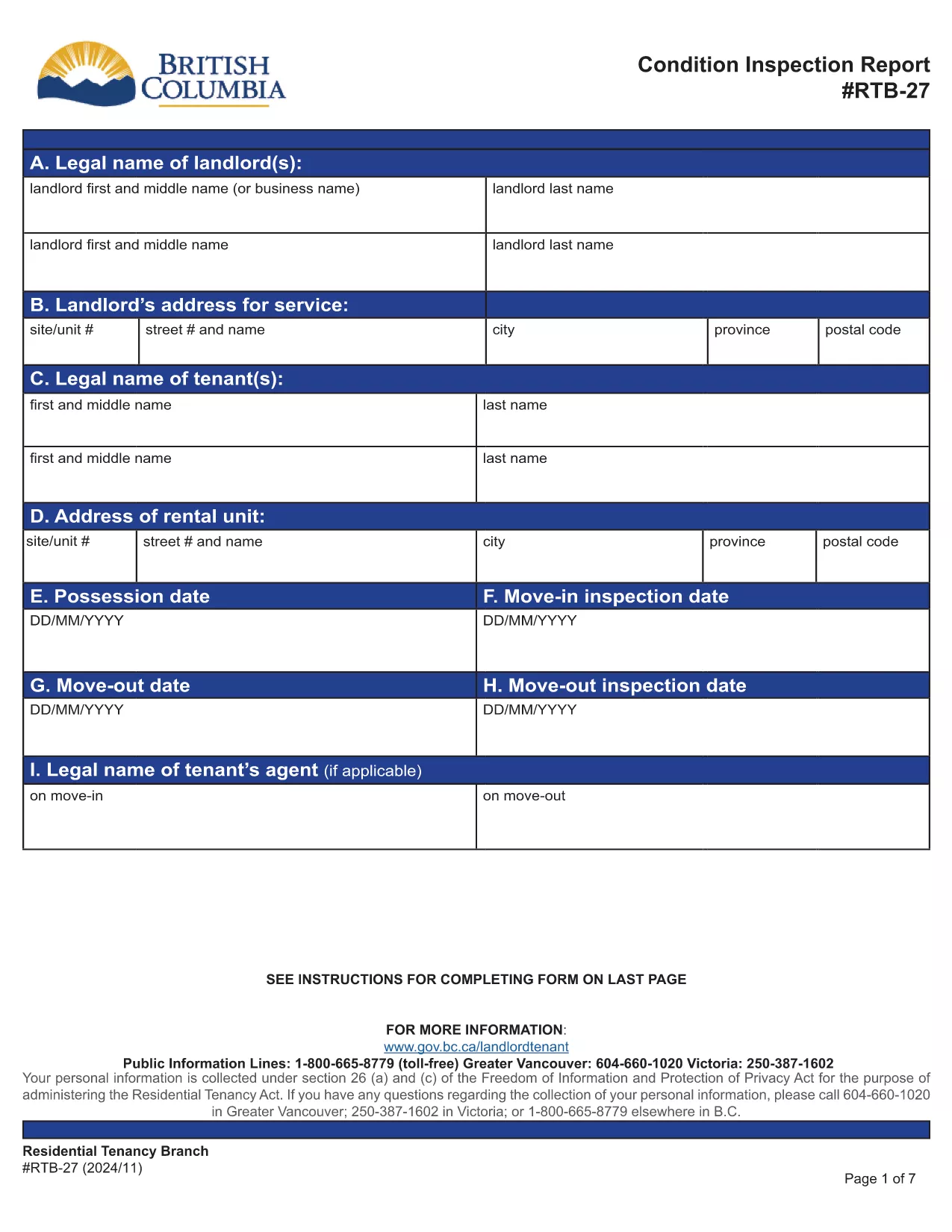
RTB‑27 captures details such as:

  • Legal names and addresses of landlord and tenant
  • Property address and unit number
  • Move‑in and move‑out inspection dates
  • Room‑by‑room condition notes and signatures

The form must be signed by both parties and kept for the duration of the tenancy.

How to Fill Out the RTB-27 Online

Instead of downloading the PDF to a desktop editor, simply click the "Fill out this form" button on this page. The Formize PDF Filler app will load the official RTB‑27 document, allowing you to:

  • Enter text directly into each field
  • Navigate with tab or mouse clicks
  • Save your progress at any time
  • Download a completed, printable PDF

Common Mistakes to Avoid

  • Leaving fields blank: Every field marked with an asterisk (*) is required.
  • Using vague descriptions: Be specific about any damage or wear.
  • Signing before both parties review: Both landlord and tenant must sign after the inspection.
  • Submitting the wrong version: Use the official PDF linked below to ensure compliance.

Where to Submit the Completed Form

After both signatures are added, keep a copy for your records and provide the original to the other party. If a dispute arises, the completed RTB‑27 can be used as evidence in Residential Tenancy Branch proceedings.

Download the Official PDF

The form below is the exact version required by the BC Residential Tenancy Branch. Click here to view the official PDF.

CÂU HỎI THƯỜNG GẶP
  • Is the RTB‑27 form required for every rental in BC?

    Yes, the Residential Tenancy Regulation requires a condition inspection report for all new tenancy agreements and for any tenancy that ends.

  • Can I use a scanned copy of the RTB‑27 instead of the fillable PDF?

    A scanned copy is accepted only if all fields are clearly legible and signatures are present. Using the fillable PDF ensures compliance and reduces errors.

  • What happens if I forget to sign the RTB‑27?

    Both parties must sign. If a signature is missing, the form is considered incomplete and may not be admissible in a dispute.

  • Do I need to submit the RTB‑27 to the Residential Tenancy Branch?

    No, you keep a copy for your records and give the original to the other party. Submit it only if a dispute is taken to the Branch.

  • Can I edit the form after I have downloaded the completed PDF?

    Once downloaded, the PDF is no longer editable. Make all changes in the Formize filler before you save and download the final version.

  • Is there a fee to use the Formize PDF Filler for RTB‑27?

    No, the online filler is free to use for this form.

  • What version of the RTB‑27 should I use?

    Always use the latest official version provided by the BC government, which is linked on this page.

LÀM THẾ NÀO ĐỂ

Cách điền RTB-27 miễn phí, trực tuyến trong 5 bước đơn giản:

  1. 1
    Click the Fill Out Button
    Press the "Fill out this form" button on the page to launch the Formize PDF Filler.
  2. 2
    Wait for the Filler to Load
    The official RTB‑27 PDF will appear in the browser. Loading usually takes a few seconds.
  3. 3
    Enter All Required Information
    Complete each field, following the on‑screen prompts. Use the tab key to move quickly between fields.
  4. 4
    Save and Review
    Click the Save button to store your progress. Review the form for completeness and accuracy.
  5. 5
    Download or Print the Completed Form
    When finished, download the filled PDF or print it directly for signatures.
Định dạng ứng dụng PDF Filler
TRONG KHOẢNG

Biểu mẫu dành cho chủ nhà và/hoặc người thuê nhà đề xuất hành động liên quan đến hợp đồng thuê nhà.

RTB-27 là loại hợp đồng thuê nhà ở được hầu hết các chủ nhà tư nhân và hiệp hội nhà ở sử dụng.

Có một số vấn đề mà chủ nhà hoặc người thuê nhà phải tuân theo các quy tắc nhất định được nêu trong các quy định. Trong một số trường hợp, họ có thể cần phải hoàn thành một biểu mẫu, được gọi là 'mẫu theo quy định', đề xuất một hành động có thể ảnh hưởng đến bên kia trong hợp đồng thuê nhà.

Các biểu mẫu được gọi là biểu mẫu quy định vì từ ngữ trong đó đã được soạn thảo cẩn thận để đảm bảo rằng người hoàn thành biểu mẫu và người nhận biểu mẫu có thể hiểu những gì đang được đề xuất và họ có thể làm gì để đáp lại. Việc không cung cấp đúng biểu mẫu có thể làm mất hiệu lực hành động đang được đề xuất.

Bạn không thể thay đổi từ ngữ trong các biểu mẫu này trừ khi biểu mẫu cho biết bạn có thể làm như vậy. Nếu bạn thay đổi từ ngữ, biểu mẫu có thể bị vô hiệu. Bạn cũng phải tuân thủ bất kỳ khoảng thời gian thông báo nào được nêu trong biểu mẫu.

ĐẶC TRƯNG

Trình điền PDF

Cách dễ nhất để điền vào các mẫu PDF trực tuyến

  • Nhanh chóng điền vào RTB-27
    Bạn đang tìm cách điền nhanh RTB-27 trực tuyến? Với trình điền biểu mẫu PDF miễn phí trực tuyến của chúng tôi, bạn sẽ biết cách chỉnh sửa và điền vào tài liệu pdf này trong vòng chưa đầy một phút.
  • Trình chỉnh sửa PDF trực tuyến dễ sử dụng
    Chán nản với việc in ra các tệp PDF để bạn có thể chỉnh sửa chúng trước khi quét lại và gửi lại? Chỉnh sửa tài liệu PDF trực tuyến miễn phí. Sử dụng trình chỉnh sửa pdf trực tuyến của chúng tôi để tiết kiệm thời gian và giấy.
  • Công cụ tuyệt vời, tất cả các nền tảng
    Bạn muốn biết cách điền RTB-27 trên máy Mac hoặc có thể là cách sử dụng trình điền PDF miễn phí? Các công cụ PDF trực tuyến của chúng tôi hoạt động trên tất cả các nền tảng.
  • Lưu trữ tệp an toàn
    Các tệp "RTB-27" đã hoàn thành được lưu trữ trong cơ sở dữ liệu bảo mật do dịch vụ lưu trữ Amazon Cloud quản lý. Bạn có thể xóa các tệp của mình khỏi hệ thống của chúng tôi bất cứ lúc nào. Trong mọi trường hợp, các tệp này sẽ tự động bị xóa sau 24 giờ.
  • Trò chuyện với RTB-27
    Trò chuyện với "RTB-27" trên Trò chuyện, một trợ lý đọc PDF miễn phí. Đặt câu hỏi và nhận câu trả lời từ "RTB-27". Chỉ cần nhấp vào nút Trò chuyện với tài liệu ở trên.

Xóa phiên điền

Xóa phiên điền đã chọn? Trong trường hợp này, tiến độ của bạn trong việc hoàn thành biểu mẫu sẽ bị mất.

Xóa phiên chỉnh sửa

Xóa phiên chỉnh sửa đã chọn? Trong trường hợp này, tiến trình tạo và chỉnh sửa biểu mẫu của bạn sẽ bị mất.