
Chọn ngôn ngữ

RTB‑45 Notice of Rent Increase – Fillable PDF

  1. Ngôn ngữ Tiếng Anh
  2. Quốc gia Canada
  3. Hoạt động thuê nhà
  4. Tiểu bang British Columbia
RTB‑45 Notice of Rent Increase – Fillable PDF

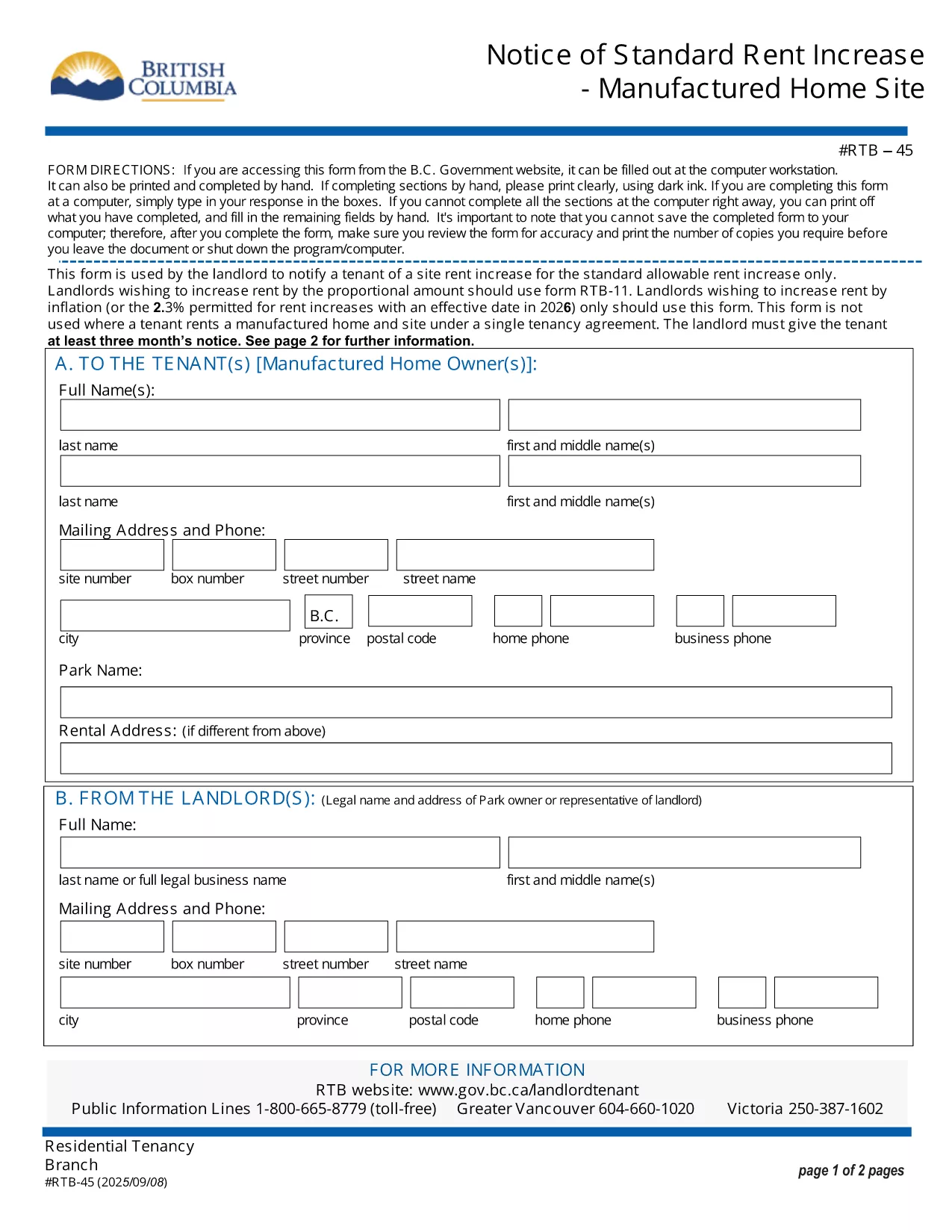
The RTB‑45 is the official notice used in British Columbia to inform tenants of a rent increase for manufactured home sites. Landlords must provide this form at least three months before the increase takes effect, as required by the Residential Tenancy Act.

Our fillable PDF version lets you complete the notice directly in your browser—no printing, scanning, or faxing needed. Simply click the button below, fill the required fields, and download a legally‑compliant PDF ready to serve.

What Is the RTB‑45 Form?

The RTB‑45 details the new rent amount, the date the increase starts, and the reason for the change. It must be signed by the landlord (or authorized agent) and delivered to the tenant in writing.

How to Complete the RTB‑45 Online

Using Formize’s PDF Filler, the process is quick and secure:

  • Click the "Fill out this form" button.
  • Wait for the Formize PDF Filler app to load.
  • Enter the landlord’s contact information, tenant’s name, current rent, new rent, and effective date.
  • Review the populated fields for accuracy.
  • Save or download the completed PDF and serve it to the tenant.

Common Mistakes to Avoid

  • Incorrect notice period: BC law requires at least three months’ written notice.
  • Missing signatures: The form is not valid without the landlord’s signature.
  • Wrong effective date: The increase cannot take effect before the tenancy has been in place for 12 months.

Download & Save Your Completed Form

After filling out the RTB‑45, you can download the PDF for your records or email it directly to the tenant. The fillable version retains all formatting, ensuring the document remains compliant with BC tenancy regulations.

CÂU HỎI THƯỜNG GẶP
  • Who must use the RTB‑45 form?

    Landlords of manufactured home sites in British Columbia must use RTB‑45 to give tenants written notice of a rent increase.

  • How many days notice is required?

    BC law requires at least three months (90 days) written notice before the rent increase takes effect.

  • Can I submit the RTB‑45 electronically?

    Yes. The fillable PDF can be completed online and emailed to the tenant, as long as the tenant receives a legible, signed copy.

  • Do I need a lawyer to fill out the form?

    No. The form is straightforward; just follow the on‑screen prompts. If you have complex questions, consult a tenancy specialist.

  • What happens if I miss the notice period?

    If the three‑month notice isn’t given, the rent increase is invalid and you must re‑issue a new RTB‑45 with proper notice.

  • Is the fillable PDF compatible with all browsers?

    The Formize PDF Filler works with modern browsers (Chrome, Edge, Firefox, Safari). For best results, use the latest version.

LÀM THẾ NÀO ĐỂ

Cách điền RTB-45 miễn phí, trực tuyến trong 5 bước đơn giản:

  1. 1
    Click the Fill Out Button
    Press the "Fill out this form" button on the page to launch the Formize PDF Filler.
  2. 2
    Wait for the Filler to Load
    The app loads in a few seconds; a loading indicator will appear.
  3. 3
    Enter Required Information
    Complete each field: landlord details, tenant name, current rent, new rent, and effective date.
  4. 4
    Review and Validate
    Double‑check all entries for accuracy and ensure the signature field is filled.
  5. 5
    Save or Download
    Click "Save" to store the form in your account or "Download" to get a printable PDF.
Định dạng ứng dụng PDF Filler
TRONG KHOẢNG

Biểu mẫu dành cho chủ nhà và/hoặc người thuê nhà đề xuất hành động liên quan đến hợp đồng thuê nhà.

RTB-45 là loại hợp đồng thuê nhà ở được hầu hết các chủ nhà tư nhân và hiệp hội nhà ở sử dụng.

Có một số vấn đề mà chủ nhà hoặc người thuê nhà phải tuân theo các quy tắc nhất định được nêu trong các quy định. Trong một số trường hợp, họ có thể cần phải hoàn thành một biểu mẫu, được gọi là 'mẫu theo quy định', đề xuất một hành động có thể ảnh hưởng đến bên kia trong hợp đồng thuê nhà.

Các biểu mẫu được gọi là biểu mẫu quy định vì từ ngữ trong đó đã được soạn thảo cẩn thận để đảm bảo rằng người hoàn thành biểu mẫu và người nhận biểu mẫu có thể hiểu những gì đang được đề xuất và họ có thể làm gì để đáp lại. Việc không cung cấp đúng biểu mẫu có thể làm mất hiệu lực hành động đang được đề xuất.

Bạn không thể thay đổi từ ngữ trong các biểu mẫu này trừ khi biểu mẫu cho biết bạn có thể làm như vậy. Nếu bạn thay đổi từ ngữ, biểu mẫu có thể bị vô hiệu. Bạn cũng phải tuân thủ bất kỳ khoảng thời gian thông báo nào được nêu trong biểu mẫu.

ĐẶC TRƯNG

Trình điền PDF

Cách dễ nhất để điền vào các mẫu PDF trực tuyến

  • Nhanh chóng điền vào RTB-45
    Bạn đang tìm cách điền nhanh RTB-45 trực tuyến? Với trình điền biểu mẫu PDF miễn phí trực tuyến của chúng tôi, bạn sẽ biết cách chỉnh sửa và điền vào tài liệu pdf này trong vòng chưa đầy một phút.
  • Trình chỉnh sửa PDF trực tuyến dễ sử dụng
    Chán nản với việc in ra các tệp PDF để bạn có thể chỉnh sửa chúng trước khi quét lại và gửi lại? Chỉnh sửa tài liệu PDF trực tuyến miễn phí. Sử dụng trình chỉnh sửa pdf trực tuyến của chúng tôi để tiết kiệm thời gian và giấy.
  • Công cụ tuyệt vời, tất cả các nền tảng
    Bạn muốn biết cách điền RTB-45 trên máy Mac hoặc có thể là cách sử dụng trình điền PDF miễn phí? Các công cụ PDF trực tuyến của chúng tôi hoạt động trên tất cả các nền tảng.
  • Lưu trữ tệp an toàn
    Các tệp "RTB-45" đã hoàn thành được lưu trữ trong cơ sở dữ liệu bảo mật do dịch vụ lưu trữ Amazon Cloud quản lý. Bạn có thể xóa các tệp của mình khỏi hệ thống của chúng tôi bất cứ lúc nào. Trong mọi trường hợp, các tệp này sẽ tự động bị xóa sau 24 giờ.
  • Trò chuyện với RTB-45
    Trò chuyện với "RTB-45" trên Trò chuyện, một trợ lý đọc PDF miễn phí. Đặt câu hỏi và nhận câu trả lời từ "RTB-45". Chỉ cần nhấp vào nút Trò chuyện với tài liệu ở trên.

Xóa phiên điền

Xóa phiên điền đã chọn? Trong trường hợp này, tiến độ của bạn trong việc hoàn thành biểu mẫu sẽ bị mất.

Xóa phiên chỉnh sửa

Xóa phiên chỉnh sửa đã chọn? Trong trường hợp này, tiến trình tạo và chỉnh sửa biểu mẫu của bạn sẽ bị mất.