
Chọn ngôn ngữ

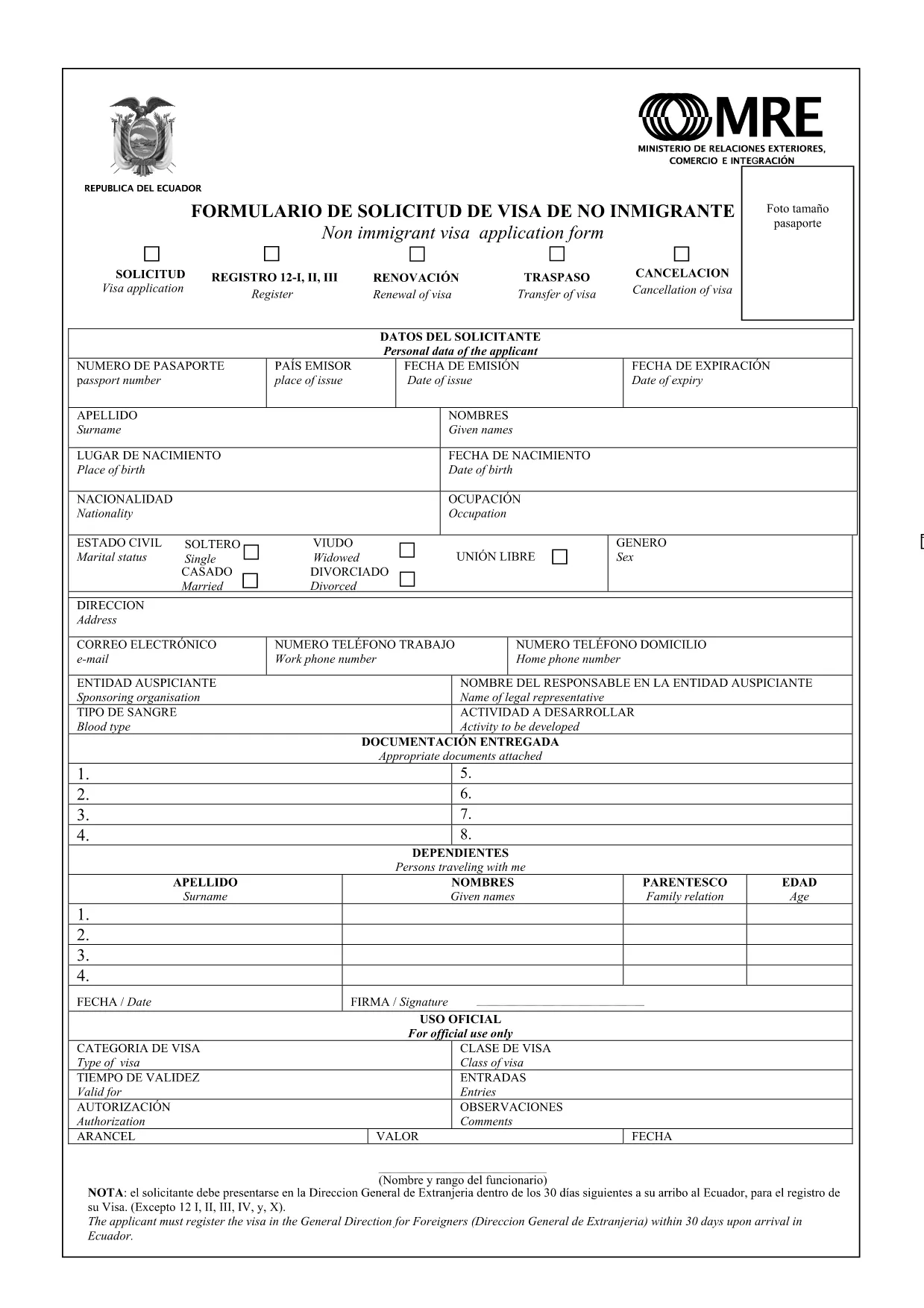
Ecuador Visa Application Form (Fillable PDF)

  1. Ngôn ngữ Tiếng Anh người Tây Ban Nha
  2. Quốc gia Ecuador
  3. Hoạt động thị thực
Ecuador Visa Application Form (Fillable PDF)

Planning a trip to Ecuador? The first step is securing the proper visa. Our fillable PDF Ecuador visa application form lets you complete the entire process online, without printing or scanning.

Why Use Our Fillable PDF for Ecuador Visa?

  • Fully interactive fields – type directly into the document.
  • Instant validation helps you avoid missing information.
  • Secure, browser‑based Formize PDF Filler loads in seconds.
  • Save a copy for your records or submit electronically where accepted.

How to Complete the Ecuador Visa Application Online

Simply click the "Fill out this form" button on this page. The Formize PDF Filler app will open, and you can start entering your details right away.

Key Sections & Common Mistakes to Avoid

Understanding each section reduces the chance of rejection:

  • Personal Information: Ensure your name matches exactly as it appears on your passport.
  • Travel Details: Provide accurate dates and purpose of visit.
  • Financial Proof: Attach recent bank statements if the form asks for them.
  • Signature: Use the digital signature field; a handwritten signature is not required.

Common mistake: Leaving optional fields blank when the instructions say "If applicable, provide details." This can be interpreted as missing information.

Download & Save Your Completed Form

After you finish, click Save to download the completed PDF. Keep a copy for your records and submit the original as instructed by the Ecuador consulate or visa agency.

Need help? Review our FAQs below or contact the relevant Ecuadorian embassy.

CÂU HỎI THƯỜNG GẶP
  • Is the Ecuador visa application form free to download?

    Yes, the fillable PDF is free to download and complete online. Consular processing fees are separate.

  • Can I submit the PDF electronically?

    Some Ecuadorian consulates accept electronic submissions. Always check the specific embassy’s requirements before sending.

  • What passport validity is required for an Ecuador visa?

    Your passport must be valid for at least six months beyond the intended stay in Ecuador.

  • Do I need a digital signature?

    The Formize PDF Filler provides a built‑in digital signature field. No handwritten signature is needed unless the consulate specifically requests it.

  • How long does the visa processing take?

    Processing times vary by visa type but typically range from 5 to 15 business days after submission.

  • Can I edit the form after saving?

    Yes. Open the saved PDF in the Formize PDF Filler again to make any necessary adjustments before final submission.

  • What documents should I attach with the application?

    Common attachments include a passport copy, recent photo, travel itinerary, proof of accommodation, and financial statements.

  • Is there a limit to how many times I can fill the form?

    No. You can open and fill the form as many times as needed until you are ready to submit.

  • Where can I find the official consulate address?

    Visit the official website of the Ecuadorian embassy or consulate in your country for the most up‑to‑date contact information.

  • What if I make a mistake on the form?

    Simply reopen the PDF in the Formize PDF Filler, correct the error, and save a new version before submitting.

LÀM THẾ NÀO ĐỂ

Cách điền Ecuador visa application miễn phí, trực tuyến trong 4 bước đơn giản:

  1. 1
    Open the Fillable Form
    Click the "Fill out this form" button on the page. The Formize PDF Filler app loads directly in your browser.
  2. 2
    Enter Your Information
    Type into each field, following the on‑screen prompts. The app validates entries in real time.
  3. 3
    Review & Save
    After completing all sections, review the data, then click the Save button to download your completed PDF.
  4. 4
    Submit to the Consulate
    Print (if required) and submit the saved PDF according to the instructions from the Ecuadorian consulate or visa agency.
Định dạng ứng dụng PDF Filler
TRONG KHOẢNG

mẫu đơn thị thực

Ecuador visa application là một trong những mẫu Visa là giấy tờ dùng để xin visa nhập cảnh nước ngoài. Thị thực là một tài liệu cho phép người nước ngoài nhập cảnh, lưu trú và đôi khi làm việc ở nước ngoài trong một khoảng thời gian nhất định. Các hình thức và yêu cầu chính xác để xin thị thực khác nhau tùy theo quốc gia và loại thị thực.

Các mẫu đơn thị thực thường yêu cầu thông tin cá nhân như tên, ngày sinh và thông tin hộ chiếu, cũng như thông tin về mục đích và thời gian của chuyến đi, điểm đến dự định và liệu người nộp đơn trước đó đã bị từ chối cấp thị thực hay bị trục xuất khỏi một quốc gia. Các biểu mẫu cũng có thể yêu cầu các tài liệu hỗ trợ như hộ chiếu, ảnh và bằng chứng hỗ trợ tài chính.

Tại Hoa Kỳ, các mẫu đơn xin thị thực phổ biến nhất là mẫu đơn DS-160 và DS-260. Mẫu DS-160 được sử dụng để xin thị thực không định cư, trong khi mẫu DS-260 được sử dụng để xin thị thực định cư. Các biểu mẫu này yêu cầu thông tin chi tiết về lịch sử cá nhân và du lịch của người nộp đơn, cũng như các tài liệu hỗ trợ như hộ chiếu, hành trình du lịch và hồ sơ tài chính.

Các quốc gia khác có thể có các yêu cầu và mẫu thị thực khác nhau, nhưng quy trình cơ bản thường bao gồm hoàn thành đơn xin thị thực, cung cấp tài liệu hỗ trợ và tham dự cuộc phỏng vấn với viên chức lãnh sự tại đại sứ quán hoặc lãnh sự quán Hoa Kỳ. Điều quan trọng cần lưu ý là quy trình xin thị thực có thể phức tạp và tốn thời gian, và các cá nhân xin thị thực nên tham khảo ý kiến ​​của luật sư nhập cư hoặc chuyên gia có trình độ khác để đảm bảo rằng tất cả các mẫu và yêu cầu cần thiết đều được đáp ứng.

ĐẶC TRƯNG

Trình điền PDF

Cách dễ nhất để điền vào các mẫu PDF trực tuyến

  • Nhanh chóng điền vào Ecuador visa application
    Bạn đang tìm cách điền nhanh Ecuador visa application trực tuyến? Với trình điền biểu mẫu PDF miễn phí trực tuyến của chúng tôi, bạn sẽ biết cách chỉnh sửa và điền vào tài liệu pdf này trong vòng chưa đầy một phút.
  • Trình chỉnh sửa PDF trực tuyến dễ sử dụng
    Chán nản với việc in ra các tệp PDF để bạn có thể chỉnh sửa chúng trước khi quét lại và gửi lại? Chỉnh sửa tài liệu PDF trực tuyến miễn phí. Sử dụng trình chỉnh sửa pdf trực tuyến của chúng tôi để tiết kiệm thời gian và giấy.
  • Công cụ tuyệt vời, tất cả các nền tảng
    Bạn muốn biết cách điền Ecuador visa application trên máy Mac hoặc có thể là cách sử dụng trình điền PDF miễn phí? Các công cụ PDF trực tuyến của chúng tôi hoạt động trên tất cả các nền tảng.
  • Lưu trữ tệp an toàn
    Các tệp "Ecuador visa application" đã hoàn thành được lưu trữ trong cơ sở dữ liệu bảo mật do dịch vụ lưu trữ Amazon Cloud quản lý. Bạn có thể xóa các tệp của mình khỏi hệ thống của chúng tôi bất cứ lúc nào. Trong mọi trường hợp, các tệp này sẽ tự động bị xóa sau 24 giờ.
  • Trò chuyện với Ecuador visa application
    Trò chuyện với "Ecuador visa application" trên Trò chuyện, một trợ lý đọc PDF miễn phí. Đặt câu hỏi và nhận câu trả lời từ "Ecuador visa application". Chỉ cần nhấp vào nút Trò chuyện với tài liệu ở trên.

Xóa phiên điền

Xóa phiên điền đã chọn? Trong trường hợp này, tiến độ của bạn trong việc hoàn thành biểu mẫu sẽ bị mất.

Xóa phiên chỉnh sửa

Xóa phiên chỉnh sửa đã chọn? Trong trường hợp này, tiến trình tạo và chỉnh sửa biểu mẫu của bạn sẽ bị mất.