
Chọn ngôn ngữ

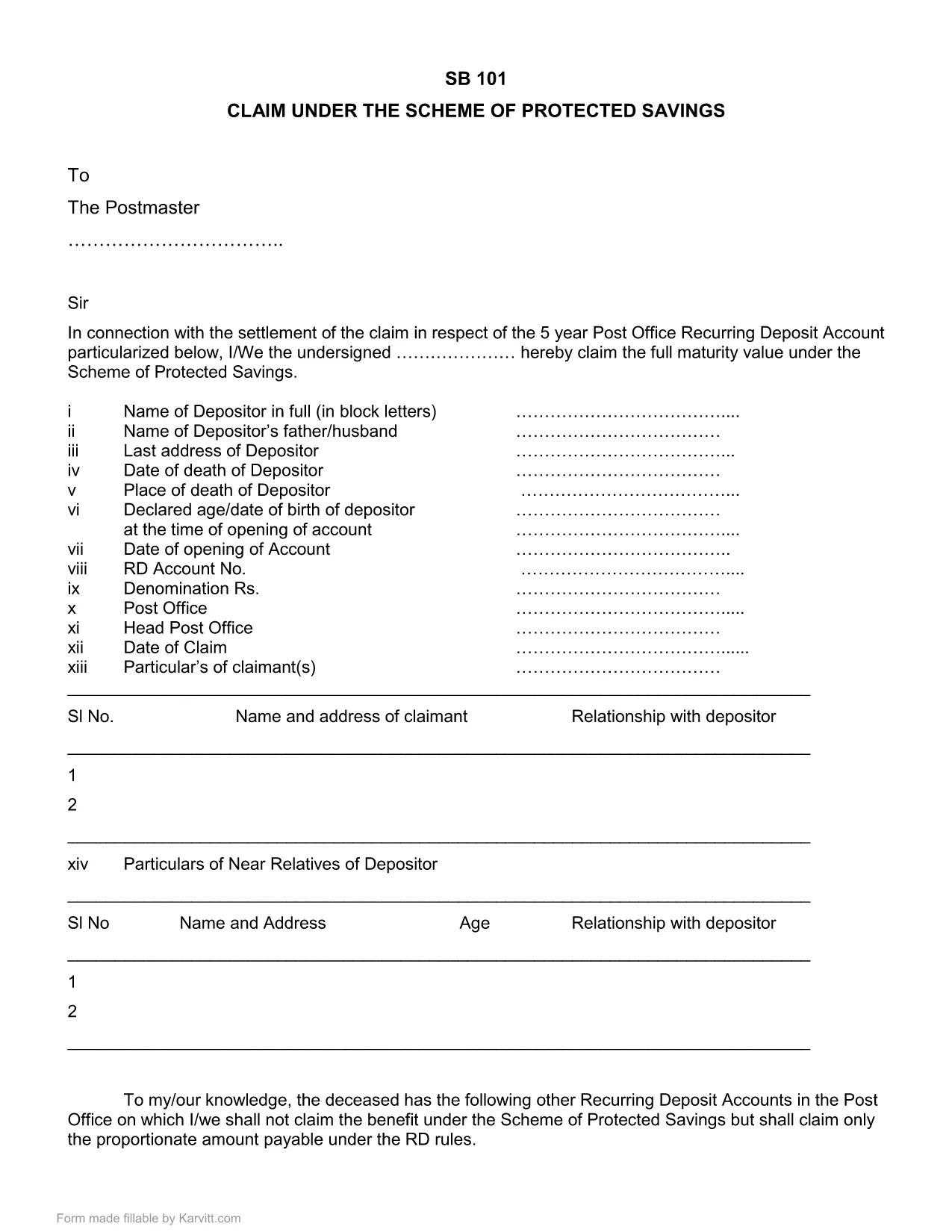
SB-101 India Fillable PDF – Claim Protected Savings

  1. Ngôn ngữ Tiếng Anh
  2. Quốc gia Ấn Độ
  3. Phòng Sở bài viết
SB-101 India Fillable PDF – Claim Protected Savings

The SB-101 form is the official Post Office document used in India to claim benefits under the Scheme of Protected Savings. Whether you are a first‑time claimant or need to submit a renewal, a fillable PDF version saves you time and reduces errors.

What is Form SB-101?

SB-101 is issued by the Indian Post Office and is required to:

  • Validate your protected savings account.
  • Apply for interest benefits and withdrawals.
  • Update personal details linked to your savings scheme.

The form is recognized nationwide and must be completed in the exact format prescribed by the Post Office.

How to Fill SB-101 Online with Formize

Instead of downloading, printing, and scanning, use the Formize PDF Filler for a seamless experience:

  1. Click the "Fill out this form" button on this page.
  2. The Formize PDF Filler loads directly in your browser – no extra software needed.
  3. Enter your information in each highlighted field. The interface guides you through mandatory sections.
  4. When you finish, review the summary screen for any missing or incorrect entries.
  5. Save the completed form to your device or submit it electronically to your nearest Post Office.

Common Mistakes to Avoid When Completing SB-101

  • Incorrect Account Number: Double‑check the 12‑digit number printed on your passbook.
  • Missing Signature: The form is invalid without a clear, legible signature.
  • Outdated Address: Ensure the address matches the one on record with the Post Office.
  • Skipping Optional Fields: Even optional fields can help speed up verification if filled correctly.

Download & Save the Official SB-101 PDF

If you prefer a traditional approach, you can still download the official fillable PDF version below. The file retains the original layout and can be opened with any modern PDF reader.

Download SB-101 Fillable PDF (India)

Remember, using the Formize PDF Filler ensures your data is captured accurately and saves you a trip to the printer.

CÂU HỎI THƯỜNG GẶP
  • What is the purpose of SB-101?

    SB-101 is used to claim benefits, update personal details, and manage withdrawals under the Scheme of Protected Savings offered by the Indian Post Office.

  • Can I fill SB-101 on a mobile device?

    Yes. The Formize PDF Filler works on all modern browsers, including mobile phones and tablets.

  • Do I need Adobe Acrobat to use the fillable PDF?

    No. While the PDF can be opened with Adobe Reader, the Formize online filler lets you complete the form without any additional software.

  • Is the downloaded PDF version still valid?

    Absolutely. The PDF retains the official layout and is accepted by all Post Office branches, provided it is fully completed and signed.

  • What should I do if I make a mistake?

    Use the Formize filler's reset option to clear fields, or download a fresh copy of the PDF and start over.

  • How long does it take to process SB-101 after submission?

    Processing time varies by branch, but most offices complete verification within 7‑10 business days.

LÀM THẾ NÀO ĐỂ

Cách điền SB-101 India miễn phí, trực tuyến trong 5 bước đơn giản:

  1. 1
    Click the Fill Out Button
    Press the "Fill out this form" button on the page to launch the Formize PDF Filler.
  2. 2
    Load the Formize PDF Filler
    The web‑based filler loads instantly in your browser—no downloads required.
  3. 3
    Enter Your Details
    Complete each highlighted field with accurate information. The filler highlights required sections.
  4. 4
    Review & Validate
    Check the summary view for any missing or incorrect entries before finalizing.
  5. 5
    Save or Submit
    Download the finished PDF to your device or submit it electronically to your local Post Office.
Định dạng ứng dụng PDF Filler
TRONG KHOẢNG

Sở Bưu chính Đơn đăng ký

SB-101 India là một trong những biểu mẫu chính thức của Bộ Bưu chính Ấn Độ cung cấp nhiều mẫu đơn đăng ký khác nhau cho các dịch vụ khác nhau. Một số mẫu đơn đăng ký phổ biến bao gồm:

Bảo hiểm nhân thọ bưu điện: Mẫu này được sử dụng để đăng ký các hợp đồng Bảo hiểm nhân thọ bưu điện do Sở Bưu điện cung cấp.

Tài khoản ngân hàng tiết kiệm: Mẫu này dùng để mở tài khoản ngân hàng tiết kiệm tại bưu điện.

Lệnh chuyển tiền: Mẫu này dùng để gửi lệnh chuyển tiền qua dịch vụ bưu chính.

Bài đăng đã đăng ký: Biểu mẫu này được sử dụng để gửi thư và bưu kiện đã đăng ký thông qua dịch vụ bưu chính.

Bưu điện nhanh: Hình thức này được sử dụng để gửi bưu kiện và tài liệu thông qua dịch vụ bưu chính tốc độ.

Chương trình thu nhập hàng tháng của Bưu điện: Biểu mẫu này được sử dụng để mở tài khoản chương trình thu nhập hàng tháng tại bưu điện.

ĐẶC TRƯNG

Trình điền PDF

Cách dễ nhất để điền vào các mẫu PDF trực tuyến

  • Nhanh chóng điền vào SB-101 India
    Bạn đang tìm cách điền nhanh SB-101 India trực tuyến? Với trình điền biểu mẫu PDF miễn phí trực tuyến của chúng tôi, bạn sẽ biết cách chỉnh sửa và điền vào tài liệu pdf này trong vòng chưa đầy một phút.
  • Trình chỉnh sửa PDF trực tuyến dễ sử dụng
    Chán nản với việc in ra các tệp PDF để bạn có thể chỉnh sửa chúng trước khi quét lại và gửi lại? Chỉnh sửa tài liệu PDF trực tuyến miễn phí. Sử dụng trình chỉnh sửa pdf trực tuyến của chúng tôi để tiết kiệm thời gian và giấy.
  • Công cụ tuyệt vời, tất cả các nền tảng
    Bạn muốn biết cách điền SB-101 India trên máy Mac hoặc có thể là cách sử dụng trình điền PDF miễn phí? Các công cụ PDF trực tuyến của chúng tôi hoạt động trên tất cả các nền tảng.
  • Lưu trữ tệp an toàn
    Các tệp "SB-101 India" đã hoàn thành được lưu trữ trong cơ sở dữ liệu bảo mật do dịch vụ lưu trữ Amazon Cloud quản lý. Bạn có thể xóa các tệp của mình khỏi hệ thống của chúng tôi bất cứ lúc nào. Trong mọi trường hợp, các tệp này sẽ tự động bị xóa sau 24 giờ.
  • Trò chuyện với SB-101 India
    Trò chuyện với "SB-101 India" trên Trò chuyện, một trợ lý đọc PDF miễn phí. Đặt câu hỏi và nhận câu trả lời từ "SB-101 India". Chỉ cần nhấp vào nút Trò chuyện với tài liệu ở trên.

Xóa phiên điền

Xóa phiên điền đã chọn? Trong trường hợp này, tiến độ của bạn trong việc hoàn thành biểu mẫu sẽ bị mất.

Xóa phiên chỉnh sửa

Xóa phiên chỉnh sửa đã chọn? Trong trường hợp này, tiến trình tạo và chỉnh sửa biểu mẫu của bạn sẽ bị mất.